UAEF:框架无关的 AI 智能体闭环评估系统
在 AWS 上构建 AI 智能体的团队会使用多种框架,包括 LangGraph、LangChain、Strands Agents 和 Amazon Bedrock AgentCore。每个框架都以自己的方式记录智能体的执行过程,因此消息、工具调用以及智能体之间交接的结构在不同框架之间各不相同。评估工具往往也沿用同样的边界:团队针对单一框架的追踪格式来构建指标、评分逻辑和结果存储,而一旦切换框架,或在多个框架上运行智能体,就必须把这些重新构建一遍。
这种耦合让一个基本的开发问题变得更难回答:对提示词、模型或工具的某次改动,是否让智能体变得更好?要回答这个问题,需要跨智能体各个版本保持一致的指标,以及一份可用于对比的历史结果共享记录。智能体质量还涉及多个维度,单一的准确率分数无法涵盖:工具调用、回复质量、负责任 AI、性能、多轮对话、多智能体协同以及推理。
在这篇文章中,我们介绍通用智能体评估框架(Universal Agent Evaluation Framework,UAEF)。来自电信、医疗保健和金融服务行业 12 家组织的客户使用 UAEF,以一套一致的指标评估其 AI 智能体,并在发布前比较智能体版本。UAEF 是一个框架无关的评估系统:它使用适配器将来自各框架的追踪数据转换为通用格式,然后用涵盖 7 个维度的 36 个内置指标对这些追踪数据进行评分。它将结果存储在 Amazon DynamoDB 和 Amazon Simple Storage Service(Amazon S3)中,并生成报告和洞察,为智能体的下一次迭代提供依据。本文介绍 UAEF 的工作原理,提供选择指标和准备数据集的行动指南,并给出每个受支持框架的可运行 notebook。
UAEF 是一个面向 AI 智能体的框架无关评估系统。它接收团队已有的智能体,并在受支持的框架和运行时中以相同方式对其进行评分。UAEF 接收两个输入:被测智能体和用于运行它的数据集。数据集为每个测试用例提供输入,也可以包含真实答案——即每个输入的预期输出。真实答案(ground truth)是可选的,只有将智能体响应与参考进行比较的指标才会使用它。要评估工具调用,真实答案还必须包含每个测试用例的预期工具调用:智能体应调用哪些工具、以什么顺序调用,以及使用什么参数。此后的一切都在 UAEF 内部发生。
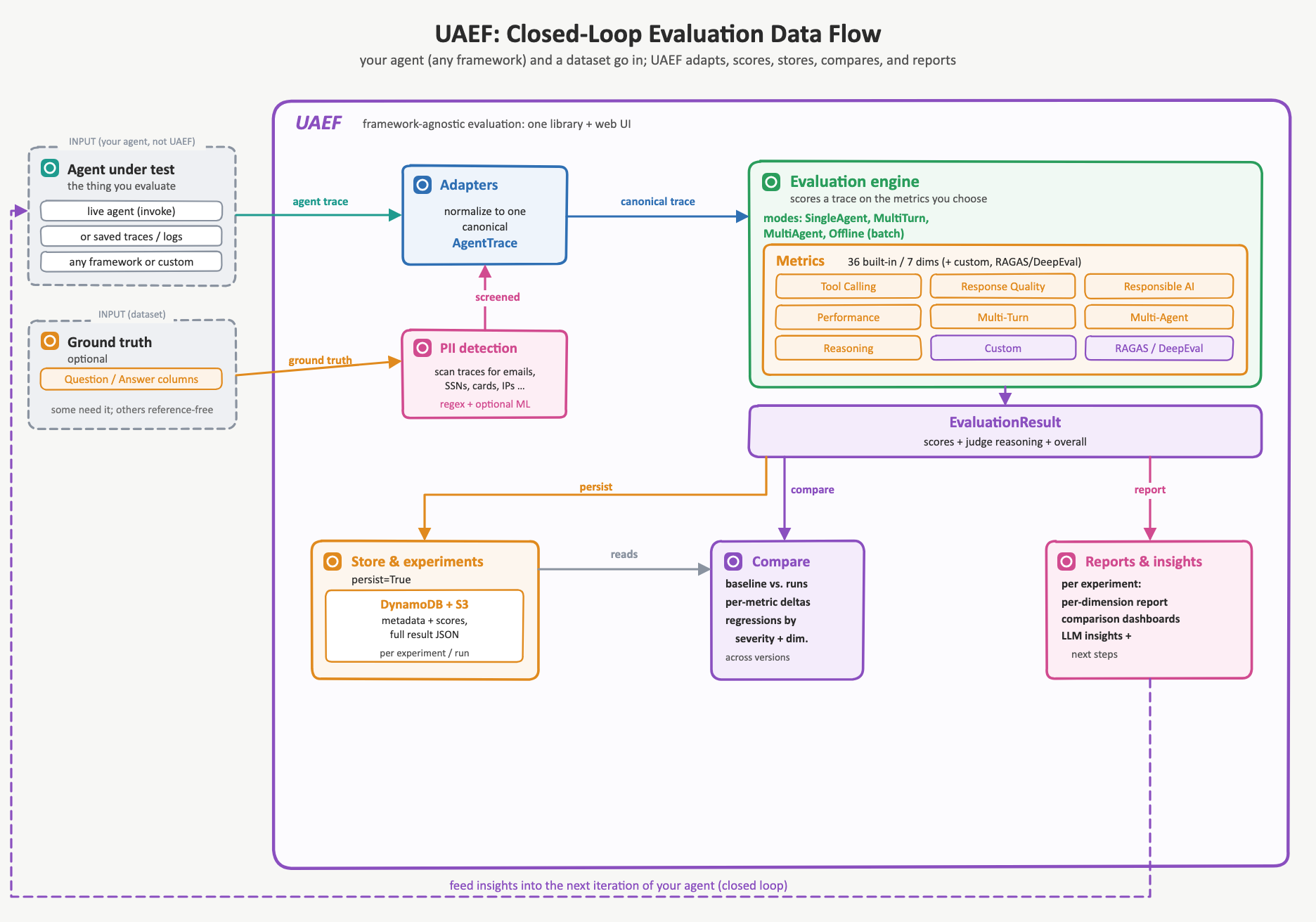
图 1 展示了单次评估所走的路径,从输入一直到报告与洞察。首先,适配器读取智能体的原生执行记录——包括其消息、工具调用以及智能体之间的交接——并将其规范化为一条统一的规范轨迹,这样无论智能体由哪个框架生成,后续步骤都完全一致。接着,在数据存储之前,UAEF 会筛查轨迹中的个人身份信息(PII),例如电子邮件地址、电话号码和信用卡号。随后,评估引擎从覆盖 7 个质量维度的 36 项内置指标中选取若干项,对轨迹进行评分。当你持久化一次运行时,UAEF 会将其作为一项实验记录到 Amazon DynamoDB 和 Amazon S3 中:Amazon DynamoDB 保存用于列举和比较的每次实验元数据,Amazon S3 保存完整结果。运行记录存储下来后,团队就可以将某个智能体版本与基线进行对比,以检测性能退化,并生成报告与洞察,解释发生了什么变化以及原因。这些报告形成闭环:团队评估智能体,了解哪些方面退化或改进,修改提示词、模型或工具,然后再次评估。
图 1:UAEF 闭环评估数据流
本节余下部分按此流程依次展开:使 UAEF 与框架无关的适配器、评估引擎及其指标、PII 检测、实验存储与比较,以及形成闭环的报告。
适配器是让 UAEF 做到框架无关的关键。适配器会读取智能体运行的记录,包括其消息、工具调用以及智能体之间的交接。它把这份记录转换成一种名为 AgentTrace 的规范表示,而 UAEF 其余部分评分时只针对它。正因有了这层转换,无论智能体是用什么 SDK 构建的(比如 LangGraph、LangChain 或 Strands Agents),UAEF 都能与之配合。它可以在本地运行,也可以部署在 HTTP 端点之后,或运行在 Amazon Bedrock AgentCore 这类托管运行时上,trace 可以存放在 Langfuse 中,也可以完全不采集。针对这些情况 UAEF 都提供了相应的适配器,它们产出的 AgentTrace 完全一致,因此指标、评分和对比在所有这些场景下都保持统一。
trace 进入 UAEF 有两种方式。如果 trace 已经存在——来自过去的运行、日志或可观测性存储——就把它交给 UAEF,由匹配的适配器将其规范化。如果不存在,UAEF 会替你调用智能体:给定运行时 Amazon Resource Name(ARN)或一个 HTTP 端点,它会对每个数据集输入调用该智能体,收集响应,并一步完成适配。无论哪种方式,输出的都是同一个 AgentTrace。
由于每个指标、模式和报告处理的都是 AgentTrace,而不是框架原生格式,因此无论 trace 来自哪里,后续的评分都完全相同。这种先规范化、后评分的分离,正是让团队能够在同一尺度上把基于某一框架构建的智能体与基于另一框架构建的智能体进行对比的关键。
该评估引擎会针对一条标准轨迹,从 7 个质量维度进行打分,每个维度都捕捉智能体行为中某个单靠一个准确率数字会被掩盖的特定方面。工具调用衡量的是智能体是否选对了工具、调用顺序是否合理、传入的参数是否有效。回复质量衡量的是最终答案是否相关、完整、准确,并且基于所提供的上下文而非凭空编造。
负责任 AI 衡量安全性、偏见、有害内容以及对提示注入的抵抗能力。性能衡量以延迟、Token 用量和吞吐表示的运营成本。多轮衡量智能体维持对话的能力,包括上下文保持、连贯性以及跨轮次的目标达成情况。多智能体衡量多个协作智能体所组成系统中的协调能力,例如任务委派与工作分工。推理衡量智能体思维链的内部逻辑,包括一致性与是否存在谬误。
每个维度由一个或多个内置指标计算得出,共 36 个内置指标,且每个指标都会返回一个位于 [0, 1] 区间内的归一化分数,其中 1 为最佳,因此各维度与总体结果共用同一套标尺。指标分为两大家族。确定性指标直接根据轨迹和标准答案计算分数,在重复运行时结果完全一致。以大语言模型(LLM)作为评判者的指标,则通过在 Amazon Bedrock 上提示一个评判模型,来为那些难以给出闭式定义的质量维度打分,例如回复相关性或安全性。你也可以添加自定义指标,或借助 RAGAS 和 DeepEval 集成。
由于评判指标会把智能体自身的输出反馈回提示词,这部分内容会被视为不可信输入:一个能影响其评判器的智能体,就能影响自己的得分。评分标准与内容分开单独发送,并且内容会被转义,使其无法突破分隔符而被当作指令读取。每条评判器响应都会被严格解析,并且必须逐字引用其所评分内容中的一段原文。若找不到证据,该得分会被拒绝记录,而不是被记录下来。评判器得分是评估信号,而非安全决策,不应用来对安全控制进行门控。若要对智能体本身做运行时强制执行,应在其自身的调用路径中应用 Amazon Bedrock Guardrails。完整模型见 SECURITY.md。
UAEF 会把每次评估记录为一次实验,这样来自不同智能体版本的结果日后就能进行比较。以 persist=True 调用 evaluate() 或 batch_evaluate() 会创建一个新实验,可由可选的名称和目标标识,并写入两个角色互补的存储。Amazon DynamoDB 中每个实验存一行,保存用于列出和比较的元数据:评估次数、各指标的平均得分以及总体平均值。Amazon S3 则存放一个 JSON 文件,包含完整评估结果,其中包括各指标的得分和评判器的推理过程。处理敏感数据的团队可以为存储副本开启 PII 脱敏。
这个 Python 库还对一种更细粒度的结构进行了建模。一个实验包含多次运行,每次运行都会记录受测的智能体设计:框架、模型、工具、系统提示词和参数。一次运行还可以记录配置快照和 Git 提交。你可以将某次运行标记为其所在实验的基线。这样就把每个分数与产生它的变更关联起来,无论是新提示词、不同模型,还是新增工具。
原文较长,译文为节选;译文由英文原文机器翻译,术语按行业惯例统一,可在文末展开原文核对。
查看英文原文(UAEF: A framework-agnostic system for closed-loop evaluation of AI agents)
Teams building AI agents on AWS use a range of frameworks, including LangGraph, LangChain, Strands Agents, and Amazon Bedrock AgentCore. Each framework records agent execution in its own way, so the structure of messages, tool calls, and handoffs between agents differs from one to the next. Evaluation tooling tends to follow the same boundaries: teams build metrics, scoring logic, and result storage against a single framework’s trace format, and they must rebuild them when they switch frameworks or run agents on more than one.
This coupling makes a basic development question harder to answer: did a change to the prompt, model, or tools improve the agent? Answering it requires consistent metrics across versions of an agent and a shared record of past results to compare against. Agent quality also spans several dimensions that a single accuracy score does not capture: tool calling, response quality, responsible AI, performance, multi-turn conversation, multi-agent coordination, and reasoning.
In this post, we introduce the Universal Agent Evaluation Framework (UAEF). Customers across 12 organizations in the telecom, healthcare, and financial services industries used UAEF to evaluate their AI agents with one consistent set of metrics and compare agent versions before release. UAEF is a framework-agnostic evaluation system: it uses adapters to convert traces from each framework into a common format, then scores those traces with 36 built-in metrics across 7 dimensions. It stores the results in Amazon DynamoDB and Amazon Simple Storage Service (Amazon S3) and generates reports and insights that inform the next iteration of the agent. This post describes how UAEF works, provides a playbook for choosing metrics and preparing datasets, and points to runnable notebooks for each supported framework.
UAEF: One evaluation layer for agent frameworks
UAEF is a framework-agnostic evaluation system for AI agents. It takes the agent a team already has and scores it the same way across supported frameworks and runtimes. UAEF takes two inputs: the agent under test and a dataset to run it on. The dataset provides the inputs for each test case, and it can also include ground-truth answers, the expected output for each input. Ground truth is optional, and only metrics that compare the agent’s response against a reference use it. To evaluate tool calling, the ground truth must also include the expected tool calls for each test case: which tools the agent should call, in what order, and with what arguments. Everything after that happens inside the UAEF.
Figure 1 shows the path a single evaluation takes, from the inputs to the reports and insights. First, an adapter reads the agent’s native execution, its messages, tool calls, and agent-to-agent handoffs, and normalizes it into one canonical trace, so that the steps that follow are identical no matter which framework produced the agent. Next, UAEF screens the trace for personally identifiable information (PII), such as email addresses, phone numbers, and credit card numbers, before data is stored. The evaluation engine then scores the trace on a selection from 36 built-in metrics across 7 quality dimensions. When you persist a run, UAEF records it as an experiment in Amazon DynamoDB and Amazon S3: Amazon DynamoDB holds the per-experiment metadata used for listing and comparison, and Amazon S3 holds the full results. With runs stored, a team can compare an agent version against a baseline to detect regressions and generate reports and insights that explain what changed and why. Those reports close the loop: the team evaluates the agent, learns what regressed or improved, changes the prompt, model, or tools, and evaluates again.
Figure 1: UAEF closed-loop evaluation data flow
The rest of this section follows that flow in order: the adapters that make UAEF framework-agnostic, the evaluation engine and its metrics, PII detection, experiment storage and comparison, and the reports that close the loop.
Canonical trace and adapters
Adapters are what make UAEF framework-agnostic. An adapter reads the record of an agent’s run, including its messages, tool calls, and agent-to-agent handoffs. It converts that record into one canonical representation called the AgentTrace, which is the only thing the rest of UAEF scores. Because of that conversion, UAEF works with the agent, whatever SDK it was built with (such as LangGraph, LangChain, or Strands Agents). It can run locally, behind an HTTP endpoint, or on a managed runtime such as Amazon Bedrock AgentCore, with traces in Langfuse or not captured at all. UAEF provides an adapter for each of these, and they produce the same AgentTrace, so metrics, scores, and comparisons stay consistent across every one of them.
A trace reaches UAEF two ways. If one already exists, from a past run, a log, or an observability store, it is handed to UAEF and the matching adapter normalizes it. If not, UAEF invokes the agent for you: given a runtime Amazon Resource Name (ARN) or an HTTP endpoint, it calls the agent on each dataset input, collects the response, and adapts it in one step. Either way, the output is the same AgentTrace.
Because every metric, mode, and report operates on the AgentTrace rather than on a framework native format, the scoring that follows is identical no matter where the trace came from. That separation, normalization first and scoring second, is what lets a team compare an agent built on one framework against an agent built on another on a single scale.
Evaluation engine
The evaluation engine scores a canonical trace across 7 quality dimensions, each capturing a distinct aspect of agent behavior that a single accuracy number would hide. Tool calling measures whether the agent selected the right tools, called them in a sensible order, and passed valid arguments. Response quality measures whether the final answer is relevant, complete, accurate, and grounded in the provided context rather than hallucinated.
Responsible AI measures safety, bias, toxicity, and resistance to prompt injection. Performance measures operational cost in latency, token use, and throughput. Multi-turn measures how well the agent sustains a conversation, including context retention, coherence, and goal completion across turns. Multi-agent measures coordination in systems of cooperating agents, such as task delegation and the division of work. Reasoning measures the internal logic of the agent’s chain of thought, including consistency and freedom from fallacies.
Each dimension is computed by one or more of 36 built-in metrics, and every metric returns a normalized score in the interval [0, 1], where 1 is best, so dimensions and the overall result share one scale. Metrics come in two families. Deterministic metrics compute a score directly from the trace and the ground truth and reproduce exactly on repeated runs. Large language model (LLM)-as-a-judge metrics score qualities that resist a closed-form definition, such as response relevance or safety, by prompting a judge model on Amazon Bedrock. You can also add your own custom metrics or draw on the RAGAS and DeepEval integrations.
Because judge metrics feed an agent’s own output back into a prompt, that content is treated as untrusted input: an agent that can influence its judge can influence its own scores. The rubric is sent separately from the content, and the content is escaped so it cannot break out of its delimiter and be read as instructions. Each judge response is parsed strictly and must cite a verbatim span of the content it scored. A score whose evidence is not found is rejected rather than recorded. Judge scores are evaluation signal, not a safety decision, and should not gate a security control. For runtime enforcement on the agent itself, apply Amazon Bedrock Guardrails in its own invocation path. The full model is in SECURITY.md.
Experiment management and comparison
UAEF records each evaluation as an experiment, so results from different agent versions can be compared later. Calling evaluate() or batch_evaluate() with persist=True creates a new experiment, identified by an optional name and objective, and writes it to two stores with complementary roles. Amazon DynamoDB holds one row per experiment with the metadata used for listing and comparison: evaluation count, the average score per metric, and an overall average. Amazon S3 holds a JSON file with the full evaluation results, including per-metric scores and the judge’s reasoning. Teams that handle sensitive data can turn on PII redaction for the stored copy.
The Python library also models a finer-grained structure. An experiment contains runs, and each run records the agent design under test: framework, model, tools, system prompt, and parameters. A run can also record a configuration snapshot and a Git commit. You can mark one run as the baseline for its experiment. This ties each score to the change that produced it, whether a new prompt, a different model, or an added tool.
Comparison works on the stored per-metric averages. For each metric that two runs have in common, the comparison engine calculates the absolute and percentage change. It then classifies the metric as a regression, an improvement, or unchanged, using a configurable threshold with a default of 5 percent. Several runs can be compared against a single baseline in one call. The regression detector also assigns a severity to each regression: minor (5–10 percent), moderate (10–20 percent), or severe (over 20 percent). It groups regressions by dimension, which shows, for example, whether a prompt change affected tool calling but not response quality.
In the web UI, the Compare tab lists stored experiments and filters them by framework or dataset. You select two or more experiments. The first is used as the baseline, and the UI shows per-metric scores with regressions and improvements highlighted. The UI calls the same library comparison engine, so results match what the Python API returns.
Report and insight generation
After an evaluation is stored, UAEF reports on it at three levels, each answering a different question. How did this run perform? Why did it score that way? How does it compare with earlier versions?
Results view. When an evaluation finishes, the web UI shows a summary of the experiment: the overall score, the number of test cases evaluated, the framework, and queries that failed to run. Per-metric averages appear with a dimension radar chart and a metric bar chart. A table lists every test case with its query, the agent’s response, the expected answer, and the score. Expanding a row shows the full response with its dimension and metric scores. For a multi-turn conversation, it shows each turn with its own scores and the tools the agent called.
Detailed report. From the results view or the experiment list, you can generate a statistical report on demand. UAEF loads the stored results from Amazon S3 and opens the report in a new browser tab. The report breaks results down by dimension and by metric. It shows confidence intervals and outliers for each metric, score distributions, correlations between metrics, a responsible AI summary, and test cases that reported failures. It closes with recommendations that point to the lowest-scoring dimensions and the metrics that vary most across test cases. The report is computed from the scores alone, without an LLM, so the same results produce the same report.
LLM-generated insights. In the Python library, you can pass a report to a model on Amazon Bedrock for analysis. For a single run, the analysis covers strengths, critical weaknesses, hypotheses about root causes, and prioritized recommendations. For a comparison of several runs, it covers the overall trend, likely causes of regressions and improvements, the risk each regression carries, and next steps. These insights suggest what to change in the prompt, model, or tools before the next evaluation.
Two ways to use it
You can run UAEF two ways over the same engine. With the Python library, you can evaluate agents in code from notebooks, scripts, and continuous integration and continuous delivery (CI/CD) pipelines. You can use the deployable AWS service to evaluate agents through a low-code web interface. You upload your dataset, select a framework and metrics, run the evaluation, and review the scores. Both paths run the identical evaluation engine and write to the same stores, so a result does not depend on which path produced it. You can start in the interface and move to code without changing how your results are scored or compared.
Evaluating agents with UAEF: A playbook
Knowing what UAEF can measure is different from knowing what you should measure. A travel-booking agent and a policy Q&A agent fail in different ways, and scoring both on every dimension wastes time and Amazon Bedrock invocations. Use this playbook to pick the metrics that match your agent, then add more as new questions come up.
Getting started
UAEF is open source under the Apache 2.0 license in the awslabs/uaef GitHub repository. It includes the Python library, framework adapters, built-in metrics, AWS Cloud Development Kit (AWS CDK) infrastructure for the deployable service, the web interface, and runnable notebooks for each supported framework. The Installation Guide covers requirements, installing from a built package, and the development setup.
The service deployment guide covers deploying UAEF as a service with the web interface, the config reference, and teardown.
See it in action
A complete evaluation in the UAEF web interface, from ground-truth upload to per-dimension scores.
Choosing the metrics
Start from your scenario, not the metric list. Find the column that matches your agent and begin with the metrics checked in it. The Needs ground truth column shows which metrics compare against a reference answer or expected tool calls.
| Dimension | Metric | Needs ground truth | Scenarios | |||||||
| RAG / knowledge Q&A | General Q&A | Tool-using agent | Multi-turn conversation | Reasoning | Safety and compliance | Multi-agent | Production monitoring | |||
| Response Quality | answer_relevance | |||||||||
| accuracy | ||||||||||
| completeness | ||||||||||
| hallucination_score | ||||||||||
| ragas_faithfulness | ||||||||||
| ragas_context_precision | ||||||||||
| ragas_context_recall | ||||||||||
| Tool Calling | tool_selection_accuracy | |||||||||
| tool_sequence_correctness | ||||||||||
| parameter_quality | ||||||||||
| mcp_compliance | ||||||||||
| Multi-Turn | context_retention | |||||||||
| coherence | ||||||||||
| conversation_completeness | ||||||||||
| user_satisfaction | ||||||||||
| turn_efficiency | ||||||||||
| Reasoning | chain_of_thought_coherence | |||||||||
| logical_consistency | ||||||||||
| reasoning_step_correctness | ||||||||||
| fallacy_detection | ||||||||||
| Responsible AI | safety_score | |||||||||
| toxicity_score | ||||||||||
| bias_score | ||||||||||
| prompt_injection_detection | ||||||||||
| Multi-Agent | workflow_completion | |||||||||
| delegation_quality | ||||||||||
| agent_utilization | ||||||||||
| coordination_efficiency | ||||||||||
| Performance | latency_score | |||||||||
| token_efficiency | ||||||||||
| cost_efficiency | ||||||||||
| throughput | ||||||||||
The table shows recommended starting metrics for each scenario. For the complete list of supported metrics, see the metrics catalog.
Pass the metrics you picked as the metrics argument to evaluate() or batch_evaluate(). For a worked example, see the Example notebooks section that follows. Deterministic metrics, such as tool calling and performance, are computed directly from the trace, whereas others call an LLM judge. UAEF automatically skips metrics that need a reference answer when no ground truth is present, so partially labeled datasets and unlabeled production traffic are still worth evaluating.
Choosing the pipeline
Metrics decide what you measure. Six independent choices decide how the evaluation runs. Use the question in each row to settle it.
| Choice | Ask yourself | Then use | In code |
| Passive or active | Do I already have traces, or do I need to generate them under controlled conditions? | Passive: evaluate a trace you already have. Active: call an invoke_* helper so UAEF runs the agent. | evaluate(trace=recorded, adapter=“langgraph”) or raw = invoke_http_agent_for_framework( ENDPOINT, query, “strands”) |
| One trace or a dataset | Am I debugging one case or measuring a release? | Use evaluate() for one trace or conversation. Use batch_evaluate() for a dataset. | evaluate(trace=trace) or batch_evaluate(traces=traces, max_workers=4) |
| Single-turn or multi-turna | Does any test case depend on an earlier turn? | Multi-turn: add session_id and turn_id to the dataset and pass every turn to the adapter, which assembles each conversation. | sessions = adapter.transform_to_canonical( turn_payloads) batch_evaluate(traces=sessions) |
| Single-agent or multi-agent | Does more than one agent handle a single request? | Nothing to configure. The adapter returns an AgentTrace or MultiAgentTrace, and UAEF selects the matching evaluator. | adapter = get_adapter(FRAMEWORK) trace = adapter.transform_to_canonical(raw) |
| Offline or online | Am I testing before release or monitoring production? | Offline: a prepared dataset in development and CI. Online: live conversations, scored turn by turn. | batch_evaluate(…) or OnlineEvaluator().evaluate_response( trace=trace) |
| Ephemeral or persistedb | Will I compare this run with a later one? | Persisted: set persist=True with an experiment name. Otherwise, use the returned result. | batch_evaluate(traces=traces, persist=True, experiment_name=“Support agent v2”) |
a Multi-turn – For details, refer to the multi-turn evaluation workflow guide.
b Only persisted runs can be compared.
Preparing your dataset
Provide one row per test case in a CSV or XLSX file. Only Question is required.
| Column | Required | Purpose |
Question |
Yes | Input sent to the agent |
Answer |
No | Expected response |
context |
No | Reference documents for retrieval-style evaluation |
expected_tool_calls |
No | Expected tool calls as a JSON array |
session_id |
Multi-turn only | Groups rows into one conversation |
turn_id |
Multi-turn only | Orders turns within a conversation, starting at 1 |
Question and Answer are matched case-insensitively and accept common aliases such as Query and Expected_Output, so existing test files usually work without renaming.
Multi-turn datasets. Rows that share a session_id are sent in order to a single agent session, so later turns can depend on earlier ones. Your agent endpoint must maintain its own conversation state, because UAEF sends each turn with its session ID rather than replaying history. Use lowercase session_id and turn_id. Otherwise, the file is evaluated as single-turn.
Protect sensitive data. Before sharing or persisting a dataset drawn from real traffic, use uaef.security.PIIDetector to detect and redact personally identifiable information such as email addresses, phone numbers, and credit card numbers.
Example notebooks
If you want to see more examples, check our notebooks/ folder. The notebooks cover scenarios such as batch evaluation, multi-turn conversations, multi-agent, and experiment management across frameworks including LangGraph, Strands Agents, and Amazon Bedrock AgentCore.
| Notebook | What it covers |
00_langgraph.ipynb |
LangGraph: single, batch, multi-turn, and multi-agent evaluation |
02_langchain.ipynb |
LangChain agents |
04_json.ipynb |
Custom frameworks, through the generic JSON adapter |
05_strands.ipynb |
Strands Agents, including multi-agent |
06_agentcore.ipynb |
Amazon Bedrock AgentCore, including multi-agent |
07_langfuse.ipynb |
Traces already collected in Langfuse |
01_langgraph_ragas_deepeval.ipynb |
RAGAS and DeepEval integrations |
08_experiment_management.ipynb |
Experiments, baselines, and regression detection |
10_reporting_pipeline.ipynb |
Reports and dashboards from stored results |
11_pii_detection.ipynb |
PII detection and redaction in traces |
Clean up
Running the library creates nothing on its own, but persisting a run writes experiment metadata to Amazon DynamoDB and full results to Amazon S3. Delete both when you no longer need the saved experiments. The default names are uaef-experiments and uaef-results, overridable through the UAEF_DYNAMODB_TABLE and UAEF_S3_BUCKET environment variables. The bucket has to be emptied before it can be deleted.
If you deployed the service, the service deployment guide has the teardown sequence for both deployment modes. Read its retained-resources note before you assume teardown is complete: the DynamoDB tables, S3 buckets, and Amazon Cognito user pool are created with a retain policy, so deleting the stack leaves them, and their contents, in place. That is deliberate, so a teardown does not destroy saved experiments, but it means the storage keeps costing you until you remove it yourself.
Conclusion
UAEF separates agent evaluation from the framework that produced the agent. Adapters convert traces from LangGraph, LangChain, Strands Agents, Amazon Bedrock AgentCore, and Langfuse into a common format, and a generic JSON adapter handles other frameworks. The same 36 built-in metrics across 7 dimensions then apply regardless of how a team built the agent. UAEF evaluates individual traces or runs batch evaluations over historical traces, then stores results per experiment in Amazon DynamoDB and Amazon S3. Teams can then compare runs across agent versions, detect regressions, and use the generated reports and insights to decide what to change in the next iteration. The web UI and the Python library share the same evaluation engine, so teams can start low-code and move to code without changing how scoring or storage works.
To get started, see the open source repository.
About the authors

Samaneh Aminikhanghahi
Samaneh is an Applied Scientist at AWS Forward Deployed Engineer (FDE) Team, where she works with customers across different verticals to accelerate their adoption of generative AI. She specializes in agentic AI frameworks, building robust evaluation systems, and implementing responsible AI practices that drive sustainable business outcomes.

Yuxuan Zhou
Yuxuan is a Data Scientist at AWS Forward Deployed Engineer (FDE) Team, where she helps enterprise customers build and scale generative AI solutions. She has delivered projects for AWS customers in financial services, insurance, manufacturing, healthcare, and media and entertainment. She specializes in agentic Retrieval Augmented Generation (RAG), context engineering for long-context reasoning, and evaluation frameworks for AI agents. Her research also covers LLM calibration and multimodal vision-language models.

Tristan Sylvain
Tristan is an Applied Scientist at AWS Forward Deployed Engineer (FDE) Team, where he partners with customers to design and deploy generative AI solutions. He has delivered projects across financial services, logistics, and industrial sectors. His research expertise spans LLM applications, representation learning, generalization in computer vision and medical data, and time series forecasting.

Amulya Cherian
Amulya is an Associate Delivery Consultant in AWS Professional Services, specializing in AI/ML. She has delivered generative AI projects for AWS customers across several industries including finance, media and entertainment, and healthcare.

Elaine Wu
Elaine is a Deep Learning Architect at AWS Forward Deployed Engineer (FDE) Team, specializing in building robust RAG and agentic AI solutions for large enterprises. She has solved real-world business challenges for AWS customers across industries including manufacturing, energy, healthcare, retail, enterprise software, and financial services. Prior to joining AWS, Elaine earned her master’s degree in Information Science from the University of Illinois Urbana-Champaign.

Vidya Sagar Ravipati
Vidya is a Applied Science Manager at the AWS Forward Deployed Engineer (FDE) Team, where he uses his vast experience in large-scale distributed systems and his passion for machine learning to help AWS customers across different industry verticals accelerate their AI and cloud adoption.

Meghana Ashok
Meghana is a Senior Machine Learning Engineer at AWS Forward Deployed Engineer (FDE) Team, where she operates at the intersection of engineering, research, and GenAI solutions. She specializes in designing and building scalable AI architectures that bridge the gap between cutting-edge generative AI research and production-ready systems. With a passion for turning complex GenAI concepts into robust, deployable solutions, Meghana drives innovation by combining deep technical engineering expertise with a forward-thinking approach to AI-powered automation and intelligent systems.
正文保留英文原文,标题与摘要由机器翻译。
原文发布于 AWS Machine Learning(UAEF: A framework-agnostic system for closed-loop evaluation of AI agents),标题、摘要与正文由机器翻译,术语按行业惯例统一,未经人工逐句校订。