如何用 Apple fm CLI 从 Python 运行端侧大模型

AI 工程师与 LLM 正变得日益密不可分。当工程师想要构建某项 AI 功能时,他们越来越倾向于使用云端托管的 LLM,为其系统提供 AI 解决方案。
云端 LLM 虽能提供最前沿的推理能力,但在早期原型开发阶段完全依赖这些远程端点,会带来不容忽视的运营开支。
设想这样一个开发流程:工程团队在研发阶段测试自动化图像解析流水线。轻量级云端视觉模型(如 GPT-4o-mini 或 Gemini 1.5 Flash)的单次请求成本虽然很低,但持续运行测试和提示工程迭代会不断累积 API 成本,并因网络往返而拖慢本地反馈循环。
如果开发者能在 Apple Silicon 上本地执行这些视觉提取测试循环,实现零网络延迟、完全的数据隐私以及零 API Token 成本,会怎样?
在近期的 macOS 版本中,Apple 提供了一款可直接从命令行访问的原生终端工具:fm(Foundation Model)CLI。
在本文中,我们对 Apple 内置的 fm 工具进行一次实用的工程评估。我们将测试其文本推理、视觉提取准确度、在 Python 中的集成模式,并讨论其架构上的局限。
Apple Foundation Model 自去年起就已成为 Apple 开发工具的一部分。它旨在直接运行 Apple 的设备端模型,充分利用 Apple Neural Engine 和统一内存。借助这一集成,开发者无需复杂配置,开箱即可获得优化后的性能。
自 macOS 27 Golden Gate 发布以来,Apple 将该模型加入 Mac 的 Terminal,使其更易使用。有了这一新增功能,开发者可以在自己的应用中集成该 LLM——即便这个应用是基于 Web 的也没问题!
在进入终端之前,请确保将设备更新到最新的 macOS。好了,话不多说,让我们开始吧!
要使用 Apple Foundation Model,请在终端中输入 fm 命令。
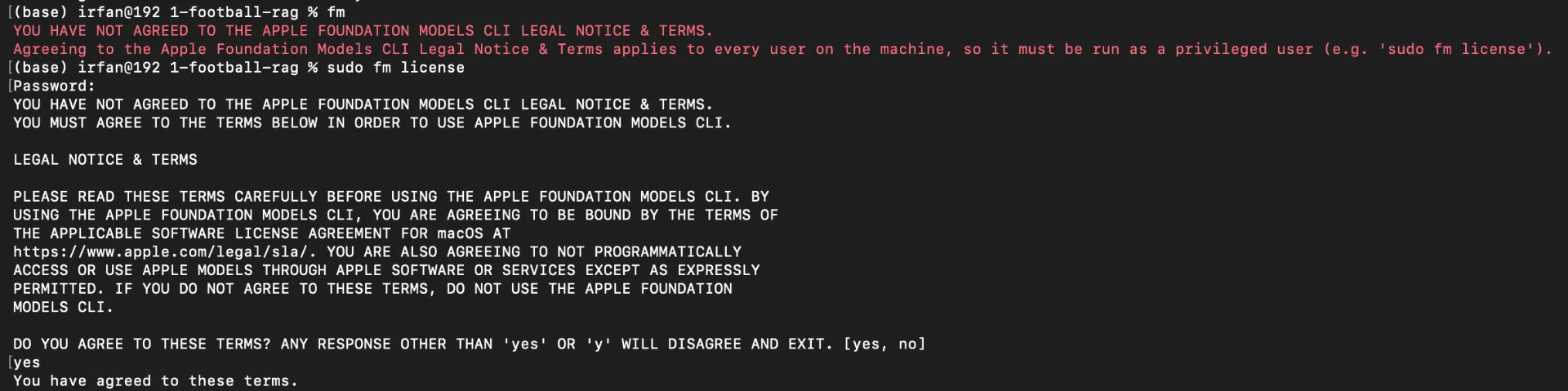
如果你是第一次使用 fm 命令,它会先要求你同意其许可协议。在终端中输入 sudo fm license。然后阅读条款并输入 yes 表示同意。之后,你就可以试着使用 fm 命令了。
截图由作者截取。
在你同意许可协议并重新运行 fm 命令后,它会显示如下输出:
截图由作者截取。
如上所示,有几个子命令可以使用。这次,我们先重点介绍 fm respond。这个命令是与 LLM 交互的入口。如果我想问 What is the capital of Malaysia?,我们可以这样写命令:
fm respond 'What is the capital of Malaysia'
在测试过程中,模型回答的是“Ipoh”,而不是“Kuala Lumpur”。
截图由作者拍摄。
虽然这看似只是一个轻微的幻觉,但它凸显了紧凑型端侧模型一个关键的架构权衡。为了在消费级硬件上保持低内存占用和高推理速度,端侧模型牺牲了庞大的参数化知识。
由此,我们不应把 Apple 的 fm 模型当作无依据的事实知识库来使用。相反,我们必须将其与检索增强生成(RAG)或结构化的外部上下文配合使用。
这个模型的妙处在于它直接运行在你的硬件里,没有任何数据会被发送到你的设备之外。因此,你不仅得到了一个免费的模型,还得到了一个私密的、针对硬件优化的模型。
另外,这个 Apple LLM 让我真正兴奋的一点是它解析图像的能力!我是怎么发现的?fm respond --help 的输出证实了这一点。
输入 fm respond --help 命令后,它会告诉你可以在 fm 命令中使用 --text 和 --image 标志,这样它就能在处理图像的同时,补充关于你要在这张图像里做什么的上下文。
截图由作者拍摄。
让我举个例子。假设我想分析这道美味却令人有罪恶感的 Sate Padang(巴东沙爹)。
Sate Padang:一道印尼美食。图片由作者提供。
我希望模型提取出菜名、烹饪方式,以及这道菜是否含椰浆(santan)。在终端里,我们可以写下这条命令:
fm respond \ --image [YOUR_IMAGE_PATH] \ --text "分析这张食物图片,只输出原始 JSON:{ 'menu_name': string, 'is_fried': boolean, 'contains_santan': boolean }"
接着,模型会给出类似这样的输出:
{ "menu_name": "Satay", "is_fried": true, "contains_santan": false}
模型成功生成了有效的 JSON 结构,并识别出核心菜品是“Satay”。但它把烹饪方式误判为油炸(is_fried: true),而沙爹传统上是烤制的。
这一误分类说明,轻量级视觉编码器在处理细粒度视觉特征时存在局限(例如区分烤制的质感与油炸的油光)。如果某个应用依赖这些数据来做严格的营养或医疗追踪,未经校验的输出可能带来严重的数据质量问题。
即使一个格式良好的 JSON 响应也只保证输出的结构,而不保证其真实性,因此任何用于实际决策的字段都应结合外部上下文进行核验,而不能仅凭模型输出就予以信任。
fm 适合用在哪里(以及哪里不适合)
上面两个错误并不是否定 fm 的理由。它们界定了 fm 的边界。基于这些测试,我把这个工具定位为三种角色,而不是把它当作云 API 的即插即用替代品。
1. Web 应用的本地原型开发
在开发过程中,fm 让我们可以迭代提示词、JSON 解析和 Streamlit UI,而无需按 Token 付费或进行网络往返。这也是 Web 应用可以使用 fm 的含义:在构建界面和解析逻辑时,模型运行在开发者的 Mac 上。它不是应答最终用户请求的服务。
在这个阶段,fm serve 很有用。由于它暴露了一个与 OpenAI 兼容的端点,之后迁移到云提供商主要只需更改 base_url 和模型名称。有两点需要注意。在紧凑模型上调优的提示词在更大模型上可能表现不同,因此切换后需要重新测试。而且这个工作流假设团队中每位开发者都在 Apple Silicon 上工作。
2. 原生 Apple 应用的端侧推理
对于 iOS 和 macOS 应用,Apple 的 Foundation Models 框架在用户自己的设备上运行推理。在这种情况下,对开发者而言,每次请求的推理成本真正降为零,而且用户数据从不离开设备。若要交付给最终用户,Swift 框架是预期路径;CLI 仍然是脚本编写和开发接口。
3. 独立的生产后端仍然需要云端 LLM
当应用通过共享服务器为跨平台用户提供服务、需要处理长文档,或要求很强的事实准确性时,托管模型仍然是正确的选择。
Ipoh 的回答以及烤/炸混淆就是具体例证:一个缺乏事实依据支撑的紧凑端侧模型,不应成为唯一的事实来源。
其他值得考虑的工具
fm 并不是本地推理的唯一选择,对某些任务来说,它甚至不是最直接的选择。
何时它比 fm 更合适
Ollama / LM Studio / llama.cpp
跨平台本地推理。让你可以更换开放权重的视觉模型,而不必固守 Apple 固定的那一款模型。
仍是 Apple Silicon,但采用开放权重,并且在量化和微调上有更多控制权。
Apple Vision 框架 / OCR
从收据或文档中提取纯文本。fm respond --help 的输出本身就列出了一个 ocr 工具;仅就 OCR 而言,专用的视觉 API 比 LLM 更可预测。
GPT-4o-mini / Gemini 1.5 Flash
当团队不使用 Apple Silicon,或原型迁移到共享后端时,用于同一提取任务的低成本云端基线方案。
这些都不会让 fm 变得多余。它的优势依然在于零配置、无需下载权重,以及数据留在本机。关键在于有意识地选择层级,而不是把某一个模型当作每个环节的默认选项。
将 FM 集成到应用中
从应用中调用该模型有两种方式。它们的区别在于生命周期,而非模型质量。
首先,你可以在终端中运行 fm serve。它会在你的 Mac 上启动一个 API,你可以调用它来让 AI 模型生成输出。这是运行 fm serve 命令后的截图:
截图由作者截取。
如果你想与这个 API 交互,可以在终端中运行 curl 命令,向 LLM 模型发送 POST 请求,如下所示:
curl -X POST http://127.0.0.1:1976/v1/chat/completions \ -H "Content-Type: application/json" \ -d '{ "model": "system", "messages": [ {"role": "user", "content": "Hello! What model are you?"} ] }'
输出结果如下所示:
截图由作者截取。
通过该 API,LLM 会生成由多个数据块(chunk)组成的 JSON 格式输出流。
原文较长,译文为节选;译文由英文原文机器翻译,术语按行业惯例统一,可在文末展开原文核对。
查看英文原文(How to Use Apple's fm CLI to Run On-Device LLMs From Python)
AI engineers and LLMs are increasingly inseparable. When engineers want to build an AI feature, they're more and more likely to use a cloud-hosted LLM to deliver AI solutions to their systems.
While cloud LLMs offer state-of-the-art reasoning, relying entirely on these remote endpoints during early-stage prototyping introduces noticeable operational expenses.
Imagine a development workflow where an engineering team tests automated image parsing pipelines during R&D. While lightweight cloud vision models (such as GPT-4o-mini or Gemini 1.5 Flash) are inexpensive per request, running continuous tests and prompt-engineering iterations can accumulate API costs and slow down local feedback loops due to network round-trips.
What if developers could execute these visual extraction test loops locally on Apple Silicon with zero network latency, complete data privacy, and zero API token cost?
Included in recent macOS releases, Apple provides a native terminal utility accessible straight from the command line: the fm (Foundation Model) CLI.
In this article, we conduct a practical engineering evaluation of Apple's built-in fm tool. We will test its text reasoning, visual extraction accuracy, integration patterns in Python, and also discuss its architectural limitations.
Apple Foundation Model has been part of Apple's development tools since last year. It is designed to run Apple's on-device models directly, leveraging the Apple Neural Engine and Unified Memory. With this integration, developers need no complex setup and get optimized performance out of the box.
Since the release of macOS 27 Golden Gate, Apple has made this model more accessible by adding it to the Mac's Terminal. With this addition, developers can integrate the LLM inside their applications, even if the app is web-based!
Before getting into the Terminal, make sure that you update your device to the newest macOS. Okay, without further ado, let's get started!
To use the Apple Foundation Model, type the fm command inside the Terminal.
If you use the fm command for the first time, it will ask you to agree to its license first. Type sudo fm license in your terminal. Then, read the terms and type yes to agree. From there, you can try playing with the fm command.
The screenshot is captured by the author.
After you agree to the license and re-run the fm command, it will show an output like this:
The screenshot is captured by the author.
As you can see above, there are several subcommands to use. This time, we will focus on the fm respond first. This command is the gateway for interacting with the LLM. If I want to ask What is the capital of Malaysia?, we can write a command like this:
fm respond 'What is the capital of Malaysia'
During the testing, the model responded with "Ipoh" instead of "Kuala Lumpur".
The screenshot is taken by the author.
While this might seem like a minor hallucination, it highlights a crucial architectural trade-off of compact on-device models. To maintain low memory usage and high inference speed on consumer hardware, on-device models sacrifice vast parametric knowledge.
From here, we should not use Apple's fm model as an ungrounded factual knowledge base.Instead, we have to pair it with Retrieval-Augmented Generation or structured external context.
The great thing about this model is that it runs directly inside your hardware, and no data is sent outside of your device. So you not only get a free model but also a private, hardware-optimized model.
And another thing that I'm truly excited about with this Apple LLM is the capability of parsing an image! How do I find that out? The fm respond --help output confirms this.
By typing the fm respond --help command, it will show you that you can use the --text and --image flags with the fm command so it can process the image while adding the context on what you are going to do inside of this image.
The screenshot is captured by the author.
Let me give you an example. Suppose that I want to analyze this tasty yet sinful Sate Padang.
Sate Padang: An Indonesian Delicacy. The image is provided by the author
I want the model to extract the dish name, the cooking method, and whether the dish contains coconut milk (santan). Inside the terminal, we can write this command:
fm respond \ --image [YOUR_IMAGE_PATH] \ --text "Analyze the food image and output ONLY raw JSON: { 'menu_name': string, 'is_fried': boolean, 'contains_santan': boolean }"
From here, the model will show an output that looks like this:
{ "menu_name": "Satay", "is_fried": true, "contains_santan": false}
The model successfully generated valid JSON structure and identified the core dish as "Satay." However, it misclassified the preparation method as fried (is_fried: true), whereas satay is traditionally grilled.
This misclassification demonstrates the limits of lightweight vision encoders when processing fine-grained visual features (e.g., distinguishing grilled texture from fried oil sheen). If an application relies on this data for strict nutritional or medical tracking, unvalidated outputs could introduce severe data quality issues.
Even a well-formed JSON response only guarantees the shape of the output, not its truth, so any field that feeds a real decision should be checked against external context rather than trusted from the model alone.
Where fm Fits (and Where It Doesn't)
The two errors above are not reasons to dismiss fm. They define its boundary. Based on the tests, I place the tool in three roles rather than treating it as a drop-in replacement for a cloud API.
1. Local prototyping for web applications
During development, fm lets us iterate on prompts, JSON parsing, and the Streamlit UI without per-token charges or network round-trips. This is also the sense in which a web-based app can use fm: the model runs on the developer's Mac while the interface and parsing logic are being built. It is not the service that answers requests from end users.
fm serve is useful in this stage. Because it exposes an OpenAI-compatible endpoint, moving to a cloud provider later is mostly a change of base_url and model name. Two caveats apply. Prompts tuned on a compact model can behave differently on a larger one, so the switch needs re-testing. And this workflow assumes every developer on the team works on Apple Silicon.
2. On-device inference for native Apple apps
For iOS and macOS applications, Apple's Foundation Models framework runs inference on the user's own device. This is the case where per-request inference cost genuinely drops to zero for the developer, and where user data never leaves the device. For shipping to end users, the Swift framework is the intended path; the CLI remains a scripting and development interface.
3. Standalone production backends still need cloud LLMs
When an application serves users across platforms from a shared server, handles long documents, or requires strong factual accuracy, a hosted model remains the right choice.
The Ipoh response and the grilled/fried mix-up are the concrete reasons: a compact on-device model without grounding should not be the only source of truth.
Other Tools Worth Considering
fm is not the only option for local inference, and for some tasks it is not even the most direct one.
When it is more relevant than fm
Ollama / LM Studio / llama.cpp
Cross-platform local inference. Lets you swap open-weight vision models instead of staying with Apple's fixed model.
Still Apple Silicon, but with open weights and more control over quantization and fine-tuning.
Apple Vision framework / OCR
Plain text extraction from receipts or documents. The fm respond --help output itself lists an ocr tool; for OCR alone, a dedicated vision API is more predictable than an LLM.
GPT-4o-mini / Gemini 1.5 Flash
Cheap cloud baselines for the same extraction task when the team is not on Apple Silicon, or when the prototype moves to a shared backend.
None of these makes fm redundant. Its advantage is still zero setup, no weights to download, and data that stays on the machine. The point is to choose the layer deliberately instead of keeping one model as the default for every stage.
Integrating FM into applications
There are two ways to call the model from an application. They differ in lifecycle, not in model quality.
First, you can run fm serve inside the terminal. It will run an API on your Mac, and you can call it to generate output from the AI model. This is the screenshot after you run the fm serve command:
The screenshot is captured by the author.
If you want to interact with the API, you can run a curl command to send a POST request to the LLM model in your terminal like this:
curl -X POST http://127.0.0.1:1976/v1/chat/completions \ -H "Content-Type: application/json" \ -d '{ "model": "system", "messages": [ {"role": "user", "content": "Hello! What model are you?"} ] }'
And the output looks like this:
The screenshot is captured by the author.
From the API, the LLM will generate a stream of JSON-formatted outputs consisting of chunks.
For example, if the LLM generates an answer like "Hello! I'm a foundation model.", it will generate separate entities as an output like the screenshot above instead of a unified sentence. If you want to return a single response body, you can add "stream": false inside the body request like this:
curl -X POST http://127.0.0.1:1976/v1/chat/completions \ -H "Content-Type: application/json" \ -d '{ "model": "system", "messages": [ {"role": "user", "content": "Hello! What model are you?"} ], "stream": false }'
{"usage":{"total_tokens":77,"completion_tokens_details":{"reasoning_tokens":0},"prompt_tokens":62,"completion_tokens":15,"prompt_tokens_details":{"cached_tokens":0}},"id":"chatcmpl-99BCE1F6-A9C9-4100-AD61-1AE33F20B6A9","object":"chat.completion","choices":[{"index":0,"message":{"content":"I’m an LLM.","role":"assistant","refusal":null},"finish_reason":"stop"}],"created":1794108065,"model":"system"}
The practical advantage here is portability. Application code written against the OpenAI SDK can point at http://127.0.0.1:1976/v1 during development and later switch base_url and model to a hosted provider. As noted in the previous section, that switch still requires re-testing the prompts.
Call the fm with subprocess
For a single-machine Streamlit prototype, a long-running server is more infrastructure than needed. The alternative is to invoke fm respond directly and let Python own the output contract.
And for analyzing the image, I call the fm command using the subprocess library. The code snippet of the system looks like this:
#### [OTHER CODE]st.image(temp_path, caption="Uploaded Image", use_column_width=True)if st.button("Analyze with On-Device AI"): with st.spinner("Processing on Apple Neural Engine..."): # Construct the CLI command prompt = "Analyze this food image and output ONLY raw JSON: { 'menu_name': string, 'is_fried': boolean, 'contains_santan': boolean }" cmd = [ "fm", "respond", "--image", temp_path, "--text", prompt ] try: # Execute native Apple binary result = subprocess.run(cmd, capture_output=True, text=True, check=True) raw_output = result.stdout.strip()#### [OTHER CODE]
And you can see from above that the application will extract the image and send the path along with the prompt to the fm command. From here, it will be processed, and a JSON-formatted output will be generated.
The table below compares fm serve and subprocess.
One long-running local server
Direct CLI call from Python
Change base_url and model
Code already written against OpenAI-compatible APIs
Local scripts and Streamlit prototypes on one Mac
Neither path is inherently better. I used subprocess for this demo because the interface and the CLI run on the same machine. For a codebase that already targets the OpenAI SDK, fm serve is the lower-friction path.
And now, here is the preview of my application that only uses Python and Apple's Foundation Model:
The screenshot is captured by the author.
For more details on how I built this application, you can head to my ShipAI page called AI Food Police, which you can access through the link below.
Inside, you can see the walkthrough and the repository for interacting with the FM model. But make sure to have a Mac and already updated the device to the newest macOS 27!
For the past two years, the default pattern for AI features has been to wrap a cloud API, write a prompt, and pay per token. That pattern is still the right one for shared backends, long documents, and high-stakes factual accuracy.
Apple's fm CLI does not remove that pattern. It adds a cheaper, private step before it. During prototyping, prompts, JSON parsing, and UI flows can be iterated on locally with no token cost and no network round-trips. For native Apple applications, inference can stay on the user's device entirely.
The limits matter as much as the convenience. The model returned "Ipoh" for a factual question and classified grilled satay as fried. Both are expected from a compact on-device model, and both are reasons to keep grounding, validation, and a cloud fallback in the architecture.
For bootstrapped teams, the value is straightforward: more iterations before the first API bill. For larger teams, it is a local, private test bed that fits alongside the existing stack. In both cases, fm works best when its boundary is explicit.
If you have questions or want to reproduce the tests, feel free to reach out on LinkedIn.
[1] Apple, Build AI-powered scripts with the fm CLI and Python SDK (2026), https://developer.apple.com/videos/play/wwdc2026/334/
Sharing our experience at making LLM-based Source Code classifier
December 28, 202315 min read
The hidden cost of storing prompts in your source code
August 25, 20254 min read
And How to use the difficulties of Landing a Gig to your advantage
September 29, 20205 min read
A step-by-step guide to linking your AI agent with a SQL database - Part 2 of the series
April 23, 202432 min read
The budget nobody saw coming
October 1, 202617 min read
How to create a local LLM AI assistant with voice support that you can have conversations with
March 14, 20248 min read
Take your documentation to the next level with charts designed using Mermaid - a markdown-like script!
July 21, 20215 min read
Secrets to success I wished I had known from the beginning
October 16, 20207 min read
An overview of regularization in the Linear Regression model.
原文为英文,正文由自动抓取并保留原文。
原文发布于 Towards Data Science(How to Use Apple's fm CLI to Run On-Device LLMs From Python),标题、摘要与正文由机器翻译,术语按行业惯例统一,未经人工逐句校订。