宏碁 Predator Helios Neo 16S AI 评测:纤薄 OLED 游戏本续航不佳
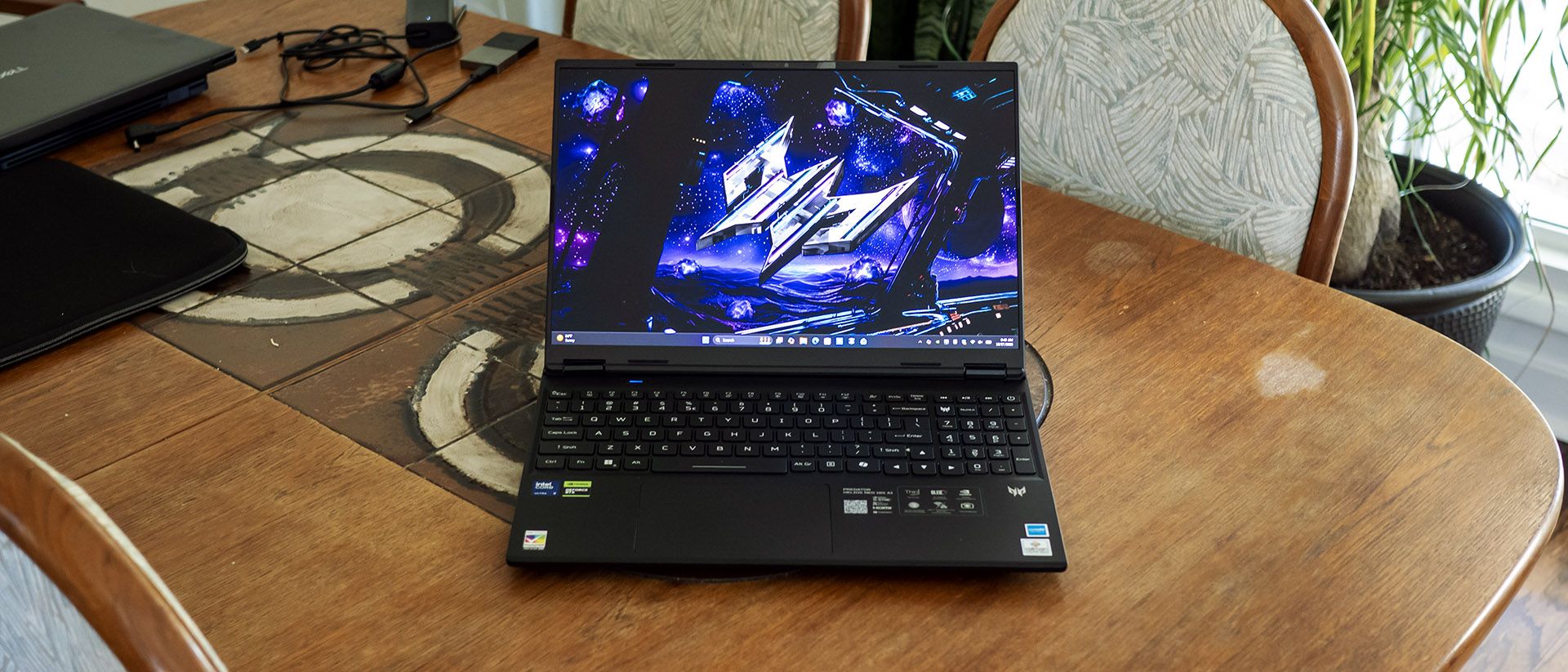
并非所有人都想要一台笨重的游戏笔记本。有些人更喜欢低调内敛的款式。Acer 的 Predator Helios Neo 16S AI 主打便携,却仍将 Core Ultra 9 290HX Plus 处理器和 Nvidia RTX 5070 Ti 显卡塞进了不到 5 磅的机身。它还配备了丰富的接口和一块出色的 240 Hz OLED 显示屏。这样的硬件配置给了它充足的发挥空间,但问题依然在于:Helios Neo 16S AI 在便携的同时,是否仍能提供扎实的游戏性能。
Acer 的黑曜石色机身延续了 Predator 系列的外观——棱角分明、色调深沉,并凭借发光的顶盖 logo 在黑暗中依然醒目。其尺寸为 14.05 x 10.85 x 0.74 英寸,重 4.85 磅,对游戏笔记本而言算是相当轻薄,不过 Gigabyte Aero X16(14 x 9.9 x 0.78 英寸,4.2 磅)和 HyperX Omen 15(13.5 x 9.96 x 0.93 英寸,4.89 磅)的机身进深都少了约 1 英寸,因为这两款都没有像 Acer 那样采用后置散热架。
做工尚可——机身和顶盖的形变都很小。顶盖底部和机身上冲压成型的铝制面板算不上顶级奢华,但仍胜过塑料。一个缺点是金属表面容易留下指纹,而且很难擦掉。
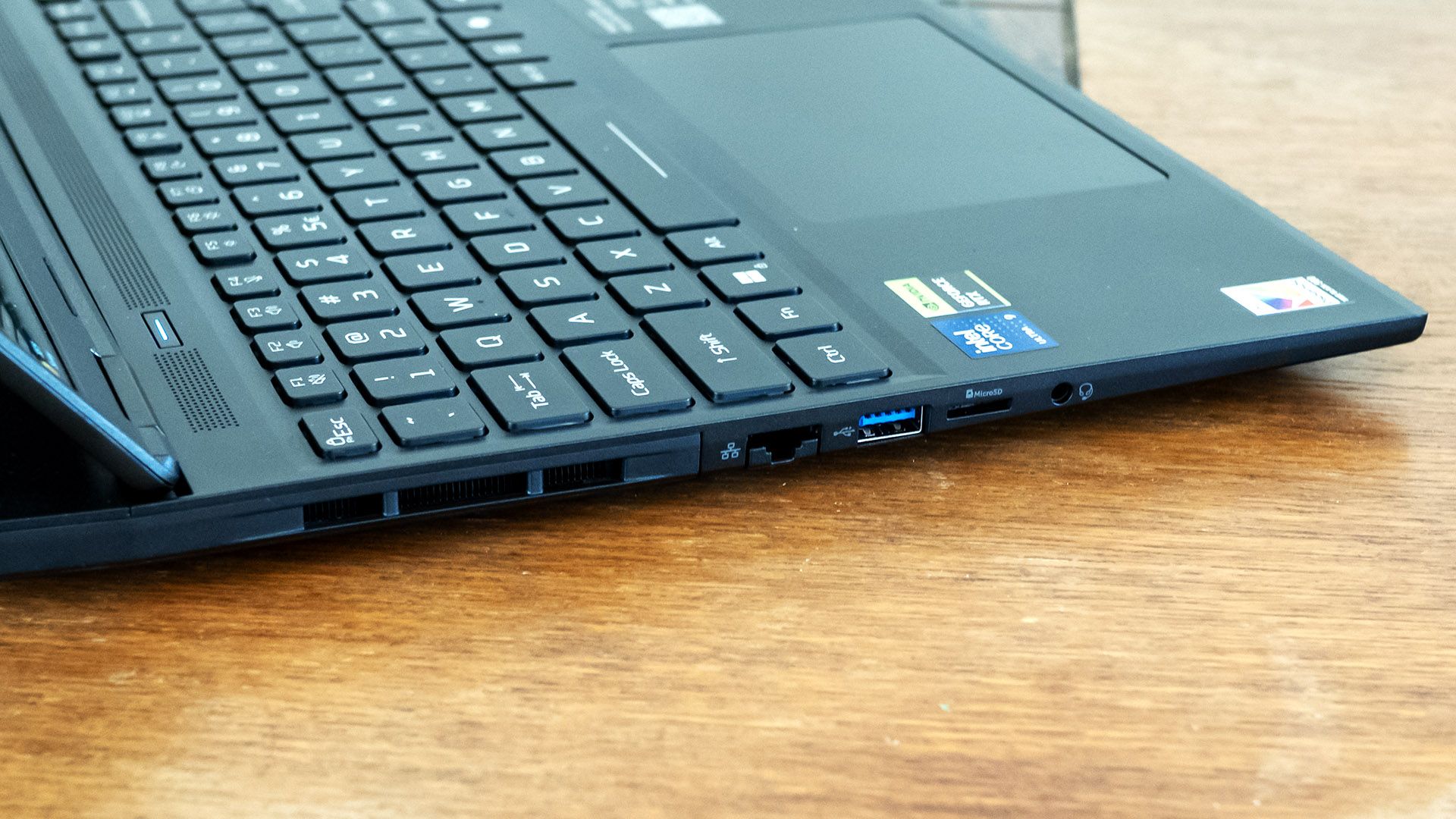
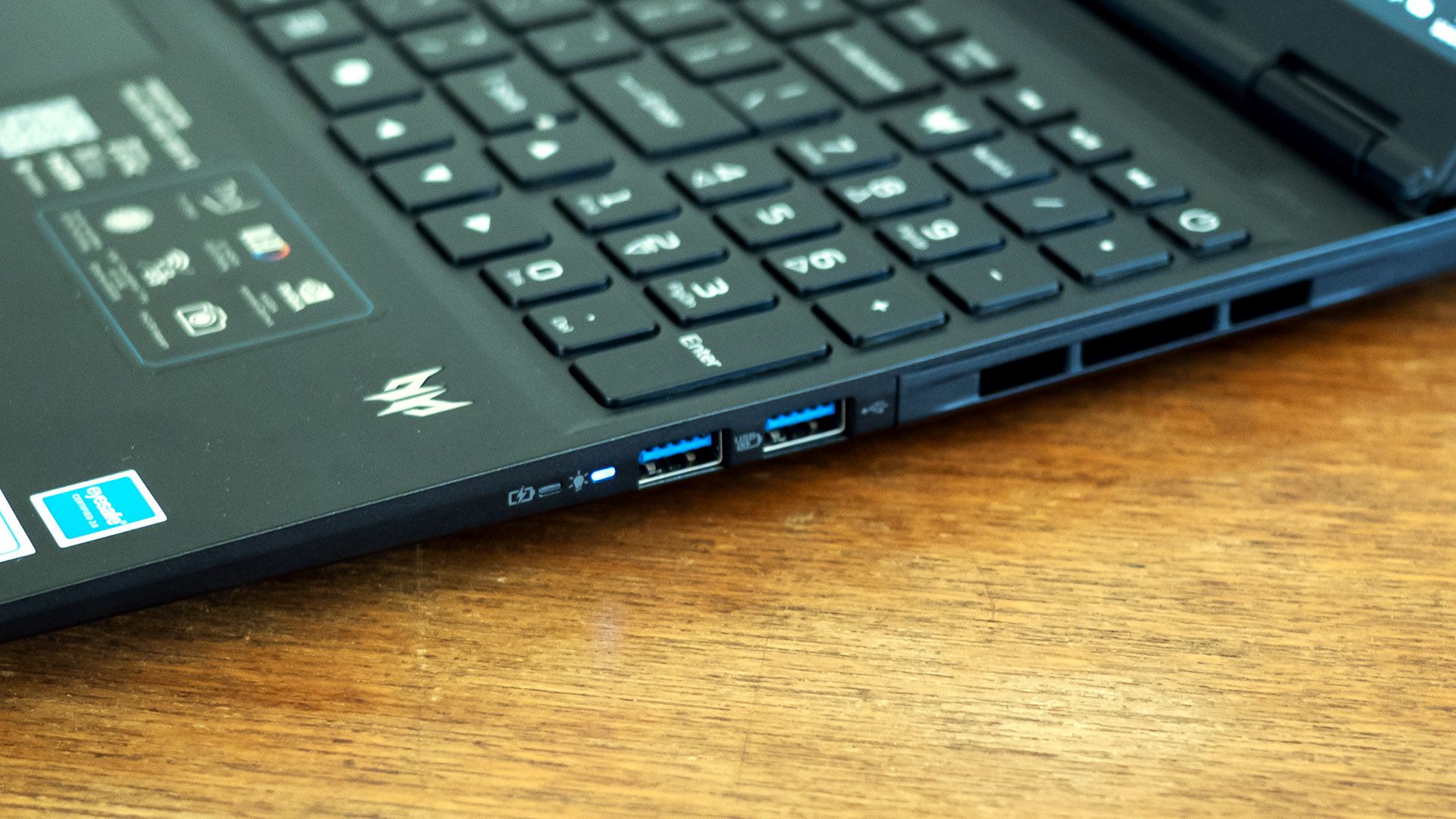
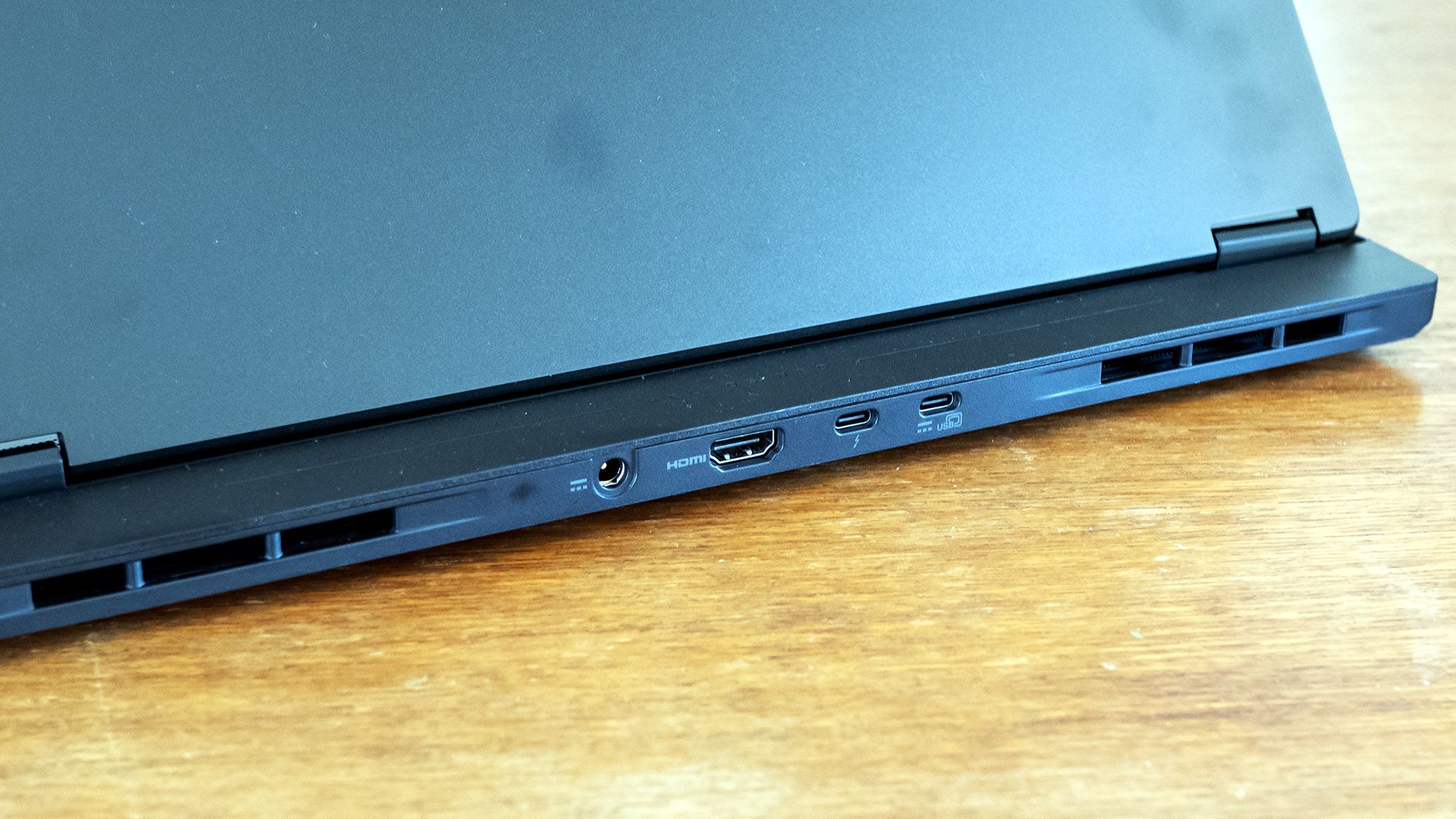
Acer 在三个侧面提供了令人印象深刻的丰富接口:Thunderbolt 4、三个 USB-A 3.2、USB-C 3.2、HDMI 2.1、2.5 Gbps 以太网、一个 MicroSD 读卡器以及一个音频接口。后置接口很方便地把线缆藏在视线之外。
在内部,这款笔记本提供 Wi-Fi 6E,虽然算不上最新,不过 Killer AX1675i 网卡和配套的 Killer 以太网接口通过 Killer Doubleshot Pro 支持同时建立网络连接,面向希望确保游戏通过其中一个连接获得网络优先级、而所有其他应用走另一个连接的玩家。值得注意的是,Acer 还附赠一个带拉链的加厚便携内胆包。
Intel Core Ultra 9 290HX Plus
Nvidia GeForce RTX 5070 Ti(12GB GDDR7,1,612 MHz 加速频率,115 W 最大图形功耗)
16GB DDR5-6400(2x 8GB)
1TB PCIe 4.0 SSD
16 英寸,OLED,16:10,2560 x 1600,240 Hz,G-Sync
Killer Wi-Fi 6E AX1675i
Thunderbolt 4,3x USB-A 3.2,USB-C 3.2,HDMI 2.1,以太网,MicroSD 读卡器,音频
电源适配器
230 W(圆孔接口)
操作系统
Windows 11 家庭版
尺寸(宽×深×高)
14.05 x 10.85 x 0.74 英寸(357 x 276 x 18.8 mm)
4.85 磅(2.2 kg)
价格(按此配置)
我们测试的 Predator Helios Neo 16S AI 搭载 Core Ultra 9 290HX Plus 处理器、Nvidia RTX 5070 Ti 显卡和 16GB 内存。
在玩 007 First Light 时,大多数场景下我看到约 65 到 75 帧每秒(FPS),在开阔区域会飙升至 100 FPS 以上。游戏整体上依然可玩,但在原生 2560 x 1600 分辨率、High 画质设置下,确实需要开启 DLSS 才能达到这样的帧率。
我们为这台 Acer 选用的对比机型是 Gigabyte 的 Aero X16(Ryzen AI 7 350、RTX 5070 85W,测试时售价 1,899.99 美元,截至本文撰写时为 1,499.99 美元)和 HyperX 的 Omen 15(Core Ultra 9 386H、RTX 5070 85W,测试时售价 2,099.99 美元,截至本文撰写时约 3,159.99 美元)。
对比将聚焦于 1920 x 1080 的测试结果,但我们也列出了各笔记本原生分辨率下的数据:Acer 和 Gigabyte 为 2560 x 1600,HP 为 2880 x 1800。
总体而言,Predator Helios Neo 16S AI 的表现明显优于 Gigabyte 和 HyperX 的两款笔记本。这在很大程度上得益于其更高功耗的 RTX 5070 Ti,不过它的 Core Ultra 9 290HX Plus 处理器也更现代。
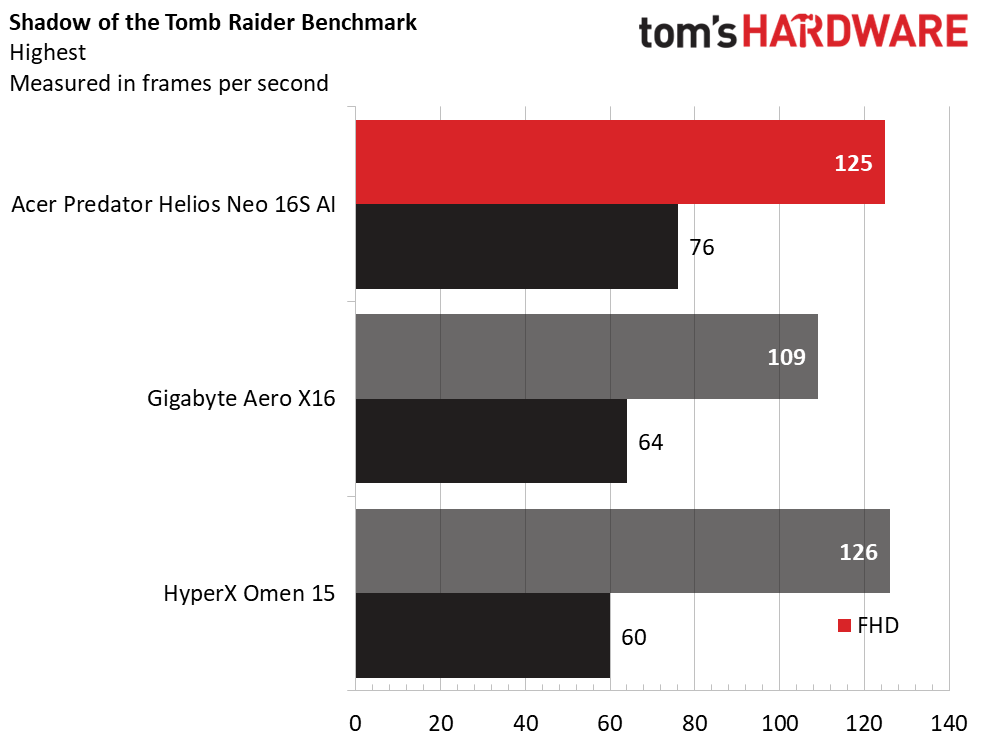
在《古墓丽影:暗影》(最高画质预设)中,Acer 在 1080p 下达到 125 FPS,与 HyperX(126 FPS)不相上下,但在 1600p 原生分辨率下占据优势,为 76 FPS,而 Gigabyte 为 60 FPS、HyperX 为 64 FPS。
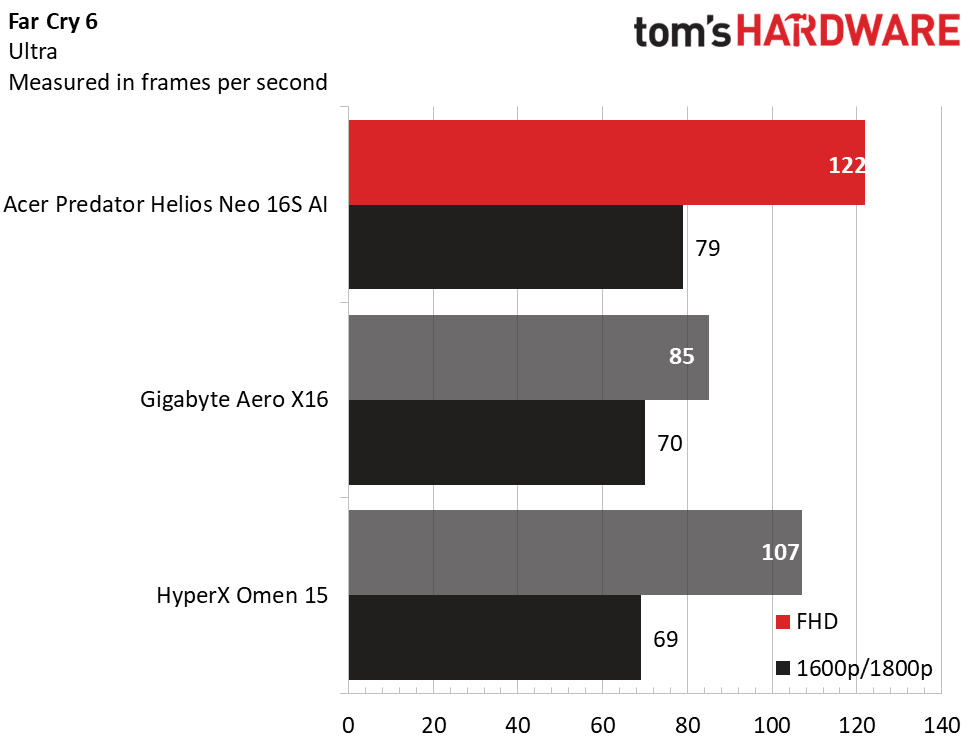
Acer 的优势在《孤岛惊魂 6》(Ultra)中延续,原生分辨率下达到 122 FPS,而 Gigabyte 为 85 FPS、HyperX 为 107 FPS。在《荒野大镖客 2》(Medium)中领先优势收窄,Acer 和 Gigabyte 在 1080p 下几乎打成平手,在原生分辨率下也仅相差几 FPS(Acer 52 FPS,Gigabyte 49 FPS)。HyperX 依然落后。
Acer 在《赛博朋克2077》(光线追踪 Ultra)中也展现出明显更好的性能,尤其是在原生分辨率下,其 21 FPS 超过了 Gigabyte(17 FPS)和 HyperX(5 FPS)。
在《极限竞速:地平线6》(Extreme)中,Acer 在 1080p 下的 72 FPS 奇怪地低于 HyperX 的 80 FPS,但在原生分辨率下结果反转,Acer 的 60 FPS 大幅领先 HyperX 的 51 FPS。
虽然并非性能猛兽,但 Predator Helios Neo 16S AI 在其 2560 x 1600 原生分辨率下展现出合格的游戏性能。关键在于,Acer 散热架设计带来的额外厚度使其 GPU 功耗可达 115 W,远超其 Gigabyte 和 HyperX 竞争对手。
我们通过运行 15 轮《地铁:离去》压力测试来测试游戏本的持续性能,模拟半小时游戏。在测试中,Predator Helios Neo 16S AI 在所有轮次中平均达到 86.82 FPS。各轮之间的差异小于 1 FPS,表明散热性能稳定。Core Ultra 9 290HX Plus 的 P 核平均运行频率为 2.94 GHz,E 核为 2.16 GHz,平均温度为 73 摄氏度。与此同时,RTX 5070 Ti 的平均频率为 1.622 GHz,温度为 74 摄氏度。
我们的 Predator Helios Neo 16S AI 配备 Core Ultra 9 290HX 处理器、16GB 双通道 DDR5-6400 内存和 1TB PCIe 4.0 SSD。
Acer 的 Core Ultra 9 290HX 在 Geekbench 中取得了强劲成绩。其单核得分 3,349、多核得分 19,313,远超搭载 Ryzen AI 7 350 的 Gigabyte(2,916 和 14,074)以及搭载 Core Ultra 9 386H 的 HyperX(2,857 和 15,916)。这一优势延续到了我们的 4K 至 1080p Handbrake 转码测试中,Acer 以 2 分 30 秒占据主导。Gigabyte(3:54)和 HyperX(3:39)完全无法接近。
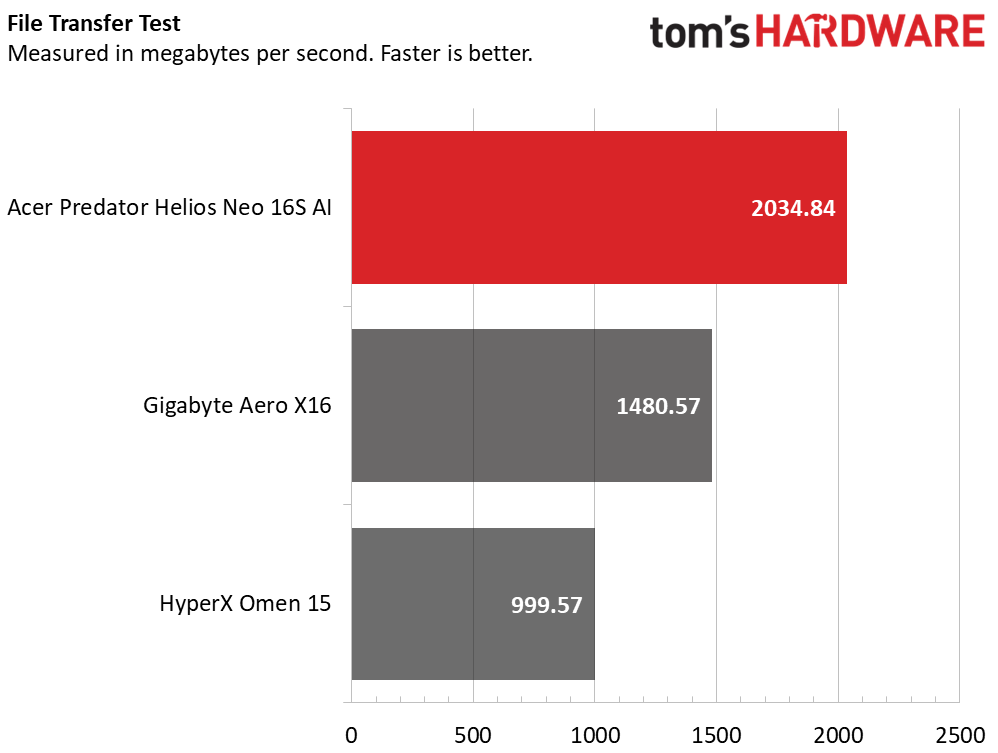
在我们 25GB 文件传输测试中,Acer 的表现同样扎实,平均达到 2,034.84 MBps,相比之下 Gigabyte 为 1,480.57 MBps,HyperX 则慢得多,仅为 999.57 MBps。
总体而言,这款 Acer 几乎能胜任任何类型的使用。多任务处理会受限于 16GB 内存,但 Acer 也销售 32GB 版本,且购买后还可自行升级。
只要看一眼这款 Acer 的屏幕,就能确信这是它的关键卖点。其 OLED 面板技术带来异常鲜艳的色彩,配合出色的亮度,光面表面更让它呈现出近乎液态的观感。2560 x 1600 分辨率在细节与系统所配 RTX 5070 Ti 显卡在当今游戏中能驱动的性能之间取得了良好平衡。游戏玩家也会喜欢 240 Hz 的流畅刷新率和 Nvidia G-Sync 支持。(正如我们将在电池续航部分看到的,这块屏幕仅支持 240 Hz,导致功耗高于预期。)
在 National Geographic 观看自然纪录片时,我注意到热带场景的鲜艳色彩,以及深海处的纯正黑色。游戏体验同样沉浸——007 First Light 感觉极为流畅,画面锐利。我甚至无需放大就能看清角色制服徽章上的字迹。
这款 Acer 的屏幕覆盖了 82.7% 的 DCI-P3 色域,表现健康,与 Gigabyte 相当,但还无法与同样采用 OLED 面板的 HyperX 相提并论。它的亮度也不及 HyperX,不过在 SDR 下峰值达到 372.4 尼特,对 OLED 而言已属扎实。我们在 40% HDR 测试中测得其亮度最高可达 608 尼特,令人印象深刻。
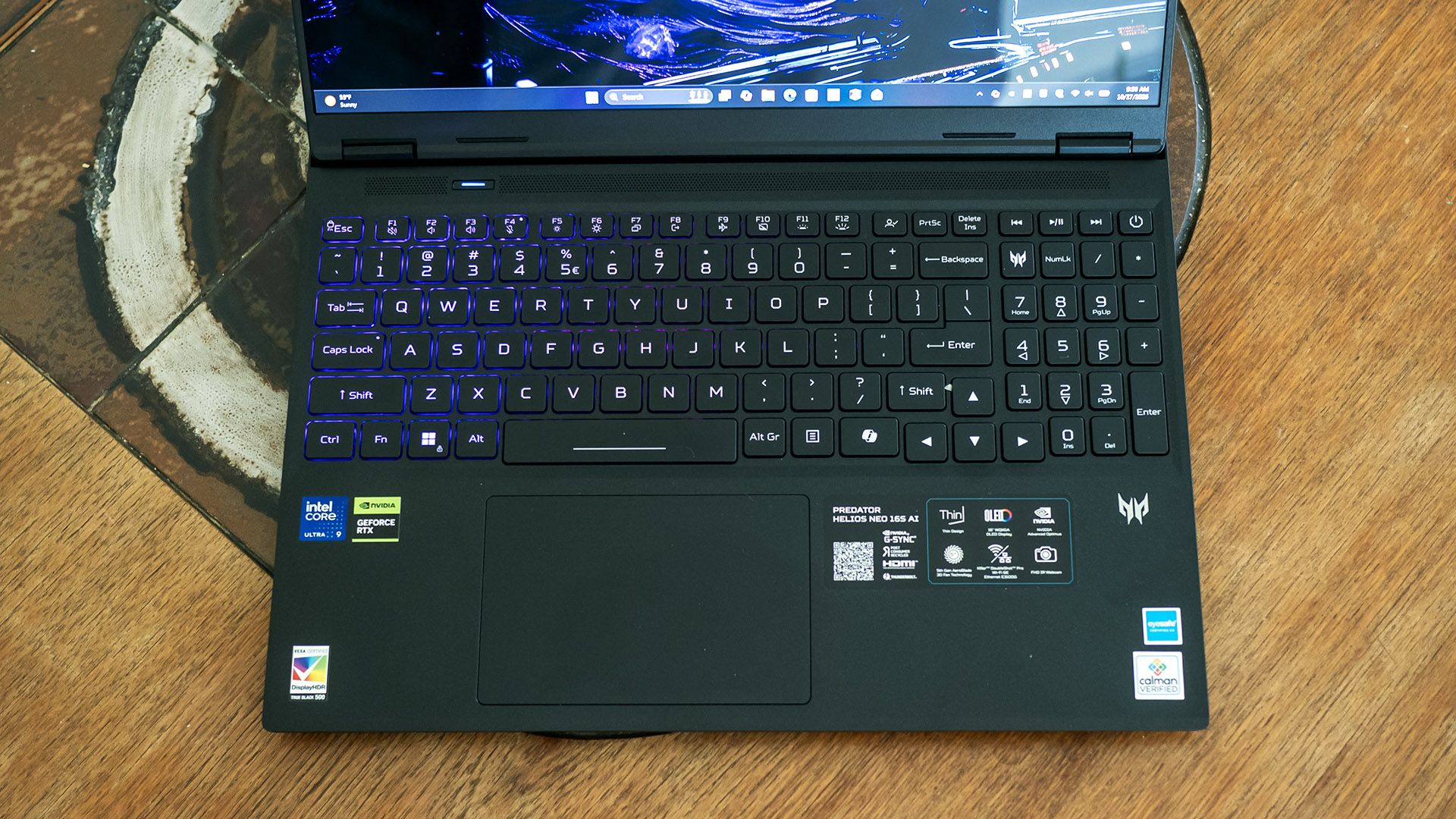
Acer 的键盘手感令人满意,键程充足并带有缓冲,却不会显得绵软。在 MonkeyType 中,我第一次尝试就打出了每分钟 116 词、准确率 99% 的成绩,这对我在任何笔记本上都是很好的结果。Acer Key 应用让你可以自定义加号键上方的用户自定义键,方便一键打开常用应用或网站。
尽管键盘不支持单键背光,但其四个 RGB 分区可在 PredatorSense 应用中设置多种灯效模式和颜色。更改灯光设置时,应用最初会提示这些设置由 Windows Dynamic Lighting 控制,但事实并非如此,因为 Dynamic Lighting 显示未检测到兼容设备。不过在 PredatorSense 中关掉该警告后,应用对分区和顶盖 logo 提供的控制虽有限,却直观易用。每个分区可指定静态灯效,也可将整个键盘设为动态灯效:呼吸、霓虹、波浪、涟漪、组合、蛇形和迪斯科,并可自定义速度、方向和亮度。设置可保存到配置文件中。
Acer 的大尺寸触控板同样表现不错,点击反馈可预期,手指在哑光表面滑动顺畅。
音频表现不是 Neo 16S AI 的强项。嵌在掌托中的双扬声器音量勉强够日常收听,清晰度一般,低音单薄。在 Phil Collins 的《Don’t Lose My Number》中,鼓点听起来平淡,人声也略显沉闷。
原文较长,译文为节选;译文由英文原文机器翻译,术语按行业惯例统一,可在文末展开原文核对。
查看英文原文(Acer Predator Helios Neo 16S AI Review: Slim OLED gaming that doesn't last long)
Not everyone wants a hulking gaming laptop. Some prefer something stealthier. Acer’s Predator Helios Neo 16S AI aims for portability but still packs a Core Ultra 9 290HX Plus processor and Nvidia RTX 5070 Ti graphics into a sub-five-pound package. It also includes plenty of ports and a beautiful 240 Hz OLED display. That hardware gives it plenty to work with, but the question remains whether the Helios Neo 16S AI can still deliver solid gaming performance while being portable.
Design of the Acer Predator Helios Neo 16S AI
Acer’s obsidian black chassis maintains the look of the Predator series – angular, dark, and visible in the dark with its illuminated lid logo. At 14.05 x 10.85 x 0.74 inches and 4.85 pounds, it’s respectably trim for a gaming laptop, though the Gigabyte Aero X16 (14 x 9.9 x 0.78 inches, 4.2 pounds) and the HyperX Omen 15 (13.5 x 9.96 x 0.93 inches, 4.89 pounds) both have about an inch less depth since neither use a rear thermal shelf like Acer.
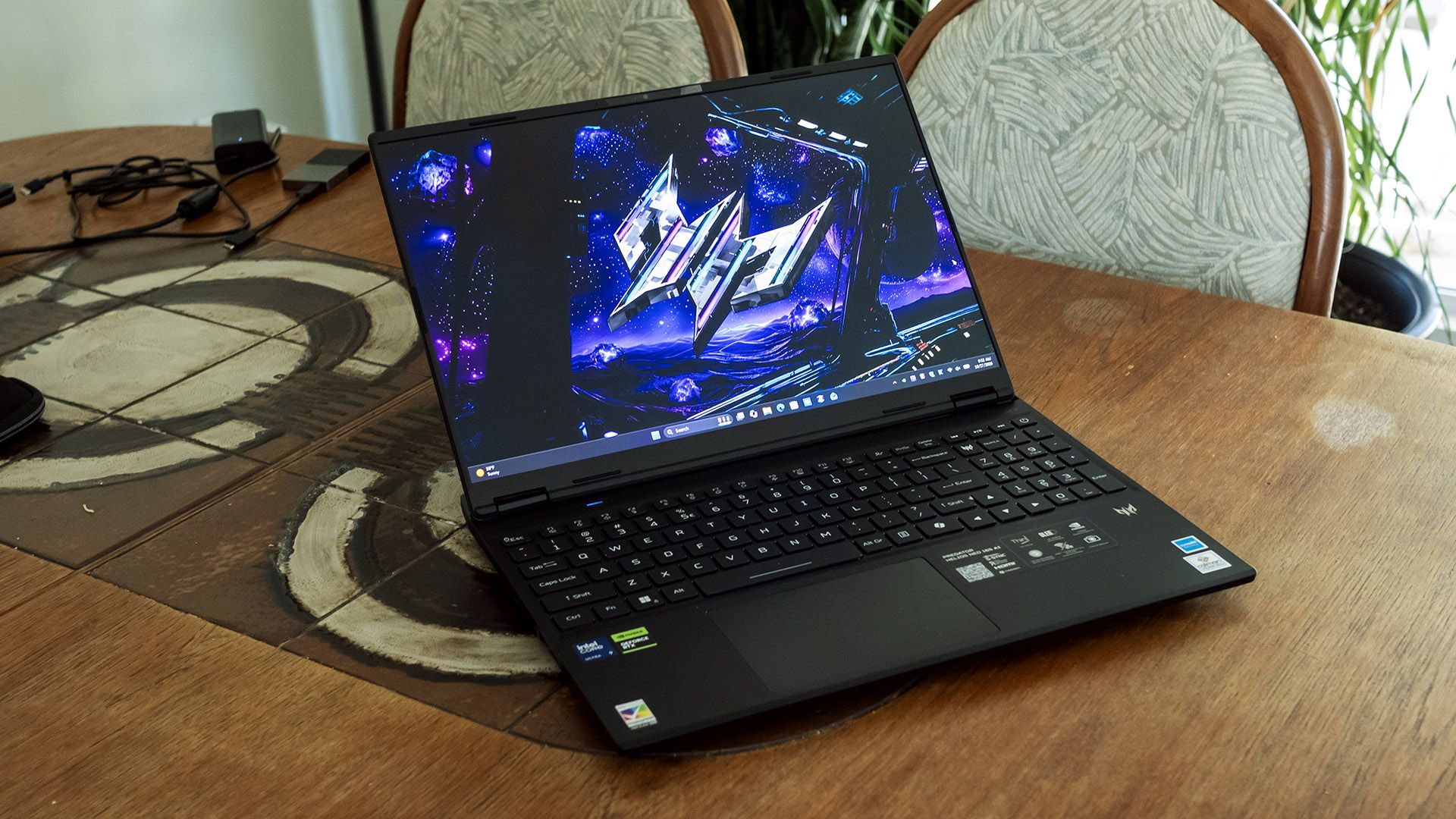
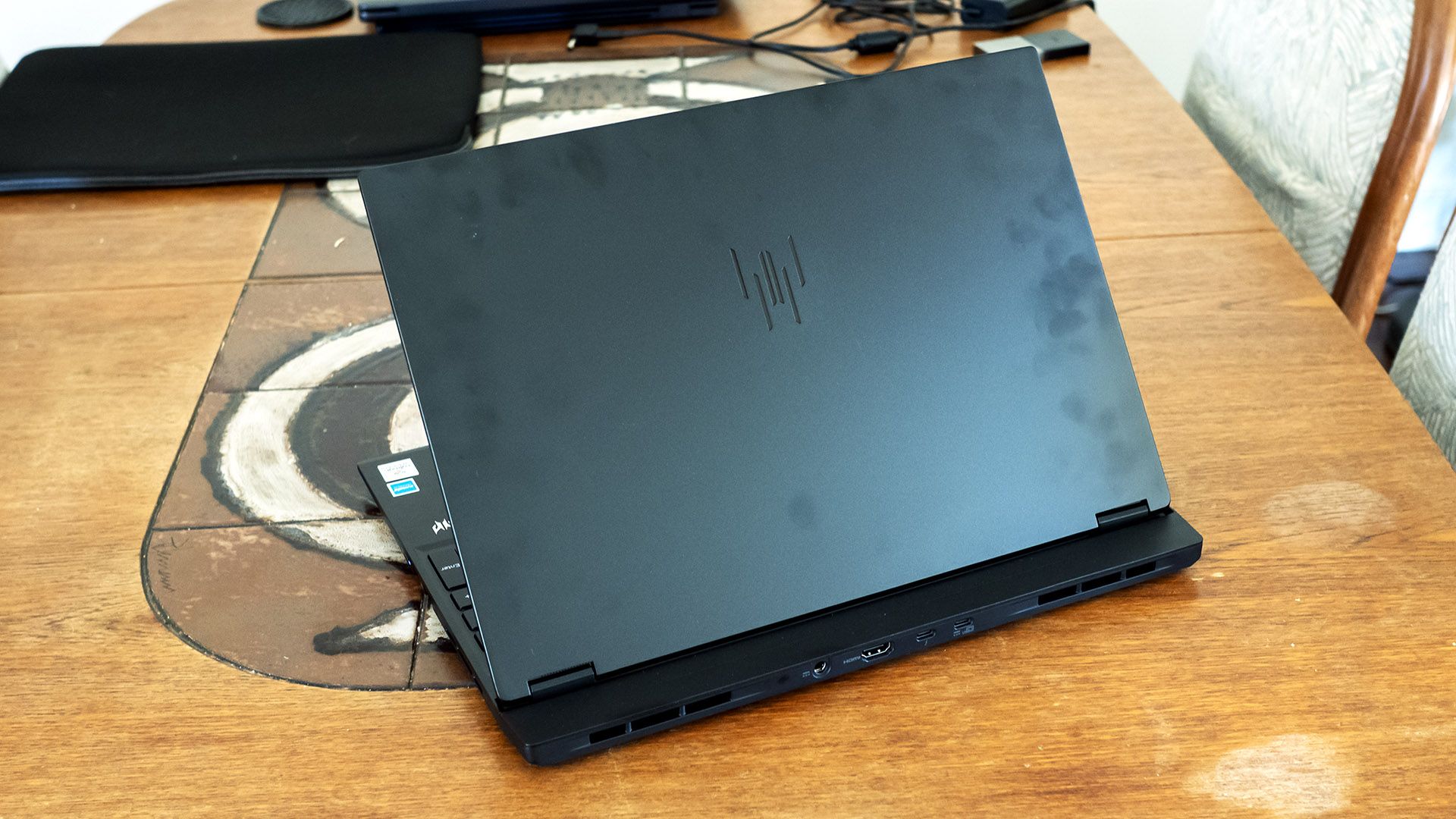
The build quality is decent – both the chassis and lid show little flex. The stamped aluminum panels on the lid bottom and chassis lid aren’t ultra-premium but still beat plastic. One downside is that the metal shows fingerprints easily, which are difficult to clean off.
Acer provides an impressive port variety across three sides: Thunderbolt 4, three USB-A 3.2, USB-C 3.2, HDMI 2.1, 2.5 Gbps Ethernet, a MicroSD card reader, and an audio jack. The rear ports conveniently leave cables out of sight.
Inside, the laptop offers Wi-Fi 6E, which isn’t as modern as it could be, though the Killer AX1675i card and accompanying Killer Ethernet jack offer simultaneous network connections via Killer Doubleshot Pro for gamers that want to ensure network priority for the games over one connection and all other apps over the other. It’s also notable that Acer includes a zippered, padded travel sleeve.
Acer Predator Helios Neo 16S AI Specifications
CPU | Intel Core Ultra 9 290HX Plus |
Graphics | Nvidia GeForce RTX 5070 Ti (12GB GDDR7, 1,612 MHz boost clock, 115 W maximum graphics power) |
Memory | 16GB DDR5-6400 (2x 8GB) |
Storage | 1TB PCIe 4.0 SSD |
Display | 16-inch, OLED, 16:10, 2560 x 1600, 240 Hz, G-Sync |
Networking | Killer Wi-Fi 6E AX1675i |
Ports | Thunderbolt 4, 3x USB-A 3.2, USB-C 3.2, HDMI 2.1, Ethernet, MicroSD card reader, audio |
Camera | 1080p IR |
Battery | 92 WHr |
Power Adapter | 230 W (barrel connector) |
Operating System | Windows 11 Home |
Dimensions (WxDxH) | 14.05 x 10.85 x 0.74 inches (357 x 276 x 18.8 mm) |
Weight | 4.85 pounds (2.2 kg) |
Price (as configured) |
Gaming and Graphics on the Acer Predator Helios Neo 16S AI
We tested the Predator Helios Neo 16S AI with a Core Ultra 9 290HX Plus processor, Nvidia RTX 5070 Ti graphics card, and 16GB of RAM.
Playing 007 First Light, I saw about 65 to 75 frames per second (FPS) in most scenes, with spikes to over 100 FPS in wide open areas. The game remained all-around playable, though it did require using DLSS to achieve these framerates at native 2560 x 1600 with High settings.
Our comparison systems for this Acer are Gigabyte’s Aero X16 (Ryzen AI 7 350, RTX 5070 85W, $1,899.99 when tested, $1,499.99 as of this writing) and HyperX’s Omen 15 (Core Ultra 9 386H, RTX 5070 85W, $2,099.99 when tested, about $3,159.99 as of this writing).
Comparisons will focus on the 1920 x 1080 results, but we also included numbers at each laptop’s native resolution: 2560 x 1600 for the Acer and Gigabyte while the HP uses 2880 x 1800.
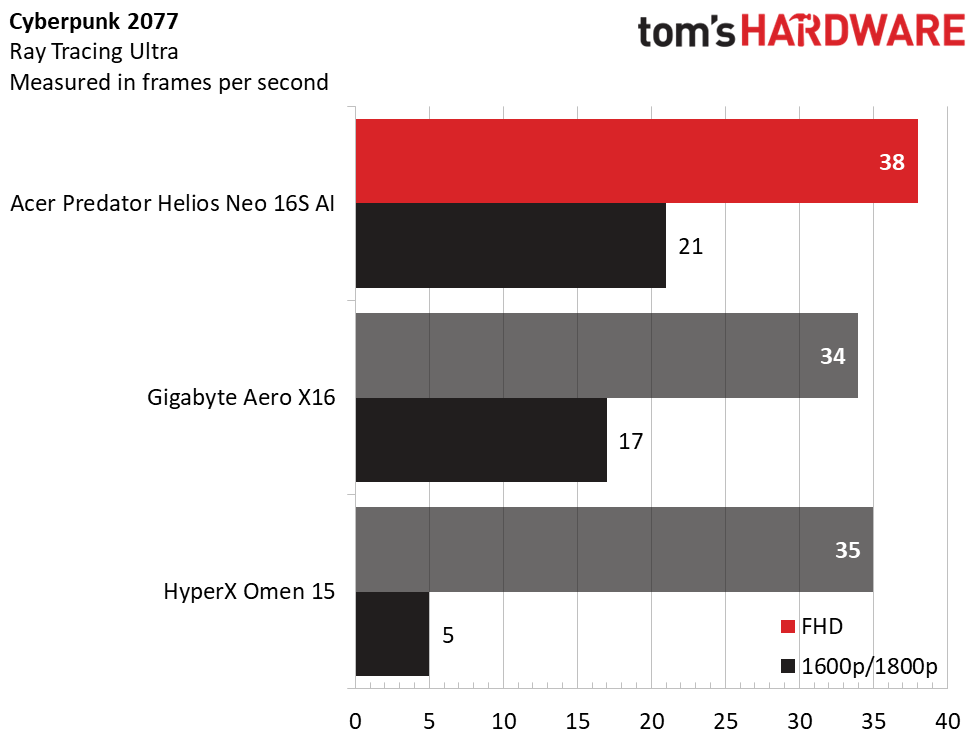
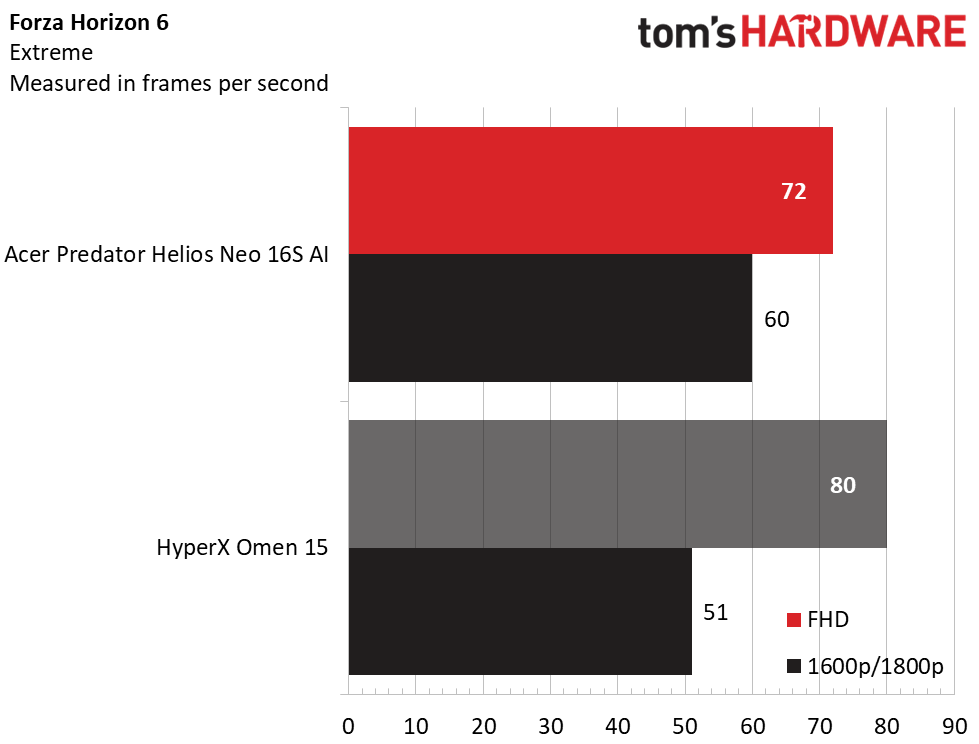
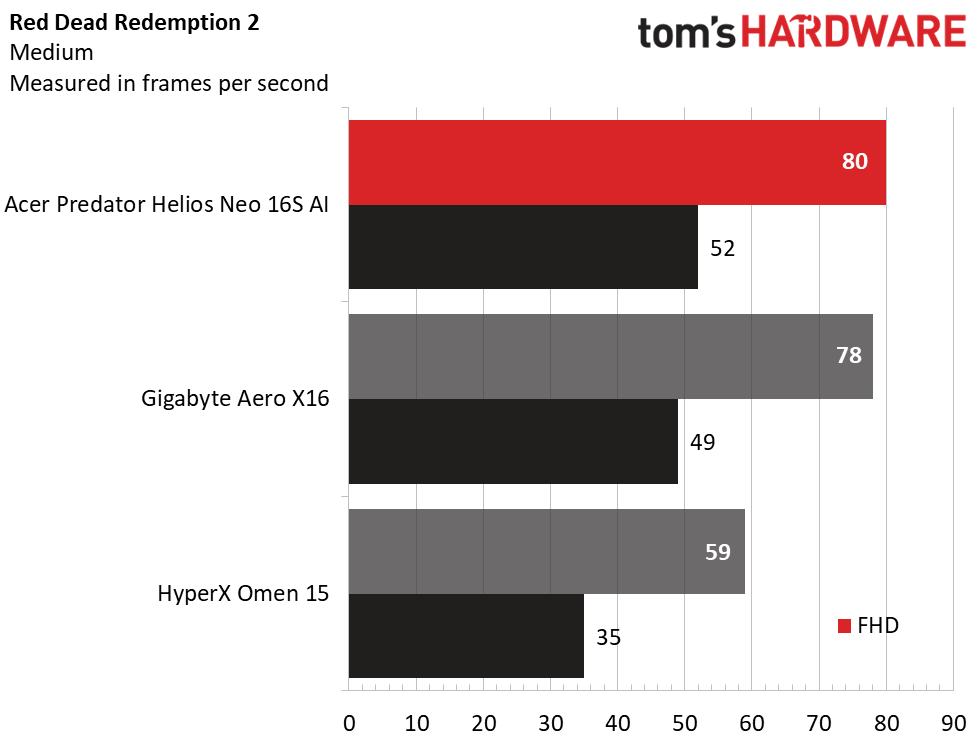
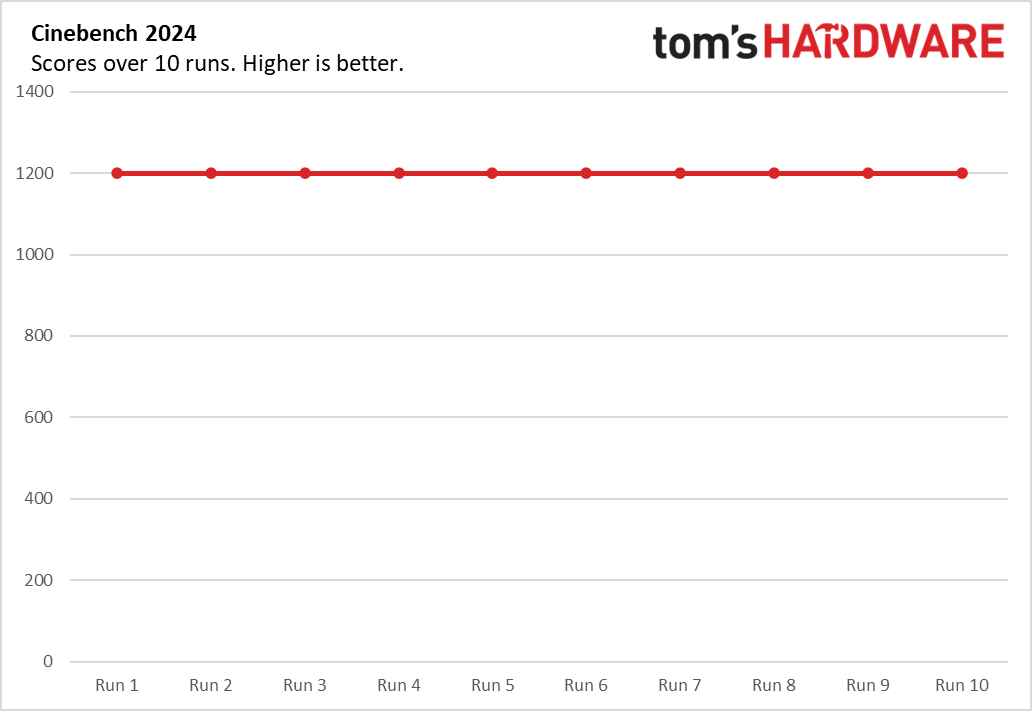
Overall, the Predator Helios Neo 16S AI performed significantly better than both the Gigabyte and HyperX laptops. Much of that has to do with its higher-wattage RTX 5070 Ti, though its Core Ultra 9 290HX Plus processor is also more modern.
In Shadow of the Tomb Raider (Highest detail preset), Acer’s 125 FPS at 1080p was on par with the HyperX (126 FPS), though it dominated at its 1600p native resolution, with 76 FPS against Gigabyte’s 60 FPS and HyperX’s 64 FPS.
Acer’s advantage continued in Far Cry 6 (Ultra), where it produced 122 FPS to Gigabyte’s 85 FPS and HyperX’s 107 FPS at native resolution. The lead narrowed in Red Dead Redemption 2 (Medium) where Acer and Gigabyte practically tied at 1080p and were within a few FPS at native (52 FPS for Acer and 49 FPS for Gigabyte). The HyperX remained behind.
The Acer also demonstrated markedly better performance in Cyberpunk 2077 (Ray Tracing Ultra) particularly at native resolution, where its 21 FPS outran Gigabyte (17 FPS) and HyperX (5 FPS).
In Forza Horizon 6 (Extreme), Acer’s 72 FPS at 1080p was strangely lower than HyperX’s 80 FPS, but the results flipped at native, where Acer’s 60 FPS was considerably ahead of HyperX’s 51 FPS.
While not a powerhouse, the Predator Helios Neo 16S AI demonstrates competent gaming performance at its 2560 x 1600 native resolution. Crucially, the extra depth from Acer’s thermal shelf design lets its GPU draw 115 W, considerably more than its Gigabyte and HyperX competitors
We test the sustained performance of gaming laptops running 15 loops of the Metro: Exodus stress test, simulating half an hour of gaming. During the test, the Predator Helios Neo 16S AI averaged 86.82 FPS across all runs. The variance was less than one FPS between runs, indicating stable thermal performance. The Core Ultra 9 290HX Plus ran at an average of 2.94 GHz on its P-cores, 2.16 GHz on its E-cores, and had an average temperature of 73 degrees Celsius. Meanwhile, the RTX 5070 Ti averaged 1.622 GHz and 74 C.
Productivity Performance on the Acer Predator Helios Neo 16S AI
Our Predator Helios Neo 16S AI features a Core Ultra 9 290HX processor, 16GB of dual-channel DDR5-6400 memory, and a 1TB PCIe 4.0 SSD.
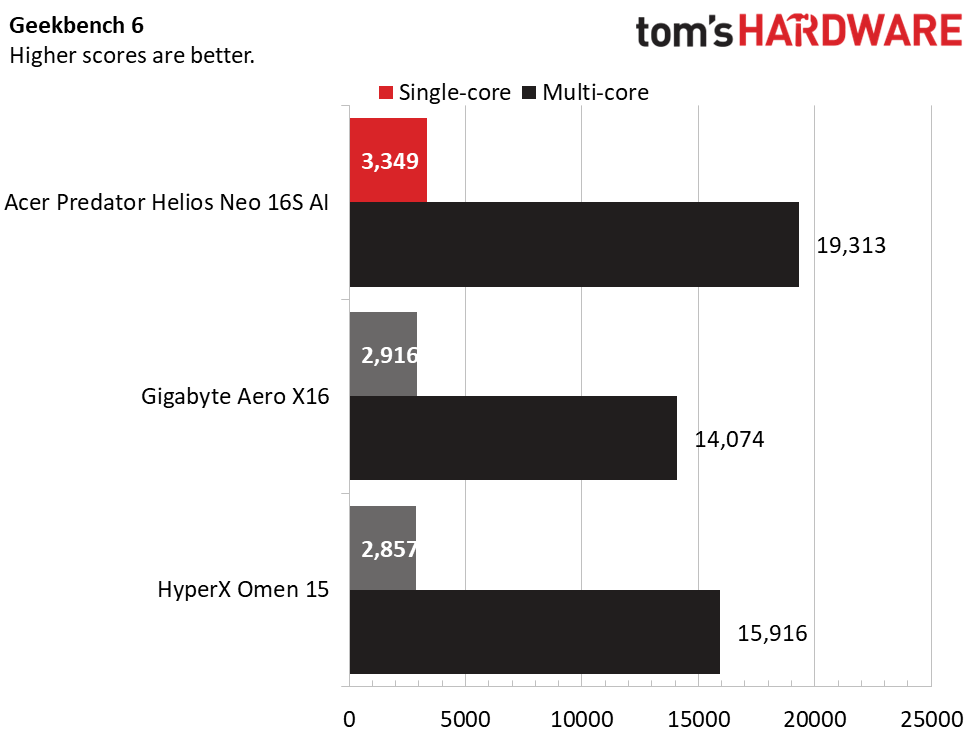
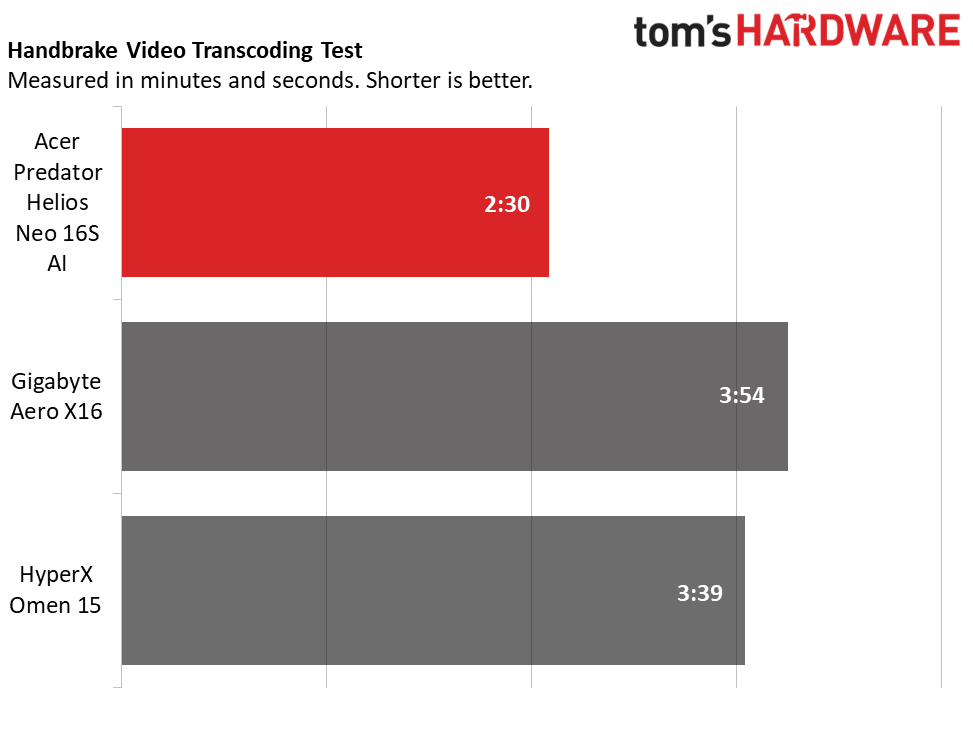
The Acer’s Core Ultra 9 290HX produced strong numbers in Geekbench. Its single-core score of 3,349 and multi-core score of 19,313 were well ahead of the Ryzen AI 7 350-powered Gigabyte (2,916 and 14,074) and Core Ultra 9 386H-powered HyperX (2,857 and 15,916). This continued into our 4K-to-1080p Handbrake transcoding testing, which Acer dominated with 2 minutes and 30 seconds. The Gigabyte (3:54) and HyperX (3:39) weren’t even close.
Acer also produced solid numbers in our 25GB file transfer test, averaging 2,034.84 MBps next to Gigabyte’s1,480.57 MBps and HyperX’s far slower 999.57 MBps.
Overall, this Acer is very capable for almost any kind of use. Multitasking will be limited by 16GB of RAM, but Acer sells versions of this laptop with 32GB and it can be upgraded after purchase.
Display on the Acer Predator Helios Neo 16S AI
Once glance at this Acer’s display leaves no doubt it’s a key selling point. Its OLED panel technology creates exceptionally vivid colors matched by excellent brightness, and its glossy surface gives it an almost liquid appearance. The 2560 x 1600 resolution is a good balance between detail and what the system’s RTX 5070 Ti graphics card can drive in today’s games. Gamers will also appreciate the smooth 240 Hz refresh rate and Nvidia G-Sync support. (As we’ll see in the battery life section, the screen only supports 240 Hz, resulting in higher-than-expected power consumption.)
Watching nature documentaries on National Geographic, I noted the vibrant colors of tropical scenes and the pitch blacks of the depths of the sea. Gaming was equally immersive – 007 First Light felt supremely fluid and looked sharp. I could even make out the writing on character’s uniform badges without zooming.
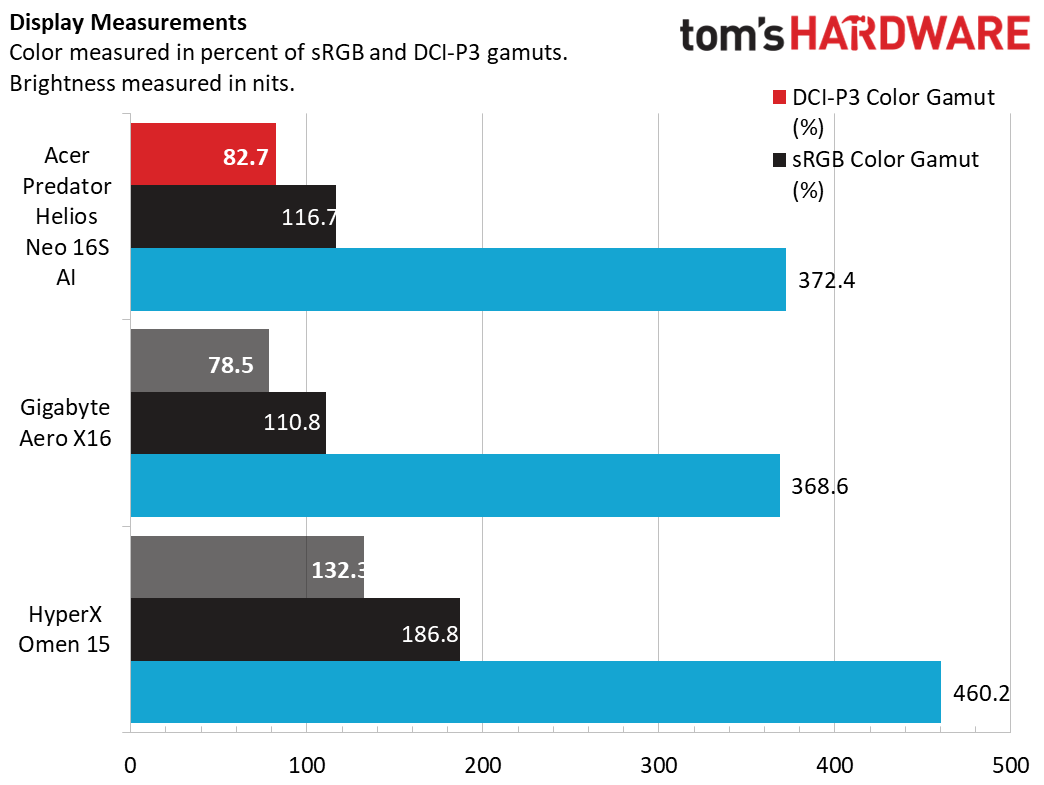
The Acer’s display covered a healthy 82.7% of the DCI-P3 color gamut, matching the Gigabyte, although it wasn’t quite in the same league as the HyperX, which also used an OLED panel. It also didn’t match the HyperX in brightness, but with a peak of 372.4 nits in SDR, the Acer boasts solid brightness for OLED. Our 40% HDR testing revealed up to an impressive 608 nits of brightness.
Keyboard and Touchpad on the Acer Predator Helios Neo 16S AI
Acer’s keyboard offers a satisfying feel, with ample throw and cushioning without feeling rubbery. In MonkeyType, I reached 116 words per minute with 99% accuracy on my first try, a great result for me on any laptop. The Acer Key app lets you customize the user-customizable key above the plus key, which is handy for creating one-press access to a favorite app or site.
Though the keyboard doesn't feature per-key backlighting, its four RGB zones can be set to many patterns and colors in the PredatorSense app. When changing lighting settings, the app initially says they’re controlled by Windows Dynamic Lighting, but that isn’t the case since Dynamic Lighting says no compatible devices are detected. But once dismissing the warning in PredatorSense, the app provides intuitive if limited control over the zones and lid logo. Each zone can be assigned a static lighting effect or the entire keyboard set in a dynamic pattern: breathing, neon, wave, ripple, combo, snake, and disco, with customizable speed, direction, and brightness. Settings can be stored in profiles.
Acer also did well with the large touchpad, which offers predictable clicking and my fingers glided smoothly over the matte surface.
Audio on the Acer Predator Helios Neo 16S AI
Audio performance isn’t a strong point for the Neo 16S AI. Twin speakers embedded in the palm rest barely have enough volume for casual listening, with average clarity and thin bass. In Phil Collins’ “Don’t Lose My Number”, drum hits sounded flat and vocals were somewhat muted.
The speakers are better-suited gaming, offering a decent sense of direction because of their placement on either side of the palm rest, but lack of bass and volume means you'll want a headset. The DTS:X app offers equalizers – without them, the sound is quite tinny. I had the best results leaving the equalizer on Auto.
Upgradeability of the Acer Predator Helios Neo 16S AI
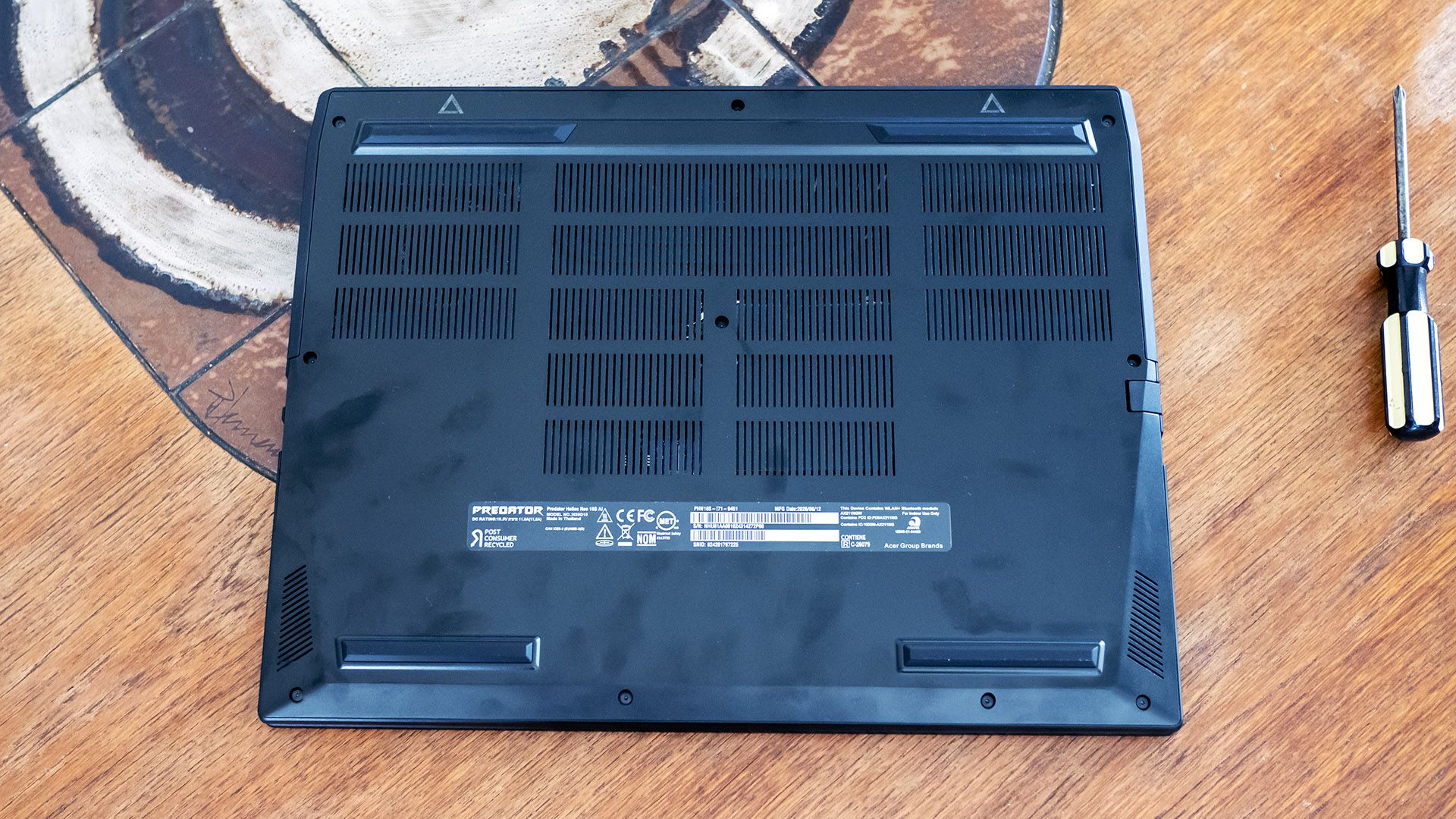
With ten Torx T6 screws securing the bottom cover, Acer doesn’t make it easy to get inside the Predator Helios Neo 16S AI. Removing the screws is the easy part – finding an entry point for my plastic pry tool provided harder. I eventually found one at the front corners of the chassis by using mild force. The fact that the side vents are part of the bottom cover compounds the difficulty – I needed to find an opening for my pry tool above those as well. The clips made cringeworthy snapping sounds as they were released, though surprisingly, none cracked off.
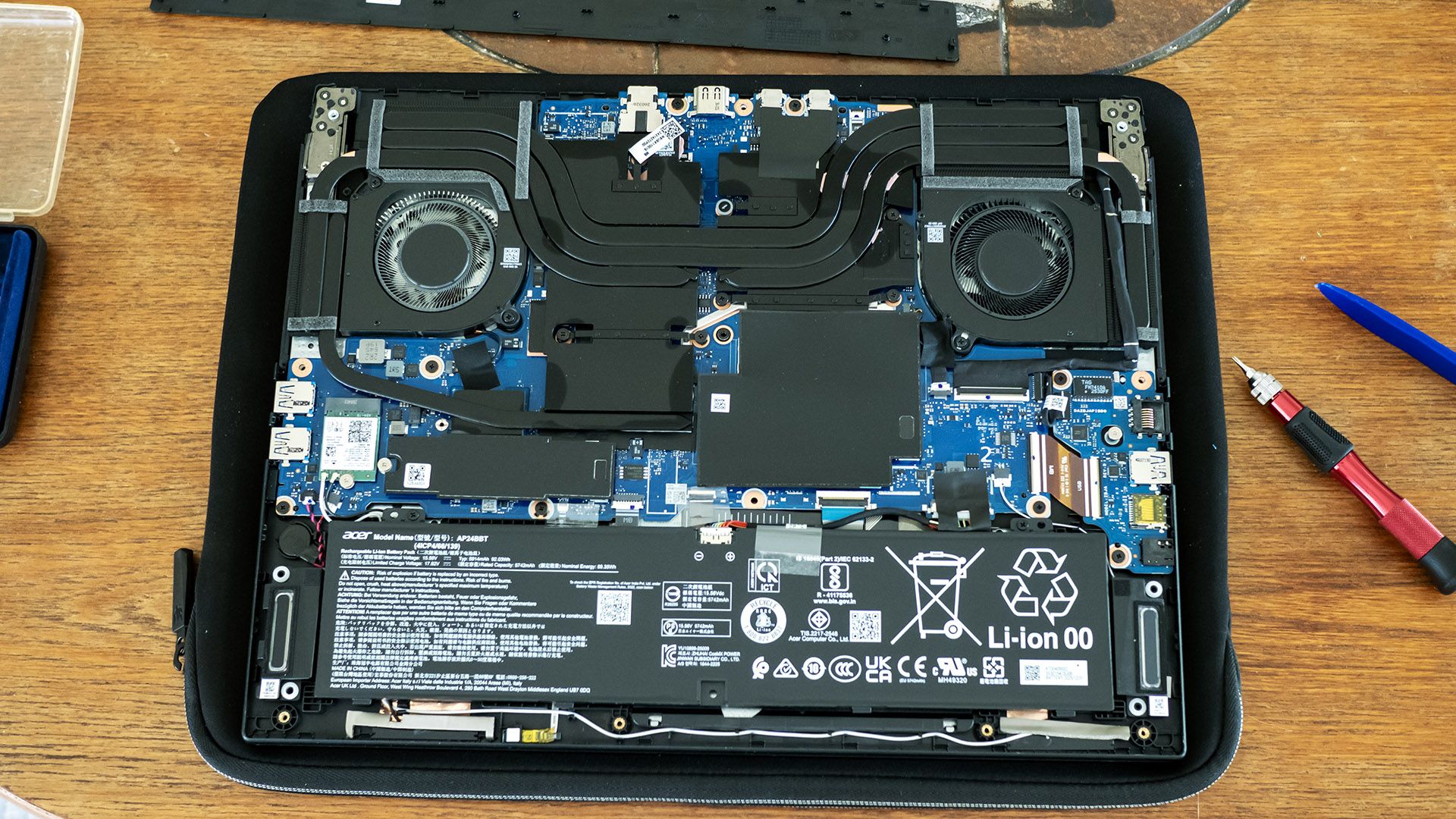
The effort is not for naught – Acer offers solid upgradeability, with two SODIMM slots under the black plastic cover in the middle, plus an M.2 2280 SSD slot and M.2 2230 wireless card slot. The battery is also replaceable.
Battery Life on the Acer Predator Helios Neo 16S AI
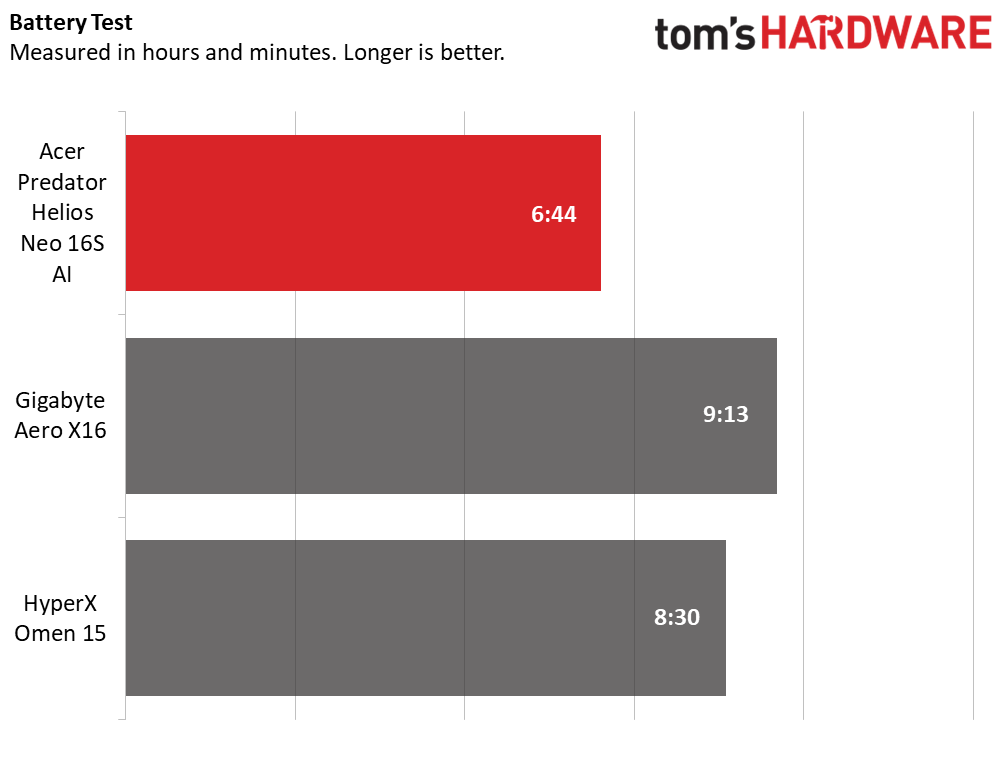
Our battery testing consists of web browsing, running OpenGL tests, and streaming videos with the screen at 150 nits while connected to Wi-Fi. The Predator underwhelmed here despite having a large 92 WHr battery – the HyperX laptop outlasted it by almost two hours and the Gigabyte nearly two and a half hours. Most of the blame goes to Acer’s decision to use a screen locked at 240 Hz; more advanced displays would support a variable refresh rate or at least allow it to be lowered to 60 Hz.
Heat on the Acer Predator Helios Neo 16S AI
We measure laptop surface temperatures during 15 loops of the Metro: Exodus stress test. During the test, the Acer’s temperatures peaked at 103 degrees F between the keyboard G and H keys, 81 F on the touchpad, and a toasty 129 F on bottom-center. Fan noise is audible particularly while gaming; hearing softer sounds in games will require using a headset. For daily use, the laptop hardly makes any noise.
Webcam on the Acer Predator Helios Neo 16S AI
Acer’s 1080p webcam offers a decently sharp picture – I could make out details in my facial hair and eyes from a few feet away. Highlights are also handled reasonably well. It lacks a physical privacy shutter or e-shutter, but it does have infrared (IR) for facial recognition.
Software and Warranty on the Acer Predator Helios Neo 16S AI
PredatorSense remains the prominent app on Acer’s Predator gaming laptops. On the Predator Helios Neo 16S AI, it offers power settings, system monitoring, updates, and system settings. Power profiles include quiet, balanced (the default), performance, and turbo. Performance mode indicates it overclocks the CPU and GPU, but doesn’t specify details, while turbo appears to be performance mode but with the fan speeds maxed.
The app’s settings let you disable Nvidia Optimus, set up optimized battery charging, a bluelight shield, and toggle a 30-second keyboard backlighting timeout. Fan control is possible, though the custom option only allows you to set the RPM, not a curve. Most of the settings above plus lighting effects and a sound equalizer can be saved in scenario profiles.
Acer loads many more apps than PredatorSense – too many: Acer Assist, Acer Chroma Tune, Acer Intelligence Space, Acer LiveArt, Acer documents, Acer Jumpstart, Acer Legal Information, Acer My Key, Acer Purified Voice Console, Acer PurifiedView, and Acer QuickPanel create a lengthy list under the Start Menu’s “A” section. Many of them are simply links to the Windows Store.
Some of the apps actually installed are useful, like Acer My Key mentioned earlier. Others could be: Acer Intelligence Space provides many AI-driven features like a meeting assistant, an image generator, a media search tool, and a game assistant that claims to automatically change the color of your crosshair for maximum visibility. I didn’t test all these out – they aren’t specific to the Predator Helios Neo 16S AI – but it seems that they could add value if you’re not already vested in other AI services.
There’s also a decent amount of bloatware, including a McAfee trial, a Dropbox promotion, and Forge of Empires. While easily uninstalled, they simply don’t belong on a laptop this expensive.
Acer Predator Helios Neo 16S AI Configurations
Our Predator Helios Neo 16S AI includes a Core Ultra 9 290HX Plus CPU, Nvidia RTX 5070 Ti graphics card, 16GB of dual-channel RAM, a 1TB PCIe 4.0 solid-state drive, and a 16-inch 2560 x 1600 OLED display with a 240 Hz refresh rate. It retails for $2,774.99 from Best Buy, though I did see it briefly drop to $1,999.99 during my review period.
Best Buy also offers a 32GB version for $3,199.99, but it was discounted to $2,459.99 during our review period, making it less expensive than our model. Pricing is always in flux with the ongoing memory shortages, but Acer’s list prices are in line with market expectations. At Best Buy, many RTX 5070 Ti models hover around the same price as our model and many are pricier.
Acer also lists a $2,099.99 model on its site with 16GB of RAM, a 1TB SSD, and an RTX 5060, though I didn’t find this model for sale.
Bottom Line
The Acer Predator Helios Neo 16S AI delivers on most of its thin-and-light gaming promise. Its RTX 5070 Ti provides solid gaming performance on its beautiful 240 Hz OLED display, and it follows up with a comfortable keyboard and touchpad, useful port selection, and solid upgradeability.
The trouble is that its portability is undermined by its below average battery life, an ironic shortcoming for a thin-and-light laptop. Audible gaming fans and lackluster speakers are further compromises, but the limited unplugged runtime is the one that those seeking a more portable package ought to be most concerned about.
But if you’re after a relatively slim gaming laptop to take between places where you can plug in, the Helios Neo 16S AI is an otherwise appealing package.
正文保留英文原文,标题与摘要由机器翻译。
原文发布于 Tom's Hardware(Acer Predator Helios Neo 16S AI Review: Slim OLED gaming that doesn't last long),标题、摘要与正文由机器翻译,术语按行业惯例统一,未经人工逐句校订。


