用 OpenAI Agents SDK 构建多智能体系统
一个 LLM 智能体自身就能完成许多工作。但随着应用规模扩大,智能体可能需要处理不同类型的任务。
这时,引入多智能体架构、拆分职责就会很有用。
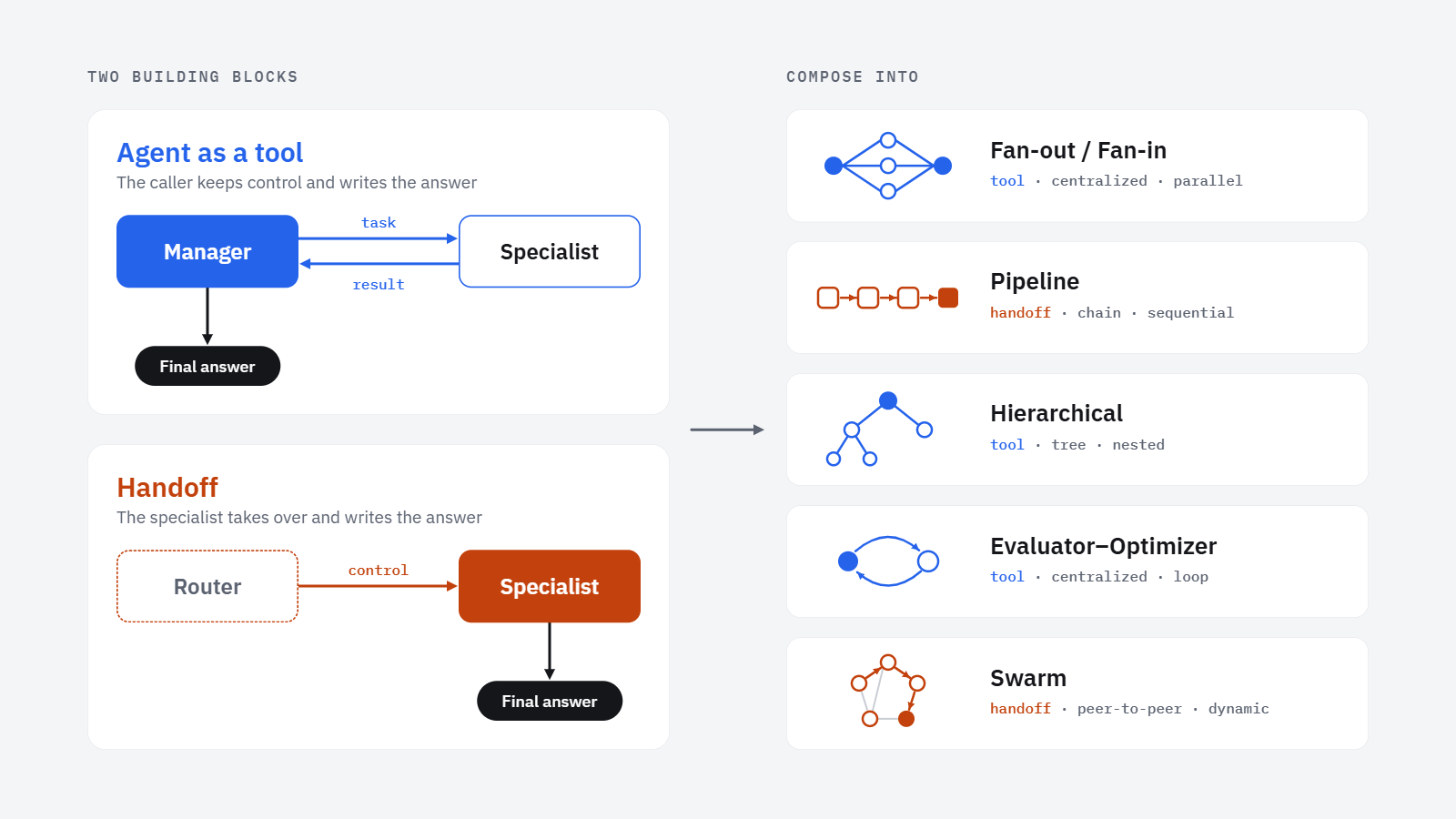
在这篇文章中,我们将讨论如何使用 OpenAI Agents SDK 构建实用的多智能体系统。我们会重点介绍两种模式——智能体即工具(agent-as-a-tool)与移交(handoff),它们是构建更复杂多智能体架构的基础模块。
我们将通过两个案例研究来说明这两种模式。
1. 一切都关乎委派
多智能体系统需要把职责拆分到多个智能体上。
职责拆分之后,智能体之间需要一种协同工作的方式,这就是委派(delegation)发挥作用的地方。
在实践中,有两种广泛使用的委派模式,即智能体即工具,以及移交。
假设某个智能体收到一个请求,需要某位专家的帮助。主智能体随后可以调用那位专家智能体。
专家智能体负责处理边界清晰的子任务,完成后把结果返回给调用它的智能体。调用方智能体保持活跃,并由它负责把专家的回复与其他可能的信息结合起来,产出最终答案。
在这种场景下,从调用方智能体的角度来看,这位专家智能体实际上就是一个工具。而且我们可以轻松扩展到多个专家智能体,由主智能体根据任务决定向哪些专家咨询。
这就构成了所谓的“智能体即工具”(agent-as-a-tool)模式。在 OpenAI Agents SDK 中,我们通过 specialist_agent.as_tool(...) 来建立这种关系。完整的配置方式我们会在第一个案例研究中看到。
另一种委派方式是把控制权移交给专家智能体。
在这种场景下,初始智能体接收请求并决定调用哪位专家。不同之处在于,专家智能体会真正接管并成为活跃智能体。此时,产出最终回复的责任就落到了专家智能体身上。
在这里,初始智能体主要充当路由器的角色,把请求路由到合适的专家。
在 OpenAI Agents SDK 中,我们可以通过 handoffs=[...] 为初始智能体配置一组可能的移交目标。
这两种机制构成了基本构件,基于它们,我们可以构建多种多智能体系统。
我们将在文章末尾回到这些更大的组合。但首先,让我们看一些实现上述两种基础模式的代码示例。
2. 将委派付诸实践
作为案例研究,我们将围绕电动汽车构建两个小型助手。
在第一个案例研究中,我们考虑以下情况:一个家庭需要判断购买电动汽车是否适合自己的情况。他们住在瑞士苏黎世,每年行驶约 15,000 公里。他们的预算是 45,000 瑞士法郎,但无法安装私人充电桩。为了给出有用的建议,我们的多智能体系统需要考察合适的车型、充电选项和持有成本。
在第二个案例研究中,我们帮助一位已经驾驶电动汽车、并在苏黎世依赖公共充电的人。该用户想了解可用的充电网络、订阅方案和价格。
针对上述任务,我们将使用 OpenAI Agents SDK 实现两个多智能体助手。
我们从购车顾问开始。
2.1 构建 EV 购车顾问
对于购车问题,它自然分解为几个独立的研究方向:我们需要找到合适的车辆、评估充电实用性,并了解拥车成本。这些发现只有综合成一条建议时才有用。
这使得“智能体即工具”模式成为一种自然的选择。
我们可以让专业智能体分别研究这些方面,同时让一个购车顾问智能体保持控制,并让它综合它们的发现。
我们首先配置共享客户端和模型:
import osfrom agents import ModelSettings, OpenAIResponsesModelfrom dotenv import load_dotenvfrom openai import AsyncAzureOpenAIload_dotenv()client = AsyncAzureOpenAI( api_key=os.environ["OPENAI_API_KEY"], azure_endpoint=os.environ["OPENAI_API_BASE"], api_version=os.environ["OPENAI_API_VERSION"],)model = OpenAIResponsesModel( model="gpt-5.4", openai_client=client,)model_settings = ModelSettings( reasoning={"effort": "medium"},)
如我们之前提到的,我们使用了三个专业智能体:
一位拥车成本研究员。
我们为每个专家智能体配备网络搜索工具:
from agents import Agent, WebSearchToolvehicle_research_agent = Agent( name="Vehicle researcher", instructions=( "研究符合用户需求与约束条件的当前在售电动汽车。" ), model=model, model_settings=model_settings, tools=[WebSearchTool(search_context_size="medium")],)charging_research_agent = Agent( name="Charging researcher", instructions=( "利用当前基础设施与定价信息评估电动汽车充电的可行性。" ), model=model, model_settings=model_settings, tools=[WebSearchTool(search_context_size="medium")],)cost_research_agent = Agent( name="Ownership-cost researcher", instructions=( "研究电动汽车决策相关的当前购车成本与持有成本。" ), model=model, model_settings=model_settings, tools=[WebSearchTool(search_context_size="medium")],)
接下来是关键一步:我们把上面定义好的各位专家作为工具开放给购车顾问:
vehicle_research_tool = vehicle_research_agent.as_tool( tool_name="research_ev_models", tool_description="研究符合用户需求的当前电动汽车车型。", max_turns=5,)charging_research_tool = charging_research_agent.as_tool( tool_name="research_charging", tool_description="研究充电便利性与当前价格。", max_turns=5,)cost_research_tool = cost_research_agent.as_tool( tool_name="research_ownership_costs", tool_description="研究购车成本与持有成本。", max_turns=5,)
请注意,tool_name 和 tool_description 会告诉购车顾问每位专家能做什么。
现在我们定义协调智能体:
ev_purchase_adviser = Agent( name="电动汽车购买顾问", instructions=( "帮助用户判断电动汽车是否适合其" "需求。可使用专用工具查询车型选项、" "充电条件和持有成本。" ), model=model, model_settings=model_settings, tools=[ vehicle_research_tool, charging_research_tool, cost_research_tool, ],)
一切就绪。我们用一个真实请求来测试它:
purchase_request = """我们是一家三口,住在苏黎世。我们每年行驶约 15,000 km, 主要用于通勤和周末出行,此外还有几次横跨欧洲的长途自驾。 我们租房居住,无法安装私人充电桩。 我们的预算是 CHF 45,000,并且需要能放下儿童座椅和行李的空间。 电动汽车对我们来说是否合适?如果合适,请推荐最多三款当前在售车型, 并说明各自的取舍。"""
from agents import Runnerpurchase_result = await Runner.run( ev_purchase_adviser, purchase_request, max_turns=10,)print(purchase_result.final_output)
在我的这次运行中,这位顾问智能体得出的结论是:电动汽车能够满足这家的驾驶需求,但缺少私人充电条件会成为主要制约因素。随后它对比了几款当前车型,并解释了相关的取舍。
我们还可以查看这个答案是如何生成的:
agent_tool_calls = [ getattr(item.raw_item, "name", None) for item in purchase_result.new_items if item.type == "tool_call_item"]print("Agent tools called:", agent_tool_calls)print("Final agent:", purchase_result.last_agent.name)
调用轨迹显示,这位顾问先后调用了车型研究、充电研究和持有成本研究三个工具,随后仍由它自己作为最终智能体给出回答。
所以,“智能体即工具”(agent-as-a-tool)的模式很清晰:专家智能体贡献了各自的发现,而管理者智能体则保留了对答案的责任。
2.2 构建 EV 支持智能体
第二个任务考虑了一种不同的场景:一位现有 EV 车主希望在公共充电方面获得实用的帮助。
由于该请求主要属于一位专家智能体,交接(handoff)是一种自然的适配。
为了说明这一点,这里我们定义了三种可能的专家智能体:
原文较长,译文为节选;译文由英文原文机器翻译,术语按行业惯例统一,可在文末展开原文核对。
查看英文原文(How to Build Multi-Agent Systems with the OpenAI Agents SDK)
An LLM agent can do a lot by itself. But as an application grows, the agent may need to handle different kinds of work.
At that point, it can be useful to introduce a multi-agent setup and split the responsibilities.
In this post, we'll discuss how to build practical multi-agent systems using the OpenAI Agents SDK. We'll specifically look at two patterns that are the building blocks for the more complex multi-agent architecture: agent-as-a-tool and handoff.
We’ll illustrate both patterns with two case studies.
1. It’s All About Delegation
A multi-agent system requires splitting responsibilities across multiple agents.
Once those responsibilities are split, the agents would need a way to work together. This is where delegation comes in.
In practice, there are two widely used patterns for delegation, i.e., agent as a tool, and handoff.
Suppose one agent receives a request and needs help from a specialist. The main agent can then call that specialist agent.
The specialist agent works on a well-bounded subtask and returns its result to the calling agent once it finishes. The calling agent remains active, and it's its responsibility to produce the final answer by combining the specialist’s response with possibly other information.
In this scenario, this specialist agent is effectively a tool from the perspective of the calling agent. And we can easily scale to several specialist agents, where the main agent decides which specialists to consult given the task.
This gives us the so-called "agent-as-a-tool" pattern. In the OpenAI Agents SDK, we create this relationship with specialist_agent.as_tool(...). We’ll see the complete setup in the first case study.
Another way to delegate is to transfer control to a specialist agent.
In this scenario, the initial agent receives the request and decides which specialist to call. What's different here is that the specialist agent would actually take over and become the active agent. It then becomes the specialist agent's responsibility to produce the final response.
Here, the initial agent primarily serves as a router, routing the request to the appropriate specialist.
In the OpenAI Agents SDK, we can configure the initial agent with a list of possible handoff targets through handoffs=[...].
These two mechanisms form the building blocks, and based on them, we can build a variety of multi-agent systems.
We’ll return to these larger compositions at the end of the post. But first, let's see some code examples that implement the above two foundational patterns.
2. Putting Delegation into Practice
For the case study, let’s build two small assistants around electric cars.
In the first case study, we consider the following situation: a family needs to decide whether buying an electric car fits their situation. They live in Zurich, Switzerland, and they drive around 15,000 kilometers per year. They have a budget of 45,000 Swiss Francs, but cannot install a private charger. To make a useful recommendation, our multi-agent system needs to look at suitable models, charging options, and ownership costs.
In the second case study, we help someone who already drives an electric car and relies on public charging in Zurich. The user wants to understand the available networks, subscriptions, and prices.
For the above tasks, we’ll implement two multi-agent assistants with the OpenAI Agents SDK.
We start with the purchase adviser.
2.1 Building an EV Purchase Adviser
For the purchase question, it naturally breaks into several independent lines of research: we need to find suitable vehicles, assess charging practicality, and understand ownership costs. These findings are useful only when combined into one recommendation.
This makes the agent-as-a-tool pattern a natural fit.
We can have specialist agents investigating each of those aspects, while we keep a purchase adviser agent in control and task it to synthesize their findings.
We first configure the shared client and model:
import osfrom agents import ModelSettings, OpenAIResponsesModelfrom dotenv import load_dotenvfrom openai import AsyncAzureOpenAIload_dotenv()client = AsyncAzureOpenAI( api_key=os.environ["OPENAI_API_KEY"], azure_endpoint=os.environ["OPENAI_API_BASE"], api_version=os.environ["OPENAI_API_VERSION"],)model = OpenAIResponsesModel( model="gpt-5.4", openai_client=client,)model_settings = ModelSettings( reasoning={"effort": "medium"},)
As we mentioned earlier, we use three specialists:
an ownership-cost researcher.
We give each specialist the web search tool:
from agents import Agent, WebSearchToolvehicle_research_agent = Agent( name="Vehicle researcher", instructions=( "Research current electric vehicles that fit the user's " "needs and constraints." ), model=model, model_settings=model_settings, tools=[WebSearchTool(search_context_size="medium")],)charging_research_agent = Agent( name="Charging researcher", instructions=( "Assess electric-vehicle charging feasibility using current " "infrastructure and pricing information." ), model=model, model_settings=model_settings, tools=[WebSearchTool(search_context_size="medium")],)cost_research_agent = Agent( name="Ownership-cost researcher", instructions=( "Research current purchase and ownership costs relevant to " "an electric-vehicle decision." ), model=model, model_settings=model_settings, tools=[WebSearchTool(search_context_size="medium")],)
Now comes the key step: we expose the above-defined specialists as tools for the purchase adviser:
vehicle_research_tool = vehicle_research_agent.as_tool( tool_name="research_ev_models", tool_description="Research current EV models that fit the user's needs.", max_turns=5,)charging_research_tool = charging_research_agent.as_tool( tool_name="research_charging", tool_description="Research charging access and current prices.", max_turns=5,)cost_research_tool = cost_research_agent.as_tool( tool_name="research_ownership_costs", tool_description="Research purchase and ownership costs.", max_turns=5,)
Note that the tool_name and tool_description tell the purchase adviser what each specialist can do.
Now we define the coordinating agent:
ev_purchase_adviser = Agent( name="EV purchase adviser", instructions=( "Help the user decide whether an electric vehicle suits their " "needs. Specialist tools are available for vehicle options, " "charging, and ownership costs." ), model=model, model_settings=model_settings, tools=[ vehicle_research_tool, charging_research_tool, cost_research_tool, ],)
Everything is set up. We test it with an actual request:
purchase_request = """We are a family of three living in Zurich. We drive about 15,000 kmper year, mostly for commuting and weekend trips, plus several longdrives across Europe. We rent an apartment and cannot install a privatecharger. Our budget is CHF 45,000, and we need room for a child seatand luggage.Would an electric vehicle make sense for us? If so, recommend up tothree current models and explain the trade-offs."""
from agents import Runnerpurchase_result = await Runner.run( ev_purchase_adviser, purchase_request, max_turns=10,)print(purchase_result.final_output)
In my run, the adviser agent concluded that an electric car could fit the family’s driving needs, but that the lack of private charging would be the main constraint. It then compared several current models and explained the relevant trade-offs.
We can also inspect how the answer was produced:
agent_tool_calls = [ getattr(item.raw_item, "name", None) for item in purchase_result.new_items if item.type == "tool_call_item"]print("Agent tools called:", agent_tool_calls)print("Final agent:", purchase_result.last_agent.name)
The trace shows that the adviser called the vehicle, charging, and ownership-cost researchers, then remained the final agent.
So, the pattern of the "agent-as-a-tool" is clear: the specialists contributed their findings, while the manager agent retained responsibility for the answer.
2.2 Building an EV Support Agent
The second task considers a different scenario: an existing EV owner wants practical help with public charging.
Since this request belongs primarily to one specialist, a handoff is a natural fit.
To demonstrate this point, here, we define three possible specialists:
charging_support_agent = Agent( name="Charging specialist", handoff_description=( "Handles questions about home and public EV charging." ), instructions=( "Help electric-vehicle owners solve charging questions using " "current information." ), model=model, model_settings=model_settings, tools=[WebSearchTool(search_context_size="medium")],)route_planning_agent = Agent( name="Route planning specialist", handoff_description=( "Handles questions about long-distance EV route planning." ), instructions=( "Help electric-vehicle owners plan journeys using current " "route and charging information." ), model=model, model_settings=model_settings, tools=[WebSearchTool(search_context_size="medium")],)vehicle_care_agent = Agent( name="Vehicle care specialist", handoff_description=( "Handles questions about EV maintenance and daily operation." ), instructions=( "Help electric-vehicle owners with maintenance and operating " "questions using current information." ), model=model, model_settings=model_settings, tools=[WebSearchTool(search_context_size="medium")],)
The support agent receives these possible handoff targets:
ev_support_agent = Agent( name="EV support agent", instructions=( "Help users with electric-vehicle ownership questions. " "Transfer the conversation to the relevant specialist " "when appropriate." ), model=model, model_settings=model_settings, handoffs=[ charging_support_agent, route_planning_agent, vehicle_care_agent, ],)
Note that we used an explicit handoffs list to inform the support agent which specialist agents can be delegated to. Here, the support agent does not need to combine several research reports. Its role is to identify which specialist should take responsibility for the request.
We test it with a charging question:
support_request = """I recently bought an electric car and rely entirely on public chargingin Zurich. The different networks, subscriptions, and prices areconfusing. Help me work out a practical charging setup."""
We run the support agent:
support_result = await Runner.run( ev_support_agent, support_request, max_turns=10,)print(support_result.final_output)
In my run, the request was handed to the charging specialist, who researched the available networks and produced the final response.
We can inspect the handoff directly:
handoff_path = [ f"{item.source_agent.name} -> {item.target_agent.name}" for item in support_result.new_items if item.type == "handoff_output_item"]print("Handoff:", handoff_path)print("Final agent:", support_result.last_agent.name)
Handoff:EV support agent -> Charging specialistFinal agent:Charging specialist
3. From Two Patterns to Larger Systems
Once we have these two delegation mechanisms, we can combine them to build different kinds of multi-agent systems.
In my experience, a useful way to think about the multi-agent system along three dimensions:
Delegation: does the delegated agent return its result, or take over the task? This is essentially what we have covered in this post, and we have two concrete patterns, i.e., agent-as-a-tool or handoff.
Topology: how are the agents connected? Practically, there could be many variants, such as connected through a central coordinator, a chain, a hierarchy, or a peer-to-peer network.
Execution: do agents run sequentially, in parallel, or repeatedly?
With these dimensions in mind, many common multi-agent patterns become easier to understand.
A coordinator has several independent subtasks, or the same subtask but wants different agents to work on it from different angles. It can send them to multiple specialists in parallel and combine their results afterwards.
This is commonly called a fan-out / fan-in pattern.
Its delegation style is agent-as-a-tool. Its topology is centralized, and its execution is parallel.
In a pipeline, different agents handle different stages of a task. Here, the topology is a chain, and execution is sequential. The delegation is usually a handoff type.
As a system grows, one specialist may itself need help from more specialized agents. This naturally creates a hierarchical structure:
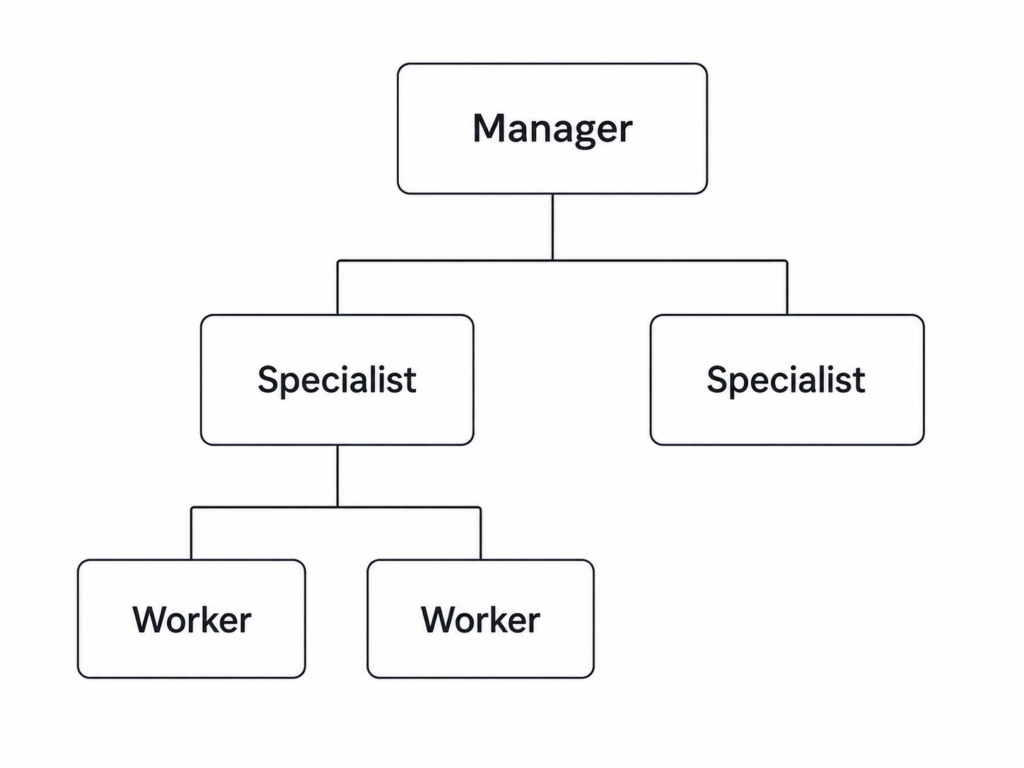
Figure 1. A hierarchical structure for the multi-agent system. (Image by author)
The topology is now a tree.
A common way to implement this is recursively with agents-as-tools. A manager calls a specialist, and that specialist can in turn call its own workers.
Some tasks benefit from an iterative process.
For example, one agent can produce an answer while another evaluates it. If the evaluator finds problems, the generator tries again using the feedback.
This is often called an evaluator-optimizer pattern.
The delegation can be implemented as the agent-as-a-tool, since the generator and evaluator provide outputs back to a coordinating workflow. The topology is centralized, and the execution happens in a loop.
3.5 Swarm / Peer-to-Peer
At the other end of the spectrum, we can remove the central coordinator. Instead, the currently active agent can decide which specialist should take over next.
This gives us a peer-to-peer, or swarm-style architecture.
Its delegation mechanism is mainly handoff, its topology is peer-to-peer, and its execution is dynamic.
Although we sampled several common multi-agent system patterns above, their underlying agent interaction mechanisms are really built from the same foundation:
Agent-as-a-tool, where the caller agent retains control while delegating tasks to specialist agents.
Handoff, where the caller agent moves control to another agent.
By arranging these relationships with different topologies and execution strategies, we can build much larger multi-agent systems.
What they are, special characters you should know about and resources to help you build them
September 18, 202011 min read
Using Python and your test set to derive distribution-agnostic intervals
February 15, 20237 min read
But I can't vectorise this, can I? .... yes, you probably can!
January 13, 202514 min read
Learn how to use GPT-5 as a powerful AI Agent on your data.
November 11, 20257 min read
The barriers to building have collapsed. That shifts the bottleneck to ownership, validation, taste, and deciding what should actually exist
Building knowledge graphs to power autonomous agents
September 14, 202518 min read
PyTorch and TensorFlow tensor broadcasting: how silent shape errors cause difficult-to-debug machine learning bugs
September 16, 20266 min read
Implementing a solitaire simulator and extracting the winning probabilities out of it, with few lines of (Python) codes
January 24, 20215 min read
How linked lists and queues work under the hood
October 21, 20246 min read
原文为英文,正文由自动抓取并保留原文。
原文发布于 Towards Data Science(How to Build Multi-Agent Systems with the OpenAI Agents SDK),标题、摘要与正文由机器翻译,术语按行业惯例统一,未经人工逐句校订。

