开源 GPU 任务管理器揭示显存占用真相
微软副总裁 Scott Hanselman 公开了一个名为 gputaskman 的新开源 GitHub 项目。这个名字精准概括了该工具的核心作用——一个以 GPU 为核心的任务管理器,但它的功能范围可能比你预想的更广。这款面向 Windows、Linux 和 macOS 的新工具可以显示按进程划分的 GPU 使用率、显存(VRAM)占用、活跃运行时以及更多统计数据。它还能单独列出 AI/LLM 任务相关的信息。
我的 GPU 里同时跑着很多东西。我正在做一个 GPU Taskman,用来搞清楚我的 GPU 显存都去哪儿了。欢迎提交 PR https://t.co/6FwKqnFWDW 2026年11月3日
在社交媒体上,Hanselman 用简洁的表述清楚说明了 gputaskman 想要解决的技术痛点。“我的 GPU 里同时跑着很多东西,”这位微软开发者生态的知名公众人物写道,“我正在做一个 GPU Taskman,用来搞清楚我的 GPU 显存都去哪儿了。”
这位微软副总裁展示了几张 GPU Taskman 实际使用的示例截图。这些截图清楚显示了该工具弹出的类终端界面中所呈现的数据类型。Hanselman 的推文显示,在他的 RTX 4080S 系统上,最吃显存的应用是桌面窗口管理器。该进程在列表中被选中,窗口底部则显示了这项任务的更多细节。此外,我们还能看到正在占用显存的 AI/LLM 应用,以及几个 Windows 常见进程。
在一张嵌入 GitHub 的图片中,我们可以看到当列表中的 llama-server.exe 应用被选中时会展开哪些细节。窗口底部的明细显示,正在使用的是 Qwen3-0.6B,并给出了其权重、KV 缓存、参数数量等信息的明细。信息非常丰富。
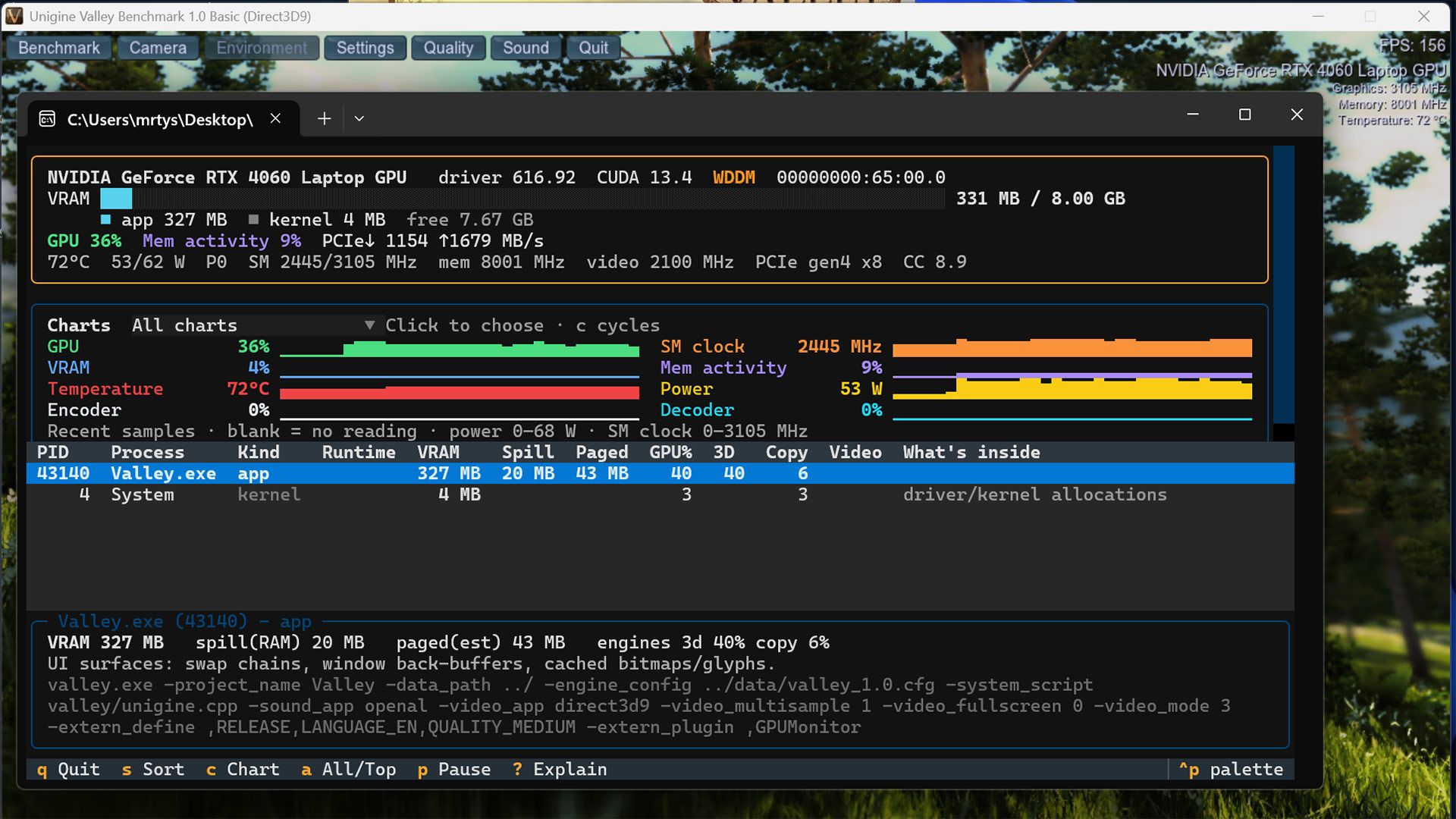
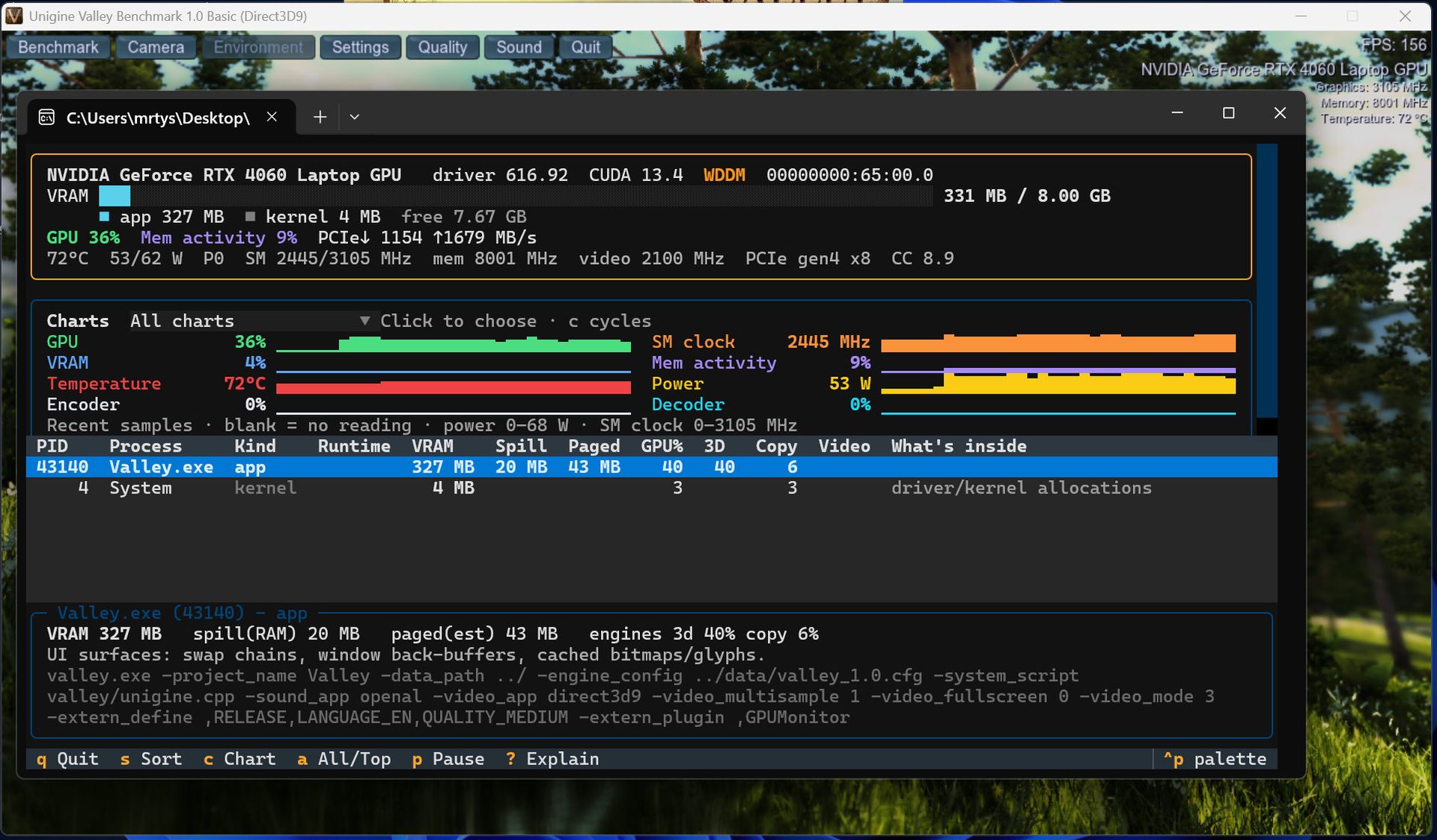
由于这位微软开发者提供了 gputaskman 最新 v0.3.0 版本的便携式 Windows 下载包,我忍不住试了一把。启动后,我发现笔记本里没有任何任务在使用独立 GPU……于是我启动了老牌的 Unigine Valley GPU 基准测试,把 RTX 4060 从沉睡中唤醒。我注意到,在我截的图里,显示 GPU 负载、VRAM 占用、温度等信息的实时图表,比 Hanselman 示例中的更醒目。也许他截的是该工具较早版本的图。
关于 gputaskman、它的内部工作原理,甚至其源代码,在链接的 GitHub 仓库里都有更多信息。Hanselman 以宽松的 MIT 许可证分享他的这款“实验性软件”工具。最后,在社交媒体的评论中,他暗示更丰富的 GPU 监控能力可能会作为 Windows 的标准功能推出。
译文由英文原文机器翻译,术语按行业惯例统一,可在文末展开原文核对。
查看英文原文(Open-source GPU task manager reveals exactly what's eating your VRAM)
Microsoft VP Scott Hanselman has revealed a new open-source GitHub project called gputaskman. The name neatly encapsulates the headline role of this tool, a GPU-focused task manager, but its scope might be broader than you expect. This new tool for Windows, Linux, and macOS can show per-process GPU usage, VRAM consumption, active runtimes, and many more stats. It also breaks out AI/LLM task-specific information.
There's a lot going on in my GPU. I'm making a GPU Taskman to get insights to where my GPU memory is going. PRs welcome https://t.co/6FwKqnFWDWNovember 3, 2026
On social media, Hanselman snappily makes clear the technical itch that gputaskman was designed to scratch. “There's a lot going on in my GPU,” wrote the prominent public face of Microsoft's developer ecosystem. “I'm making a GPU Taskman to get insights to where my GPU memory is going.”
There are several example screenshots of GPU Taskman in use by the Microsoft VP. They clearly show the kinds of data that are presented in the terminal-like display that pops up in the tool. Hanselman’s tweet shows that the most VRAM-hungry app on his RTX 4080S system is the desktop windows manager. That is selected in the list, and more details are shown for this task at the bottom of the window. Also, we see AI/LLM apps consuming VRAM, and a few Windows staples.
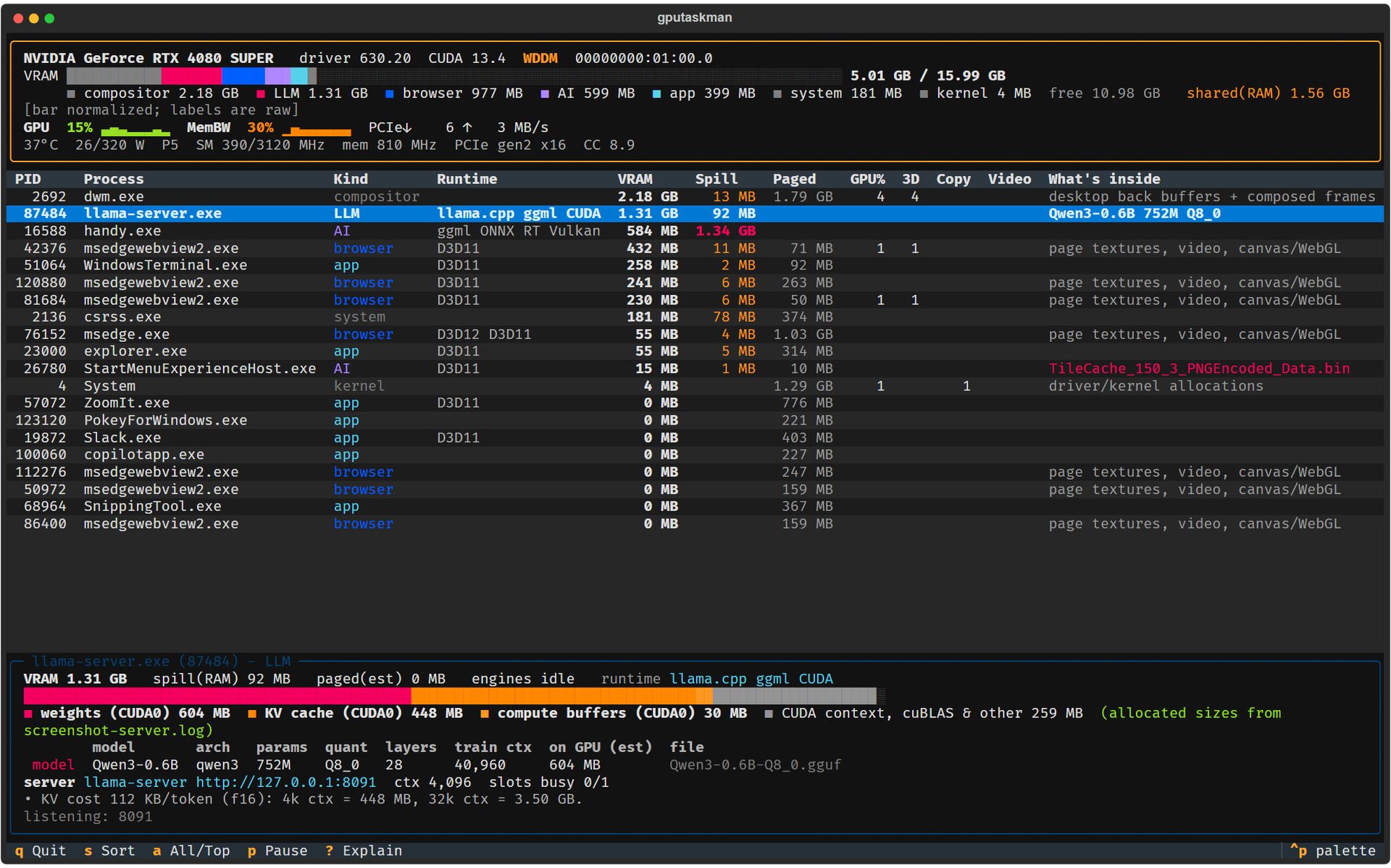
In a GitHub-embedded image, we see what details are broken out when the llama-server.exe app is selected in the list. The bottom of the window breakdown reveals that Qwen3-0.6B is being used, and there’s a breakdown of its weights, the KV cache, the number of parameters, and more. Very informative.
As the Microsoft developer has made portable Windows downloads of the latest v0.3.0 release of gputaskman, I couldn’t resist giving it a spin. Upon launch, I found that no tasks were using the discrete GPU in my laptop… so I fired up ye olde Unigine Valley GPU benchmark to stir the RTX 4060 from its slumber. I note the live-streaming charts showing GPU load, VRAM use, temperature, and so on are more prominent in my screenshot than in Hanselman’s examples. Perhaps he screen-shotted a previous version of the tool.
There’s a lot more information about gputaskman, its inner workings, and even its source code, on the linked GitHub repository. Hanselman is sharing his “experimental software” tool under the permissive MIT license. Finally, in social media comments, he hints that expanded GPU monitoring capabilities could be coming to Windows as standard.
正文保留英文原文,标题与摘要由机器翻译。
原文发布于 Tom's Hardware(Open-source GPU task manager reveals exactly what's eating your VRAM),标题、摘要与正文由机器翻译,术语按行业惯例统一,未经人工逐句校订。