Okta 与 Amazon Bedrock AgentCore 治理智能体访问(下)
在第 1 部分中,你在 Amazon Bedrock AgentCore 上构建了一个任务智能体——这是一个可用任意框架或模型大规模构建、连接和优化智能体的平台。该智能体运行在 Amazon Bedrock AgentCore runtime(Amazon Bedrock AgentCore 的一项能力)上,并通过 Okta Cross App Access(XAA)代表已登录用户执行操作。Okta 决定哪个智能体可以代表哪个用户行事,而 Amazon Bedrock AgentCore Identity(Amazon Bedrock AgentCore 的一项能力)则在智能体内部兑换 Okta 的授权。这证明了治理机制可行,而它运行在一个有意设计得很小的拓扑上:一个智能体、两个 Model Context Protocol(MCP)服务器,以及写入每个服务器的授权检查。
这套机制可以扩展,但拓扑不行。对于一个智能体和两个工具来说没问题的三件事,在拥有数百个智能体和数千个工具的企业里就会变成实际的工作量:
在本文中,你要在第 1 部分的解决方案上完成这一改动。Amazon Bedrock AgentCore Gateway(Amazon Bedrock AgentCore 的一项能力)成为唯一的统一入口,并为每个目标兑换 Okta 的授权。Amazon Bedrock AgentCore 中的 Policy 会评估 Cedar 策略,这些策略将每个工具与智能体以及 Okta 委托的范围绑定。Amazon Elastic Kubernetes Service(Amazon EKS)上的第二个智能体以自己的 Okta 身份加入,用以表明这个统一入口并不关心智能体运行在哪里。而 Amazon Bedrock AgentCore Observability(Amazon Bedrock AgentCore 的一项能力)与 Amazon CloudWatch 结合,让你在一个地方就能读取包括 Okta 在内的每一项决策。我们还会针对无法接受 Okta 授权的应用,将 XAA 与按用户进行 OAuth 授权同意(per-user OAuth consent)做比较。
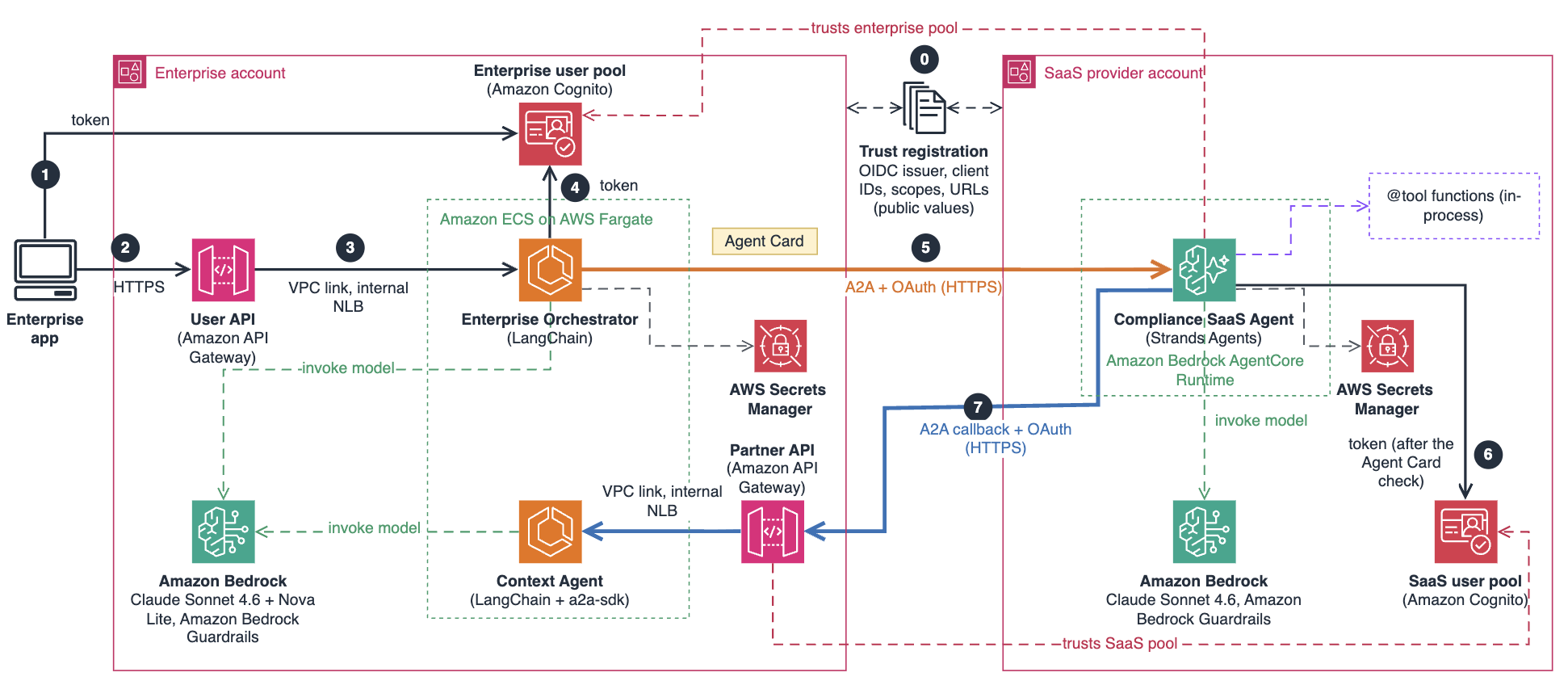
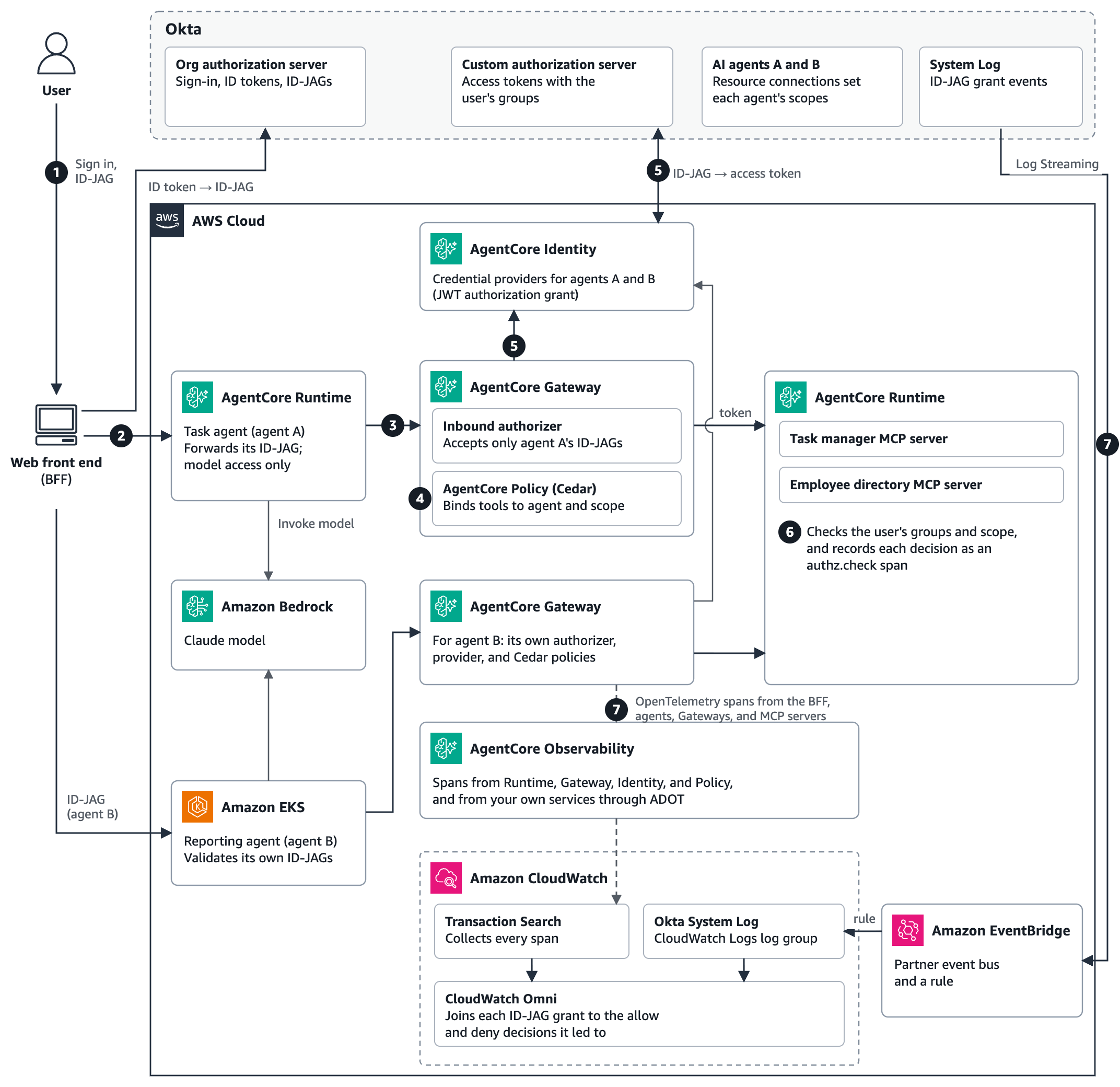
第 1 部分中的 Okta 配置、AgentCore Identity 凭证提供程序以及 MCP 服务器均保持不变。图 1 展示了加入这些新增组件后的架构。
图 1:Part 1 的解决方案,包含 AgentCore Gateway、Policy 和 Observability,以及运行在 Amazon EKS 上的第二个智能体和审计路径,图中的编号与后续步骤一一对应
负责报告的智能体 agent B 运行在 Amazon EKS 上,并通过它自己的 Gateway 走相同的路径。
除 Part 1 的解决方案之外,你还需要以下内容:
这些新增内容大约需要 90 分钟。EKS 控制平面的费用为每小时 $0.10,另加节点费用和 Amazon EKS Auto Mode 管理费,AgentCore 各项功能按实际使用量计费。参见 Amazon EKS 定价和 Amazon Bedrock AgentCore 定价。
与 Part 1 一样,本方案的基础是 GitHub 上的 AWS 示例 08-okta-xaa-delegation-chain,你可以在其之上构建 Part 2 的新增内容。除该示例之外,本文中的代码片段和配置只是在概念上展示这一模式,它们并不是完整、可部署的解决方案。这些代码属于示例代码,仅供非生产环境使用,因此在部署之前,请与你的安全和法务团队协作,以满足所在组织的安全、监管和合规要求。
Gateway 的入站授权器的工作方式与 Part 1 中的运行时授权器相同。它的颁发者是 Okta 的组织授权服务器,受众是自定义授权服务器,而 allowedClients 将其限定为单个智能体:
authorizer = {"customJWTAuthorizer": { "discoveryUrl": f"{OKTA_ORG}/.well-known/openid-configuration", # ID-JAG 的颁发者 "allowedAudience": [f"{OKTA_ORG}/oauth2/{CUSTOM_AS_ID}"], # 资源的授权服务器 "allowedClients": [AGENT_CLIENT_ID], # 仅限该智能体的 ID-JAG "allowedScopes": ["xaa:read", "xaa:write"], }} 图 2 展示了最终得到的入站授权器。
图 2:Gateway 只接受 Okta 为该资源的授权服务器签发给该智能体的 ID-JAG
每个 MCP 服务器都会成为一个 Gateway 目标,其出站授权通过第 1 部分中的凭证提供程序使用 TOKEN_EXCHANGE,因此由 Gateway 执行第二次交换:
"credentialProviderConfigurations": [{ "credentialProviderType": "OAUTH", "credentialProvider": {"oauthCredentialProvider": { "providerArn": provider_arn, # 第 1 部分中的 JWT_AUTHORIZATION_GRANT 提供程序 "scopes": ["xaa:read", "xaa:write"], # 必须与 ID-JAG 的 scopes 相同 "grantType": "TOKEN_EXCHANGE", }}, }] 图 3 展示了按此方式配置的一个目标。
图 3:任务管理器目标通过第 1 部分的凭证提供程序兑换 ID-JAG
这里有三个细节值得注意。第一,与第 1 部分一样,目标的 scopes 必须与 ID-JAG 的 scopes 相同。第二,为每个目标提供静态工具 schema(将 listingMode 设为 DEFAULT,并内联 mcpToolSchema),这样你编写 Cedar 策略时所引用的工具名就是固定的。在我们的测试中,指定了工具名的策略也无法附加到动态列出的目标上。第三,Gateway 按目标对 tools/list 分页,因此你的客户端必须跟随分页游标,否则后续目标的工具就会消失。AgentCore Identity 会保留 Gateway 交换得到的 Token,因此一个一次性 ID-JAG 可服务一个会话中的每一次工具调用。在我们的测试中,它还在其 5 分钟有效期内开启了第二个会话。
由于一个凭证提供程序是以单个 Okta 智能体的身份进行认证的,因此要为每个智能体分配各自的 Gateway 和提供程序。示例 08-okta-xaa-delegation-chain 走的是另一条路线,由 Gateway 拦截器自行执行两次交换。
在 AgentCore engine 中把策略以 ENFORCE 模式附加到 Gateway,并且只编写 permit-only(仅允许)策略。Cedar 会把 JWT claims 以标签的形式暴露出来。读取不存在的标签的策略会报错并被跳过。被跳过的 permit 不授予任何权限,因此默认拒绝仍然成立;但被跳过的 forbid 也拦截不了任何东西。要为每个标签加上 hasTag 保护:
permit( principal is AgentCore::OAuthUser, action in [AgentCore::Action::"taskmanager___create_task", AgentCore::Action::"taskmanager___update_task_status"], resource == AgentCore::Gateway::"<gateway-arn>" ) when { principal.hasTag("client_id") && principal.getTag("client_id") == "<agent-client-id>" && principal.hasTag("scope") && (principal.getTag("scope") == "xaa:write" || principal.getTag("scope") like "xaa:write *" || principal.getTag("scope") like "* xaa:write" || principal.getTag("scope") like "* xaa:write *") }; scope 标签保存的是 ID-JAG 中以空格分隔的 scope claim,因此这四个条件只有在 xaa:write 作为完整条目出现时才会匹配。像 xaa:write-admin 这样的 scope 不会匹配。以同样方式编写的匹配策略则用 xaa:read 放行读取类工具。在附加 engine 之前,请确认每条策略都处于 ACTIVE 状态:如果 engine 的策略创建失败,Gateway 会拒绝每一次调用。Cedar 将工具绑定到智能体及其被委派的 scope,而 MCP server 仍会依据 groups claim 决定每个用户的权限,这一点与第 1 部分相同。
现在,Agent A 不再自己去调用 AgentCore Identity,而是把入站的 ID-JAG 转发给 Gateway:
id_jag = context.request_headers["Authorization"].removeprefix("Bearer ") # 白名单头部 tools = make_client(GATEWAY_URL, id_jag) # Gateway 为每个目标兑换 ID-JAG 从智能体的执行角色中移除第 1 部分的 AgentCore Identity 语句。这是对该角色做的唯一改动,它现在不再持有 Token 交换或密钥权限,因为兑换 Token 的权限由 Gateway 的角色持有。在运行时的授权器(authorizer)上保留 allowedClients。
我们的第二个智能体是一个报表智能体,它在 Amazon EKS 上运行同样的代码,并拥有自己的 Okta 注册。它的资源连接仅允许 xaa:read,并且它有自己的 Gateway 和凭证提供程序。EKS Pod Identity 为该 Pod 分配一个 IAM 角色,该角色可以调用模型并写入自己的日志和追踪数据,除此之外别无其他权限。AWS Distro for OpenTelemetry(ADOT)SDK 负责导出其追踪数据。agents-on-eks 示例展示了 Pod Identity 的配置方式。
在 AgentCore 运行时之外,Pod 前面没有授权器,因此智能体在调用模型前会先校验 ID-JAG。它会检查签名、签发者(issuer)、受众(audience)、Token 类型 oauth-id-jag+jwt、有效期,以及 client_id 是否为它自己。如果你在 MCP 服务器中保留了第 1 部分的智能体检查,请把智能体 B 的 client ID 加入 REGISTERED_AGENTS。有两个设置让我们栽了跟头。EKS Auto Mode 的通用型节点池只运行 amd64,所以要构建多架构镜像。另外,AgentCore Python SDK(Amazon Bedrock AgentCore 的一项能力)会绑定到 localhost,除非你设置 DOCKER_CONTAINER=true。
本节中的 span 就是 AgentCore Observability,即图 1 中位于智能体与 CloudWatch 之间的组件。在开启 Transaction Search 和 trace 投递后,Runtime、Gateway、Identity 和 Policy 无需改动代码,就会为每一跳发出 OpenTelemetry span。你自己的服务则通过 AWS Distro for OpenTelemetry(ADOT)添加各自的 span。CloudWatch Transaction Search 负责收集这些 span,AgentCore 控制台将它们作为智能体 trace 读取,而 Amazon CloudWatch Omni 将同一批 span 作为 traces.default 读取,这正是让一次查询就能把它们与 Okta 的事件并列呈现的原因。
因此,一次工具调用会产生这样一条 span 链,每个 span 都标明做出决策的控制组件:
Okta 的 System Log 是 AWS 无法发出的那一份记录,因此需要由你引入。图 4 展示了这两条路径在 Omni 中汇合。
图 4:审计路径,span 与 Okta 的 System Log 在此抵达 CloudWatch,并由一次 Omni 查询将它们关联起来
设置步骤如下:
原文较长,译文为节选;译文由英文原文机器翻译,术语按行业惯例统一,可在文末展开原文核对。
查看英文原文(Govern AI agent access with Okta Cross App Access and Amazon Bedrock AgentCore – Part 2)
In Part 1, you built a task agent on Amazon Bedrock AgentCore, a platform to build, connect, and optimize agents at scale, with any framework or model. The agent runs on Amazon Bedrock AgentCore runtime, a capability of Amazon Bedrock AgentCore, and acts for signed-in users through Okta Cross App Access (XAA). Okta decided which agent might act for which user, and Amazon Bedrock AgentCore Identity, a capability of Amazon Bedrock AgentCore, redeemed Okta’s grant inside the agent. That proves the governance mechanism, and it runs on a deliberately small topology: one agent, two Model Context Protocol (MCP) servers, and the authorization check written into each server.
The mechanism scales. The topology doesn’t. Three things that are fine for one agent and two tools become the work in an enterprise with hundreds of agents and thousands of tools:
| What Part 1 does | Why it stops scaling | What Part 2 does instead |
| The agent holds each MCP server’s runtime ARN and calls it directly | N agents against M servers is a wiring matrix, and every new tool touches every agent that needs it | Agents reach one Gateway endpoint, and the Gateway holds the target registry |
| The agent’s role holds the token-exchange permission and reads the provider’s secret | Every agent that acts for users gets a credential path to every resource it might reach | The Gateway redeems the grant, and the agent’s role holds no token-exchange or secret permissions |
Each MCP server carries the same groups check in its own code |
The same rule, copied into thousands of servers, drifts and can’t be audited or changed in one place | One default-deny Cedar policy set, evaluated at the Gateway before tools run |
In this post, you make that change on the Part 1 solution. Amazon Bedrock AgentCore Gateway, a capability of Amazon Bedrock AgentCore, becomes the single front door and redeems Okta’s grant for each target. Policy in Amazon Bedrock AgentCore evaluates Cedar policies that bind each tool to the agent and the scope Okta delegated. A second agent on Amazon Elastic Kubernetes Service (Amazon EKS) joins under its own Okta identity, to show that the front door doesn’t care where an agent runs. And Amazon Bedrock AgentCore Observability, a capability of Amazon Bedrock AgentCore, with Amazon CloudWatch gives you one place to read every decision, including Okta’s. We also compare XAA with per-user OAuth consent for applications that can’t accept Okta’s grant.
What changes from Part 1
The Okta configuration, the AgentCore Identity credential provider, and the MCP servers from Part 1 stay as they are. Figure 1 shows the architecture with the additions.
Figure 1: The Part 1 solution with AgentCore Gateway, Policy, and Observability, a second agent on Amazon EKS, and the audit path, with numbers matching the steps that follow
- The user signs in, and the backend for frontend (BFF) exchanges the ID token for an Identity Assertion JWT Authorization Grant (ID-JAG) issued to the task agent, agent A, as in Part 1.
- The BFF invokes agent A on AgentCore runtime with the ID-JAG.
- Agent A forwards the ID-JAG to its Gateway as the bearer token of its MCP session. The Gateway’s inbound authorizer accepts only agent A’s ID-JAGs.
- Policy in AgentCore evaluates Cedar policies for each tool listing and each tool call, before the Gateway invokes a target.
- For calls that Cedar permits, the Gateway has AgentCore Identity redeem the ID-JAG for each target at Okta’s custom authorization server through the Part 1 credential provider. A call that Cedar denies doesn’t redeem the ID-JAG.
- The MCP server checks the user’s groups and scope, as in Part 1, and records each decision as an
authz.checkspan. - Every hop emits OpenTelemetry spans to AgentCore Observability, which CloudWatch Transaction Search collects, and Okta streams its System Log to CloudWatch through Amazon EventBridge.
The reporting agent, agent B, runs on Amazon EKS and follows the same path through its own Gateway.
Prerequisites
In addition to the Part 1 solution, you need the following:
| Prerequisite | Needed for |
| eksctl, kubectl, and Docker | The second agent on Amazon EKS |
| Okta Log Streaming | Okta’s System Log in CloudWatch |
| AWS Identity and Access Management (IAM) permissions | AgentCore Gateways and policy engines, Amazon EKS clusters, CloudWatch log groups, and Amazon EventBridge rules |
The additions take about 90 minutes. The EKS control plane costs $0.10 per hour, plus nodes and the Amazon EKS Auto Mode management fee, and the AgentCore features charge for what you use. See Amazon EKS pricing and Amazon Bedrock AgentCore pricing.
As in Part 1, the base for this solution is the AWS sample 08-okta-xaa-delegation-chain on GitHub, and you can build the Part 2 additions on top of it. Beyond that sample, the snippets and configurations in this post show the pattern conceptually. They aren’t a complete, deployable solution. The code is sample code for non-production use, so work with your security and legal teams to meet your organization’s security, regulatory, and compliance requirements before you deploy it.
Create a Gateway that accepts the ID-JAG
The Gateway’s inbound authorizer works like the runtime authorizer from Part 1. Its issuer is Okta’s org authorization server, its audience is the custom authorization server, and allowedClients pins it to one agent:
authorizer = {"customJWTAuthorizer": {
    "discoveryUrl": f"{OKTA_ORG}/.well-known/openid-configuration",  # the ID-JAG's issuer
    "allowedAudience": [f"{OKTA_ORG}/oauth2/{CUSTOM_AS_ID}"],         # the resource's authorization server
    "allowedClients": [AGENT_CLIENT_ID],                               # only this agent's ID-JAGs
    "allowedScopes": ["xaa:read", "xaa:write"],
}}
Figure 2 shows the resulting inbound authorizer.
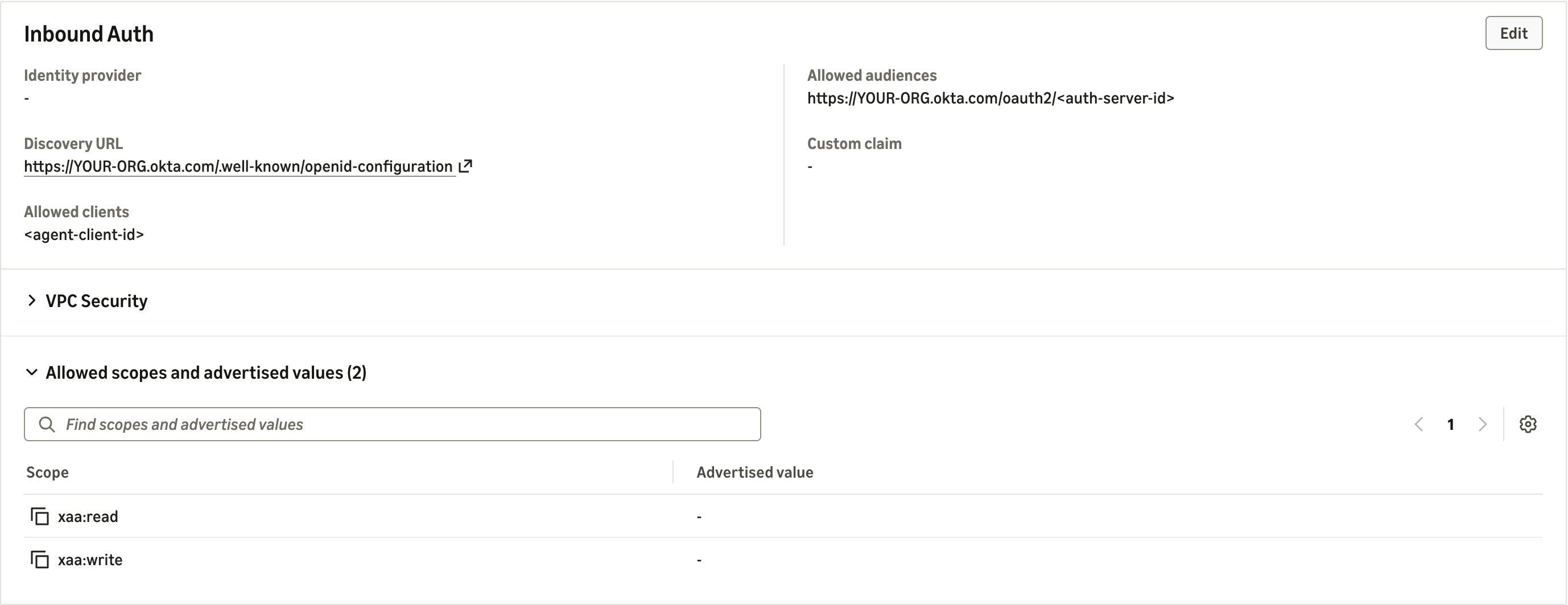
Figure 2: The Gateway accepts only ID-JAGs that Okta issued to the agent for the resource’s authorization server
Each MCP server becomes a Gateway target whose outbound authorization uses TOKEN_EXCHANGE through the Part 1 credential provider, so the Gateway performs the second exchange:
"credentialProviderConfigurations": [{
    "credentialProviderType": "OAUTH",
    "credentialProvider": {"oauthCredentialProvider": {
        "providerArn": provider_arn,          # the JWT_AUTHORIZATION_GRANT provider from Part 1
        "scopes": ["xaa:read", "xaa:write"],  # must equal the ID-JAG's scopes
        "grantType": "TOKEN_EXCHANGE",
    }},
}]
Figure 3 shows a target configured this way.
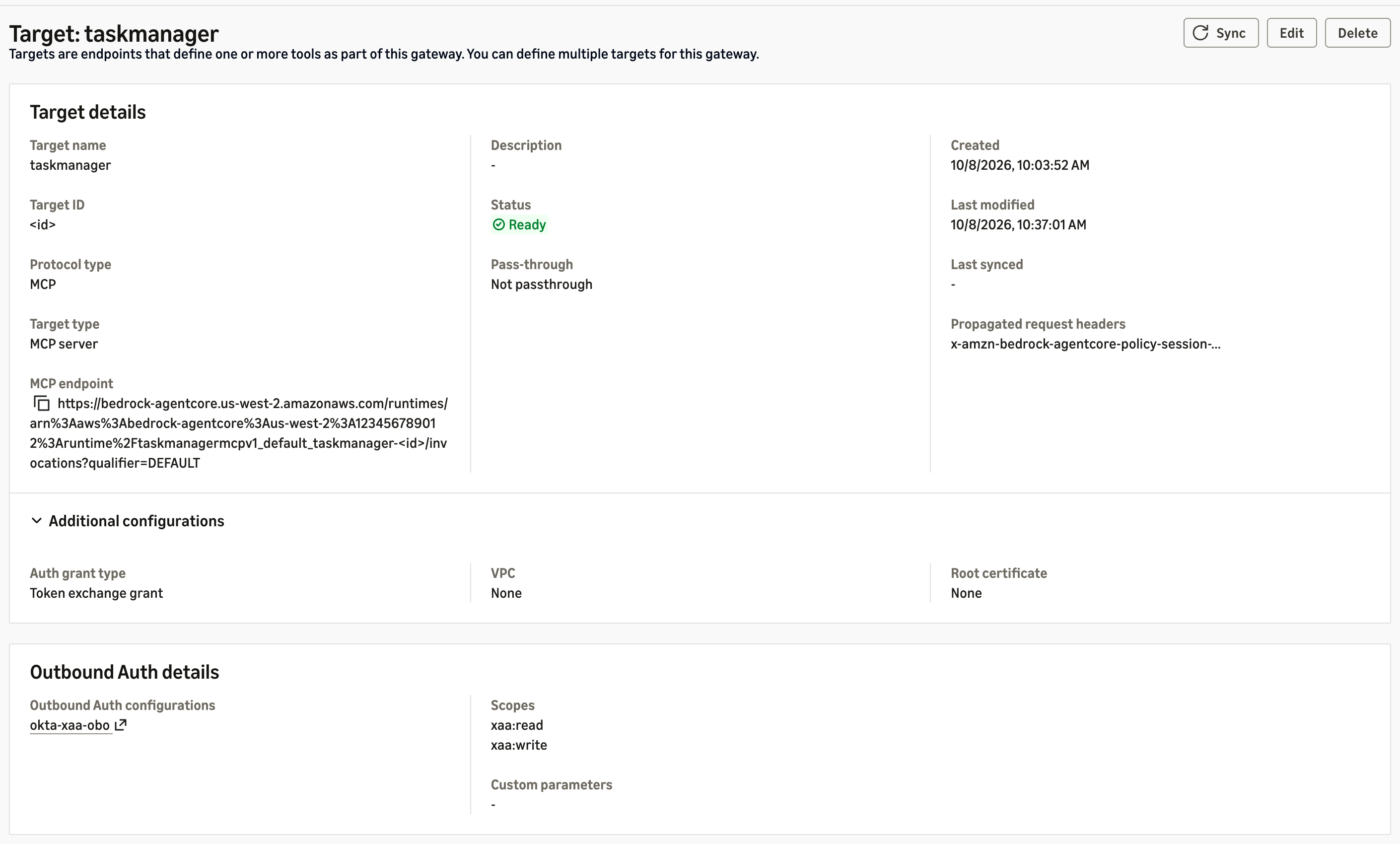
Figure 3: The task manager target redeems the ID-JAG through the Part 1 credential provider
Three details matter here. First, as in Part 1, the target’s scopes must equal the ID-JAG’s. Second, give each target a static tool schema (listingMode set to DEFAULT with an inline mcpToolSchema), so the tool names your Cedar policies reference are fixed when you write them. In our tests, policies that name tools also couldn’t attach to dynamically listed targets. Third, the Gateway pages tools/list by target, so your client must follow the pagination cursor, or tools from later targets disappear. AgentCore Identity keeps the token from the Gateway’s exchange, so one single-use ID-JAG serves every tool call in a session. In our tests, it also opened a second session within its 5-minute life.
Because a credential provider authenticates as one Okta agent, give each agent its own Gateway and provider. Sample 08-okta-xaa-delegation-chain takes a different route, in which a Gateway interceptor performs both exchanges itself.
Bind tools to agents with Cedar
Attach a Policy in AgentCore engine to the Gateway in ENFORCE mode, and write permit-only policies. Cedar exposes JWT claims as tags. A policy that reads a missing tag errors and is skipped. A skipped permit grants nothing, so default deny holds, but a skipped forbid blocks nothing. Guard each tag with hasTag:
permit(
  principal is AgentCore::OAuthUser,
  action in [AgentCore::Action::"taskmanager___create_task",
             AgentCore::Action::"taskmanager___update_task_status"],
  resource == AgentCore::Gateway::"<gateway-arn>"
) when {
  principal.hasTag("client_id") && principal.getTag("client_id") == "<agent-client-id>" &&
  principal.hasTag("scope") &&
  (principal.getTag("scope") == "xaa:write" ||
   principal.getTag("scope") like "xaa:write *" ||
   principal.getTag("scope") like "* xaa:write" ||
   principal.getTag("scope") like "* xaa:write *")
};
The scope tag holds the ID-JAG’s space-separated scope claim, so the four conditions match xaa:write only as a whole entry. A scope such as xaa:write-admin doesn’t match. A matching policy, written the same way, permits the read tools with xaa:read. Check that every policy is ACTIVE before you attach the engine: an engine whose policies failed to create leaves the Gateway denying every call. Cedar binds tools to the agent and its delegated scope, and the MCP server still decides each user’s authority from the groups claim, as in Part 1.
Point the agent at the Gateway
Agent A now forwards its inbound ID-JAG to the Gateway instead of calling AgentCore Identity itself:
id_jag = context.request_headers["Authorization"].removeprefix("Bearer ")  # allowlisted header
tools = make_client(GATEWAY_URL, id_jag)  # the Gateway redeems the ID-JAG for each target
Remove the Part 1 AgentCore Identity statements from the agent’s execution role. That’s the only change to the role, which now holds no token-exchange or secret permissions, because the Gateway’s role holds the permission to exchange tokens. Keep allowedClients on the runtime’s authorizer.
Run a second agent on Amazon EKS
Our second agent, a reporting agent, runs the same code on Amazon EKS with its own Okta registration. Its resource connection allows only xaa:read, and it has its own Gateway and credential provider. EKS Pod Identity gives the pod an IAM role that can invoke models and write its own logs and traces, and nothing else. The AWS Distro for OpenTelemetry (ADOT) SDK exports its traces. The agents-on-eks sample shows the Pod Identity setup.
Outside AgentCore runtime, no authorizer sits in front of the pod, so the agent validates the ID-JAG before a model call. It checks the signature, issuer, audience, token type oauth-id-jag+jwt, expiry, and that client_id is its own. If you kept the Part 1 agent check in the MCP servers, add agent B’s client ID to REGISTERED_AGENTS. Two settings tripped us up. The EKS Auto Mode general-purpose node pool runs only amd64, so build multi-architecture images. And the AgentCore Python SDK, a capability of Amazon Bedrock AgentCore, binds to localhost unless you set DOCKER_CONTAINER=true.
Trace every decision with AgentCore Observability
The spans in this section are AgentCore Observability, the component in Figure 1 that sits between the agents and CloudWatch. Runtime, Gateway, Identity, and Policy emit OpenTelemetry spans for each hop without code changes, after you turn on Transaction Search and trace delivery. Your own services add theirs with the AWS Distro for OpenTelemetry (ADOT). CloudWatch Transaction Search collects them, the AgentCore console reads them as agent traces, and Amazon CloudWatch Omni reads the same spans as traces.default, which is what lets one query put them beside Okta’s events.
One tool call therefore produces this chain of spans, each naming the control that made a decision:
| Span | Emitted by | What it records |
AgentCore.Gateway.InboundAuth |
Gateway | Whether the inbound ID-JAG was issued to this agent |
AgentCore.Policy.AuthorizeAction |
Policy | The Cedar decision for this tool |
AgentCore.Identity.GetWorkloadAccessToken |
Identity | Binding the agent’s workload identity to the user |
AgentCore.Identity.GetResourceOauth2Token |
Identity | Redeeming the ID-JAG at Okta for a scoped access token |
AgentCore.Gateway.InvokeTool |
Gateway | The tool call and its outcome |
authz.check |
The MCP server (ADOT) | The user’s groups, the agent, the decision, and the reason |
Okta’s System Log is the one record AWS can’t emit, so you bring it in. Figure 4 shows both paths meeting in Omni.
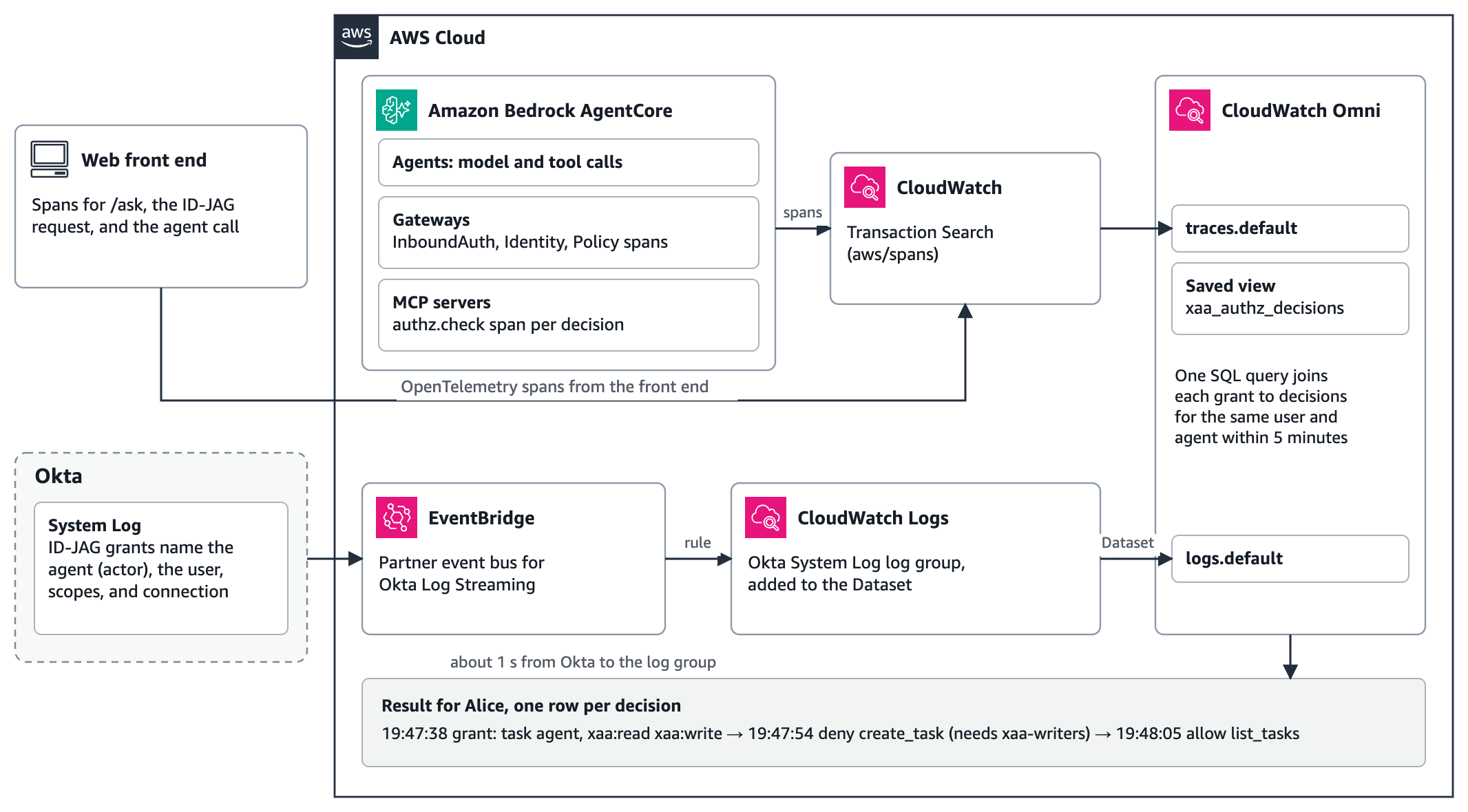
Figure 4: The audit path, where spans and Okta’s System Log reach CloudWatch and one Omni query joins them
To set it up:
- Turn on CloudWatch Transaction Search, turn on trace delivery for each Gateway (see this sample script), and add ADOT to the BFF and the MCP servers. The task manager writes each decision, the user, and the agent onto an
authz.checkspan. - In Okta, add a Log Stream for Amazon EventBridge. Okta delivers each event to a partner event bus in your account, and a rule writes it to a CloudWatch Logs log group. In our tests, events arrived about 1 second after Okta published them. Each ID-JAG grant event names the agent as the actor, the user as a target, and the granted scopes and resource connection.
- Set up an Omni space in the account and AWS Region, add the Okta log group to the CloudWatch Dataset integration, and save a view,
view.xaa_authz_decisions, over theauthz.checkspans.
One query then joins each ID-JAG grant to the decisions it led to:
SELECT o.okta_time, o.agent, o.user_email, o.granted, a.decision_time, a.decision, a.reason
FROM (SELECT `@timestamp` AS okta_time, detail['actor']['id'] AS agent_id,
             detail['actor']['displayName'] AS agent,
             array_element(regexp_match(`@message`, '"type"\s*:\s*"User"\s*,\s*"alternateId"\s*:\s*"([^"]+)"'), 1) AS user_email,
             detail['debugContext']['debugData']['grantedScopes'] AS granted
      FROM "logs.default"
      WHERE `@timestamp` BETWEEN NOW() - INTERVAL '1' HOUR AND NOW()
        AND detail['eventType'] = 'app.oauth2.token.grant.id_jag') o
JOIN (SELECT `@timestamp` AS decision_time, user_id, agent_client_id, decision, reason
      FROM "view.xaa_authz_decisions"
      WHERE `@timestamp` BETWEEN NOW() - INTERVAL '1' HOUR AND NOW()) a
  ON a.user_id = o.user_email AND a.agent_client_id = o.agent_id
 AND a.decision_time BETWEEN o.okta_time AND o.okta_time + INTERVAL '5' MINUTE
For Alice, the result shows Okta granting the task agent xaa:read xaa:write for her, then the MCP server denying her create_task 16.7 seconds later and allowing list_tasks after that, as Figure 5 shows.
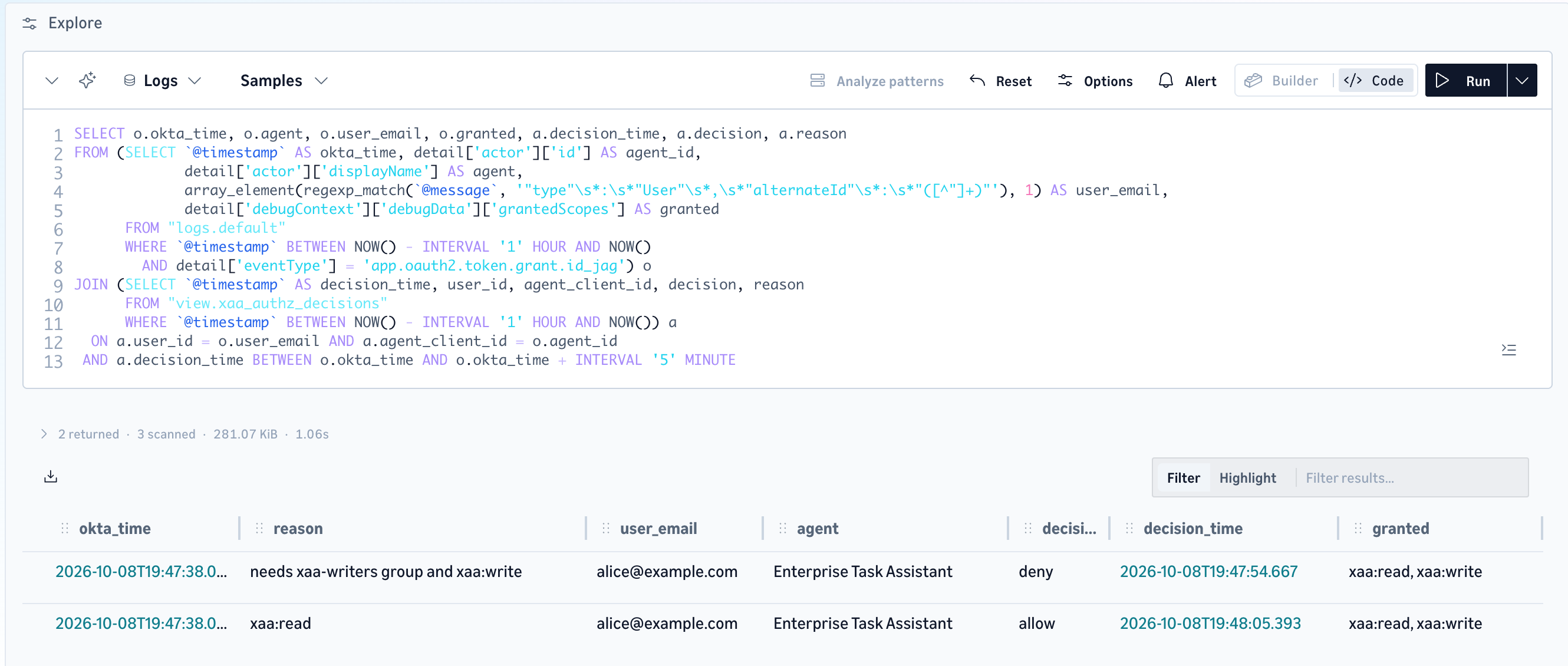
Figure 5: The Omni query joins Alice’s ID-JAG grant in Okta’s System Log to the two decisions it led to
Each request is also one trace, from the BFF through the agent, the Gateway’s identity and policy checks, and the MCP server’s decision, as Figure 6 shows. Omni marks the trace as a fault because the agent’s create_task call returned the denial.
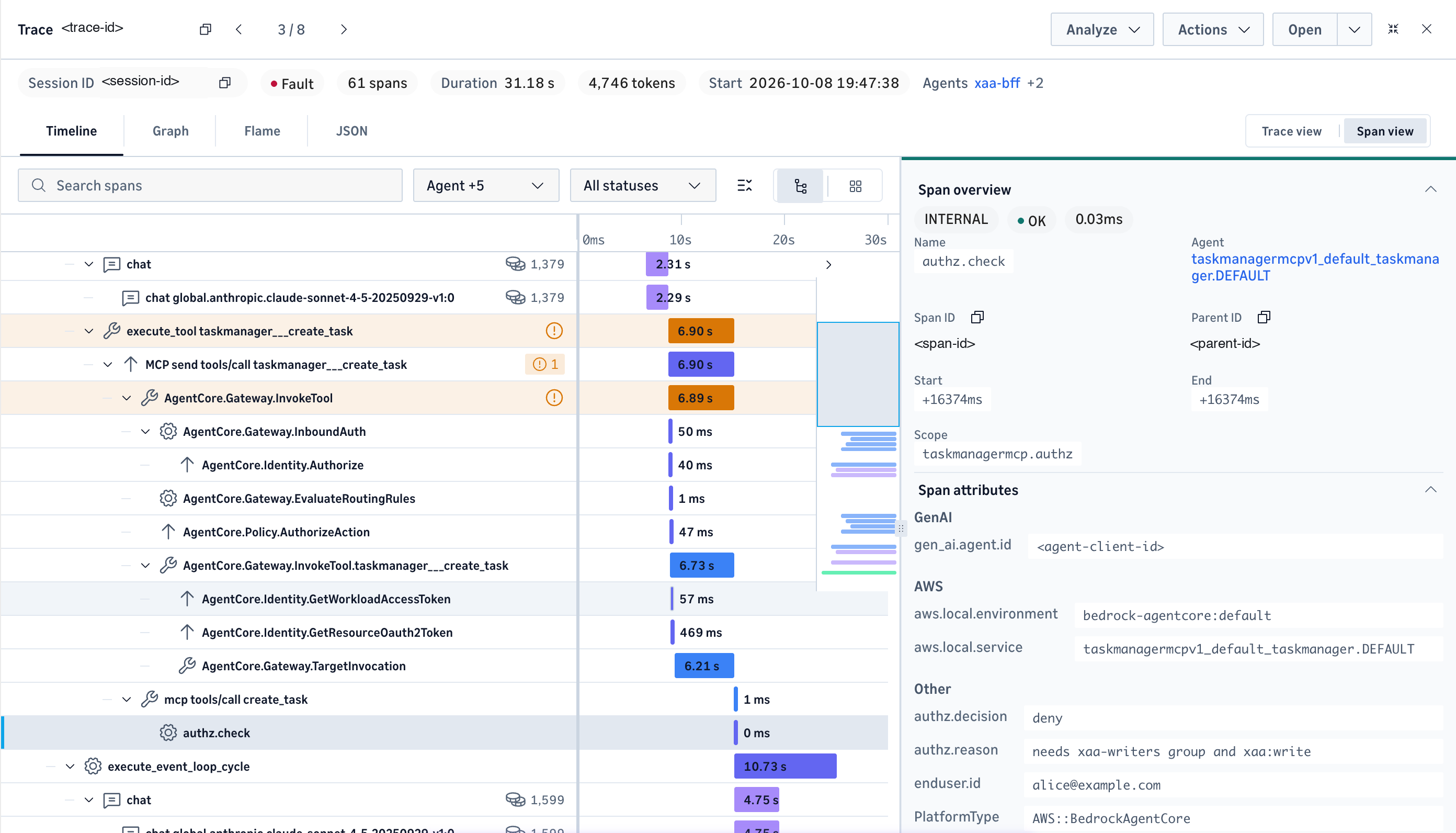
Figure 6: One trace for Alice’s request, from the agent’s tool call through the Gateway’s identity and Cedar checks to the MCP server’s deny
Two instrumentation details matter. ADOT finds the Region and signs its exports through botocore, so add botocore to services that lack it. Until we did, our MCP servers exported no spans. And ADOT’s agent mode turns off instrumentation for HTTP client libraries such as requests and urllib3 by default, so set OTEL_PYTHON_DISABLED_INSTRUMENTATIONS in your BFF to override that default with a list that leaves out the BFF’s HTTP client (requests, in ours), or its trace context won’t reach the agent.
Validate the results
We ran each check through both Gateways with the users from Part 1. Each session listed the tools, then called list_tasks, create_task, and an employee lookup:
| Caller and path | Tools listed | create_task |
Reads |
| Alice, agent A, Gateway A | 6 | Denied by the MCP server: requires xaa-writers |
Allowed |
| Bob, agent A, Gateway A | 6 | Created | Allowed |
| Carol, agent A, Gateway A | 6 | Denied by the MCP server: no groups claim |
Allowed |
| Bob, agent B, Gateway B | 4: Cedar hid the write tools | Refused by the Gateway: “No policy applies to the request (denied by default)” | Allowed |
Through the deployed agents, the results matched: agent A denied Alice and Carol and created Bob’s task, and agent B told Bob it had no tool to create tasks. The same user got different authority through different agents, and Okta decided it.
These requests stopped at the front door:
| Request | Response |
| Agent B’s ID-JAG at Gateway A, or agent A’s at Gateway B | HTTP 403, MCP error -32002 insufficient_scope |
| An Okta access token instead of an ID-JAG | HTTP 403, the same error |
| No token | HTTP 401, “Missing Bearer token” |
| Agent A’s ID-JAG sent to agent B on EKS | Refused in 98 milliseconds, before a model call: “issued to a different agent” |
The Gateway returns the same generic error for a wrong agent and for the wrong token type, so check your configuration against the token’s client_id and aud when you see it.
The Gateway’s identity and policy work is small next to the tool itself. Medians and 90th percentiles from 24 hours of Gateway A spans in Omni:
| Span | p50 | p90 |
Gateway.InboundAuth |
34 ms | 69 ms |
Identity.Authorize |
25 ms | 60 ms |
Identity.GetWorkloadAccessToken |
48 ms | 94 ms |
Identity.GetResourceOauth2Token |
70 ms | 439 ms |
Policy.AuthorizeAction (Cedar, per call) |
47 ms | 56 ms |
Policy.PartiallyAuthorizeActions (Cedar, per tool listing) |
65 ms | 75 ms |
Gateway.TargetInvocation (the MCP server on AgentCore runtime) |
5,565 ms | 6,273 ms |
The identity and policy spans for one tool call sum to about 0.2 seconds at their medians, and the MCP server’s own authz.check span took under 1 millisecond. Gateway B showed the same pattern, with GetResourceOauth2Token at 408 milliseconds at the median.
Cross App Access or per-user consent
XAA applies where the target application’s authorization server accepts an ID-JAG. There, your Okta administrator decides which agent may act for which users, users see no consent prompt, and Okta evaluates policy each time a token is requested. Applications with their own authorization servers, such as GitHub, rely on each user’s own OAuth consent instead. Figure 7 compares the two, as we measured them.
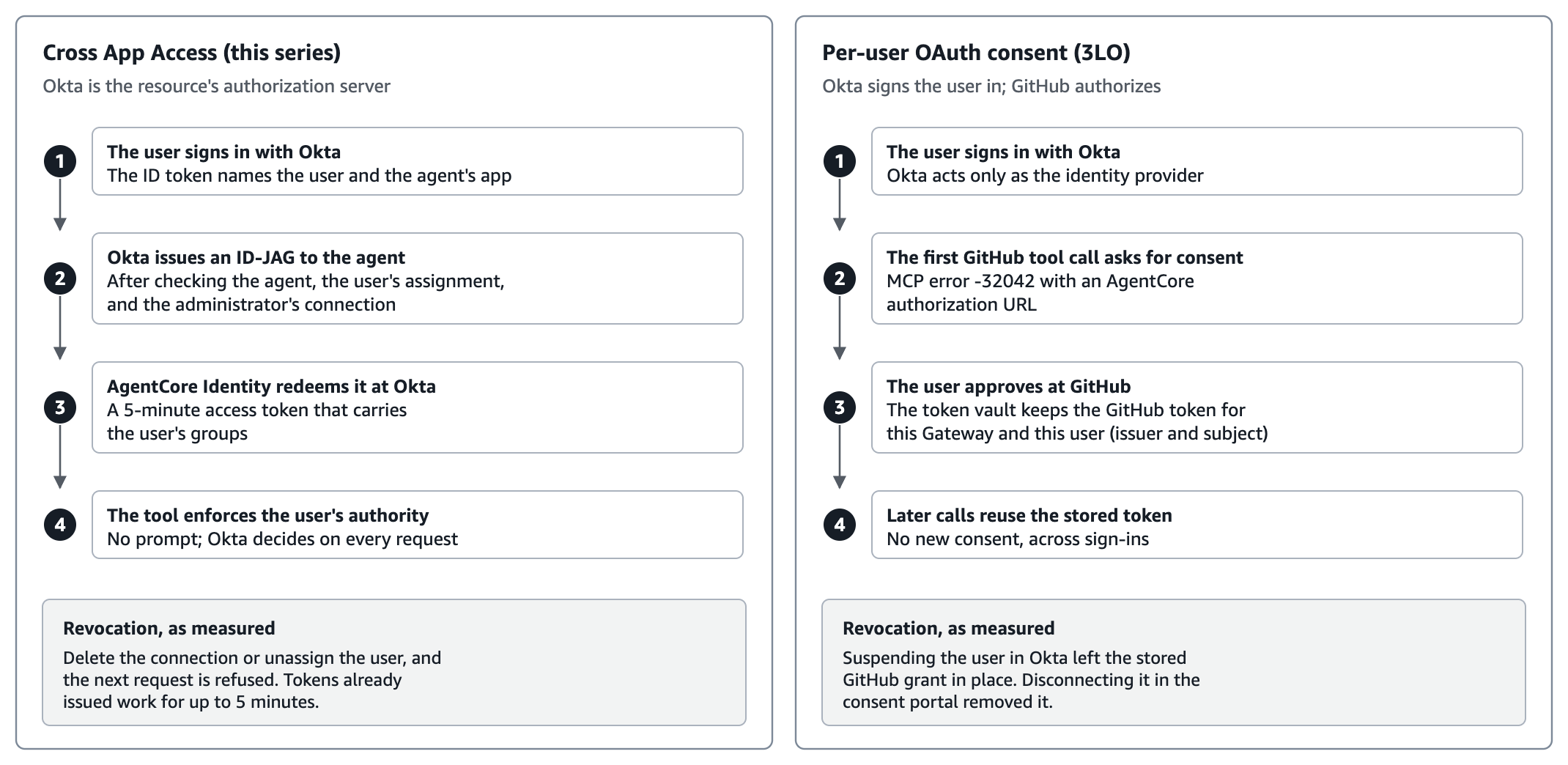
Figure 7: Cross App Access compared with per-user OAuth consent, with the revocation behavior we measured
We deployed the AWS sample 07-consent-portal-auth-code-flow-targets beside our stack, with Okta signing users in to an AgentCore Identity consent portal and a GitHub target on its own Gateway. Alice connected a GitHub test account through the portal, and Bob never connected one. The post Manage end-user OAuth consent for AI agents with Amazon Bedrock AgentCore describes this lane in full. Here’s what we observed:
| Action | Next GitHub tool call |
| Alice consented in the portal | Returned her GitHub identity |
| Bob, who never consented | MCP error -32042 with an AgentCore authorization URL |
| Alice suspended in Okta, earlier token reused | Still worked: the Gateway checks the inbound token’s signature and expiry, and that token lived 1 hour |
| Alice suspended, new sign-in | Refused |
| Alice unsuspended | Worked with no new consent |
| Alice’s grant disconnected through the consent portal’s API | Not connected, then -32042 again |
The two lanes revoke differently. In XAA, Okta’s controls stop the next ID-JAG mint, and issued tokens expire within about 5 minutes. In the consent lane, Okta controls only sign-in: the stored grant outlived the suspension and stayed until we disconnected it. Choose per target application, not once for the enterprise.
Where this pattern applies
In media and entertainment, the fleet arrives quickly. A studio or streaming or games organization has agents for production tracking, title and asset metadata, rights and localization, and viewer or player support, each sitting in front of a different system with its own authorization model and its own auditors. The question isn’t whether one agent can be governed. It’s whether the hundredth one is governed the same way, and whether an administrator can still answer which agents reach which systems for which users.
Nothing here is specific to that industry. The agent is an identity in your IdP, the target is an OAuth 2.0 authorization server, and the Gateway is where authorization is decided. Teams in financial services, healthcare, and the public sector put different resources behind the same front door and get the same audit trail.
What’s next: observability and evaluations
This post uses AgentCore Observability for one purpose: to prove that each allow and deny traces back to a control. There’s more in it than that, and it’s a body of work in its own right. The spans already carry the model and tool latency behind every governance decision, Transaction Search can alert on a spike in denials, and AgentCore evaluations can score an agent’s behavior against your own criteria, online for live traffic or on demand over a chosen set of spans. A later post takes that up: what to measure on a governed agent, which evaluators catch an agent that reports success after a refused tool call, and how to run both without turning your traces into your largest bill.
Clean up
To avoid ongoing charges, delete the Part 2 resources, then follow the cleanup steps in Part 1:
- Delete the Amazon EKS cluster (
eksctl delete cluster) and its Amazon Elastic Container Registry (Amazon ECR) repository. - Delete the Gateways and their targets, then the Policy in AgentCore engines, and then agent B’s credential provider.
- Delete the CloudWatch Omni space and domain, the Dataset integration, the Amazon EventBridge rule and partner event bus, and the CloudWatch log groups.
- If you deployed sample 07, follow its cleanup steps.
- Delete the IAM roles and policies you created.
- In Okta, delete the log stream, and deactivate and delete agent B and its linked app.
Conclusion
In this post, you moved the Part 1 solution from a topology that suits a few agents and tools to one that holds up across many. The Gateway became the single front door and redeemed Okta’s grant, so the agents held no tool credentials. Cedar policies evaluated by Policy in AgentCore replaced the check copied into each server. A second agent on Amazon EKS joined under its own Okta identity. And AgentCore Observability, with Okta’s System Log beside it in CloudWatch Omni, traced each allow and deny back to the agent, the user, and the control that decided it. The governance mechanism didn’t change, which is the point: only the topology around it did.
To get started, explore the AgentCore samples and Okta’s Cross App Access documentation. For plain token exchange through a Gateway, read Implement on-behalf-of token exchange for multi-tenant agents with Amazon Bedrock AgentCore Gateway.
About the authors

Hammad Ausaf
Hammad is a Principal Solutions Architect in Media and Entertainment. He is a passionate builder and strives to provide the best solutions to AWS customers.

Rajat Jain
Rajat is a Technical Account Manager in Media and Entertainment at AWS with over 3 years at the company. He guides customers through operational best practices and helps them get the most out of AWS services.

Madhu Samhitha Vangara
Madhu is a Worldwide Generative AI Specialist Solution Architect at AWS, focusing on agentic AI go-to-market for Amazon Bedrock AgentCore and Strands Agents. She translates emerging AI capabilities and research into measurable outcomes for customers. Outside work, she’s a trained Indian classical dancer and an art enthusiast.
正文保留英文原文,标题与摘要由机器翻译。
原文发布于 AWS Machine Learning(Govern AI agent access with Okta Cross App Access and Amazon Bedrock AgentCore – Part 2),标题、摘要与正文由机器翻译,术语按行业惯例统一,未经人工逐句校订。