如何为 AI 智能体赋予记忆
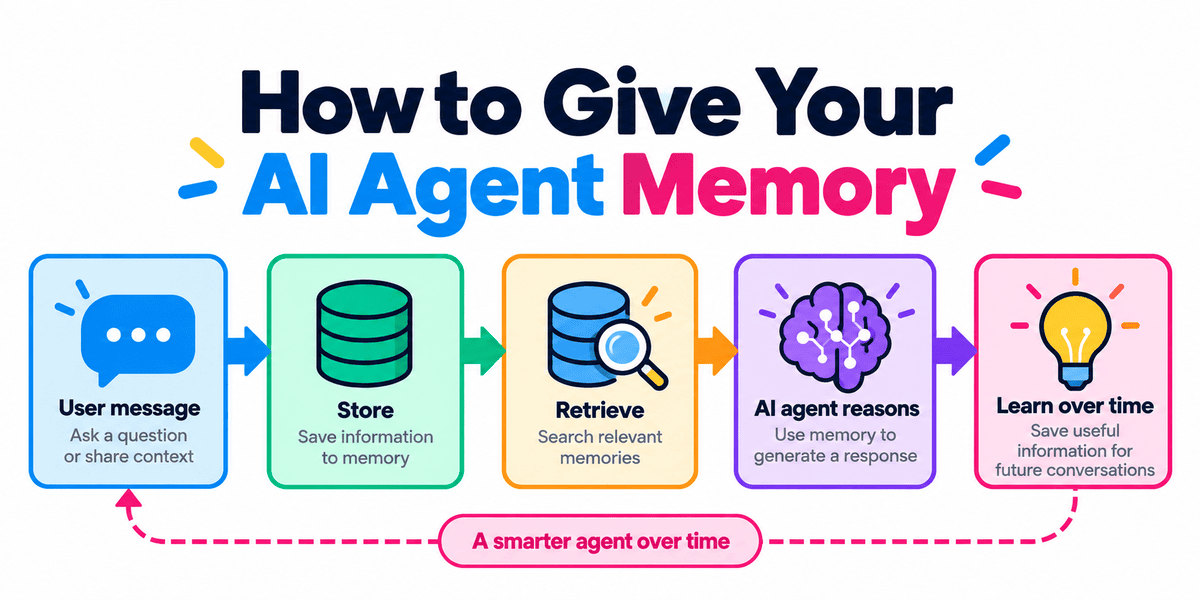
作者:Abid Ali Awan,KDnuggets 助理编辑,2026 年 11 月 6 日,Artificial Intelligence
AI 智能体能够推理、使用工具并完成复杂任务。但有一个问题:大多数智能体在会话结束后就会忘掉一切。
这意味着每一次新的对话都可能像从零开始。
智能体记忆让 AI 系统能够跨会话记住有用的信息,比如你的偏好、先前的决定、目标或重要上下文。
在本教程中,我们将使用 OpenAI Agents SDK 和 Mem0 构建一个具备长期记忆的 AI 智能体。随后,我们会把同一套记忆系统接入 OpenCode,让你的编程智能体也能跨会话记住信息。
AI 智能体记忆的工作原理
一个简单的智能体记忆系统遵循一条直接的循环:用户发送消息,智能体在记忆中检索相关上下文,在推理时使用这些信息,然后保存任何对后续对话有用的内容。
记忆主要分为两种类型:
短期记忆:来自当前对话或任务的信息,例如最近的消息和临时状态。
长期记忆:跨会话持续保留的信息,例如偏好、决策、目标和过往经历。
关键在于检索。智能体不会把此前每一次对话都加入提示词,而是搜索自己的记忆,只取回与当前请求相关的信息。
这样可以让上下文更小,同时仍能让智能体的表现如同记得此前的交互。
构建具有长期记忆的智能体
在本节中,我们将构建一个简单的智能体,能够在多轮对话之间搜索、保存和复用信息。
首先安装 OpenAI Agents SDK 和 Mem0:
pip install openai-agents mem0ai
export OPENAI_API_KEY="your-openai-key"
export MEM0_API_KEY="your-mem0-key"
然后导入所需的类并创建一个 Mem0 客户端:
from agents import Agent, Runner, function_tool
from mem0 import MemoryClient

memory = MemoryClient()
USER_ID = "abid"
MemoryClient 让我们的智能体能够访问 Mem0,而 USER_ID 则告诉 Mem0 要存储和检索谁的记忆。为每个用户使用单独的标识符可以使其记忆保持隔离。
创建记忆搜索工具
现在我们需要给智能体一种从之前对话中查找相关信息的方法。
我们通过创建一个 search_memory 工具来实现这一点,该工具会把当前查询发送给 Mem0,并返回最相关的已存储记忆。
@function_tool
def search_memory(query: str) -> str:
 """Search for relevant memories about the user."""

 results = memory.search(
 query=query,
 filters={"user_id": USER_ID},
 top_k=5,
 )

 memories = results.get("results", [])

 if not memories:
 return "No relevant memories found."

 return "\n".join(
 f"- {item['memory']}"
 for item in memories
 )
Mem0 使用语义搜索,因此措辞不必完全一致。只要含义相近,智能体仍然能够检索到正确的记忆。
创建记忆写入工具
接下来,我们需要一种方式,让智能体能够为未来的对话保存有用信息。
我们通过一个 save_memory 工具来实现这一点,它会将重要的事实、偏好或决策发送到 Mem0。
@function_tool def save_memory(content: str) -> str: """保存关于用户的有用长期信息。""" memory.add( messages=[ { "role": "user", "content": content, } ], user_id=USER_ID, ) return "Memory saved."
然后,Mem0 可以处理这些信息,并将有用的部分作为长期记忆存储起来,而不是把整段对话作为一个大块整体保存。
现在,我们可以通过创建智能体,并让它能够访问这两个记忆工具,将所有环节连接起来。
系统会指示智能体在回答前检查相关记忆,并保存那些日后需要记住的有用信息。
agent = Agent( name="Memory Assistant", model="gpt-5.6-luna", instructions=""" 你是一名具备长期记忆的个人助理。回答前始终调用 search_memory,即使是通用问题也不例外。当找到相关记忆时,自然地在开头予以确认,例如:“哦,我记得你更喜欢……”,然后加以使用。保存持久的偏好、目标和事实;每次保存后用一句话确认。跳过问候语、临时信息和重复内容。 """, tools=[ search_memory, save_memory, ], )
在这里,instructions 控制智能体如何使用记忆。它们告诉智能体要检索什么、保存什么,以及应忽略哪些类型的信息。
最后,创建一个小的 chat() 函数来运行该智能体:
def chat(message): result = Runner.run_sync( agent, message, ) return result.final_output
每次调用 chat() 时,消息都会被传递给智能体,智能体可以在其响应过程中使用这些记忆工具。
现在我们来验证一下,智能体是否真的能在多次交互中记住信息。
首先,给它一条值得保存的偏好:
print(chat( "记住我偏好 Python,并使用 uv " "管理我的项目。" ))
我会记住你偏好 Python,并使用 `uv` 来管理你的项目。
接下来,问一个相关问题:
print(chat( "我应该如何设置我的下一个 Python 项目?" ))
我记得你偏好 Python,并使用 **uv** 进行项目管理。一个可靠的设置:```bash uv init my-project cd my-project uv add uv add --dev pytest ruff mypy ```
智能体可以通过 search_memory() 检索已保存的偏好,并用它让回复更相关。
由于记忆存储在 Mem0 中,即使 Python 应用程序重启后,仍然可以检索到它。
让 OpenCode 拥有相同的记忆
我们也可以让 OpenCode 这样的编程智能体拥有持久记忆,而无需自己编写 Python 工具。
Mem0 提供官方的托管 Model Context Protocol(MCP)服务器,内置用于添加、搜索、更新和删除记忆的工具。
用以下命令将其添加到 OpenCode:
npx mcp-add \ --name mem0-mcp \ --type http \ --url "https://mcp.mem0.ai/mcp" \ --clients "opencode"
重启 OpenCode 并进行测试:
记住,我在新建 Python 项目时更喜欢用 uv 而不是 pip。
然后开启一个新会话并提问:
我该如何初始化这个 Python 项目?
OpenCode 可以通过 Mem0 MCP 工具检索到已存储的偏好。Mem0 目前提供的操作包括 add_memory、search_memories、get_memories、update_memory、delete_memory 等。
你可以通过以下方式验证连接:
ChatGPT 具备记忆功能,能够记住此前对话中的有用信息,并在之后的会话中重新调用。因此,有时你会感觉 ChatGPT 似乎已经理解你想表达的内容,无需你再重新解释一遍。
你也可以在自己的 AI 应用中打造类似的体验。
例如,你可以构建一个能记住客户偏好的助手、一个记录重要决策的内部工具,或者一个能记住你常用框架、项目规则和开发习惯的编程智能体。
主要好处在于,用户不必每次都从零开始。智能体可以调取此前会话中的相关信息,并借此给出更个性化、更一致的回复。
在本指南中,我们了解了 AI 智能体记忆的工作原理、短期记忆与长期记忆的区别,以及如何使用 Mem0 配合 OpenAI Agents SDK 来保存和调取记忆。我们还通过 MCP 将同一套记忆系统接入了 OpenCode。
Abid Ali Awan(@1abidaliawan)是一位认证数据科学家,热衷于构建机器学习模型。目前,他专注于内容创作,并撰写关于机器学习和数据科学技术的技术博客。Abid 拥有技术管理硕士学位和通信工程学士学位。他的愿景是利用图神经网络打造一款 AI 产品,帮助受心理疾病困扰的学生。
译文由英文原文机器翻译,术语按行业惯例统一,可在文末展开原文核对。
查看英文原文(How to Give Your AI Agent Memory)
By Abid Ali Awan, KDnuggets Assistant Editor on November 6, 2026 in Artificial Intelligence
AI agents can reason, use tools, and complete complex tasks. But there is one problem: most of them forget everything once the session ends.
That means every new conversation can feel like starting from scratch.
Agent memory gives an AI system a way to remember useful information across sessions, such as your preferences, previous decisions, goals, or important context.
In this tutorial, we will build an AI agent with long-term memory using the OpenAI Agents SDK and Mem0. We will then connect the same memory system to OpenCode so your coding agent can remember information across sessions too.
How AI Agent Memory Works
A simple agent memory system follows a straightforward loop: the user sends a message, the agent searches its memory for relevant context, uses that information while reasoning, and then saves anything useful for future conversations.
There are two main types of memory:
Short-term memory: Information from the current conversation or task, such as recent messages and temporary state.
Long-term memory: Information that persists across sessions, such as preferences, decisions, goals, and previous experiences.
The key part is retrieval. Instead of adding every previous conversation to the prompt, the agent searches its memory and brings back only the information that is relevant to the current request.
This keeps the context smaller while still allowing the agent to behave as if it remembers previous interactions.
Building an Agent with Long-Term Memory
In this section, we will build a simple agent that can search, save, and reuse information across conversations.
Start by installing the OpenAI Agents SDK and Mem0:
pip install openai-agents mem0ai
export OPENAI_API_KEY="your-openai-key"
export MEM0_API_KEY="your-mem0-key"
Then import the required classes and create a Mem0 client:
from agents import Agent, Runner, function_tool
from mem0 import MemoryClient
memory = MemoryClient()
USER_ID = "abid"
The MemoryClient gives our agent access to Mem0, while USER_ID tells Mem0 whose memories to store and retrieve. Using a separate identifier for each user keeps their memory isolated.
Creating a Memory Search Tool
Now we need to give the agent a way to look up relevant information from previous conversations.
We do this by creating a search_memory tool that sends the current query to Mem0 and returns the most relevant stored memories.
@function_tool
def search_memory(query: str) -> str:
"""Search for relevant memories about the user."""
results = memory.search(
query=query,
filters={"user_id": USER_ID},
top_k=5,
)
memories = results.get("results", [])
if not memories:
return "No relevant memories found."
return "\n".join(
f"- {item['memory']}"
for item in memories
)
Mem0 uses semantic search, so the wording does not have to match exactly. As long as the meaning is similar, the agent can still retrieve the right memory.
Creating a Memory Writing Tool
Next, we need a way for the agent to save useful information for future conversations.
We do this with a save_memory tool that sends important facts, preferences, or decisions to Mem0.
@function_tool
def save_memory(content: str) -> str:
 """Save useful long-term information about the user."""

 memory.add(
 messages=[
 {
 "role": "user",
 "content": content,
 }
 ],
 user_id=USER_ID,
 )

 return "Memory saved."
Mem0 can then process that information and store the parts that are useful as long-term memory, rather than saving the entire conversation as one large block.
Now we can connect everything by creating the agent and giving it access to both memory tools.
The agent is instructed to check for relevant memories before answering and to save useful information that should be remembered later.
agent = Agent(
 name="Memory Assistant",
 model="gpt-5.6-luna",
 instructions="""
 You are a personal assistant with long-term memory.
 Always call search_memory before answering, even for general questions.
 When a relevant memory is found, acknowledge it naturally at the start,
 for example: "Oh, I remember you prefer...", then use it.
 Save durable preferences, goals, and facts; confirm each save in one
 sentence. Skip greetings, temporary info, and duplicates.
 """,
 tools=[
 search_memory,
 save_memory,
 ],
)
Here, the instructions control how the agent uses memory. They tell it what to retrieve, what to save, and what kinds of information should be ignored.
Finally, create a small chat() function to run the agent:
def chat(message):
 result = Runner.run_sync(
 agent,
 message,
 )

 return result.final_output
Each time chat() is called, the message is passed to the agent, which can use the memory tools as part of its response.
Now let's check that the agent can actually remember something across interactions.
First, give it a preference worth saving:
print(chat(
 "Remember that I prefer Python and use uv "
 "for managing my projects."
))
I'll remember that you prefer Python and use `uv` to manage your projects.
Next, ask a related question:
print(chat(
 "How should I set up my next Python project?"
))
I remember you prefer Python and use **uv** for project management. A solid setup:

```bash
uv init my-project
cd my-project
uv add
uv add --dev pytest ruff mypy
```
The agent can retrieve the saved preference with search_memory() and use it to make the response more relevant.
Because the memory is stored in Mem0, it can still be retrieved even after the Python application is restarted.
Giving OpenCode the Same Memory
We can also give a coding agent such as OpenCode persistent memory without writing the Python tools ourselves.
Mem0 provides an official hosted Model Context Protocol (MCP) server with tools for adding, searching, updating, and deleting memories.
Add it to OpenCode with:
npx mcp-add \
 --name mem0-mcp \
 --type http \
 --url "https://mcp.mem0.ai/mcp" \
 --clients "opencode"
Restart OpenCode and test it:
Remember that I prefer uv instead of pip for new Python projects.
Then start a new session and ask:
How should I initialize this Python project?
OpenCode can retrieve the stored preference through the Mem0 MCP tools. Mem0 currently exposes operations including add_memory, search_memories, get_memories, update_memory, delete_memory, and more.
You can verify the connection with:
ChatGPT has a memory feature that can remember useful information from previous conversations and bring it back in later sessions. That is why it can sometimes feel like ChatGPT already understands what you are trying to say without you having to explain everything again.
You can create a similar experience in your own AI applications.
For example, you can build an assistant that remembers customer preferences, an internal tool that keeps track of important decisions, or a coding agent that remembers your preferred frameworks, project rules, and development habits.
The main benefit is that users do not have to start from scratch every time. The agent can retrieve relevant information from earlier sessions and use it to give more personalized and consistent responses.
In this guide, we learned how AI agent memory works, how short-term and long-term memory differ, and how to use Mem0 with the OpenAI Agents SDK to save and retrieve memories. We also connected the same memory system to OpenCode through MCP.
Abid Ali Awan (@1abidaliawan) is a certified data scientist professional who loves building machine learning models. Currently, he is focusing on content creation and writing technical blogs on machine learning and data science technologies. Abid holds a Master's degree in technology management and a bachelor's degree in telecommunication engineering. His vision is to build an AI product using a graph neural network for students struggling with mental illness.
原文为英文,正文由自动抓取并保留原文。
原文发布于 KDnuggets(How to Give Your AI Agent Memory),标题、摘要与正文由机器翻译,术语按行业惯例统一,未经人工逐句校订。

