让决策模型引导你的语音助手
还有一个适合放置决策模型的有用场景:实时语音对话之中。
真实的说话方式是杂乱无章的。一个人说话时,可能把细节的顺序讲乱,甚至漏掉一个,然后在下一句话里又纠正另一个。
如果我们想构建一个语音助手,我们的应用必须跟踪它实际已经掌握了哪些信息,并决定接下来该问什么。
这个“做决策”的环节,正是决策模型可以发挥作用的地方。
你把上下文和一个问题交给它,它就会从你预先定义好的一组选项中做出选择。它正是为此而训练的,所以速度快、成本低,应用可以直接根据返回的答案采取行动。
那么,如何构建这样一个语音助手?我们把这项工作拆成两部分。
具体来说,我们会用一个语音模型负责听和说,并让决策模型居于其后,随着对话的展开读取对话内容,并告诉应用哪些已经完成、哪些还缺失。
在这篇文章中,我们将使用 GPT-Live(OpenAI 的实时语音模型)和 Decision-1(来自微软的决策模型)来构建这个助手。
1. 我们究竟为什么需要一个决策模型?
假设用户告诉我们的助手:“我已经修好了。”那么,我们可以直接继续把任务标记为完成吗?
因为如果完成需要一次成功的测试,那么我们就不应把任务标记为完成,而应追问用户是否测试过,以及结果如何。
好,假设用户确认测试通过了,于是我们把任务标记为完成。紧接着,用户又补充道:“其实,那是在我最近一次修改之前。”很好。现在,之前的结果不再能验证当前情况,我们需要重新打开那项检查。同时,我们还需要保留其他仍然成立的信息。
这些就是我们可以交给决策模型做出的判断。
本质上,对于每项要求,我们定义什么证据才算数。然后模型会读取对话,并告诉我们当前状态:该要求是否已满足?用户是否确认了某个问题,还是我们仍然需要证据?无论决策模型选择哪种结果,我们的应用都知道下一步该做什么。它可以是更新状态、让用户验证某项内容,或者直接继续处理下一项要求。
在这个案例研究中,我们将为一名清洁工构建一个语音助手,该清洁工会在客人到达前检查一套出租公寓。清洁工在逐处检查公寓时报告发现的情况,助手则提出追问,直到有足够证据来评估四项要求:
入口:当前的客人密码能打开门吗?
卧室:床单和枕套是否已换成干净的,床是否铺好了?
浴室洗手池:排水是否正常,水龙头放水时下方是否保持干燥?
厨房:台面是否干净,冰箱里是否没有上一位客人留下的食物?
对话可能会是这样:
清洁工:“客人密码可用。床已经铺好,床单和枕套都是干净的。厨房和洗手池还没弄。” 助手:“你能打开水龙头,检查一下洗手池排水是否正常、下方是否保持干燥吗?” 清洁工:“水要到今天下午才来,但我现在可以检查厨房。” 助手:“好,那我们先做厨房。你能检查一下台面和冰箱吗?”
为了支持这段对话,我们会让决策模型评估清洁工的报告确认了哪些情况,并针对当前情形选择一项有用的后续动作。
在技术栈方面,我们会使用 GPT-Live(OpenAI 的语音模型)和 Decision-1(微软的决策模型),并通过一个 Python 工作流将它们连接起来:
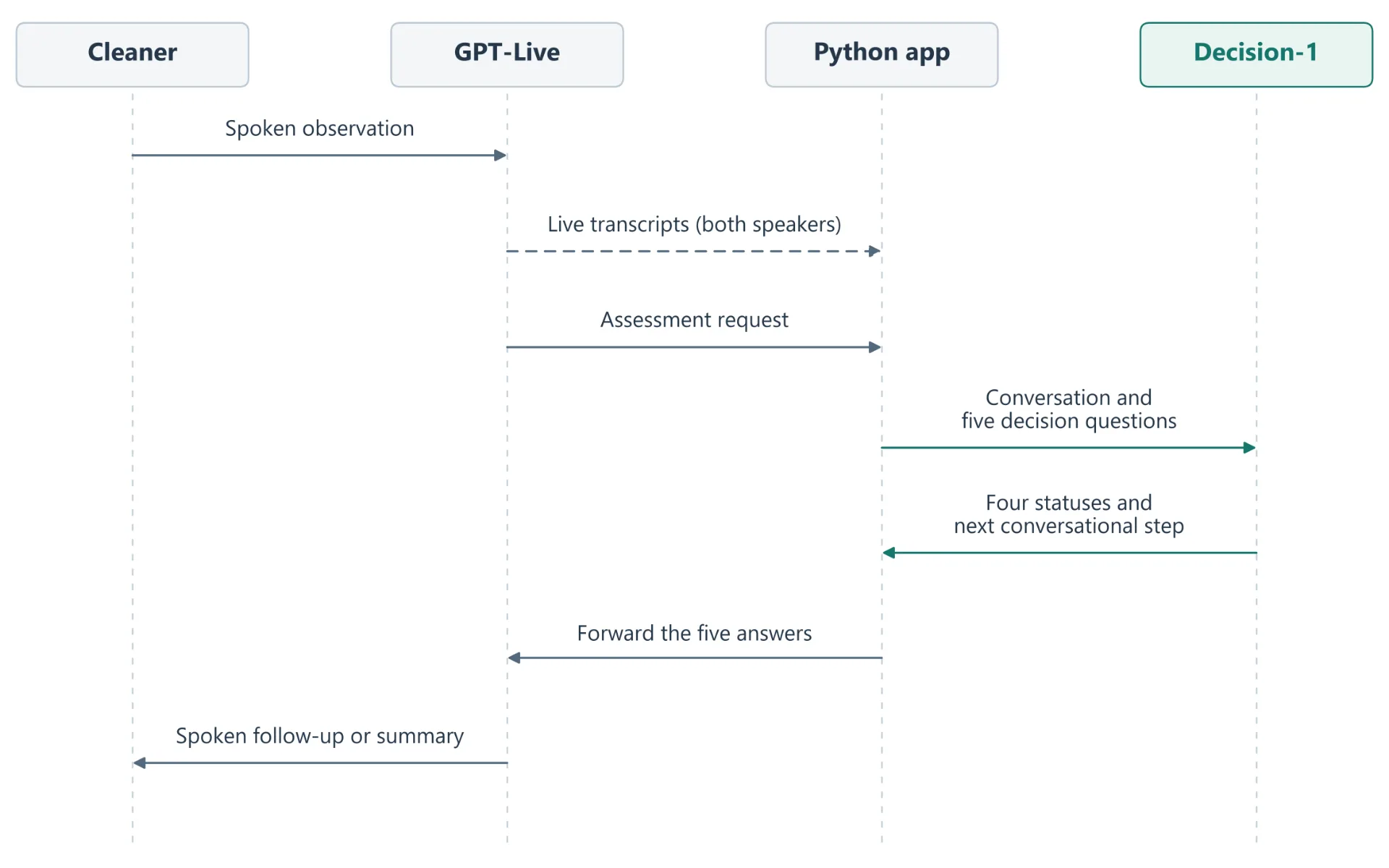
图 1. 我们将构建的工作流。(图片由作者提供)
如上所示,GPT-Live 负责听和说。当清洁工给出更新时,Python 会把到目前为止的对话发送给 Decision-1,同时附上五个问题:四项需求各自进展到哪一步了,以及助手接下来该做什么?
注意:Decision-1 并非唯一选择。你也可以使用 Jev 或 OpenAI 的 Decisions API。整体模式保持不变,只是决策函数内部的请求会有所变化。
对于每一项需求,它会从三个选项中选出一个:
ready,即根据证据,该需求已满足。
issue,即仍然存在问题。
needs_evidence,即目前证据不足,无法确定该需求是已满足还是存在问题。
对于下一步,它会从六个选项中选出一个:
ask_entrance:就入口需求请求缺失的证据。
ask_bedroom:询问床上用品的要求。
ask_bathroom:询问洗手池的要求。
ask_kitchen:询问厨房的要求。
defer:解释是什么阻碍了剩余的检查,并等待。
finish:总结评估结果,包括任何已确认的问题。
这里要注意,finish 意味着我们有足够的证据来评估每项要求——而不是所有要求都已通过。
然后 Python 将这些选中的选项传回给 GPT-Live,由 GPT-Live 将其转换为语音回复。下次清洁人员回应时,我们会带着更新后的对话重复这一过程。
好了,我们准备好构建完整工作流了!下面是我们的清单:
构建决策函数。在这一部分,我们定义证据标准和允许的结果,然后编写一个函数,在单次请求中向 Decision-1 询问四项需求状态以及下一步对话步骤。
设置语音对话。在这里,我们配置 GPT-Live 并在我们的应用中收集对话转录文本。
将决策连接到语音回复。当 GPT-Live 请求评估时,我们调用决策函数,并将 Decision-1 的答案传回。
我们将逐一构建这些内容。
3. 构建决策函数
在这里,我们专注于构建一个函数,它接收到目前为止的对话,并生成每项需求的状态以及助手的下一步对话步骤。
这个函数本身很短:
async def assess_inspection(conversation): response = await http.post( f"{AZURE_ENDPOINT}/providers/microsoft/v1/systemone", json={ "model": "Decision-1", "state": {"conversation": conversation}, "questions": QUESTIONS, }, ) response.raise_for_status() return { name: answer["choice"] for name, answer in response.json()["answers"].items() }
首先,我们准备发给决策模型的请求。这里有两个主要组成部分:state 提供累积的对话内容;QUESTIONS 指定我们想要的决策。该函数直接返回模型选定的标签。
那么,QUESTIONS 里都包含什么?
它是一个包含 5 个条目的字典,每个需求对应一个条目,另有一个对应下一步对话动作:
QUESTIONS = { "entrance": {...}, "bedroom": {...}, "bathroom": {...}, "kitchen": {...}, "next_action": {...},}
我们先从四个需求问题入手。以 "bathroom" 条目为例,下面是它的完整结构(为适应本文篇幅,instructions 在此做了精简;完整措辞见 notebook):
QUESTIONS["bathroom"] = { "type": "choice", "instructions": ( "评估水槽排水是否正常,以及在水流过程中其下方" "是否保持干燥。" "以清洁人员报告的观察结果作为证据。" "结合上下文解读回复,对相关事实进行更正," "并保留无关的有效观察。" "先前的证据仍须适用于当前状况。" "计划与一般性保证不能确立结果。" ), "criteria": { "needs_evidence": ( "当前报告的证据不足以确立该需求的" "每一部分,且不足以确立" "当前存在故障。" ), "ready": ( "当前报告的证据已确立该需求的" "每一部分。" ), "issue": ( "当前报告的证据已确立该需求中至少一个部分" "存在尚未解决的故障。" ), },}
这沿用了 Microsoft Decision-1 的 choice 格式:instructions 告诉模型要评估什么、以及如何解读对话,criteria 则定义可选的选项以及每个选项的含义。
其他三个需求问题遵循相同的结构,并共享这些状态定义。
然后,对于下一个对话步骤,我们添加“next_action”问题。它读取的是同一段对话,但这一次我们问:鉴于我们已知的信息以及清洁人员现在能做什么,助手接下来应该问什么或说什么?
结构如下(说明已简化):
原文较长,译文为节选;译文由英文原文机器翻译,术语按行业惯例统一,可在文末展开原文核对。
查看英文原文(Let Decision Models Guide Your Voice Assistant)
Let Decision Models Guide Your Voice Assistant | Towards Data Science
Here’s another useful place to put a decision model: inside a live voice conversation.
Real speech is messy. As someone speaks, they might give you the details out of order, or even skip one, and then correct another a sentence later.
If we want to build a voice assistant, our app has to keep track of what it actually knows, and decide what to ask next.
This "decision-making" part is where a decision model can help.
You give it the context and a question, and it picks from a set of options you’ve defined. It’s trained for exactly that, so it’s fast and cheap, and the app can directly act on the returned answer.
So, how to build such a voice assistant? We split the job into two.
Concretely, we'll use a speech model to do the listening and talking, and we'll make the decision model sit behind it, read the conversation as it unfolds, and tell the app what’s already done and what’s still missing.
In this post, we’ll build that assistant using GPT-Live, OpenAI’s real-time speech model, and Decision-1, a decision model from Microsoft.
1. Why Do We Need a Decision Model After All?
Suppose the user tells our assistant, “I’ve fixed it.” Well, can we go ahead and mark the task complete?
Because if completion requires a successful test, then, instead of marking the task complete, we should follow up with the question of whether the user tested it and what happened.
Ok, say the user confirms that the test passed, so we mark the task complete. Right after, the user adds, “Actually, that was before my latest change.” Great. Now, the earlier result no longer verifies the current situation, and we need to reopen that check. Meanwhile, we need to keep the other information that still holds.
These are the judgments we can give to the decision model.
Essentially, for each requirement, we define what evidence counts. The model then reads the conversation and tells us the current status: is the requirement met? Has the user confirmed a problem, or do we still need evidence? Whatever the decision model picks, our app knows what to do next. It can be updating a status, asking the user to verify something, or just moving on to the next requirement.
In this case study, we’ll build a voice assistant for a cleaner who checks a rental apartment before guests arrive. The cleaner reports what they find as they check through the apartment, and the assistant asks follow-up questions until there’s enough evidence to assess four requirements:
Entrance: Does the current guest code unlock the door?
Bedroom: Are fresh sheets and pillowcases on, and is the bed made?
Bathroom sink: Does the water drain normally, and does the area underneath stay dry while the tap runs?
Kitchen: Are the counters clean, and is the fridge free of previous guests’ food?
Here's how a conversation might go:
Cleaner: “The guest code worked. The bed’s made with fresh sheets and pillowcases. The kitchen and sink are still to go.”
Assistant: “Could you run the tap and check whether the sink drains normally and stays dry underneath?”
Cleaner: “The water’s off until this afternoon, but I can check the kitchen now.”
Assistant: “Okay, let’s do the kitchen while we wait. Could you inspect the counters and fridge?”
To support that exchange, we’ll ask the decision model to assess what the cleaner’s reports establish and select a useful follow-up for the current situation.
In terms of the tech stack, we’ll use GPT-Live (OpenAI's speech model) and Decision-1 (Microsoft's decision model), and we'll connect them through a Python workflow:
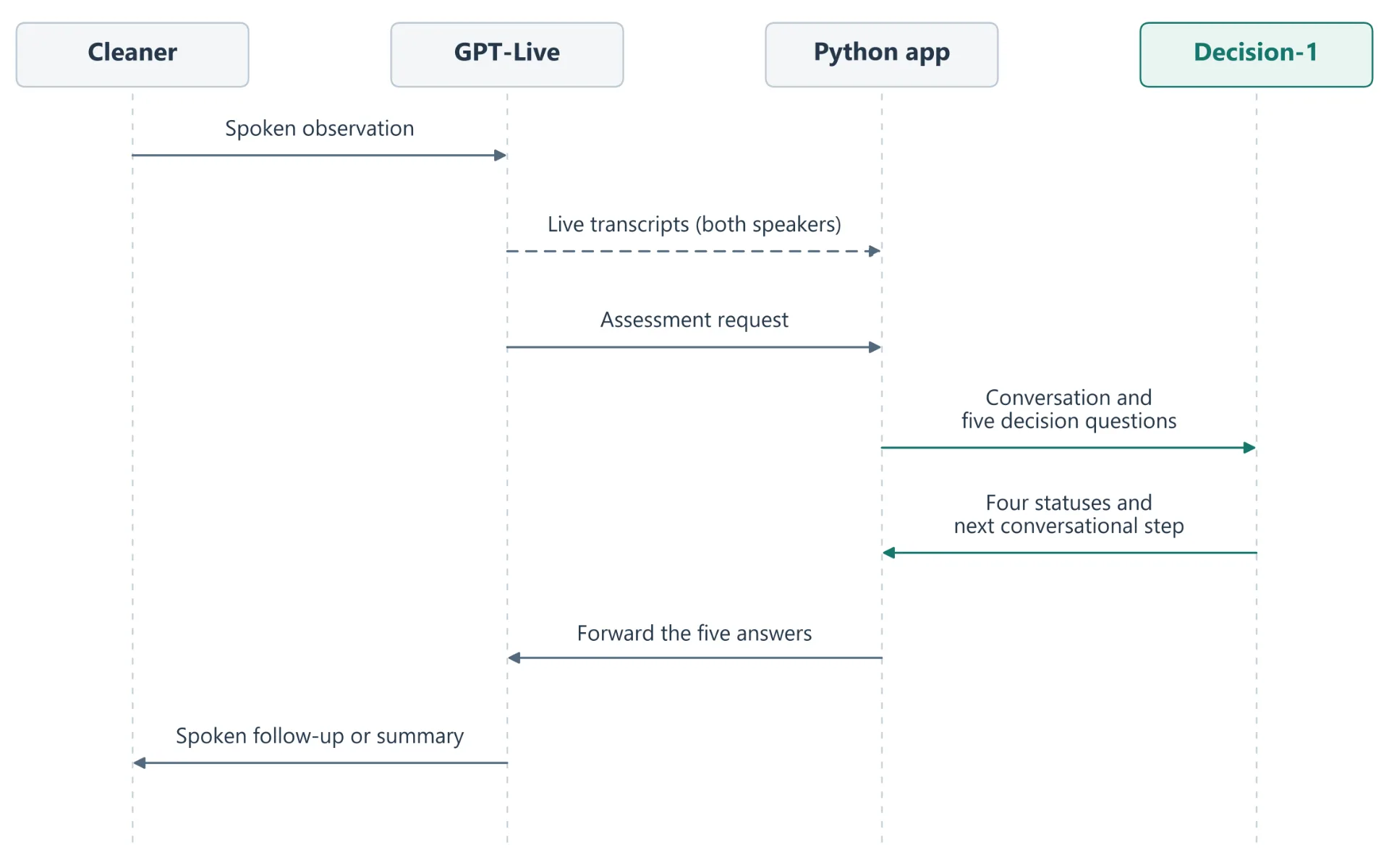
Figure 1. The workflow we’ll build. (Image by author)
As illustrated above, GPT-Live does the listening and talking. When the cleaner gives an update, Python sends the conversation so far to Decision-1, together with five questions: where do we stand on each of the four requirements, and what should the assistant do next?
Note: Decision-1 isn’t the only option. You can also use Jev or OpenAI’s Decisions API. The overall pattern stays the same; only the request inside the decision function changes.
For each requirement, it picks one of three options:
ready, the requirement is met, according to the evidence.
issue, there is still a problem,
needs_evidence, there isn’t enough evidence yet to establish whether the requirement is met or has a problem.
For the next step, it picks one of six options:
ask_entrance: Ask for missing evidence about the entrance requirement.
ask_bedroom: Ask about the bedding requirement.
ask_bathroom: Ask about the sink requirement.
ask_kitchen: Ask about the kitchen requirement.
defer: Explain what’s blocking the remaining checks and wait.
finish: Summarize the assessment, including any confirmed problems.
Here, note that finish means we have enough evidence to assess every requirement—not that everything passed.
Python then passes those selected choices back to GPT-Live, which turns them into a spoken reply. Next time the cleaner responds, we repeat this process with the updated conversation.
Ok, we're ready to build the full workflow! Here's our checklist:
Build the decision function. In this part, we define the evidence criteria and allowed outcomes, then write a function that asks Decision-1 for the four requirement statuses and the next conversational step in one request.
Set up the voice conversation. Here, we configure GPT-Live and collect the conversation transcript in our app.
Connect decisions to spoken replies. When GPT-Live requests an assessment, we call our decision function and pass Decision-1’s answers back.
We’ll build these one at a time.
3. Build The Decision Function
Here, we focus on building a function that takes the conversation so far and produces the status of each requirement and the assistant’s next conversational step.
The function itself is short:
async def assess_inspection(conversation): response = await http.post( f"{AZURE_ENDPOINT}/providers/microsoft/v1/systemone", json={ "model": "Decision-1", "state": {"conversation": conversation}, "questions": QUESTIONS, }, ) response.raise_for_status() return { name: answer["choice"] for name, answer in response.json()["answers"].items() }
First, we prepare the request to the decision model. Two main ingredients here: state supplies the accumulated conversation; QUESTIONS specifies the decisions we want. The function returns the model’s selected labels directly.
So, what goes into QUESTIONS?
It's a dictionary with 5 entries, one for each requirement, and one for the next conversational step:
QUESTIONS = { "entrance": {...}, "bedroom": {...}, "bathroom": {...}, "kitchen": {...}, "next_action": {...},}
Let’s start with the four requirement questions. Take the "bathroom" entry as an example. Here’s its full structure (instructions are shortened here to fit in the post; the notebook has the complete wording):
QUESTIONS["bathroom"] = { "type": "choice", "instructions": ( "Assess whether the sink drains normally and its underside " "stays dry while water is running. " "Use the cleaner's reported observations as evidence. " "Interpret replies in context, apply corrections to the facts " "they concern, and preserve unrelated valid observations. " "Earlier evidence must still apply to the current condition. " "Plans and general assurances do not establish a result." ), "criteria": { "needs_evidence": ( "Current reported evidence is insufficient to establish " "every part of the requirement, and does not establish " "a current failure." ), "ready": ( "Current reported evidence establishes every part " "of the requirement." ), "issue": ( "Current reported evidence establishes an unresolved " "failure of at least one part of the requirement." ), },}
This follows Microsoft Decision-1's choice format: the instructionstells the model what to assess and how to interpret the conversation, while criteriadefines the possible choices and what each one means.
The other three requirement questions follow the same structure and share these status definitions.
Then, for the next conversational step, we add the "next_action" question. It reads the same conversation, but this time we ask: what should the assistant ask or say next, given what we know and what the cleaner can do now?
Here is the structure (the instructions are shortened):
QUESTIONS["next_action"] = { "type": "choice", "instructions": ( "Choose the next useful conversational step. " "Use the cleaner's observations, corrections, and the " "requirements below to determine what still needs evidence. " "Ask for evidence the cleaner can collect now, considering " "access, timing, and available resources. " "There is no fixed room order. " "Choose defer if evidence is missing but no remaining check " "can be advanced now. " "Choose finish when every requirement has a determined " "outcome, including any confirmed problems." "\nRequirements: " + json.dumps(CHECKS) ), "criteria": { "ask_entrance": ( "Collect missing evidence that the current guest code " "successfully opens the entrance door." ), "ask_bedroom": ( "Collect missing evidence that the bed is made " "with clean sheets and clean pillowcases." ), "ask_bathroom": ( "Collect missing evidence that the sink drains normally " "and stays dry underneath while water runs." ), "ask_kitchen": ( "Collect missing evidence that the counters are clean " "and the fridge has no previous guests' food." ), "defer": ( "Explain what is blocking the remaining checks " "and wait for new information." ), "finish": ( "Summarize the assessment, including any confirmed problems." ), },}
Here, CHECKS is the dictionary containing our four requirement descriptions. We include it so the model can assess what’s still missing across the whole inspection.
One detail matters: All five questions are sent together in one request. This is supported by the Decision-1’s API, i.e., multiple questions can be answered at the same time against the same context.
That's it for the decision function.
4. Set Up the Voice Conversation
Our decision function takes a conversation and returns five choices.
But where does that conversation come from, and how does the assistant speak back?
That’s where GPT-Live comes in, OpenAI’s model for real-time spoken conversations. In our case, it does two jobs. First, it listens to the cleaner and generates spoken replies. Second, it transcribes both sides of the exchange as the conversation unfolds: what the cleaner says, and what the assistant says back. These transcripts arrive as events over the same connection, so we don’t need a separate speech-to-text step. Our app collects them into a running conversation, and that’s exactly what we hand to the decision function.
Here, we need to shift our thinking a bit. With conventional LLMs and also with decision models, we send a request, we get a response, and it's done. With GPT-Live, however, we open a session and keep it running as the conversation unfolds. The cleaner speaks, the assistant replies, and the cleaner speaks again—all within the same ongoing connection.
A WebSocket connection lets us maintain that ongoing exchange. Here's how we can do that:
import jsonfrom websockets.asyncio.client import connectasync with connect( LIVE_URL, additional_headers={"api-key": API_KEY},) as ws: await ws.send(json.dumps({ "type": "session.start", "session": { "model": "gpt-live-1", "instructions": LIVE_INSTRUCTIONS, "audio": { "output": {"voice": "marin"}, }, "delegation": {"type": "client"}, }, })) # Audio streaming and event handling continue here.
Here, LIVE_URL points to our GPT-Live endpoint, which is via Azure. LIVE_INSTRUCTIONS tells GPT-Live what to do. Also, note that we set delegation to "client". This is how we let GPT-Live hand work over to our Python app during the conversation. Here, “client” means our Python app. When GPT-Live needs an assessment, it sends a delegation event through the WebSocket. Our app then calls Decision-1 and sends its answers back to GPT-Live, which uses them to respond to the cleaner.
Here is the full content of LIVE_INSTRUCTIONS:
LIVE_INSTRUCTIONS = """You are the spoken interface for a rental apartment inspection.Speak English only.Decision-1 assesses the requirements and selects the nextconversational step. You express its answers naturally.Keep replies brief. Ask at most one question.While backend work is pending, only acknowledge briefly.Generate <|SpawnThinking|> when the cleaner finishes an observation,answers a question, or corrects facts or practical constraints.Do not delegate for greetings, while the cleaner is still listinginformation, or merely because a backend result arrives.Wait for backend answers before asking an inspection questionor reporting inspection outcomes.Follow next_action; use the conversation to phrase the questionabout the missing evidence without inventing observations.Status meanings:- ready means the requirement is met.- issue means a confirmed problem.- needs_evidence means insufficient evidence to determine the requirement.For defer, explain the blocker from the conversation and wait.For finish, summarize the returned outcomes, including any problems.Only describe the apartment as ready when all four requirementsare ready."""LIVE_INSTRUCTIONS += ( "\nRequirements: " + json.dumps(CHECKS) + "\nNext-step meanings: " + json.dumps(NEXT_ACTIONS))
You might notice the special marker <|SpawnThinking|> in the instruction. That's the recommended way to prompt the handoff, i.e., letting GPT-Live signal that it needs help from the backend.
Here's what happens when the cleaner gives our app an update:
GPT-Live recognizes that an assessment is needed and generates the marker.
Because we configured delegation as "client", the GPT-Live API sends a session.delegation.created event to our Python app through the WebSocket.
Our app picks up that event and calls assess_inspection() with the conversation collected so far.
Decision-1 returns its five choices, Python sends them back through a session.commentary.append event. It includes the delegation ID from the original request, so GPT-Live knows which request those answers belong to.
GPT-Live then uses the answers to respond to the cleaner.
We’ll connect those pieces in the next section.
5. Connect Decisions to Spoken Replies
Inside the WebSocket event loop, we listen for session.delegation.created and start our assessment handler:
import asyncioif kind == "session.delegation.created": pending = asyncio.create_task( decide(event["delegation"]["id"]) )
Here, event is the incoming WebSocket message parsed as JSON, and kind is its "type". We pass the delegation ID to decide() so it can associate the answers with this request.
We use asyncio.create_task() here, so the assessment can run while our app continues receiving audio and transcript events.
So, what does decide() do? Here’s the core of it:
async def decide(delegation_id): assessment = await assess_inspection(conversation) await ws.send(json.dumps({ "type": "session.commentary.append", "delegation_id": delegation_id, "content": json.dumps(assessment), }))
That’s the connection between our two models. We pass the accumulated conversation to the decision function, then send its five selected labels back to GPT-Live, to turn it into a spoken response.
As mentioned in Section 4, it’s built from GPT-Live’s transcripts. GPT-Live streams them in small fragments as two types of events: session.input_transcript.delta for what the cleaner says, and session.output_transcript.delta for what the assistant says. Each time one arrives, our app appends the fragment to conversation under the matching speaker. You’ll see these two branches in the event loop of the full code below.
After a short exchange, this is what conversationmight look like:
conversation = [ { "speaker": "assistant", "text": "Did the underside stay dry while the tap was running?", }, { "speaker": "cleaner", "text": "Yes, throughout.", },]
By keeping both the cleaner's answers and the assistant's questions, our decision model would have the full context to understand what was confirmed.
Now we've done the hard work! Here's the full picture:
import asyncioimport base64import jsonfrom websockets.asyncio.client import connect# Our decision function from Section 3.async def assess_inspection(conversation): response = await http.post( f"{AZURE_ENDPOINT}/providers/microsoft/v1/systemone", json={ "model": "Decision-1", "state": {"conversation": conversation}, "questions": QUESTIONS, }, ) response.raise_for_status() return { name: answer["choice"] for name, answer in response.json()["answers"].items() }async def run_voice(audio_source, on_audio): conversation = [] # Open the voice session. async with connect( LIVE_URL, additional_headers={"api-key": API_KEY}, ) as ws: await ws.send(json.dumps({ "type": "session.start", "session": { "model": "gpt-live-1", "instructions": LIVE_INSTRUCTIONS, "audio": {"output": {"voice": "marin"}}, "delegation": {"type": "client"}, }, })) started = json.loads(await ws.recv()) assert started["type"] == "session.started" # Bridge an assessment request to Decision-1 and back. async def decide(delegation_id): assessment = await assess_inspection(conversation) await ws.send(json.dumps({ "type": "session.commentary.append", "delegation_id": delegation_id, "content": json.dumps(assessment), })) # Send incoming audio while the receiving loop runs. async def send_audio(): async for pcm in audio_source: await ws.send(json.dumps({ "type": "session.input_audio.append", "audio": base64.b64encode(pcm).decode(), })) sender = asyncio.create_task(send_audio()) # Collect transcripts, handle assessments, and receive speech. async for raw in ws: event = json.loads(raw) kind = event["type"] if kind == "session.input_transcript.delta": # GPT-Live's transcript of the cleaner append_transcript( conversation, "cleaner", event["delta"] ) elif kind == "session.output_transcript.delta": # GPT-Live's transcript of its own reply append_transcript( conversation, "assistant", event["delta"] ) elif kind == "session.delegation.created": # GPT-Live asks for an assessment pending = asyncio.create_task( decide(event["delegation"]["id"]) ) elif kind == "session.output_audio.delta": on_audio(base64.b64decode(event["delta"])) elif kind == "session.closed": break # Timing, cancellation, and shutdown details are in the notebook.
Here, audio_source supplies audio chunks from a microphone or recording, and on_audio plays or saves the generated speech. append_transcript() joins transcript fragments while keeping their speaker labels. Those supporting pieces are in the notebook.
You can see that we use asynchronous execution extensively. This makes sure that the app can keep sending audio and receiving events while an assessment is underway. asyncio.create_task() lets the audio sender and assessment handler run alongside the receiving loop.
Within each assessment, the order stays simple: call Decision-1, wait for its answers, then send them back to GPT-Live. That wait doesn’t block incoming audio or transcript updates.
For the full implementation, see notebook here.
That completes our build checklist.
Now we take our newly built assistant for a spin.
We'll consider a synthetic scenario where the cleaner's conversation is scripted. The assistant's replies are nevertheless the actual GPT-Live outputs.
The cleaner starts with this update:
“Okay, so the new guest code works, I got in fine. Bed’s made, fresh sheets and pillowcases. Haven’t looked at the sink or the kitchen yet. The painter’s still working in the kitchen, so I can’t get in there right now. I can do the bathroom now, though”
Decision-1 marks the entrance and bedroom as ready. The bathroom and kitchen still need evidence, and it selects ask_bathroom. GPT-Live follows up:
“When you run the bathroom sink, does it drain normally, and stay dry underneath?”
Here's the response of the cleaner:
“The plumber has just shut off the bathroom water for the next hour. The painter has finished and reopened the kitchen. I still have not checked either room. But I can go into the kitchen now.”
Both requirements still have the status needs_evidence, but Decision-1 switches to ask_kitchen:
“Can you check the kitchen now? Are the counters clean, and is there any food left in the fridge?”
“The kitchen counters are clean now. I opened the refrigerator and removed every item left by the previous guests. The bathroom water is still shut off, so I cannot run the tap yet.”
With the kitchen now ready and the remaining sink check blocked, Decision-1 selects defer. The assistant goes:
“We can’t finish the bathroom check until the water is back on. Let me know when it’s running again.”
Later, once the water is back on, the cleaner reports:
“The water is back on. I let the tap run and the basin emptied normally, but droplets appeared on the joint underneath while the water was flowing.”
“The place isn’t ready yet. There’s a leak under the bathroom sink. The other spots look good.”
The bathroom is now issue, and the next step is finish. We have enough evidence to assess every requirement, even though one has a confirmed problem.
Then the cleaner corrects an earlier observation:
“Oh wait, I got something wrong about the bedding. Those clean pillowcases were next door, not here. In this one I did change the sheets and make the bed, but I haven’t actually looked at the pillowcases. I can go check them now if you want.”
“Could you take a look at the bed now? Are the pillowcases clean in this unit?”
Decision-1 reopens the bedroom requirement as needs_evidence and selects ask_bedroom. The other statuses stay unchanged, including the sink problem.
“I found marks on the pillowcases, so I replaced them with clean ones and made the bed again using the clean sheets. The sink is still dripping underneath. Nobody has repaired it yet.”
“The place still isn’t ready yet. The bathroom sink is leaking. The other areas look good.”
Later, after maintenance has attended to the leak, the cleaner returns:
“Maintenance has now repaired the joint. After they finished, I ran the tap for a full minute. Water drained normally, and I watched underneath the whole time. It stayed dry.”
Decision-1 marks the bathroom as ready. All four requirements are now met, and it selects finish. GPT-Live replies:
“Great. Everything’s ready now.”
This completes the full interaction.
We can see that our assistant is working properly: across the conversation, the decision model keeps track of the current status and drives what to ask next. GPT-Live, in the meantime, turns those choices into a natural back-and-forth with the cleaner.
Note: In practice, if the inspection is long, you don't need to keep the voice session open. With OpenAI's GPT-Live API, there are two ways to do it: you can either have the app save the conversation and supply it as history when starting a new session, or if you’ve turned on session storage, you can fork the finished session and pick up where you left off under a new session ID. Find out more here.
In a live conversation, the app keeps asking itself the same things: what do we know now, and what’s next?
A decision model is a good fit for those calls. It returns clear choices the app can act on, and the speech model just has to say them well.
To try this in your own app, start with a judgment your app needs to make over and over. Think about what context it needs, and what answers the app can act on. Define those choices, then connect the decision to the conversation.
You can find the full notebook here.
Language models are becoming really good. But where did they come from?
August 27, 202513 min read
We are currently living in a time where Artificial Intelligence, especially Large Language models like...
February 16, 202610 min read
Learn how you can use vision language models to perform advanced document understanding tasks.
October 20, 202510 min read
Maximize your efficiency with Claude Code
July 26, 20269 min read
Turning Codex from an interactive assistant into a programmable automation component
August 21, 20266 min read
Become a more productive software engineer with LLMs
August 17, 20267 min read
Build and deploy an agent on AWS with Strands and AgentCore
July 1, 202623 min read
HuggingFace smolagents framework in action
May 26, 202516 min read
I replayed correct model decisions through four deliberately broken browser actions, and a simple page check missed half of the wrong clicks, which shows that noticing a fault and recovering from it are different skills.
October 27, 202615 min read
原文为英文,正文由自动抓取并保留原文。
原文发布于 Towards Data Science(Let Decision Models Guide Your Voice Assistant),标题、摘要与正文由机器翻译,术语按行业惯例统一,未经人工逐句校订。