Supermicro 兼作工作站的 AI 服务器评测
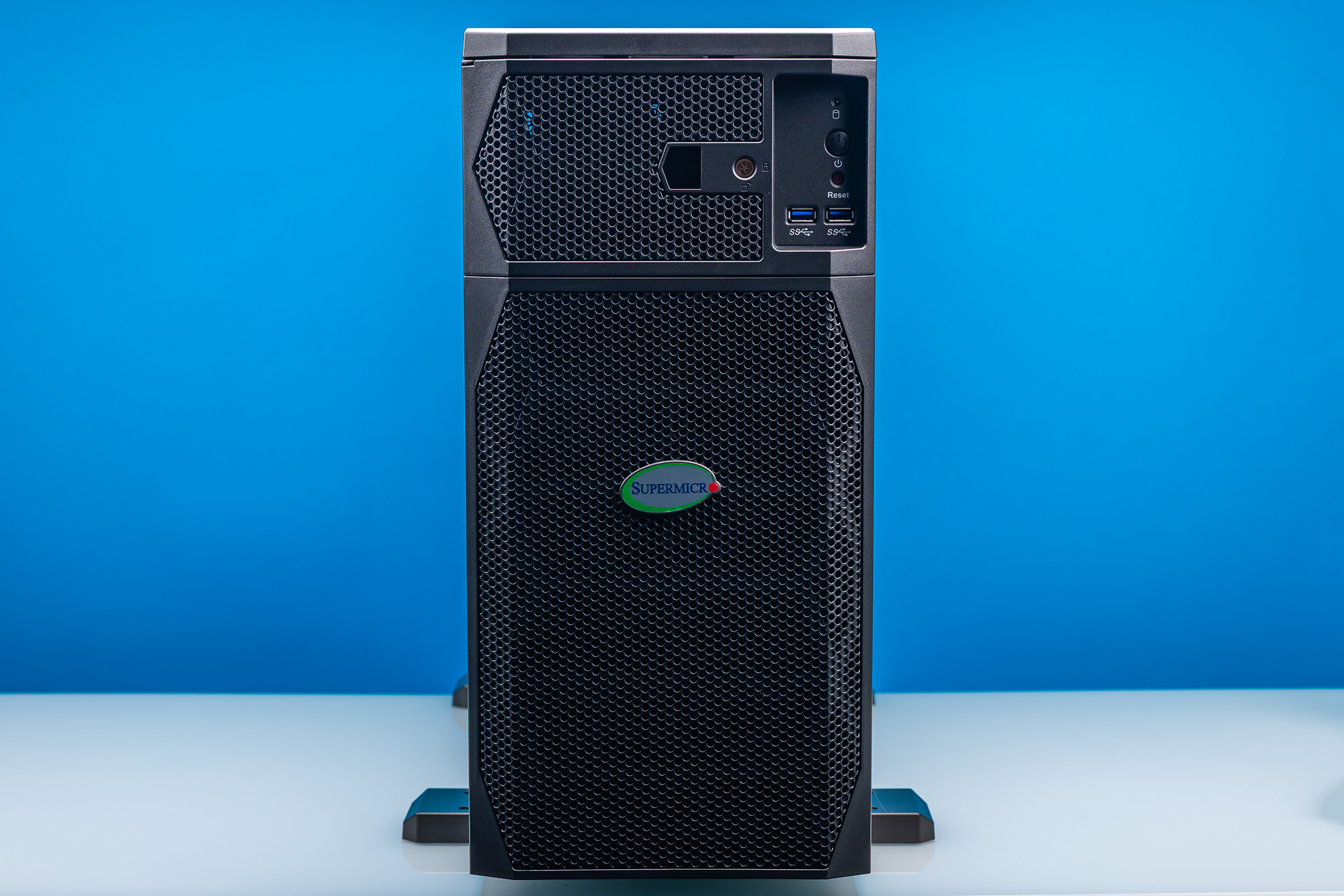
Supermicro ARS-511GD-NB-LCC Super AI Station——正面 4
NVIDIA 的 DGX Station 计划旨在将其服务器级 Grace Blackwell GB300 硬件引入桌面工作站,该计划拥有多家合作伙伴,因此硬件供应商并不短缺,系统设计也不少。在所有这些方案中,凭借其独特的可转换设计,Supermicro 显然是最有趣工作站的领跑者。
今天我们来审视我们最新的 DGX Station 系统——Supermicro 的 Super AI Station(ARS-511GD-NB-LCC)。通过塞入 1.6kW 电源所能支撑的尽可能多的计算硬件,NVIDIA 及其合作伙伴正将这些系统定位为面向本地 AI 工作的终极桌边 AI 设备。
Supermicro Super AI Station(ARS-511GD-NB-LCC)关键规格
NVIDIA Grace 72 核 Neoverse V2(72C/72T)
Ubuntu 24.04 LTS 搭配 NVIDIA AI 开发者工具
CPU:496GB LPDDR5X(396GB/s) GPU:252GB HBM3E(7.1TB/s)
2 个 M.2 2280(PCIe Gen6 x4) 2 个 M.2 2280(PCIe Gen5 x4)
可选配置:NVIDIA RTX PRO Blackwell 2000/4000/6000
1600W(80 PLUS Titanium)
塔式工作站(5U)218 x 455 x 701 mm(8.6 x 17.9 x 27.6 in)
2 个 400Gbps(QSFP112,ConnectX-8)10Gb 以太网(RJ45,Marvell)1Gb 以太网(BMC)
前置:2 个 USB-A 5Gbps;后置:4 个 USB-A 10Gbps、1 个 USB Micro-B UART(BMC)、2 个 400GbE(QSFP112)、1 个 10GbE LAN(RJ45,Marvell)、1 个 1GbE LAN(RJ45,BMC)、3 个 3.5mm 音频接口、1 个 Mini DisplayPort(BMC)
与此同时,每家 DGX Station 厂商都在为 GB300 台式机应当如何打造给出自己的诠释,Supermicro 也不例外。对 Supermicro 而言,这意味着它比大多数厂商更字面地理解了“把服务器放在办公桌上”这一理念——它开发的系统既可以作为全尺寸台式塔式机使用,也可以作为 5U 系统装入机架。毫无疑问,这非常 Supermicro,也是该公司将服务器专长应用于工作站市场的一个绝佳范例。考虑到我们在这些系统的网络配置上了解到的情况,这种设计也非常合理。
闲话少说,我们直接开始。
Supermicro Super AI Station 外部硬件概览
第一次看到 Supermicro 的 Super AI Server 时,你会立刻发现它与其他 DGX Station 厂商提供的全塔式 PC 明显不同。对于自家的 DGX Station 系统,Supermicro 做了最「Supermicro」的一件事:把整套系统装进了一个可转换机箱里。这套系统既可以作为桌面工作站部署,也可以装上导轨,作为 5U 服务器上架机架。
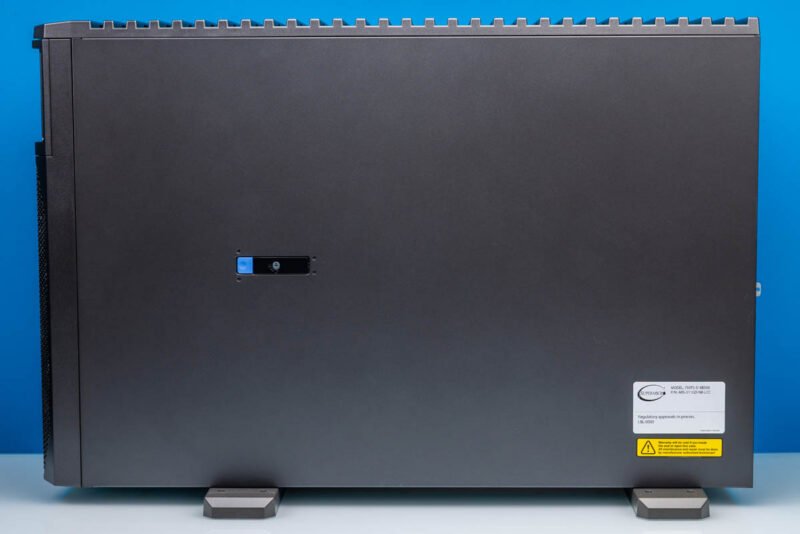
Supermicro ARS-511GD-NB-LCC Super AI Station 侧面 3
正如我们将看到的,这种可转换设计对系统设计产生了巨大影响。系统的外形尺寸和内部布局都针对这两种角色做了优化,这也让它在某些方面与其他 DGX Station 系统截然不同。
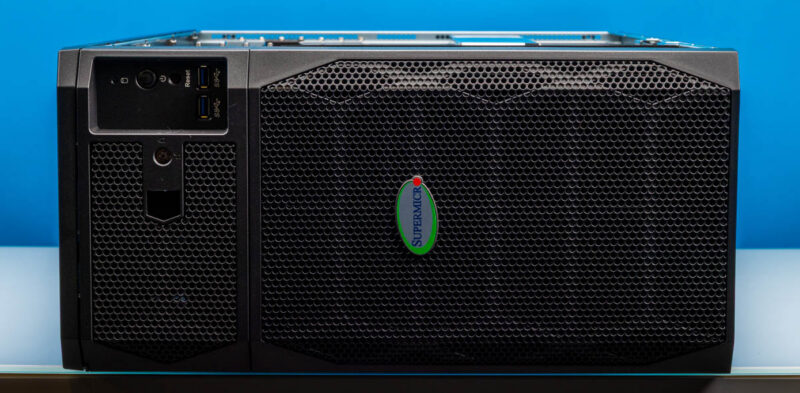
这种设计带来的一个直接影响是,Super AI Station 比典型的 PC 塔式工作站更矮,但深度大得多。Super AI Station 高度为 455mm,机身足够窄,可以放进一对机架立柱之间。代价是它的长度为 701mm(接近 28 英寸)。
Supermicro ARS-511GD-NB-LCC Super AI Station 正面 1
需要为 1600 瓦的硬件散热,Super AI Station 用「高风量系统」来形容最为贴切。系统正面几乎每一平方毫米的空间都用于吸入空气为系统散热。
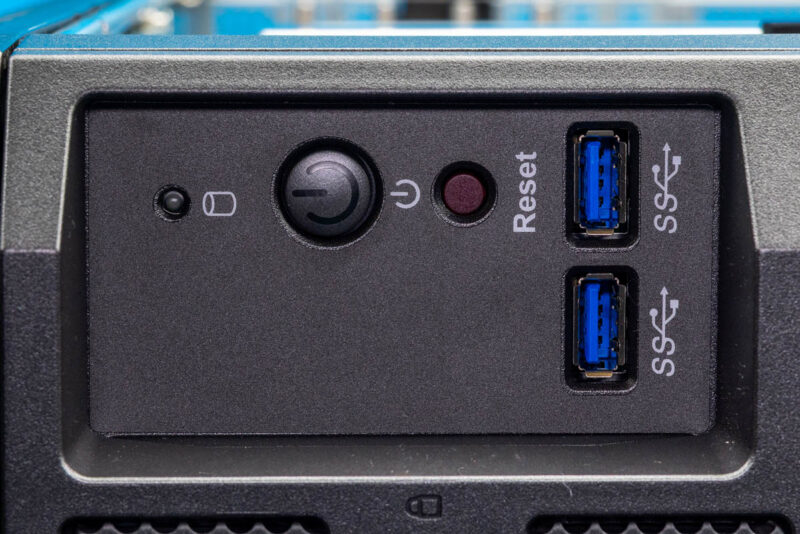
Supermicro ARS-511GD-NB-LCC Super AI Station 正面 IO 1
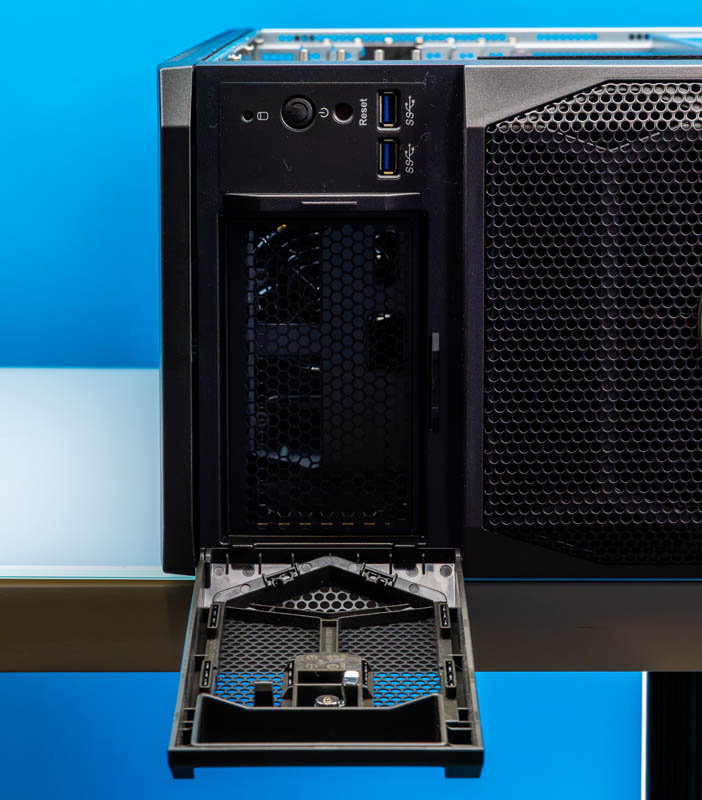
唯一的例外是一个小型前置 I/O 面板;尽管该设计非常强调气流,但这是我们第一次在 DGX Station 上看到真正的前置 I/O 面板。Supermicro 的服务器血统在这里再次显露出来,因为其端口配置只是简单的两个 5Gbps USB-A 端口。与其他系统相比,我们见过其他厂商在这里配备 10Gbps USB-A 和 USB-C 端口,这再次凸显了该设计的服务器血统。这些端口本身标注得足够清楚,但在这一方面,它感觉更像一台服务器。
Supermicro ARS-511GD-NB-LCC Super AI Station-电源按钮 1
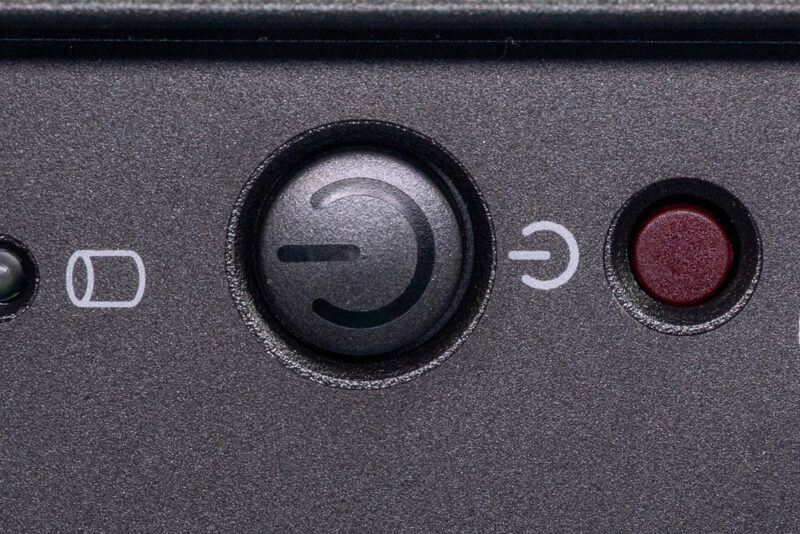
除此之外,前置 I/O 面板还配有电源按钮、一个较小的重置按钮,以及最后一个驱动器活动 LED。系统状态 LED 嵌入在电源按钮中,可根据系统状态亮红色或蓝色。
Supermicro ARS-511GD-NB-LCC Super AI Station-前置锁扣 1
前置 I/O 面板左侧是一个上锁的笼架,它遮盖了系统的服务标签信息。理论上,这个区域也可以容纳前面板存储扩展。
Supermicro ARS-511GD-NB-LCC Super AI Station-侧面 1
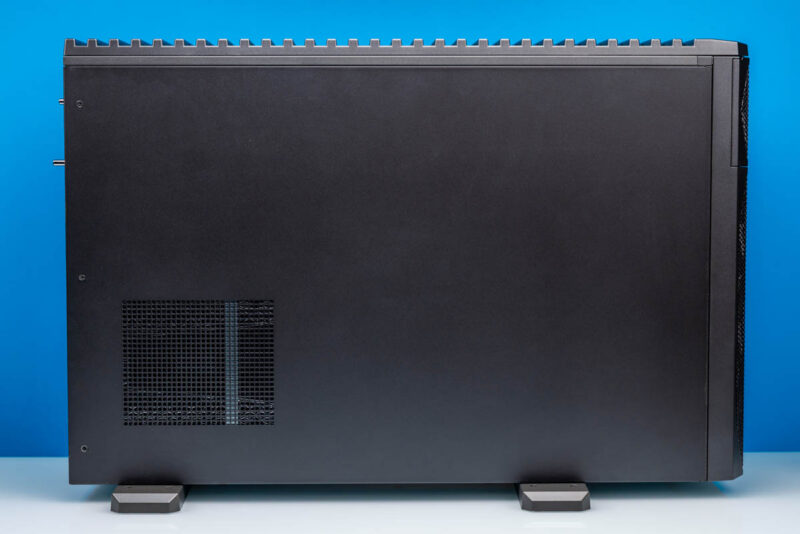
至于 Super AI Station 的两侧,两侧都平平无奇。与 Supermicro 在 Computex 上那台有趣的演示机不同,量产硬件没有配备有机玻璃窗。如果你想看到内部,就必须拆下侧板。由于该系统是可转换的,Supermicro 并不依赖两侧进行显著通风,因此这些面板不过是简单的钢板。
Supermicro ARS-511GD-NB-LCC Super AI Station-后部 1
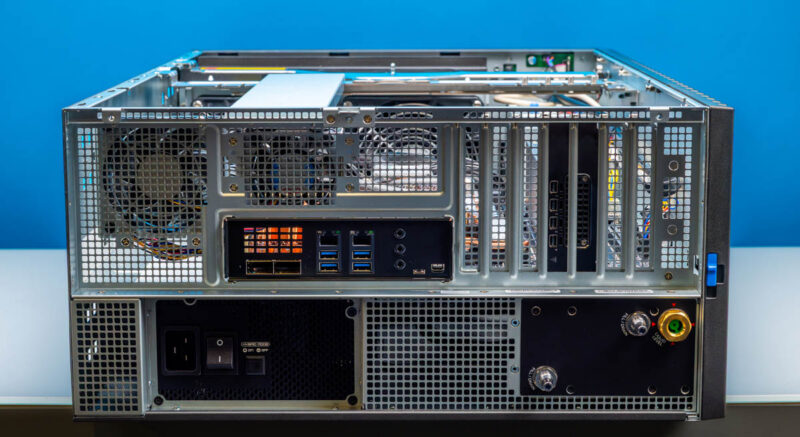
转到系统后部,我们终于能更清楚地看出 Super AI Station 与更标准的工作站有多大不同:它不是标准的 EEB/E-ATX 机箱。电源被放在系统的一侧,有一个明显的冷却液罐,而且主板是倒装的——这一点在这张照片里不太明显。PCIe 插槽挡板位于系统顶部。
由于所有这些 DGX Station 系统的主板都由 NVIDIA 提供,接口布局是标准化的,因此 Supermicro 的布局与其他厂商一致。
Supermicro ARS-511GD-NB-LCC Super AI Station-QSFP 400Gb LAN 端口 1
从左侧开始,系统的两个 QSFP112 端口由性能强劲的 NVIDIA ConnectX-8 SuperNIC 驱动。每个端口提供 400Gbps 网络能力,是系统连接高速存储和/或其他基于 DGX Station 的系统的主要途径。我们已经展示过,在某些情况下这些系统可以通过该网卡跑出 800Gbps。驱动这些端口的 ConnectX-8 SuperNIC 在网络之外还承担了大量繁重工作,因此这些 QSFP 端口的能力和局限也相应地有些复杂(稍后再详细说明)。同时,QSFP 笼子上方有一个栅格,以便增加一些气流用于散热。
Supermicro ARS-511GD-NB-LCC Super AI Station-后置 IO 1
对于更常规的网络用途,该系统还配备了两个 RJ45 以太网口。左侧的 1G 端口连接到 BMC,用于系统管理。OpenBMC 通过 HTML5 iKVM 进行管理。右侧的 RJ45 接口是一个 10Gb 以太网端口,由 Marvell 久经考验的 10GbE 控制器驱动。该系统的拓扑结构很有意思。Marvell 的 10Gbase-T 控制器连接到 NVIDIA ConnectX-8 SuperNIC 内置的 PCIe 交换机,然后再连接到 CPU。它并不直接连接到 CPU。
下面是其余的 USB 端口。这四个端口均以 10Gbps 运行,是系统中速度最快的 USB 端口。这也意味着,由于 NVIDIA 在主板设计中没有加入 USB-C 端口,你在 Super AI Station 上找不到任何 USB-C 端口。
Supermicro ARS-511GD-NB-LCC Super AI Station-音频端口 1
右侧是三个音频接口,用于两声道音频输出,另有独立的麦克风和线路输入接口。
在后置 I/O 面板的末端,还有两个端口连接到 BMC。左侧是 micro-USB 形式的串行 UART。右侧是 BMC 提供的 Mini DisplayPort 输出,用于系统管理和配置。DGX Station 系统没有真正集成的显示 GPU(Blackwell Ultra 更像是计算加速器),因此 BMC 提供了唯一的开箱即用图形输出。若需要完整的图形解决方案,你可以将 DGX Station 系统与兼容的 NVIDIA RTX PRO Blackwell 显卡搭配使用。在本例中,Supermicro 配备了一块 RTX PRO 2000 Blackwell 显卡。
值得注意的是,该系统背部没有任何端口标注。Supermicro 似乎选择在其 I/O 挡板上不印制任何内容,至少这台机器是如此。对于一台服务器来说,这属于常规做法,但既然 Super AI Station 还要兼作工作站,能看到标注会更好。我们拿到的是早期系统,这类早期系统有时会漏掉此类细节。
Supermicro ARS-511GD-NB-LCC Super AI Station——冷却液罐 1
与所有 DGX Station 系统一样,Super AI Station 采用液冷。Supermicro 的设计让这一点一目了然。该公司在系统靠近顶部的位置安装了一个可从外部接触的冷却液罐。由于系统出厂即完全组装完毕,Super AI Station 的设计目标是尽量少维护,因此这个可从外部接触的液罐看起来更像是数据中心系统的遗留设计——数据中心系统可能需要更频繁的主动维护。无论如何,如果系统冷却液开始不足,液位指示器可以让人轻松看到,并且设有加注和排空接口。
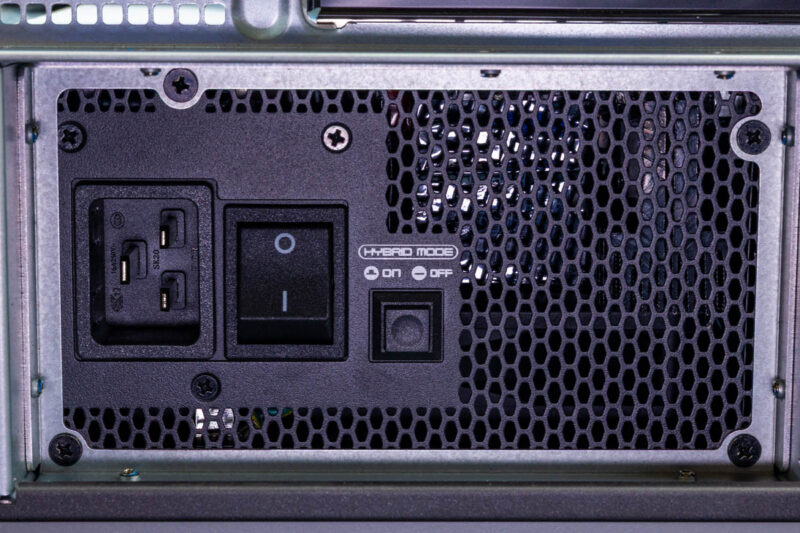
Supermicro ARS-511GD-NB-LCC Super AI Station——1600W 白金级电源 1
原文较长,译文为节选;译文由英文原文机器翻译,术语按行业惯例统一,可在文末展开原文核对。
查看英文原文(Supermicro Super AI Station Review: The AI Server That Doubles as a Workstation)
Supermicro Super AI Station Review: The AI Server That Doubles as a Workstation - ServeTheHome
HomeAISupermicro Super AI Station Review: The AI Server That Doubles as a...
Supermicro ARS-511GD-NB-LCC Super AI Station-Front 4
With several partners in its DGX Station initiative, NVIDIA’s project to bring its server-grade Grace Blackwell GB300 hardware to desktop workstations has no shortage of hardware suppliers. Or system designs, for that matter. Of all of these, Supermicro is a clear frontrunner for the most interesting workstation, thanks to its unique, convertible design.
Today we are taking a look at our latest DGX Station system with Supermicro’s Super AI Station (ARS-511GD-NB-LCC). By squeezing in as much compute hardware as a 1.6kW power supply can sustain, NVIDIA and its partners are positioning these systems as the ultimate desk-side AI boxes for local AI work.
Supermicro Super AI Station (ARS-511GD-NB-LCC) Key Specs
NVIDIA Grace 72-Core Neoverse V2 (72C/72T)
Ubuntu 24.04 LTS with NVIDIA AI Developer Tools
CPU: 496GB LPDDR5X (396GB/s)
GPU: 252GB HBM3E (7.1TB/s)
2x M.2 2280 (PCIe Gen6 x4)
2x M.2 2280 (PCIe Gen5 x4)
Optional: NVIDIA RTX PRO Blackwell 2000/4000/6000
1600W (80 PLUS Titanium)
Tower Workstation (5U)
218 x 455 x 701 mm (8.6 x 17.9 x 27.6 in)
2x 400Gbps (QSFP112, ConnectX-8)
10Gb Ethernet (RJ45, Marvell)
1Gb Ethernet (BMC)
Front:
2x USB-A 5Gbps
Rear:
4x USB-A 10Gbps, 1x USB Micro-B UART (BMC), 2x 400GbE (QSFP112), 1x 10GbE LAN (RJ45, Marvell), 1x 1GbE LAN (RJ45, BMC), 3x 3.5mm Audio, 1x Mini DisplayPort (BMC)
Meanwhile, every DGX Station vendor is putting their own spin on how a GB300 desktop should be built, and Supermicro is no different. For Supermicro, that means taking the “server at your desk” motif a little more literally than most, by developing a system that can either be set up as a full-size desktop tower or placed in a rack as a 5U system. It is, without a doubt, quintessentially Supermicro and a great example of how the company has applied its server expertise to the workstation market. It also makes a lot of sense given what we have learned with the networking on these systems.
Without further ado, let us dive right in.
Supermicro Super AI Station External Hardware Overview
The first time you see Supermicro’s Super AI Server, it is immediately obvious that it is different from the full-tower PCs other DGX Station vendors offer. For their own DGX Station system, Supermicro has done the most Supermicro thing possible by putting the system inside of a convertible chassis. This system can be set up as a desktop workstation, or it can be put on rails and rack-mounted as a 5U server.
 Supermicro ARS-511GD-NB-LCC Super AI Station-Side 3
That kind of convertible design has a huge impact on the system design, as we will see. Both the system’s form factor and internal layout have been optimized to fulfill both roles, which at times makes this a very different system from other DGX Station systems.
One immediate impact of that design is that the Super AI Station is a bit shorter and much deeper than a typical PC tower workstation. At 455mm tall, the Super AI Station is skinny enough to fit between a pair of rack posts. The trade-off is that it is 701mm (or nearly 28 inches) long.
 Supermicro ARS-511GD-NB-LCC Super AI Station-Front 1
With 1600 watts of hardware to cool, the Super AI Station is best described as a high-airflow system. Almost every square millimeter of space on the front of the system is dedicated to drawing in air to cool the system.
 Supermicro ARS-511GD-NB-LCC Super AI Station-Front IO 1
The sole exception to that is a small front I/O panel, which, despite the heavy airflow emphasis, marks the first time we have seen an actual front I/O panel on a DGX Station. Supermicro’s server roots make themselves apparent here once again, as the port collection is a simple pair of 5Gbps USB-A ports. Compared with other systems, we have seen other vendors put 10Gbps USB-A and USB-C ports here, underscoring the server roots of this design once more. The ports themselves are adequately labeled, but it feels a bit more like a server in this respect.
 Supermicro ARS-511GD-NB-LCC Super AI Station-Power Button 1
Otherwise, the front I/O panel is rounded out with the power button, a smaller reset button, and finally a drive activity LED. The system status LED is embedded in the power button and can illuminate red or blue, depending on the system status.
 Supermicro ARS-511GD-NB-LCC Super AI Station-Front Latch 1
To the left of the front I/O panel is a locked cage, which hides the system’s service tag information. This area could also theoretically house front panel storage expansion.
 Supermicro ARS-511GD-NB-LCC Super AI Station-Side 1
As for the sides of the Super AI Station, both sides are unremarkable. Unlike Supermicro’s fun demo unit back at Computex, the production hardware does not come with a plexiglass window. If you want to see inside, you will have to take the side panels off. Since the system is convertible, Supermicro doesn’t rely on the sides for significant ventilation, so these panels are little more than simple steel sheets.
 Supermicro ARS-511GD-NB-LCC Super AI Station-Rear 1
Flipping over to the rear of the system, we finally get a better idea of just how different the Super AI Station is from more standard workstations: this is not a standard EEB/E-ATX chassis. The power supply is on its own side of the system, there is an obvious coolant tank, and, though not obvious in this shot, the motherboard is installed upside-down. The PCIe slot brackets are at the top of the system.
Because NVIDIA provides the motherboards for all these DGX Station systems, the port layout is standardized, so Supermicro’s matches the other vendors.
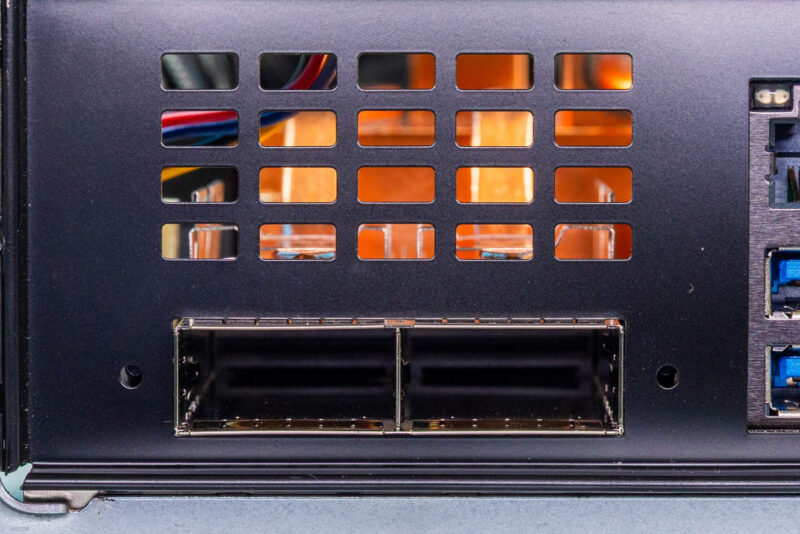 Supermicro ARS-511GD-NB-LCC Super AI Station-QSFP 400Gb LAN Ports 1
Starting on the left, the system’s two QSFP112 ports are fed by the powerful NVIDIA ConnectX-8 SuperNIC. Each port offers 400Gbps networking and is the primary way the system connects to high-speed storage and/or other DGX Station-based systems. We have shown that these systems can push 800Gbps through the NIC in certain circumstances. The ConnectX-8 SuperNIC driving these ports does a lot of heavy lifting beyond networking, and the capabilities and limitations of these QSFP ports are somewhat complex as a result (more on this in a bit). Meanwhile, there is a grate above the QSFP cages to allow for a bit more airflow for cooling.
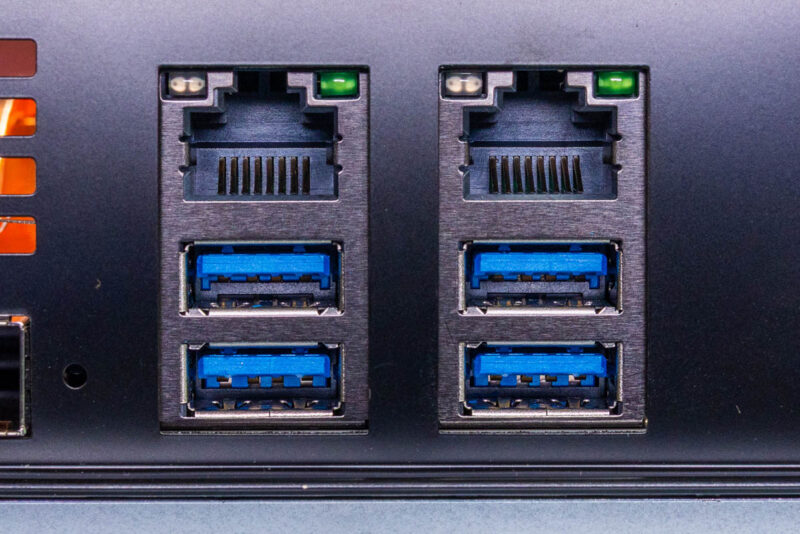 Supermicro ARS-511GD-NB-LCC Super AI Station-Rear IO 1
For more mundane networking use cases, the system also has a pair of RJ45 Ethernet jacks. The left 1G port connects to the BMC and is for system management. OpenBMC handles management via an HTML5 iKVM. The RJ45 jack on the right side is a 10Gb Ethernet port powered by Marvell’s tried-and-true 10GbE controller. The system topology is fascinating. Marvell’s 10Gbase-T controller is attached to the NVIDIA ConnectX-8 SuperNIC’s built-in PCIe switch, then to the CPU. It does not connect directly to the CPU.
Below are the remaining USB ports. These four ports all run at 10Gbps, making these the fastest USB ports on the system. This also means that since NVIDIA did not include USB-C ports in its motherboard design, you will not find any USB-C ports on the Super AI Station.
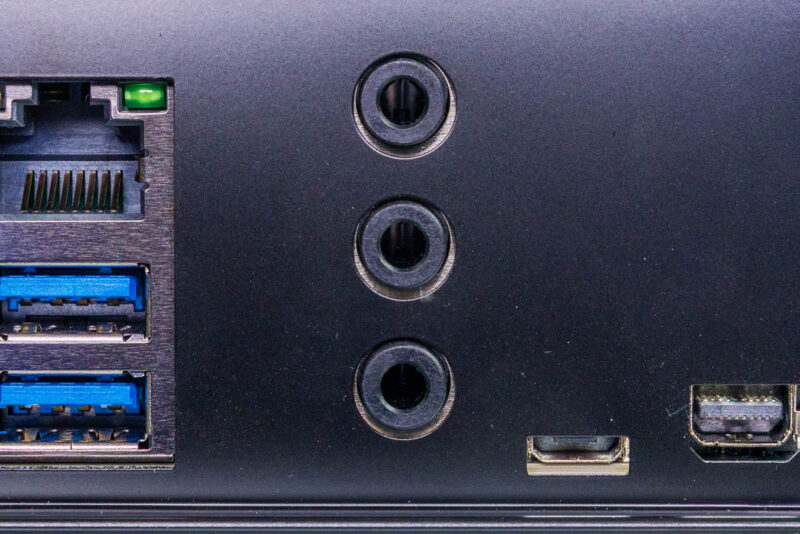 Supermicro ARS-511GD-NB-LCC Super AI Station-Audio Ports 1
To the right, we have a trio of audio jacks for two-channel audio out, plus separate mic and line-in jacks.
At the end of the rear I/O panel, two more ports connect to the BMC. On the left is a serial UART in a micro-USB form factor. To the right is a Mini DisplayPort output from the BMC for system management and configuration. DGX Station systems do not have a true integrated display GPU (Blackwell Ultra is more of a compute accelerator), so the BMC provides the only out-of-the-box graphics output. For a full-featured graphics solution, you can pair DGX Station systems with a compatible NVIDIA RTX PRO Blackwell video card. In this case, Supermicro has included an RTX PRO 2000 Blackwell card.
Notably, no port is labeled on the rear of the system. Supermicro has seemingly opted not to print anything on its I/O shield, at least in this example. For a server, this is par for the course, but as the Super AI Station is meant to double as a workstation, it would have been nice to see. We have an early system, so sometimes those early systems miss details like that.
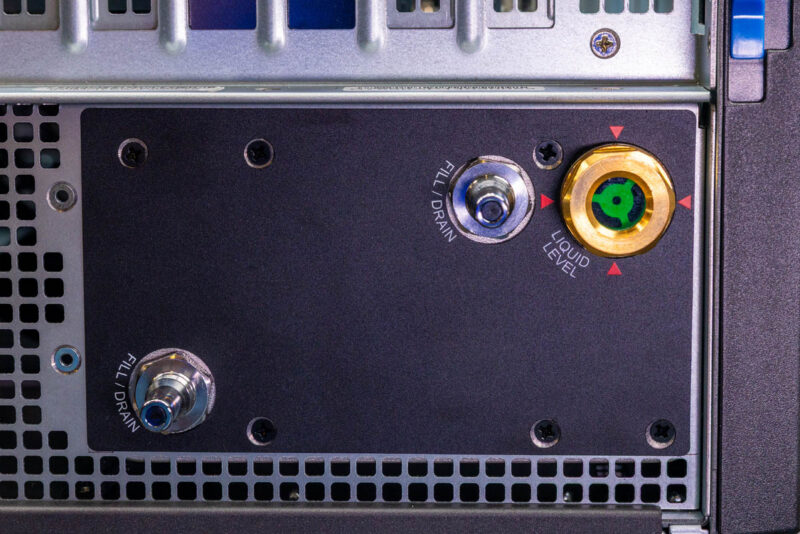 Supermicro ARS-511GD-NB-LCC Super AI Station-Coolant Tank 1
Like all DGX Station systems, the Super AI Station is liquid-cooled. Supermicro’s design makes this obvious. The company uses an externally accessible coolant tank mounted toward the top of the system. Because the system comes completely pre-built, the Super AI Station is designed for minimal maintenance, so the externally accessible tank seems like a holdover from data center systems that can require more active maintenance. Regardless, if the system starts running low on coolant, the liquid level indicator makes it easy to see, and there are ports for filling and draining the system.
 Supermicro ARS-511GD-NB-LCC Super AI Station-1600W Platinum Level Power Supply 1
Elsewhere, near the bottom of the system, we have the Super AI Station’s 1600 Watt power supply. While the wattage is standardized across DGX Station systems, the actual power supply model is not. This benefits Supermicro, as theirs is the first DGX Station system to cross our labs with an 80 Plus Titanium-rated power supply, one step higher than the Platinum units we have seen in other systems.
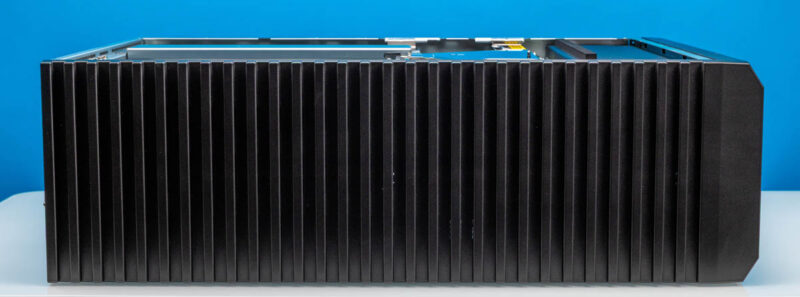 Supermicro ARS-511GD-NB-LCC Super AI Station-Top 1
Because Supermicro put all of their front I/O and buttons on the front of the system, there is no need for the top of the system to be anything special. Coupled with the fact that it has no ventilation here, since that would not work in a rackmount scenario, Supermicro is keeping things simple on top. This top can be popped off to expose mounting points for rackmount rails.
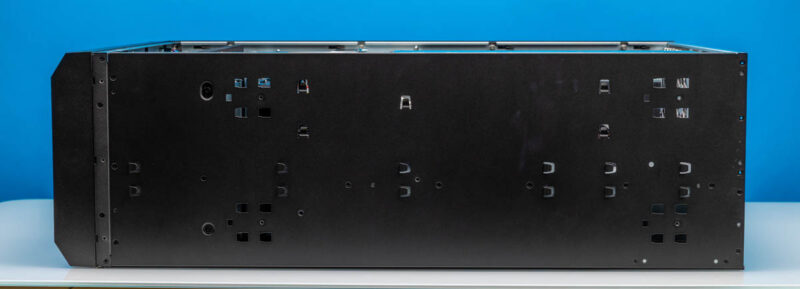 Supermicro ARS-511GD-NB-LCC Super AI Station-Bottom 1
The bottom, for that matter. Here it is much more obvious, even in a workstation configuration, that this chassis can be rack-mounted, as you can easily see where the rails would go.
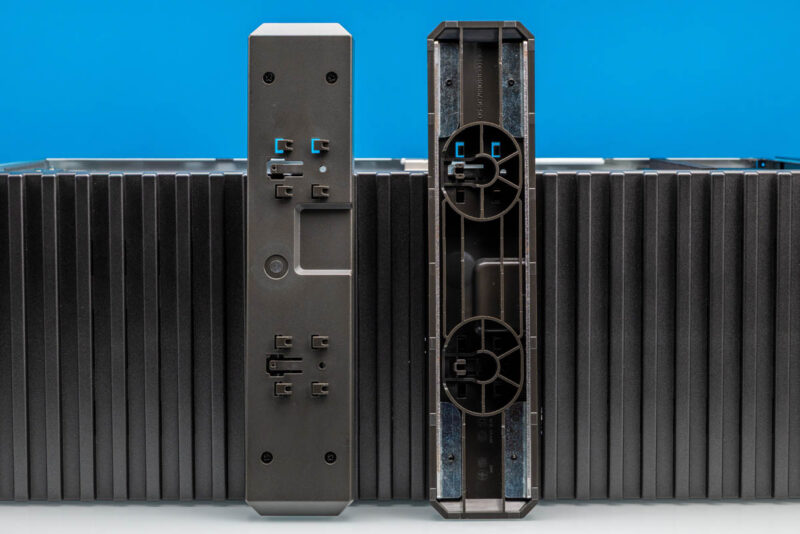 Supermicro ARS-511GD-NB-LCC Super AI Station-Feet 1
This also means that for workstation mode, the chassis needs a pair of feet attached to properly support the system and its copious 88lb weight.
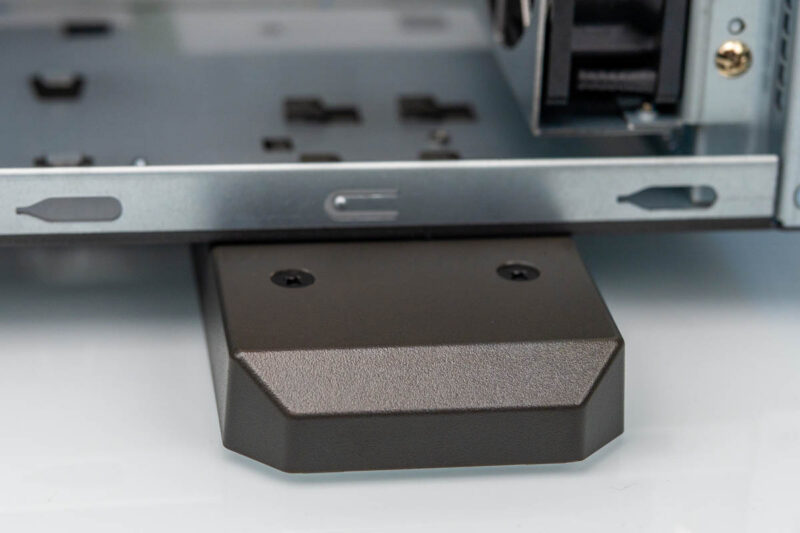 Supermicro ARS-511GD-NB-LCC Super AI Station-Feet 2
That wraps things up for our outside look at the Super AI Station. For the rest of the story, let us dive into the system’s chassis, where this gets very different.
原文为英文,正文由自动抓取并保留原文。
原文发布于 ServeTheHome(Supermicro Super AI Station Review: The AI Server That Doubles as a Workstation),标题、摘要与正文由机器翻译,术语按行业惯例统一,未经人工逐句校订。


