MSI EdgeMesa N AI+ 评测:性能与取舍
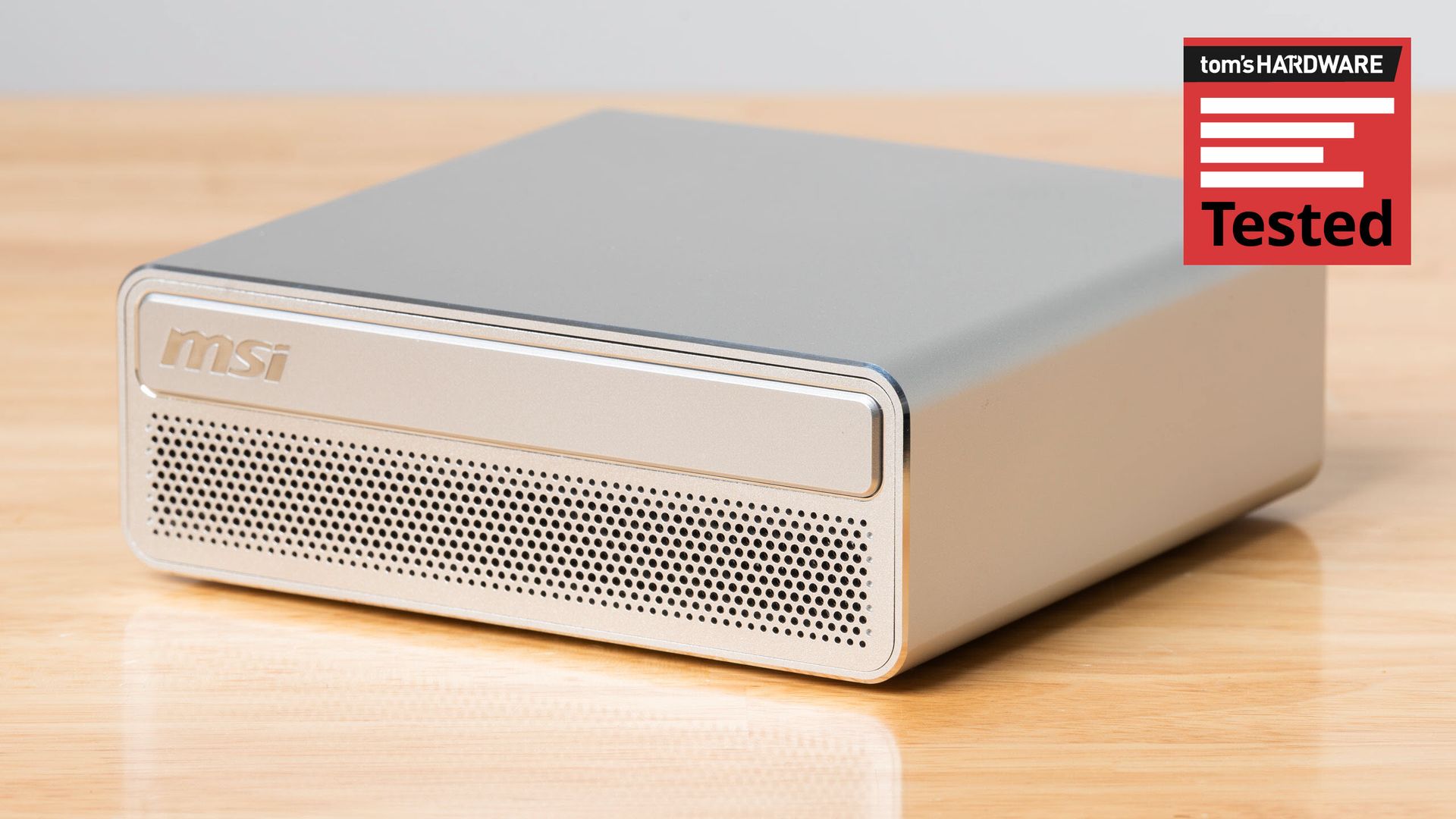
NVIDIA 的 RTX Spark 平台由 RTX Spark N1X SoC 驱动,上个月在 Windows on Arm 笔记本电脑的核心位置通过了迄今最严苛的考验。现在我们有机会看看,这颗芯片如何作为 Windows on Arm 的基础来支撑紧凑型台式机。
我们拿到了 MSI EdgeMesa N AI+,这是一台售价 7,500 美元的 RTX Spark 迷你主机,让 Windows 原生创作者和本地 AI 先行者能够用上我们最近在 Surface Laptop Ultra 上测试过的同款强大 6144 核 Blackwell GPU 和 20 核 Arm CPU,并在我们测试的配置中配备 128GB 统一内存池和 4TB 存储。
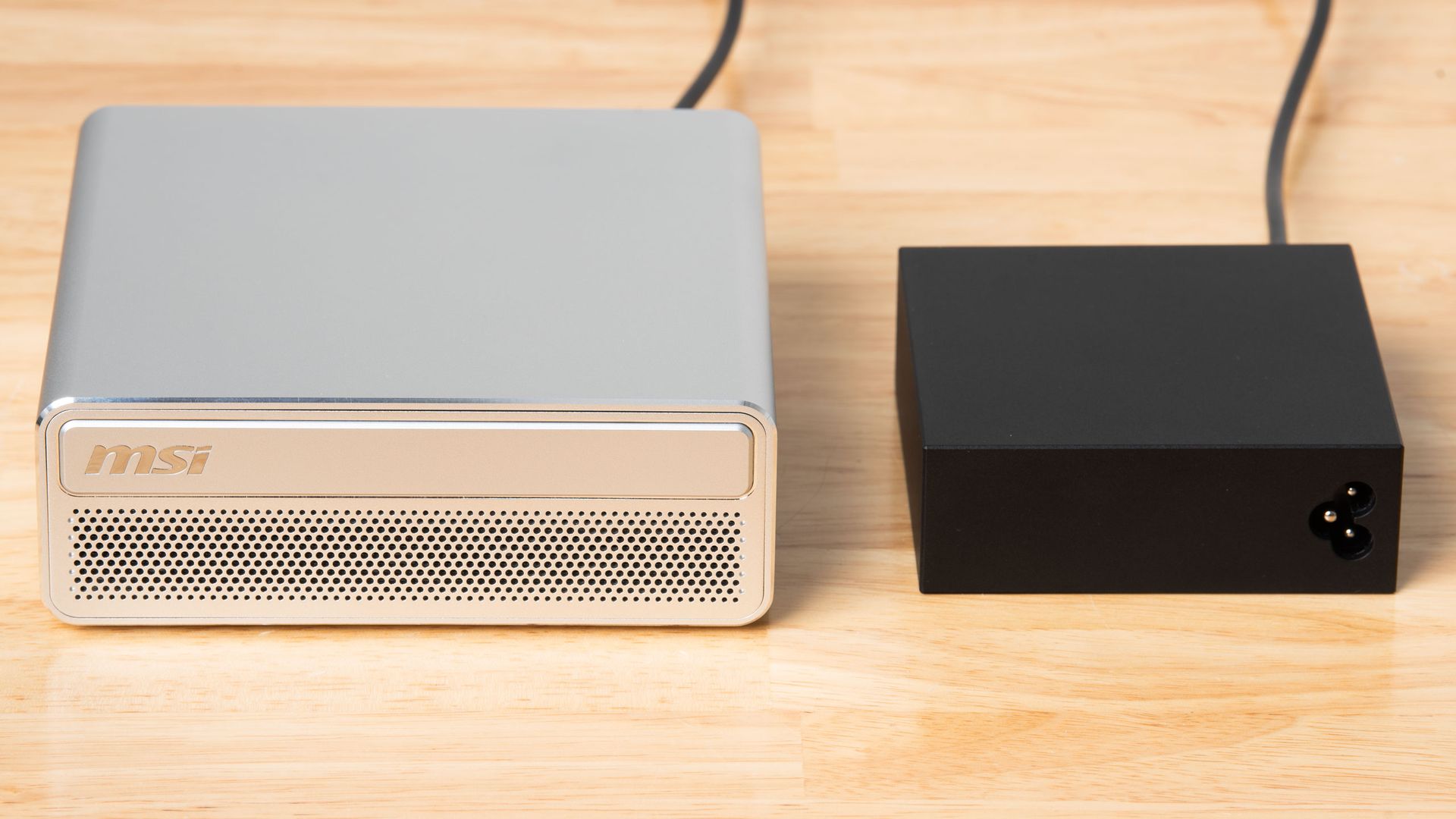
我们以 DGX Spark 及其同类产品的形式测试搭载 NVIDIA GB10 的台式机系统已将近一年,而 EdgeMesa N AI+ 的设计正是这一类型中的典型。它外面包裹着一层手感略显空心的哑光铝制外壳,边缘是闪亮的钻石切割工艺,背板为白色塑料。
就其价格而言,这台系统的设计和做工略显逊色。手感还算不错,但它远不像 Mac Mini 或 Mac Studio 那样,是一件精密加工、可摆在桌面上的标志性作品。
EdgeMesa 通过带孔的前面板吸入冷空气,空气随后流经底部带均热板(vapor chamber)的双风扇散热器,再从背板排出。前面板上半部分的圆角矩形看起来可能像光驱托盘,但它纯粹是装饰性的设计元素。
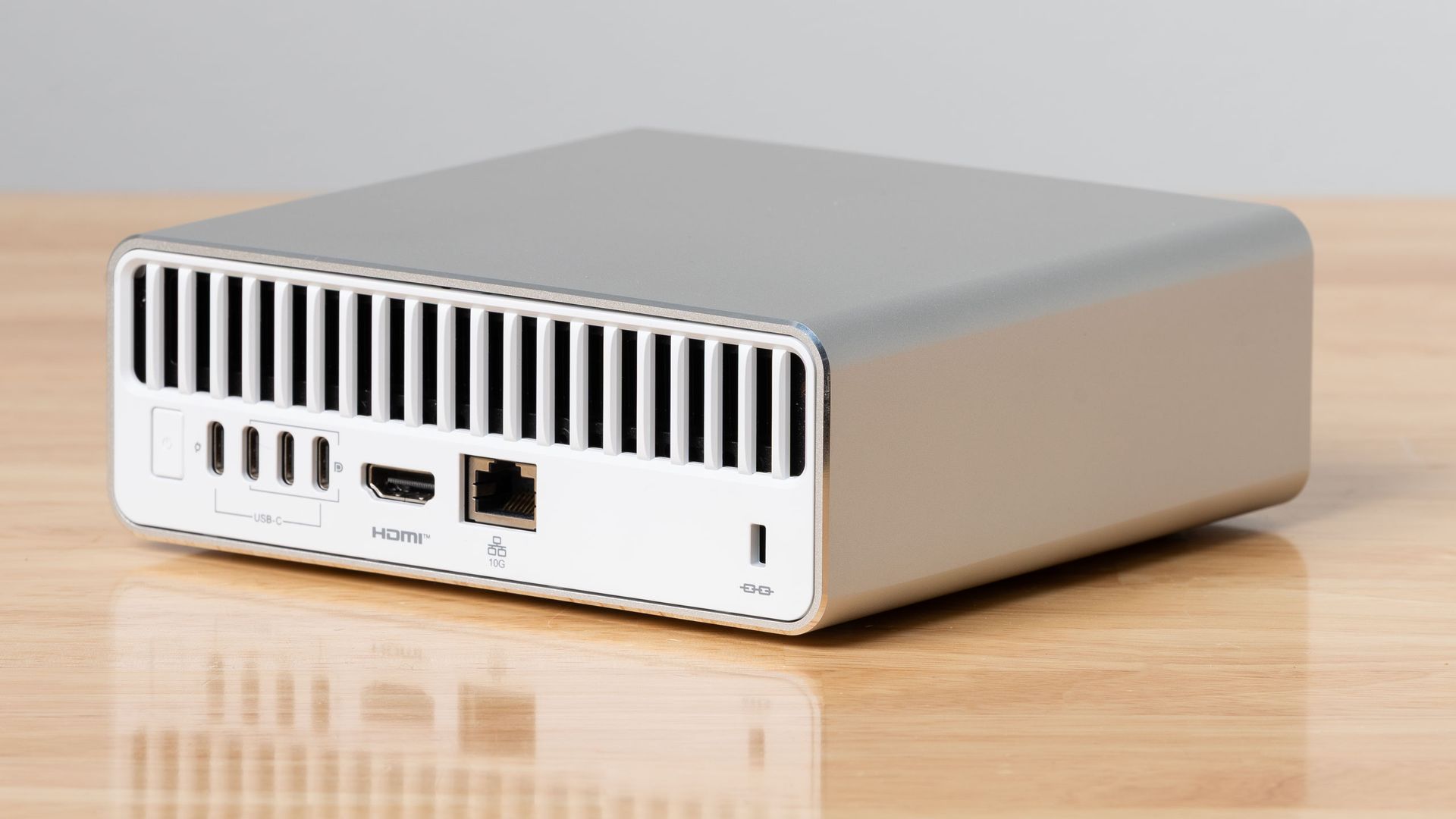
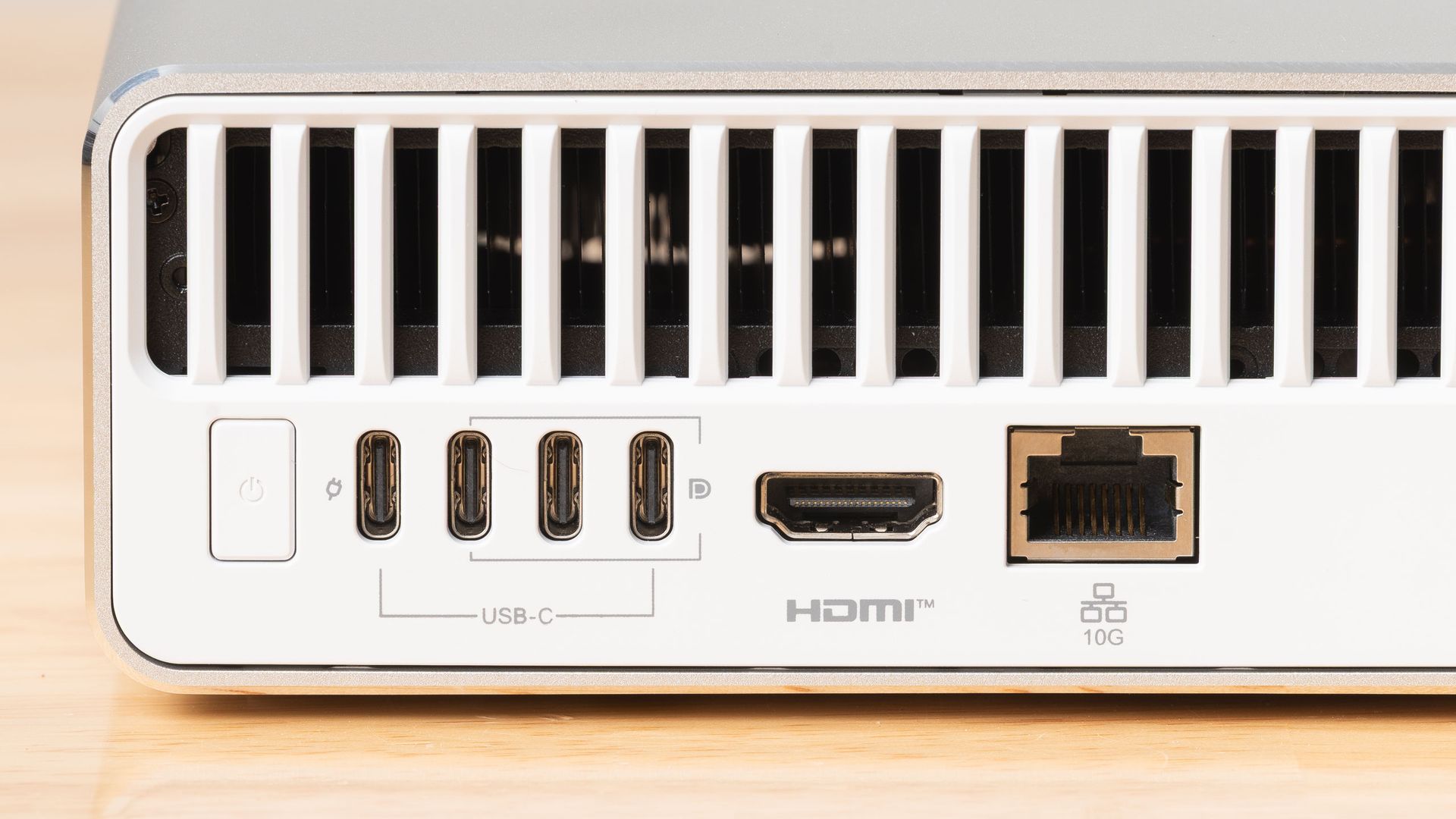
机身背面,EdgeMesa 配备一个 10 Gigabit 以太网口、一个 HDMI 2.1 接口,以及三个支持 DisplayPort Alt Mode 的 20 Gbps USB Type-C 接口。第四个 USB-C 接口专供系统的 240 W USB-PD 电源适配器使用。EdgeMesa 内部还配有 Wi-Fi 7 和蓝牙 5.4 无线模块。
即便配上无线键盘和鼠标,对于一台售价 7,499 美元、定位为内容创作与游戏全能台式机的 PC 来说,三个 20Gbps USB-C 接口作为唯一的扩展选项也显得有些单薄。如果你需要通过 USB-C 给 RTX Spark 连接多台显示器,那么本就不多的外设连接选择会进一步缩水。
作为对比,价格相近的 Mac Studio 在机身后部提供四个 80Gbps Thunderbolt 5 接口,前面还有两个 USB Type-C 接口和一个 SD 读卡器。Mac 甚至提供耳机插孔,而 EdgeMesa 则要求你插上 USB 耳机或 DAC,或者配对蓝牙耳机,才能输出音频。
即便是 Mac Mini,机身后部也有三个 Thunderbolt 接口,前面还有两个 USB 3 10Gbps 接口。
在实际使用中,后置且间距紧凑的 USB-C 接口,让频繁插拔读卡器、外置 SSD 这类创作工作流中常见设备的过程变得很烦人。哪怕只在前置面板加一个 USB-C 接口,也会让这套设计的易用性大不相同。
EdgeMesa 还砍掉了实用的 ConnectX RDMA 网卡,而正是它让你能把多台 DGX Spark 系统组成集群来运行更大的 AI 模型。这一省略引出一个沉重的问题:Windows 支持与应用程序兼容性,真的重要到值得放弃未来扩展本地 AI 基础的任何机会吗?
测试 DGX Spark 已经有一段时间了,我不确定这是一笔明智的取舍——毕竟读到这篇文章的人大多已经拥有一台性能不错的 Windows PC 或 Mac,可以借助 Nvidia Sync 应用与 DGX Spark 联动,完成许多本地 AI 计算任务。
DGX Spark 的价格正在上涨,但现在你可以用 8099 美元买到 MSI 自家的 EdgeXpert,配备 128GB 内存和 4TB SSD(原价 8499 美元)。在 PC 定价如此高企的区间里,光是那块 ConnectX 网卡带来的 1000 美元价差,就足以让我在认真考虑如何为家里增添本地 AI 算力时犹豫再三。
如果你完全不想学 Linux 或网络概念,只想要一台省心、能跑 AI 的 Windows 迷你 PC,并把它当作主力桌面电脑,那么像这样的 RTX Spark 系统或许就是合适之选。但在花这么多钱之前,你最好真的确定自己的决定。
20 核 Arm CPU(10 个 X925 性能核,10 个 A725 能效核)
6144 核(48 SM)NVIDIA Blackwell 集成 GPU
128GB LPDDR5X,273 GB/s 共享内存带宽
4TB NVMe SSD
网络与无线连接
10 千兆以太网、Wi-Fi 7、蓝牙 5.4
3 个 USB 3.2 Gen 2x2 Type-C 接口(后置)
电源
240 W USB-C PD
操作系统
Windows 11 Pro
配置后价格
NVIDIA GB10 SoC 的 CPU 与 GPU 性能表现,无论是在 DGX OS 还是 Windows 下,到如今都已是老生常谈的话题。但为了提供一个新鲜的对比参照,我们找来 AMD 的 Ryzen AI Halo,换上闲置的 SSD,并安装了 Windows 11 Pro,因为 Ryzen AI Halo 是唯一另一款面向 AI 玩家、具备大容量统一内存池且可直接运行 Windows 的平台。
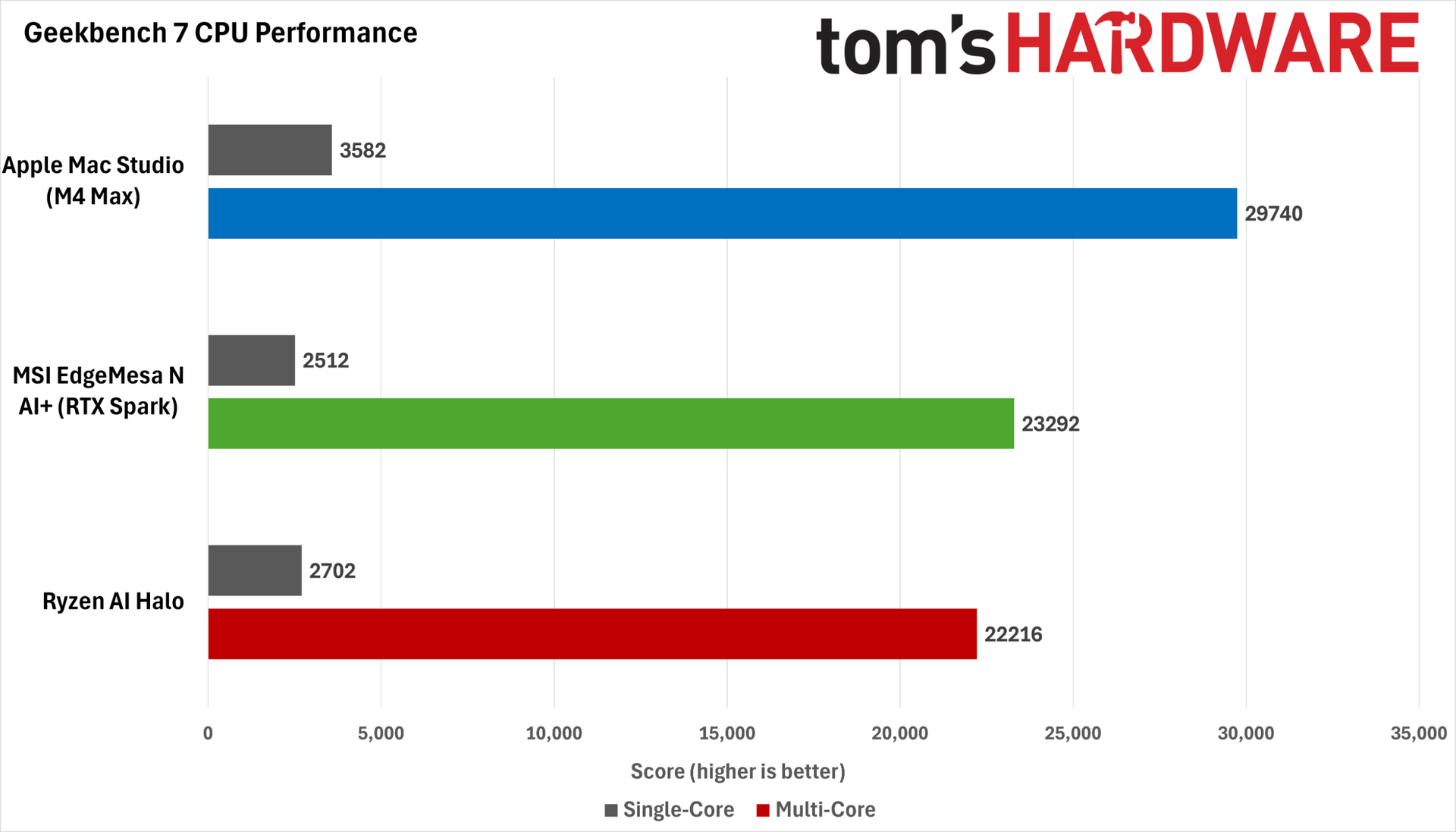
在 Windows 下的 Geekbench 7 CPU 基准测试中,Ryzen AI Halo 的单线程得分略高于 MSI EdgeMesa 的 RTX Spark Superchip,但多线程得分落后于 NVIDIA 那颗芯片。若在 Linux 下,我们预计 Ryzen CPU 的两项得分都会更高。但更宏观的结论依然不变:在 Windows 下,这两款 CPU 的性能预期大体相当。
我们在这几张图表中保留了搭载 M4 Max 的 Apple Mac Studio,只是为了强调 Apple Silicon 在这一基准测试中握有的大幅性能领先,即便用的是较老的芯片也是如此。而当前的 M5 Max 很可能会把领先优势拉得更大。
在 AgentPerf-Local AI 推理基准测试中,MSI EdgeMesa 在运行同一个采用 DFlash2 推测解码的 Qwen 3.8 27B 模型时,性能与 Microsoft 的 Surface Laptop Ultra 几乎完全相同。至少对这一 LLM 服务配置而言,其台式机形态似乎并没有给它带来任何额外的性能余量。其他工作负载或模型可能会体现出差异。
我们在 Surface Laptop Ultra 的评测中,已经在 AgentPerf-Local 里把 RTX Spark 与 Ryzen AI Halo 做过对比,AMD 的平台在这些测试中远远落后于 GB10。而在这一轮新测试中,AMD 的 LLM 性能在 Windows 上使用 Vulkan 后端时比在 Linux 上使用 ROCm 时更差,完成基准测试所花的时间是 EdgeMesa 的整整四倍。
当 Strix Halo 还是市面上唯一开放且相对可自由改造的统一内存平台时,它或许曾是一个有吸引力的本地推理选项;但如果你认真对待本地 AI 性能(尤其是当 Token 就等于金钱时),那么在 2026 年底,GB10 系统是更优的选择。
在 RTX Spark 上玩游戏依旧有点古怪,而 MSI EdgeMesa N 并没有改变这种体验,即便它的功耗和散热预算比我已测试过的 Surface Laptop Ultra 更宽裕。
这个平台就是不像我们从传统游戏 PC 和笔记本的经验中预期的那样对调校做出响应。这种古怪部分源于 GB10 上内存带宽与计算资源之间的失衡。
RTX Spark N1X GPU 的 48 个 SM 必须与 CPU 共享仅 273 GB/s 的 LPDDR5X 带宽。相比之下,规格相近的 RTX 5070 凭借其 12 GB GDDR7 显存,可独享 672 GB/s 的专用带宽。
撇开架构层面的取舍不谈,RTX Spark 平台的游戏性能还受到另一因素的拖累:在大多数游戏中,GPU 的完整利用率似乎因 Prism x86 模拟的开销而受限。主流大作中少有(甚至几乎没有)推出 Arm 版本,因此如果你购买这类系统,在可预见的未来这都将是必须接受的现实。
下面来看看 RTX Spark 与 AMD Strix Halo 上集成的 Radeon 8060S 在实际表现中究竟如何。
在 3DMark Steel Nomad 光栅基准测试中,RTX Spark 大幅领先 Ryzen AI Halo,得分约高出 56%。这一结果似乎预示着 NVIDIA 平台将在游戏中完胜。
但 Steel Nomad 并不能代表 RTX Spark 在真实游戏中的性能。如果我们在两个平台上启动 Control Resonant,选择 1440p 下的 High 光栅预设并开启 Performance 超分(输入分辨率为 1280x720),RTX Spark 与 Strix Halo 的表现就会接近得多。
不过值得注意的是,RTX Spark 桌面平台的 1% low 帧率明显差于 Ryzen AI Halo,这确实会表现为可见的卡顿与掉帧。因此这并非 NVIDIA 平台的明显胜出。
AMD 的拥趸或许可以从这一事实中获得些许安慰:Strix Halo 在这一光栅游戏基准上能如此接近 RTX Spark;但 Radeon 8060S 并没有那么多后手可用来进一步榨取性能。
其一,在 RDNA 3.5 上,较低输入分辨率下的 FSR 4 超分质量仍比不上 DLSS 4.5 所能达到的效果。其二,Radeon 8060S 的 RDNA 3.5 计算单元也无法与 Spark 基于 Blackwell 的光追实力相抗衡。
而且,FSR Frame Generation 仍仅限于将基础帧率翻倍,因此在高刷新率显示器上,你平滑游戏体验的效果远不如使用 DLSS MFG 时。
原文较长,译文为节选;译文由英文原文机器翻译,术语按行业惯例统一,可在文末展开原文核对。
查看英文原文(MSI EdgeMesa N AI+ review — RTX Spark power comes to Windows on Arm desktops, but there are trade-offs)
Nvidia’s RTX Spark platform, powered by the RTX Spark N1X SoC, passed its most difficult test yet last month at the heart of Windows on Arm laptops. Now we get to see how that chip serves as a Windows on Arm foundation for compact desktops.
We’ve got our hands on the MSI EdgeMesa N AI+, a $7,500 RTX Spark mini PC that gives Windows-native creators and local AI trailblazers access to the same powerful 6144-core Blackwell GPU and 20-core Arm CPU that we recently put to the test in the Surface Laptop Ultra, along with a 128GB pool of unified memory and 4TB of storage in our tested config.
We’ve been testing Nvidia GB10-powered desktop systems for almost a year now in the form of the DGX Spark and friends, and the EdgeMesa N AI+’s design is typical of the breed. It’s wrapped in a slightly hollow-feeling matte aluminum shell with shiny diamond-cut edges and a white plastic back plate.
The design and build quality of this system is a tad underwhelming for the price. It feels nice enough, but It’s hardly a precision-milled statement piece for your desk like a Mac Mini or Mac Studio.
The EdgeMesa draws cool air in through its perforated front panel, which then passes through a dual-fan heatsink with a vapor-chamber base and exhausts through the back panel. The rounded rectangle on the top half of the front panel might look like an optical drive tray, but it’s a purely cosmetic accent.
Around back, the EdgeMesa comes equipped with a 10 Gigabit Ethernet jack, an HDMI 2.1 port, and three USB Type-C 20 Gbps ports with DisplayPort Alt Mode support. A fourth USB-C port is dedicated to the system’s 240 W USB-PD power adapter. The EdgeMesa also has Wi-Fi 7 and Bluetooth 5.4 radios inside.
Even with a wireless keyboard and mouse, three 20Gbps USB-C ports feel a bit skimpy as the sole expansion options on a $7,499 PC that’s positioned as a do-it-all desktop for content creation and gaming. If you need to connect multiple monitors to an RTX Spark via USB-C, those scant options for peripheral connectivity shrink even further.
For comparison, a similarly priced Mac Studio gives you four 80Gbps Thunderbolt 5 ports around back and two more USB Type-C ports, plus an SD card reader, up front. The Mac even provides a headphone jack, while the EdgeMesa requires you to plug in a USB headset or DAC or pair Bluetooth earbuds for audio output.
Even the Mac Mini gives you three Thunderbolt ports out back and two USB 3 10Gbps ports out front.
In use, the tightly spaced, rear-mounted USB-C ports make for an annoying time when doing frequent unplugging and replugging of devices like card readers and external SSDs that are typical in creative workflows. Even one front-panel USB-C port would have made a huge difference in the ease of use of this design.
The EdgeMesa also drops the handy ConnectX RDMA NIC that lets you cluster DGX Spark systems together to run larger AI models. That omission raises a weighty question: is Windows support and application compatibility important enough to trade away any chance of expanding your local AI foundation in the future?
Having tested DGX Sparks for some time now, I’m not sure that’s a wise trade-off, given that most anybody reading this already has a capable Windows PC or Mac that can link up with a DGX Spark for many local AI compute jobs using the Nvidia Sync app.
DGX Spark prices are rising, but you can get MSI's own EdgeXpert with 128GB of memory and a 4TB SSD on sale for $8,099 right now (or $8,499 at full price). Even a $1000 difference in price for that ConnectX NIC in this rarefied air of PC pricing would give me pause if I'm seriously considering how to add local AI capacity to my home.
If you have no inclination whatsoever to learn Linux or networking concepts and just want a no-questions-asked, AI-capable Windows mini PC that can serve as your primary desktop, an RTX Spark system like this may be the way to go. But you'll want to be really sure of your decision before dropping this much cash.
CPU | 20-core Arm CPU (10 X925 performance cores, 10 A725 efficiency cores) |
GPU | 6144-core (48 SM) Nvidia Blackwell integrated GPU |
Memory | 128GB LPDDR5X, 273 GB/s shared memory bandwidth |
Storage | 4TB NVMe SSD |
Networking and wireless | 10 Gigabit Ethernet, Wi-Fi 7, Bluetooth 5.4 |
Expansion | 3x USB 3.2 Gen 2x2 Type-C ports (rear) |
Power Supply | 240 W USB-C PD |
Operating System | Windows 11 Pro |
Price as Configured | $7,499.99 |
CPU and local AI performance
The performance of the Nvidia GB10 SoC's CPU and GPU resources, whether under DGX OS or Windows, is well-trodden ground by this point. But for a fresh point of comparison, we grabbed AMD’s Ryzen AI Halo, swapped in a spare SSD, and installed Windows 11 Pro, as the Ryzen AI Halo is the only other Windows-ready platform with a large unified memory pool for AI adventurers.
In the Geekbench 7 CPU benchmark under Windows, the Ryzen AI Halo delivers a slightly higher single-threaded score than the MSI EdgeMesa’s RTX Spark Superchip, but its multithreaded score trails the Nvidia part. Using Linux, we would expect both scores to be higher for the Ryzen CPU. But the broader point remains the same: you can expect similar performance from both of these CPUs under Windows.
We’ve left Apple’s Mac Studio with M4 Max in these charts just to emphasize the large performance lead Apple Silicon holds in this benchmark, even with older chips. The current M5 Max would likely open an even larger lead.
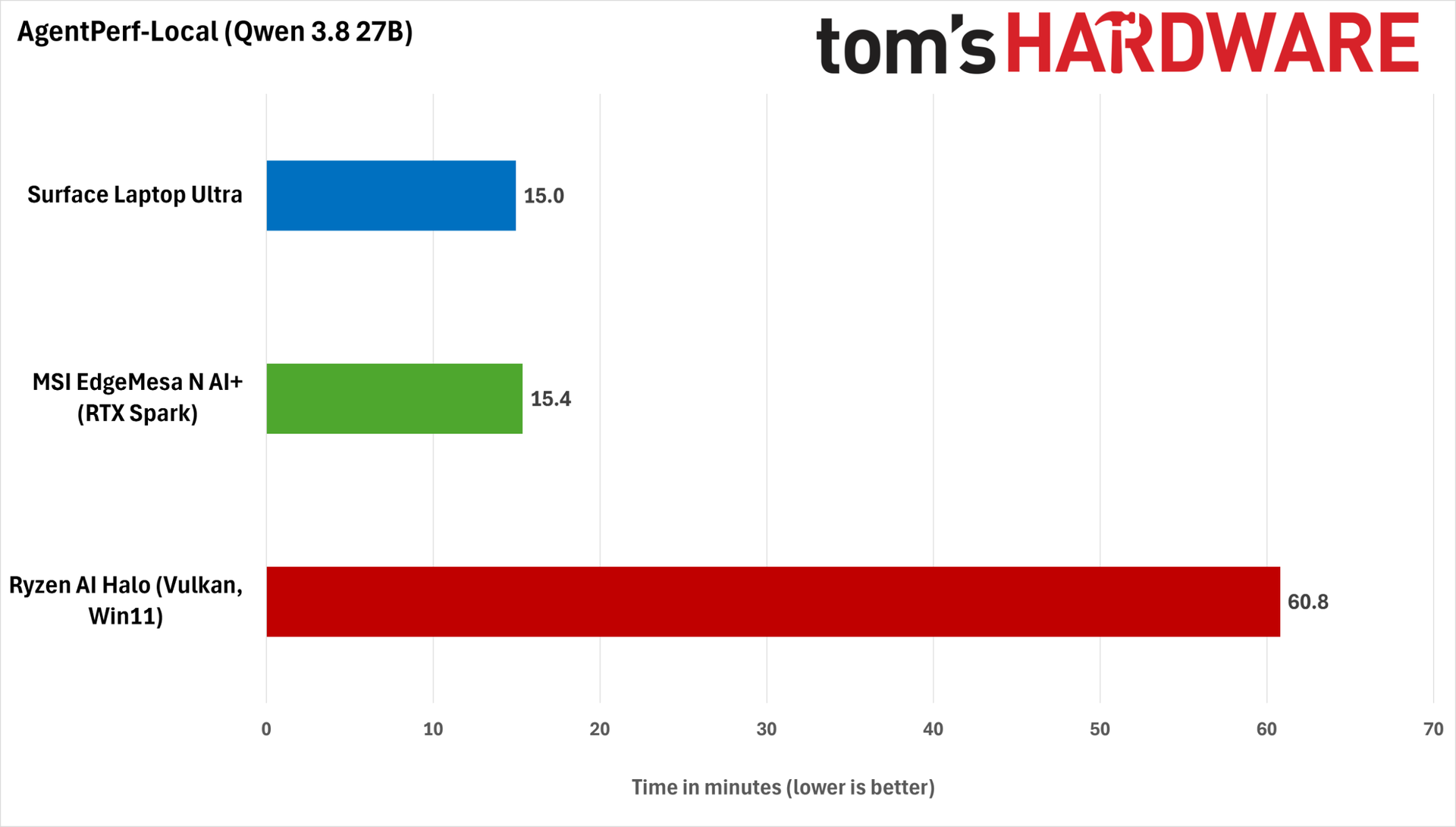
In the AgentPerf-Local AI inference benchmark, the MSI EdgeMesa delivered performance practically identical to Microsoft’s Surface Laptop Ultra when running the same Qwen 3.8 27B model with DFlash2 speculative decoding. Its desktop form factor doesn’t seem to give it any extra performance headroom, at least for this LLM serving configuration. Other workloads or models could reveal a difference.
We already tested the RTX Spark against the Ryzen AI Halo in AgentPerf-Local in our Surface Laptop Ultra review, and AMD’s platform ended up way behind GB10 in those tests. And in this new round of testing, AMD's LLM performance is worse under Windows with the Vulkan backend than in Linux with ROCm, taking a whopping four times as long as the EdgeMesa to complete the benchmark.
Strix Halo might have been an appealing local inference option when it was the only open and relatively hackable unified memory platform around, but if you’re serious about local AI performance (and especially if tokens equal dollars for you), a GB10 system is the superior choice in late 2026.
Gaming performance and the tuning experience
Gaming on RTX Spark continues to be a bit of a weird time, and the MSI EdgeMesa N doesn’t change that experience, even with a more generous power and thermal budget than the Surface Laptop Ultra I've already tested.
This platform just doesn’t respond to tuning as we might expect from our experience with traditional gaming PCs and laptops. That weirdness stems, in part, from the imbalance between memory bandwidth and compute resources on GB10.
The 48 SMs of the RTX Spark N1X GPU have to share just 273 GB/s of LPDDR5X bandwidth with the CPU. Compare that with the 672 GB/s of dedicated bandwidth the similarly-specced RTX 5070 enjoys from its 12 GB of GDDR7.
Architectural decisions aside, the RTX Spark platform's gaming performance isn't helped by the fact that full GPU utilization is seemingly hampered by the overhead of Prism x86 emulation in most games. Few (if any) major titles have Arm ports, so this is just a fact of life for the foreseeable future if you buy one of these systems.
Let's see how this all plays out in practice for the RTX Spark versus the Radeon 8060S on board AMD's Strix Halo.
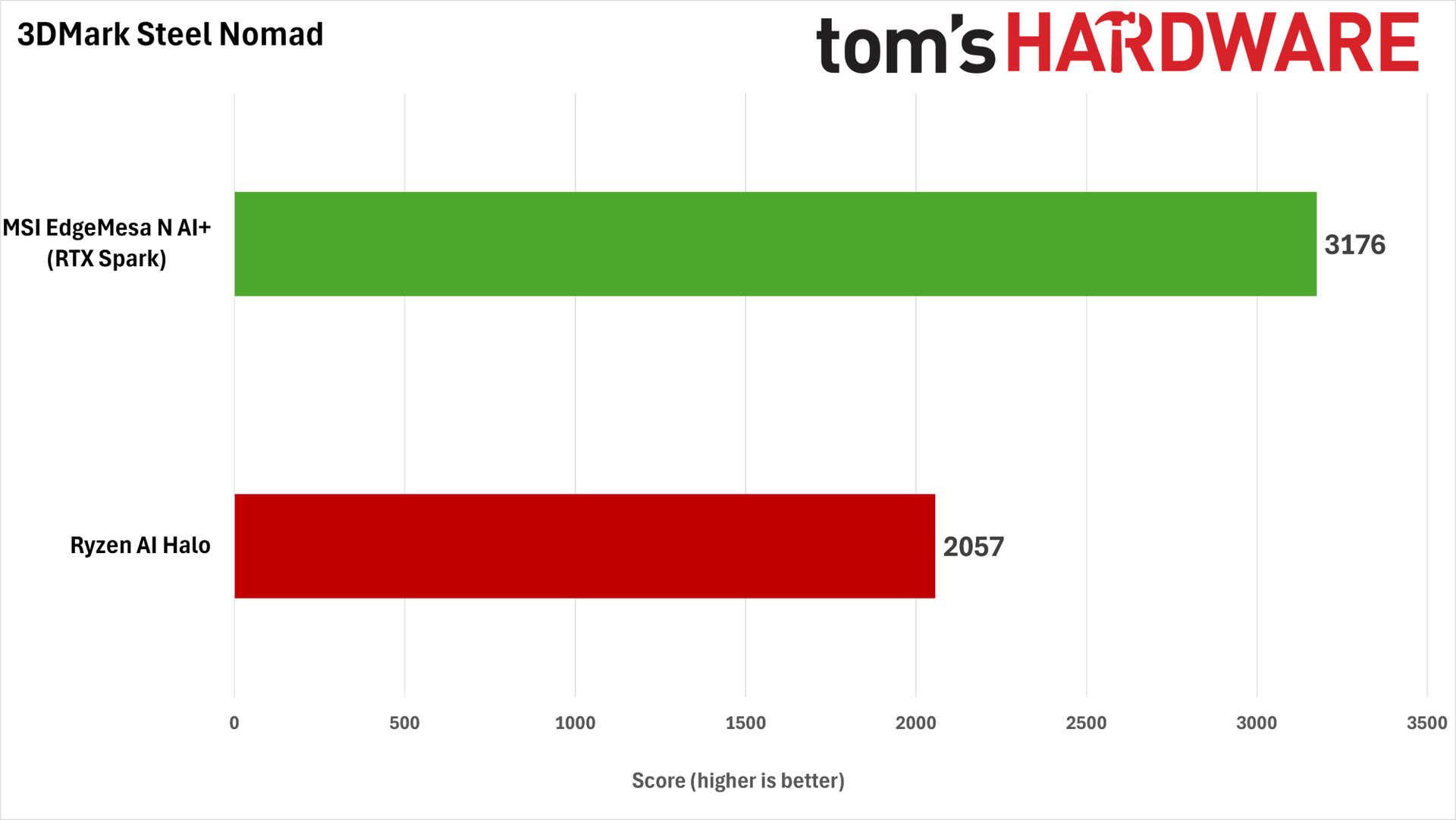
In the 3DMark Steel Nomad raster benchmark, the RTX Spark holds a wide lead over the Ryzen AI Halo, delivering a roughly 56% higher score. That result would suggest a knockout in games for Nvidia’s platform.
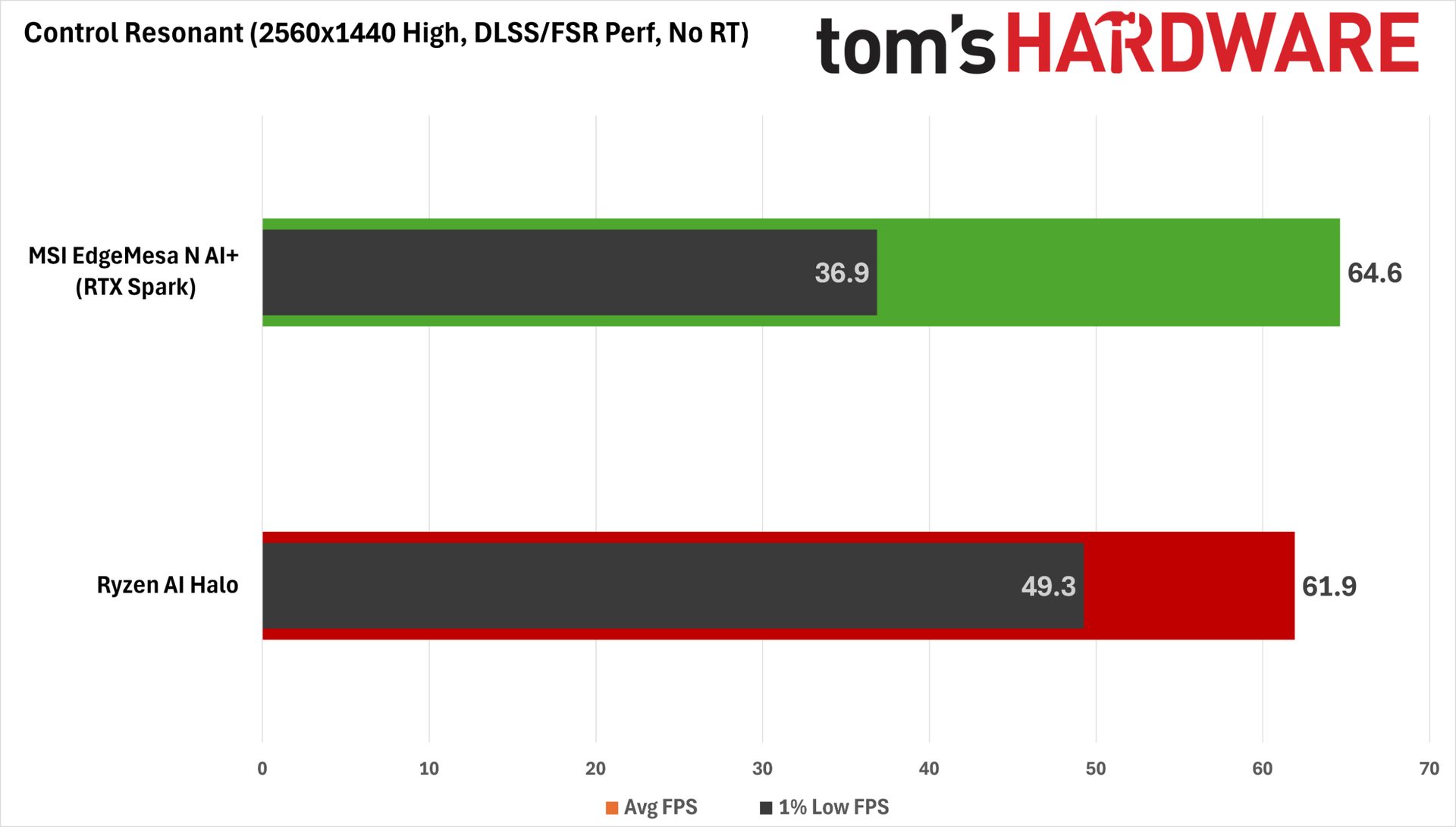
But Steel Nomad isn’t representative of real-world gaming performance on the RTX Spark. If we fire up Control Resonant on both platforms and choose the High raster preset at 1440p with Performance upscaling (a 1280x720 input resolution), the RTX Spark and Strix Halo end up a lot closer.
Notably, though, the RTX Spark desktop delivers considerably worse 1% low FPS performance than the Ryzen AI Halo, and this does manifest as visible stutter and hitching. So it's not a clear win for the Nvidia platform.
AMD fans might take heart in the fact that Strix Halo can get this close to the RTX Spark on this raster gaming baseline, but the Radeon 8060S doesn’t have nearly as many tricks up its sleeve to further juice performance.
For one, the quality of FSR 4 upscaling at lower input resolutions on RDNA 3.5 is still not up to par with what you can get out of DLSS 4.5. For two, the Radeon 8060S’s RDNA 3.5 CUs don't match up well against the Spark's Blackwell-powered RT chops.
And FSR Frame Generation is still limited to a doubling of a base frame rate, so you can’t smooth out gameplay on a high-refresh-rate monitor nearly as well as you can with DLSS MFG.
So even if their raster baseline frame rates are similar, the Radeon 8060S isn't delivering the same image quality in Control Resonant as an RTX Spark system does with all its DLSS features in play.
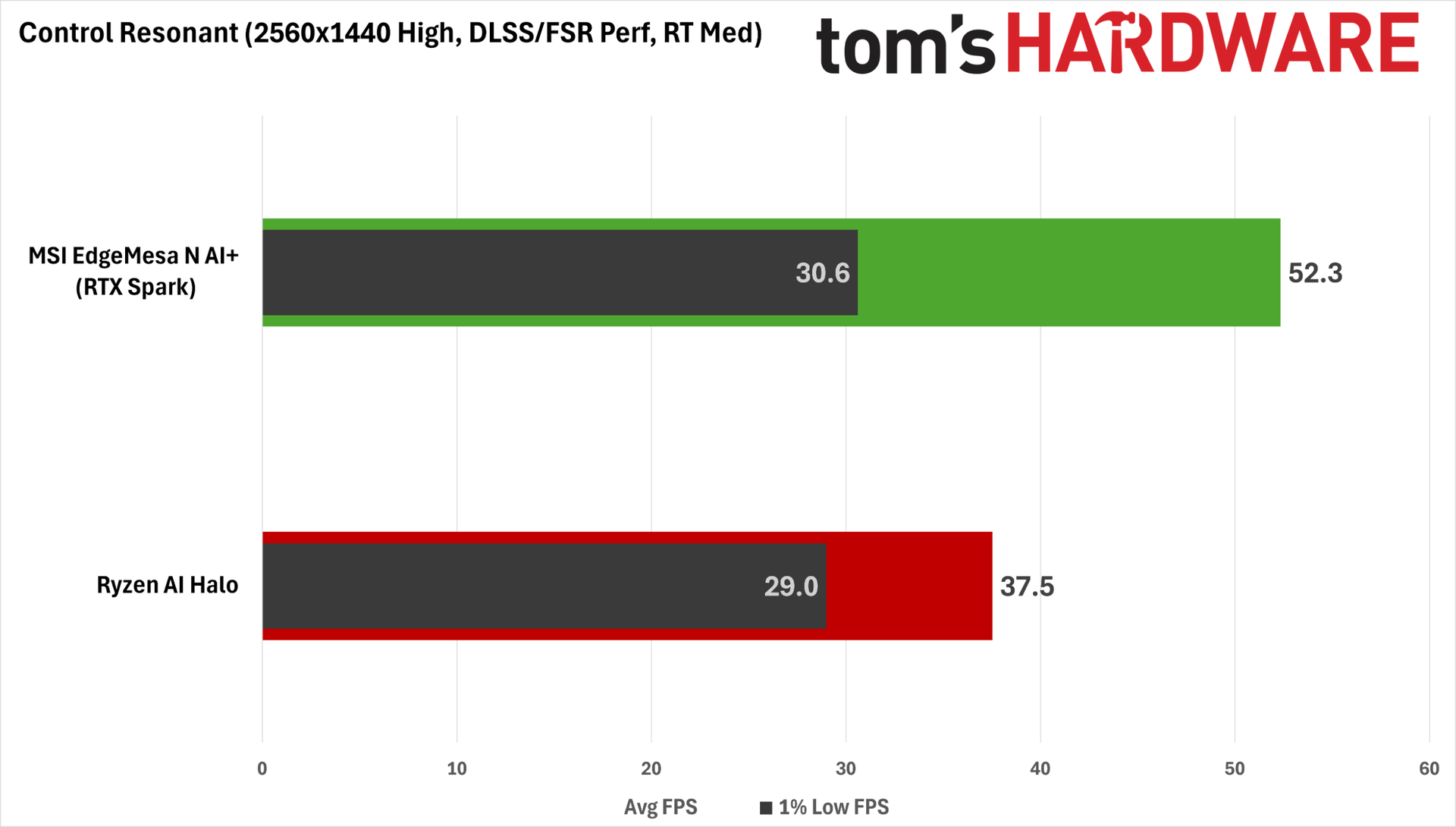
RT is the next step for squeezing better image quality out of Control Resonant. Surprisingly, enabling RT Medium only results in a 14% performance hit on the Spark versus 38% on the AI Halo. That might be due in part to the efficiency of DLSS Ray Reconstruction versus the Northlight engine's built-in denoiser, but the RT prowess of Blackwell certainly can't hurt.
A 52.3 FPS average with a 75 ms average PC latency is an OK baseline — at least in the context of an RTX Spark system — for adding MFG to the mix for a smoother experience, especially since Control Resonant seems to link Nvidia Reflex latency reduction to that tech anyway. But dialing in MFG 3X with the default MFG Preset B model still results in a PC latency of 96 ms on average, which is too high to be enjoyable, even if we give the Spark some slack.
I found that the new MFG Preset C, available through the Nvidia App, significantly lowered latency versus the more compute-intensive Preset B. While input latency with Preset C is still high at about 84 ms, we have to take every bit of help we can get here, and the resulting 145 FPS average is notably smoother than native gameplay on my 160 Hz monitor.
We only had time to dive into this one title in our testing, but when Nvidia says the RTX Spark platform is great for 1440p gaming, our experience suggests that you need to be ready to tweak DLSS upscaling and dial in MFG for more demanding games. And look: that’s fine. These are proven technologies at this point, and they let us get a better experience out of this platform than native rendering would allow.
But all of these data points should go to show that if you're used to the low input latency and predictable performance scaling characteristics of an x86 desktop gaming PC with a discrete GPU, the RTX Spark platform still has a ways to go before it can truly replace such a system.
Power draw and noise levels
During our AgentPerf-Local LLM benchmark, the EdgeMesa N AI+ pulls about 140 W from the wall, and under that load, it produces just 38.2 dBA at 18” (46 cm) according to our calibrated SPL meter, well below the 47.4 dBA of the RTX Spark-powered Surface Laptop Ultra and the 48 dBA of the Ryzen AI Halo.
That makes the EdgeMesa an easy system to live with for local AI work, especially if it’s moonlighting as an AI inference server or always-on agent host in shared spaces.
Under gaming workloads, the EdgeMesa draws about 200 W. With more heat to dissipate, the MSI box’s noise output rises to 40.7 dBA, which is still much quieter than the average gaming laptop and will easily be covered by speakers or a closed-back gaming headset.
The Ryzen AI Halo, on the other hand, emits a piercing 46.9 dBA whine while gaming, much closer to what we expect from a gaming laptop. And that’s not because it has that much more heat to dissipate; the AI Halo is pulling about 209 W with Control Resonant running.
Under that same load, the EdgeMesa’s fans have a slightly high-pitched character to them, but it’s much less pronounced than the typical gaming laptop. Mostly, the sound from the system is that of air moving, and it's easy to ignore (so much so that I missed the aural cues I sometimes listen for when a benchmark finishes).
MSI deserves high praise for this system’s thermal design and cooling system. It’s both quiet and pleasant-sounding, and those factors aren’t always a given with mini PCs.
Bottom line
If you’re a hardcore Windows fan who’s been intrigued by Nvidia’s DGX Sparks for local AI, but you've been repelled by the idea of using Linux, RTX Spark desktops like this MSI EdgeMesa N AI+ finally pair your preferred OS with the same 6144-core Nvidia Blackwell GPU, 20-core Arm CPU, and up to 128GB of unified memory that give those systems their local AI grunt.
These systems are a potentially exciting prospect for those who want to explore the possibilities of local AI and agentic workflows without the privacy and token caps of cloud models, all from the comfort of Windows.
But that potential comes with tradeoffs that you’ll need to weigh carefully before buying. And at an eye-popping $7,499 for the 128GB EdgeMesa configuration with a 4TB SSD that we tested, those tradeoffs weigh all the more heavily.
The MSI EdgeMesa N AI+ delivers essentially the same performance from the RTX Spark N1X SoC (aka GB10) we’ve come to know and love for about a year now. It’s reasonably fast for local LLM inference, and it offers leading performance with generative AI workflows like images and videos in ComfyUI. Its Arm CPU offers solid enough single-threaded and multi-threaded performance for general computing tasks, and it can game in a pinch. The EdgeMesa is laudably quiet, too — no small feat for a compact PC like this.
But in exchange for Windows support, RTX Spark desktops lose the valuable expandability offered by the ConnectX 7 RDMA NIC that comes standard on DGX Spark boxes. So if you want to try your hand at running a bigger, more intelligent LLM than you can fit in one of these systems’ unified memory pools through clustering, you are forever out of luck if you go down the RTX path.
Even if you can live without the ConnectX NIC, we’re a bit let down by the peripheral connectivity the EdgeMesa N AI+ offers, both for its price and for its ambitions as a do-it-all creator and gaming system.
With just three 20 Gbps USB Type-C ports on the back panel that have to do double duty as display outputs in multi-monitor setups, folks who have to juggle external storage and card readers frequently may find both the number and placement of those ports an obstacle to a smooth workflow. We really would have liked to see more expansion ports on this system overall, or at least one on the front panel.
Nvidia loves to tout the gaming capability of Windows on Arm with RTX Spark systems, but we're still not that impressed by the experience in practice, especially for a system this expensive.
It's nice that you can enjoy PC gaming on these systems at all, but even in a desktop with more power and thermal budget to spare, the gaming performance and responsiveness we saw can only be described as adequate. We were especially surprised by the gulf in 1% low FPS between the RTX Spark and the much cheaper Ryzen AI Halo in Control Resonant, despite the RTX Spark N1X's much stronger GPU on paper.
In general, we find that it takes a lot of careful tweaking and application of DLSS magic to get around this platform's wrinkles for gaming (or a willingness to just let the Nvidia App optimize your game settings). In other words, don't retire your dedicated gaming PC or laptop just yet.
The large memory pools available from RTX Spark systems have uses beyond local AI, of course. Nvidia GPUs are favorites for creative work on Windows, and if you work with massive 3D or game development projects, or you edit lots of high-resolution video, RTX Sparks are the first unified memory systems to pair a powerful Nvidia GPU with this much VRAM for Windows users.
Adobe just updated several of its Creative Suite apps with Arm-native versions, so if you’re trying to blaze the trail of agentic content creation and generation in this modern age, an RTX Spark desktop (or laptop, for that matter) might be intriguing.
But we feel like $7,499 is still a ton of money to spend on a system like this to run Adobe's apps specifically, unless a large unified memory pool is particularly useful for your work today.
All told, we're left scratching our heads a bit about who RTX Spark desktops are really for. RTX Spark laptops meaningfully expanded the capabilities of mobile Windows on Arm systems thanks to the unmatched AI compute resources of their Blackwell GPUs and support for the full Nvidia software stack, along with solid CPU performance and battery life.
But compared to both the existing DGX Spark platform and other mini PCs, RTX Spark desktops like the MSI EdgeMesa N AI+ ask you to give up a lot in exchange for the Nvidia-powered Windows on Arm experience, especially for the high prices they’re likely to command amid the current silicon supply crunch.
If you’re a hardcore Windows-native developer or creator looking to explore the boundaries of what’s possible from local and agentic AI and want the best possible Microsoft-powered foundation for those activities, an RTX Spark desktop might be the right choice for the job, assuming you have the cash.
But if you're just curious, we'd wait for the value proposition of local or agentic AI under Windows to firm up a bit and for the prices of these systems to come down before spending thousands of dollars on a still-fuzzy vision of the future of computing.
正文保留英文原文,标题与摘要由机器翻译。
原文发布于 Tom's Hardware(MSI EdgeMesa N AI+ review — RTX Spark power comes to Windows on Arm desktops, but there are trade-offs),标题、摘要与正文由机器翻译,术语按行业惯例统一,未经人工逐句校订。