Amazon Polly 推出语音克隆功能
Amazon Polly 的声音克隆功能现已正式可用,采用受限发布(gated release)形式。只需向 Amazon Polly 提供已同意克隆其声音的说话人几分钟的录音,Amazon Polly 就能构建出以该说话人声音说话的克隆声音。克隆声音运行在 Amazon Polly 生成式引擎上,其自然度和准确度与其他生成式声音相当。Amazon Polly 声音克隆发布时支持七种语言:英语、西班牙语、德语、法语、意大利语、葡萄牙语和印地语。每个克隆声音只能说出其录制时所用的语言。克隆声音会自动加密并受访问控制:只有你本人可以访问自己的克隆声音。
Amazon Polly 声音克隆已在 Amazon Polly 生成式引擎支持的所有 AWS 区域可用,包括 AWS GovCloud (US) 区域。部分 Amazon Polly 客户已可直接使用。其他客户可以联系其 AWS 客户团队,或申请获取访问权限。
借助这一新增功能,你可以将克隆生命周期构建到 AWS 应用中。对 Amazon Polly 客户而言,构建克隆声音是免费的,Amazon Polly 则按使用量对克隆声音的使用计费,详情请参阅 Amazon Polly 定价页面。
点击播放:前几秒是说话人的真实录音,随后由其克隆声音接续,说出他们从未录制过的话语。
跨渠道一致的品牌声音
确立一个具有辨识度的声音,并将其贯穿用于你的交互式语音应答(IVR)系统、级联语音智能体、移动应用、店内广播、广告和联网设备。不必依赖通用的素材音库,也不必每次脚本变更就重新预约录音,你可以按需生成符合品牌调性的音频,让每个渠道的声音保持一致。
联络中心
在自助服务流程中提供独特且符合品牌调性的声音,并在优惠和政策变化时更新提示语,无需重新进棚录音。你可以从源文本创建提示语,在上线前进行测试,并在问候、路由和通知体验中使用同一个声音。
规模化媒体与内容
创作者、出版商和工作室可以用多种定制声音制作有声书、课程、播客、游戏角色和视频,以提升聆听体验,并快速产出后续章节或更新内容。
保持人设一致的本土化
在整个内容库中保持可辨识的声音身份,使旁白在不同作品和更新之间保持连贯。每个克隆声音只能说出其录制时所用的语言。若要实现多语言体验,需针对每种支持的语言分别创建并审核已批准的声音。
无障碍与个性化
为阅读体验、辅助工具和个性化交互提供自然、拟人化的语音。你每次创建语音时,都要确认已获得说话人的同意。
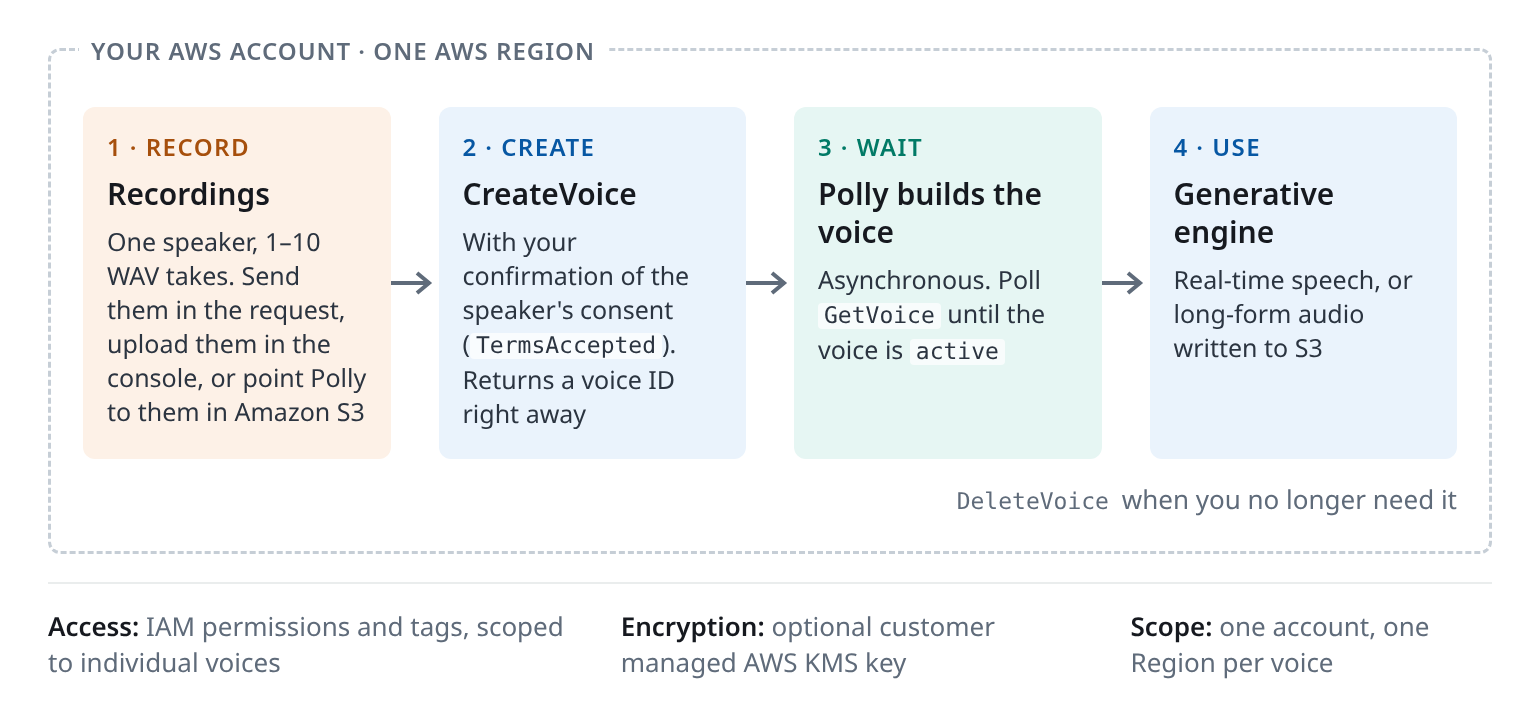
借助语音克隆,你可以用单个说话人的录音构建自定义的 Amazon Polly 语音,然后通过 Amazon Polly 生成式引擎用该语音合成语音。从录制说话人到使用成品语音,该语音要经历四个步骤:
图 1:语音克隆生命周期,从录制说话人到使用成品语音
克隆语音要经历四个步骤:
克隆语音由一个人的录音制作而成。你需要确认已获得说话人对所有录音的同意,并确认由你掌控谁可以使用该语音以及何时删除它。
我们建议你:
关于预期用途和限制的详细信息,请参阅 Amazon Polly AI Service Card 和 AWS Responsible Use of AI 指南。
你的克隆语音会从录音中学习,包括那些你宁愿它不要学到的部分:笔记本电脑风扇声、房间回声、会议应用的噪声滤波器。
在控制台中:为你的账户启用语音克隆后(参见「可用性」),展开左侧面板并选择 Voice cloning,上传最多 10 个录音,或从 Amazon S3 中选择这些录音,确认条款,然后选择 Create。每次上传最大可达 5 MB。语音准备就绪后,可在其详情页上进行试用。
在代码中,你需要:
import time import boto3 # 使用你 S3 录音所在的 Region。 polly = boto3.client("polly", region_name="us-east-1") # 1. 使用已同意授权的说话人的录音创建语音。 # 使用 1-10 段干净的 WAV 录音,每段最长一分钟。 takes = [ "s3://amzn-s3-demo-bucket/brand-voice/take-1.wav", "s3://amzn-s3-demo-bucket/brand-voice/take-2.wav", "s3://amzn-s3-demo-bucket/brand-voice/take-3.wav", ] voice = polly.create_voice( Name="MyBrandVoice", # 字母、数字、- 和 _,最多 64 个字符 LanguageCode="en-US", # 录音中所说的语言 TermsAccepted=True, # 你确认说话人同意以及使用条款 VoiceCreationData={ "Recordings": [{"Format": "wav", "Data": {"S3Url": url}} for url in takes], }, Tags={"consent-record": "speaker-0042"}, # 可选:你自己同意记录的 ID,例如已签署的授权书 # 可选:使用你自己的 KMS 密钥加密该语音(对称密钥,同一 Region)。 # 创建或使用该语音的调用方需要对密钥拥有 kms:DescribeKey、 # kms:GenerateDataKey 和 kms:Decrypt 权限。 # CustomerManagedEncryption={ # "KmsKeyArn": "arn:aws:kms:us-east-1:111122223333:key/EXAMPLE" # }, )["Voice"] voice_id = voice["Id"] # 例如 "vc-0123456789" # 2. 每 30 秒检查一次状态,直到语音处于 active 或 failed # (通常几分钟)。20 分钟后以错误停止。 deadline = time.monotonic() + 20 * 60 while voice["Status"] not in ("active", "failed"): if time.monotonic() > deadline: raise TimeoutError(f"{voice_id} is still {voice['Status']}") time.sleep(30) voice = polly.get_voice(VoiceId=voice_id)["Voice"] if voice["Status"] == "failed": # 检查录音,删除该语音并创建一个新语音。 raise RuntimeError(f"{voice_id}: {voice.get('StatusReason', 'creation failed')}") # 3. 使用新语音合成语音。 speech = polly.synthesize_speech( VoiceId=voice_id, Engine="generative", LanguageCode="en-US", OutputFormat="mp3", Text="Hello! This is my very own Amazon Polly voice.", ) with open("my-voice.mp3", "wb") as f: f.write(speech["AudioStream"].read()) # 当不再需要该语音时: # polly.delete_voice(VoiceId=voice_id) 如果 Python 报告 Polly 对象没有 create_voice 属性,请升级 boto3。
对于有声书章节或课程模块等长文本,请使用异步合成任务,将音频写入 S3:
from pathlib import Path task = polly.start_speech_synthesis_task( VoiceId=voice_id, Engine="generative", LanguageCode="en-US", OutputFormat="mp3", OutputS3BucketName="amzn-s3-demo-bucket", OutputS3KeyPrefix="narration/chapter-01", Text=Path("chapter-01.txt").read_text(encoding="utf-8"), # SnsTopicArn="arn:aws:sns:us-east-1:111122223333:polly-tasks", # notify instead of polling )["SynthesisTask"] print(task["TaskId"], task["OutputUri"]) # poll get_speech_synthesis_task until "completed" or "failed" 有关你可以使用 Amazon Polly 构建的更多端到端语音 AI 应用,包括语音克隆功能,例如级联语音智能体和实时语音翻译器,请访问 Amazon Polly GitHub 仓库。
提前创建语音
语音创建需要几分钟,因此应将其视为预配步骤,而不是用户请求的一部分。一个小型工作流(例如 AWS Step Functions 或作业队列)可以调用 CreateVoice,每 30 秒检查一次 GetVoice,直到语音处于活动状态,然后将语音 ID 存储到配置中。CreateVoice 和 DeleteVoice 共享每秒 1 个请求的限制,因此请对批量创建和删除进行排队。
维护清单
DescribeVoices 会列出你的克隆语音以及 Amazon Polly 内置的语音。克隆语音的 Origin 设置为 customer。为每个语音存储语音 ID、Region、语言、同意引用和所有者,并为每个语音赋予唯一的 Name。如果 CreateVoice 调用超时或返回服务器错误,该语音可能已经存在,而 SDK 的自动重试可能会创建第二个。再次尝试前,请检查 DescribeVoices 中是否存在该名称。
为错误做好规划
当超过 CreateVoice 与 DeleteVoice 共享的每秒 1 次请求限制时,CreateVoice 会返回 ThrottlingException;当账户在该 Region 中已达到克隆语音配额时,则会返回 ServiceQuotaExceededException。对仍在创建中的语音进行合成或删除,会返回 ConflictException。如果某个语音使用了您自己的 KMS 密钥,无权访问该密钥的调用方会收到访问被拒绝错误。创建失败时,StatusReason 只会给出笼统的消息,因此请对照前述录音最佳实践检查录音,然后删除失败的语音并新建一个。
将权限范围限定到语音
原文较长,译文为节选;译文由英文原文机器翻译,术语按行业惯例统一,可在文末展开原文核对。
查看英文原文(Amazon Polly launches voice cloning: A unique voice for your brand)
Voice cloning in Amazon Polly is now generally available as a gated release. Give Amazon Polly a few minutes of audio recordings from a speaker who has agreed to have their voice cloned, and Amazon Polly builds your own cloned voice in that speaker’s voice. The cloned voices run on the Amazon Polly generative engine, which delivers similar naturalness and accuracy as the rest of the generative voices. Amazon Polly voice cloning launches with seven languages: English, Spanish, German, French, Italian, Portuguese, and Hindi. Each cloned voice speaks the language it was recorded in. The cloned voices are automatically encrypted and access-controlled: only you can access your cloned voices.
Amazon Polly voice cloning is available in all the AWS Regions supported by the Amazon Polly generative engine, including the AWS GovCloud (US) Region. Access is already enabled for select Amazon Polly customers. Others can reach out to their AWS account team or apply for access to get access.
With this new feature addition, you can build the cloning lifecycle into AWS applications. Building a cloned voice is free for Amazon Polly customers, and Amazon Polly charges for cloned voice usage on a pay-as-you-go basis, see Amazon Polly Pricing page for details.
Hear it for yourself
Press play: the first few seconds are a real recording of the speaker, and then their cloned voice takes over with words they never recorded.
- From recordings to TTS voice. A few minutes of our science lead Trevor’s source audio, and the resulting generative voice.
- Recorded: “Hello, I’m Trevor, from Science.” Cloned voice: “That first sentence was my real voice. This is my cloned voice, created from a few minutes of my recordings. It can read any text you give it.”
- Supports seven languages. Hear Jonas, one of the authors, speaking German in his recording and then in his cloned voice:
- Recorded: “Hallo, ich bin Jonas. Das ist meine echte Stimme.” (Hi, I’m Jonas. This is my real voice.) Cloned voice: “Und das ist meine geklonte Stimme! Gleiche Stimme, neue Worte: Diesen Satz habe ich geschrieben, aber nie aufgenommen.” (And this is my cloned voice! Same voice, new words: I wrote this sentence, but never recorded it.)
- Use in a variety of applications. Here’s Trevor in a new job he hasn’t had: a non-player character in a game.
- “Who’s that crossing my bridge? Oh, it’s you again. Same deal as last time: answer my riddle, or hand over the sandwich.”
- Expand your voice library with voice cloning. Hear this audio sample from AWS Chief Evangelist Jeff Barr: a real recording, then his cloned voice.
- Recorded: “Hi, I’m Jeff, and this is how I really sound.” Cloned voice: “And this is how my cloned voice sounds, reading a sentence I never recorded.”
- Hannah: a real recording, then her cloned voice on a support line.
- Recorded: “Hello, I’m Hannah. This is my real voice.” Cloned voice: “Thanks for calling AnyCompany. Your order 4471 9902 ships today and should arrive on Thursday between 9 AM and 1 PM. Your confirmation code is K-7-Q-2-X-9.”
- Joely: a real recording, then her cloned voice narrating a lesson.
- Recorded: “Hi, I’m Joely, and this is how I really sound.” Cloned voice: “In this module, we’ll look at how a neural network learns. First, it makes a guess. Then it measures how far off that guess was, and adjusts, a little at a time.”
What you can build
A consistent brand voice across channels
Establish one recognizable voice and use it across your interactive voice response (IVR) system, cascaded voice agents, mobile app, in-store announcements, advertising, and connected devices. Rather than relying on a generic stock voice or re-booking a recording session each time a script changes, you can generate on-brand audio on demand, with a consistent sound in every channel.
Contact centers
Deliver a distinctive, on-brand voice across self-service flows, and update prompts as offers and policies change without a new studio session. You can create prompts from source text, test them before rollout, and use the same voice across greeting, routing, and notification experiences.
Media and content at scale
Creators, publishers, and studios can create audiobooks, courses, podcasts, game characters, and videos in multiple custom voices to enhance the listening experience, and produce subsequent chapters or updates quickly.
Localization with a consistent persona
Maintain a recognizable voice identity across a content library, so narration remains coherent across titles and updates. Each cloned voice speaks only the language it was recorded in. For multilingual experiences, create and review approved voices per supported language.
Accessibility and personalization
Offer a natural, human-sounding voice for reading experiences, assistive tools, and personalized interactions. You confirm the speaker’s consent each time you create a voice.
How voice cloning works
With voice cloning, you can build a custom Amazon Polly voice from recordings of a single speaker and then synthesize speech in that voice through the Amazon Polly generative engine. The voice moves through four steps, from recording the speaker to using the finished voice:
Figure 1: The voice cloning lifecycle, from recording a speaker to using the finished voice
A cloned voice goes through four steps:
- Record. You record one speaker (see the following recording tips). You can send the recordings directly in the
CreateVoicerequest or upload them on the console. You can also store them in an Amazon Simple Storage Service (Amazon S3) bucket in the AWS Region where you want the voice and point Amazon Polly to them. - Create. You call
CreateVoicewith 1-10 recordings, the language they are spoken in, andTermsAccepted=True, your confirmation that you have the speaker’s consent. Amazon Polly returns a voice ID (vc-…) right away and builds the voice in the background. - Wait. Creation is asynchronous and typically takes 5-10 minutes. During that time, Amazon Polly also checks the quality of your text-to-speech (TTS) voice for speaker similarity. You call
GetVoiceuntil the status changes frompendingtoactiveorfailed. - Use. You pass the voice ID to
SynthesizeSpeechfor real-time audio or toStartSpeechSynthesisTaskfor long-form audio written to S3, withEngine="generative", the same way you call the other generative voices in Amazon Polly. When you no longer need the voice, you callDeleteVoice.
Consent and control
A cloned voice is made from one person’s recordings. You confirm that you have the speaker’s consent for all recordings and that you control who can use the voice and when it’s deleted.
- You confirm consent for each voice you create. When you create a voice, on the console or with
TermsAccepted=Truein the API, you confirm that you have obtained all rights and consents necessary to create and use the cloned voice. Your use of voice cloning is subject to the AWS Service Terms, the Biometric Notice and Consent Terms, the AWS Responsible AI Policy, and the AWS Acceptable Use Policy. - Generated speech carries a watermark. Amazon Polly adds a watermark to text-to-speech audio generated with the cloned voice.
- Only your account can use it. A cloned voice is scoped to the AWS account that created it, and you control access with AWS Identity and Access Management (IAM). You can encrypt voices with your own AWS Key Management Service (AWS KMS) key and tag them.
- You decide when it goes away. Delete a voice with one
DeleteVoicecall or on the console, once it’s active or its creation has failed. - Amazon Polly does not retain a copy of your voice recordings once the voice is created and doesn’t use them to train Amazon Polly models. It keeps only the voice data it needs to synthesize speech, and stores it encrypted. You can use your own AWS KMS key for that encryption, and
DeleteVoiceremoves the data immediately.
We recommend that you:
- Keep a record of each speaker’s consent.
- Delete the voice if the speaker withdraws consent.
- Tell listeners when they’re hearing a synthetic voice where that’s appropriate.
- Grant voice permissions only to the people and systems that need them.
For details on intended uses and limitations, see the Amazon Polly AI Service Card and the AWS Responsible Use of AI guidance.
Best practices for recordings
Your cloned voice learns from the recording, including the parts you’d rather it didn’t: the laptop fan, the room echo, the meeting app’s noise filter.
- Record two to ten minutes of natural speech, split into takes of up to a minute. You can send up to 10 recordings per voice, and up to 15 minutes of audio in total. Quality matters more than length: more audio might not change how the voice sounds.
- One speaker, a quiet room, the same distance from the mic. Use a USB microphone, or a phone app that can record WAV. Record in mono WAV, 16-bit, at 24 kHz from the start, so there’s nothing to convert later. Amazon Polly accepts other audio formats, but we recommend WAV. See the Amazon Polly Developer Guide for supported formats and limits.
- Avoid using meeting apps and browser recorders. Their echo cancellation and noise suppression change the voice, and the clone learns those changes too.
- Record every take in the style you want the voice to have. The cloned voice takes its style from the recordings and can’t blend several, so upbeat, sad, and angry takes won’t give you a voice that can do all three.
- Record in the language the voice should speak. Voice cloning is tested with recordings in US English, German, US Spanish, French, Italian, Brazilian Portuguese, and Hindi. Recordings in other accents of these languages, such as British English or Canadian French, also work but are less tested, so check the voice with your own content.
Getting started
On the console: once voice cloning is enabled for your account (see Availability), expand the left panel and choose Voice cloning, upload up to 10 recordings or select them from Amazon S3, confirm the terms, and choose Create. Each upload can be up to 5 MB. When the voice is ready, try it out on its details page.
In code, you need:
- The latest version of boto3 (
pip install --upgrade boto3). - IAM permissions for
polly:CreateVoice,polly:GetVoice,polly:DescribeVoices,polly:SynthesizeSpeechandpolly:DeleteVoice. For long-form audio, alsopolly:StartSpeechSynthesisTask,polly:GetSpeechSynthesisTaskands3:PutObjecton the output bucket. - For the following Amazon S3 example: your recordings in a bucket in the Region where you create the voice, with
s3:GetObjectpermission for the IAM role or user that callsCreateVoice.
import time

import boto3

# Use the Region of your S3 recordings.
polly = boto3.client("polly", region_name="us-east-1")

# 1. Create a voice from recordings of a speaker who has given consent.
#    Use 1-10 clean WAV takes of up to a minute each.
takes = [
    "s3://amzn-s3-demo-bucket/brand-voice/take-1.wav",
    "s3://amzn-s3-demo-bucket/brand-voice/take-2.wav",
    "s3://amzn-s3-demo-bucket/brand-voice/take-3.wav",
]
voice = polly.create_voice(
    Name="MyBrandVoice",    # letters, digits, - and _, up to 64 characters
    LanguageCode="en-US",   # the language spoken in the recordings
    TermsAccepted=True,     # you confirm the speaker's consent and the terms of use
    VoiceCreationData={
        "Recordings": [{"Format": "wav", "Data": {"S3Url": url}} for url in takes],
    },
    Tags={"consent-record": "speaker-0042"},  # optional: the ID of your own consent record, e.g. a signed release
    # Optional: encrypt the voice with your own KMS key (symmetric, same Region).
    # Callers who create or use the voice need kms:DescribeKey,
    # kms:GenerateDataKey and kms:Decrypt on the key.
    # CustomerManagedEncryption={
    #     "KmsKeyArn": "arn:aws:kms:us-east-1:111122223333:key/EXAMPLE"
    # },
)["Voice"]
voice_id = voice["Id"]      # for example "vc-0123456789"

# 2. Check the status every 30 seconds until the voice is active or failed
#    (usually a few minutes). Stop with an error after 20 minutes.
deadline = time.monotonic() + 20 * 60
while voice["Status"] not in ("active", "failed"):
    if time.monotonic() > deadline:
        raise TimeoutError(f"{voice_id} is still {voice['Status']}")
    time.sleep(30)
    voice = polly.get_voice(VoiceId=voice_id)["Voice"]
if voice["Status"] == "failed":
    # Check the recordings, delete this voice and create a new one.
    raise RuntimeError(f"{voice_id}: {voice.get('StatusReason', 'creation failed')}")

# 3. Synthesize speech with your new voice.
speech = polly.synthesize_speech(
    VoiceId=voice_id,
    Engine="generative",
    LanguageCode="en-US",
    OutputFormat="mp3",
    Text="Hello! This is my very own Amazon Polly voice.",
)
with open("my-voice.mp3", "wb") as f:
    f.write(speech["AudioStream"].read())

# When you no longer need the voice:
# polly.delete_voice(VoiceId=voice_id)
If Python reports that the Polly object has no attribute create_voice, upgrade boto3.
For long texts such as audiobook chapters or course modules, use an asynchronous synthesis task that writes the audio to S3:
from pathlib import Path

task = polly.start_speech_synthesis_task(
    VoiceId=voice_id,
    Engine="generative",
    LanguageCode="en-US",
    OutputFormat="mp3",
    OutputS3BucketName="amzn-s3-demo-bucket",
    OutputS3KeyPrefix="narration/chapter-01",
    Text=Path("chapter-01.txt").read_text(encoding="utf-8"),
    # SnsTopicArn="arn:aws:sns:us-east-1:111122223333:polly-tasks",  # notify instead of polling
)["SynthesisTask"]
print(task["TaskId"], task["OutputUri"])  # poll get_speech_synthesis_task until "completed" or "failed"
For additional end-to-end Speech AI applications you can build with Amazon Polly, including the voice cloning feature, such as cascaded voice agents and live speech translators, go to the Amazon Polly GitHub repo.
Production considerations
Create voices ahead of time
Voice creation takes minutes, so treat it as a provisioning step, not part of a user request. A small workflow (for example, AWS Step Functions or a job queue) can call CreateVoice, check GetVoice every 30 seconds until the voice is active, and then store the voice ID in your configuration. CreateVoice and DeleteVoice share a limit of 1 request per second, so queue bulk creations and deletions.
Keep an inventory
DescribeVoices lists your cloned voices alongside the voices built into Amazon Polly. Cloned voices have Origin set to customer. Store the voice ID, Region, language, consent reference, and owner for each voice, and give each voice a unique Name. If a CreateVoice call times out or returns a server error, the voice might already exist, and the SDK’s automatic retries can create a second one. Check DescribeVoices for that name before you try again.
Plan for errors
CreateVoice returns ThrottlingException when you exceed the 1-request-per-second limit it shares with DeleteVoice, and ServiceQuotaExceededException when the account has reached its cloned-voice quota in that Region. Synthesizing with, or deleting, a voice that is still being created returns ConflictException. If a voice uses your own KMS key, callers without access to the key get an access-denied error. When creation fails, StatusReason gives only a general message, so check the recordings against the preceding recording best practices, then delete the failed voice and create a new one.
Scope permissions to voices
Cloned voices are IAM resources, so you can give the role that serves traffic permission to synthesize with one voice of choice. If the voice uses your own KMS key, that role also needs access to the key. Keep polly:CreateVoice and polly:DeleteVoice for a separate provisioning role. Here’s an example policy for the serving role:
{
  "Version": "2012-10-17",
  "Statement": [
    {
      "Effect": "Allow",
      "Action": "polly:SynthesizeSpeech",
      "Resource": "arn:aws:polly:us-east-1:111122223333:voice/vc-0123456789"
    }
  ]
}
With tags, you can write the same rule once for a whole group of voices using aws:ResourceTag conditions. Review your existing policies too: a statement that allows polly:SynthesizeSpeech on all resources ("Resource": "*") also covers every cloned voice in the account.
Plan for quotas and Regions
Each account has an initial quota of 10 cloned voices per Region. To request an increase, contact your account team or AWS Support. A voice exists only in the account and Region where you created it. To serve another Region or account, create the voice again in that Region from the same recordings, and make sure the speaker’s consent covers every copy.
Test with your real scripts
Before a voice goes live, listen to it reading your own content: product names, numbers, addresses, and the longest sentences you have. The same text can come out slightly differently from one request to the next. For fixed prompts such as phone-line greetings, generate the audio once, approve it with the speaker and your brand team, and serve the stored file. If a name or term comes out wrong, spell it differently in the text or use a Speech Synthesis Markup Language (SSML) <phoneme> tag. Phoneme tags work with cloned voices in English, French, Italian, German, and Spanish. See Supported SSML tags.
Things to know
| Availability | Access is enabled per AWS account. If you see Voice cloning in the Amazon Polly console (expand the left panel and see if Voice cloning is listed), it’s enabled for your account. If not, you can reach out to your AWS account team or apply for access to request access. Supported AWS Regions are the same as the generative engine: US East (N. Virginia), US West (Oregon), Europe (Frankfurt), Europe (Zurich), Europe (London), Asia Pacific (Sydney), Asia Pacific (Seoul), Asia Pacific (Singapore), Asia Pacific (Tokyo), Canada (Central), and AWS GovCloud (US-West). A cloned voice lives in the AWS Region where you created it. |
| Languages | English, German, Spanish, French, Italian, Portuguese, and Hindi. Tested recording locales: US English (en-US), German (de-DE), US Spanish (es-US), French (fr-FR), Italian (it-IT), Brazilian Portuguese (pt-BR), and Hindi (hi-IN). Other accents of these languages also work but are less tested. Each voice speaks the language it was recorded in. |
| Recordings | 1-10 recordings per voice, up to 15 minutes in total. WAV is recommended: mono, 16-bit, at 24 kHz or 44.1/48 kHz. Amazon Polly accepts other audio formats too. Console uploads are limited to 5 MB per file. For larger files, use Amazon S3. |
| Data handling | Amazon Polly deletes its copy of your recordings once the voice is created and doesn’t use them to train Amazon Polly models. It keeps only the voice data needed for synthesis, stored encrypted (you can use your own AWS KMS key), until you call DeleteVoice. |
| Creation time | Typically takes 5-10 minutes to build a TTS voice, asynchronous. |
| Synthesis latency | Same as Generative voices in Amazon Polly. |
| Quotas | 10 cloned voices per account per AWS Region initially. To request an increase, contact AWS Support. CreateVoice and DeleteVoice share a limit of 1 request per second. |
| Synthesis | Cloned voices follow the Amazon Polly quotas for generative voices, including the text limits per request and per synthesis task. See Amazon Polly quotas. |
| Pricing | Creating a cloned voice is free. Amazon Polly charges for cloned voice usage on a pay-as-you-go basis. See Amazon Polly pricing. |
| APIs | CreateVoice, GetVoice, DeleteVoice and DescribeVoices to manage voices. SynthesizeSpeech and StartSpeechSynthesisTask with Engine="generative" to use them. See the Amazon Polly API reference. |
Conclusion
Voice cloning in Amazon Polly gives your application a voice people recognize: recorded once, with the speaker’s consent, and ready to use through the Amazon Polly APIs. To get started on the console, make sure Voice cloning is enabled for your account, prepare a recording and the required consent, open the Amazon Polly console, and create your first cloned voice. If you are a new customer and would like to enable voice cloning, reach out to your AWS account team or apply for access to get access.
For the developer guide, refer to the Amazon Polly documentation. For pricing, see the Amazon Polly Pricing Page. For additional speech AI use cases you can build with Amazon Polly, including voice cloning, check out the GitHub repo.
We can’t wait to hear what you build.
Thanks to Trevor Wood, Jonas Rohnke, Suyin Wang, Hannah Barrett, Nikie Xiong, Jeff Barr, and Joely Huang for lending us their voices.
About the authors

Suyin Wang
Suyin is a Senior Generative AI Solutions Architect at AWS. She has years of experience building data-driven and machine learning applications that solve real-world problems. She enjoys helping customers identify the right problems to solve and build generative AI solutions that drive business value. In her spare time, she loves singing, or trying out new recipes in the kitchen.

Jonas Rohnke
Jonas is a Senior Technical Program Manager on Amazon Polly. He brings science, engineering and product together to get new voices from research into customers’ hands, including the cloned voices in this post. He likes plans that stay simple and launches that people actually get to hear. Outside of work, he flies his drone over the English countryside to make short films, and makes chili oil that’s a lot hotter than he admits.

Nikie Xiong
Nikie is a Senior Technical Product Manager at Amazon Polly. She has 10+ years of experience in AI, voice technology, and bringing innovative products from ideas to launch across consumer and enterprise sectors. With a background in product design and media entertainment production, she thrives at building products and experiences that delight customers. Outside of work, she creates interactive art and enjoys techno.
正文保留英文原文,标题与摘要由机器翻译。
原文发布于 AWS Machine Learning(Amazon Polly launches voice cloning: A unique voice for your brand),标题、摘要与正文由机器翻译,术语按行业惯例统一,未经人工逐句校订。