如何在云端 24/7 运行 Claude Code 等编码智能体
我最近开始采用的一种让自己在使用编程智能体时更高效的技巧,就是把它们放到云端运行。与其在自己的电脑上运行这些智能体,我有一台服务器,用来启动我所有的编程智能体会话以及其他与编程相关的工作。
这些其他工作,举例来说,可以是我的 OpenClaw 智能体——我设置好的定时任务——以及类似的东西。
在云端运行非常有效,因为它不会因为你合上电脑或某些时候没有 Wi-Fi 而受影响。它可以一直在线,当你需要长时间运行的编程智能体会话时,这就是一个优势。
我认为这会越来越普遍,因为编程智能体正变得越来越先进,它们运行时间更长、始终在线也是自然趋势。这自然就要求它们运行在一台不会被每天中断几次的电脑上:比如,当你下班回家途中合上电脑,或者你在乘坐交通工具时 Wi-Fi/移动数据无法正常工作时。
在本文中,我会带你了解我为什么开始运行云端编程智能体,以及如何高效地做到这一点。
这张信息图概括了本文的主要内容。我会讨论如何高效运行始终在线的云端编程智能体。图片由 ChatGPT 生成。
为什么要运行云端编程智能体?
首先,我们来谈谈为什么要运行云端编程智能体。我之所以开始这么做,是因为我注意到,每当我下班步行回家时,我都得合上电脑,于是我的编程智能体也随之关闭。回到家后,我总得确保立刻打开电脑,确认所有编程智能体都重新启动且没有出现问题。这当然要耗费我大量时间。
第一,因为在我步行回家的那 20 分钟里,编程智能体并没有在运行。第二,我到家后还得立刻花时间去确保把所有编程智能体都打开,而如果你回家后还有别的事要做,这并不总是那么容易。我还发现,当我不必总是惦记着要启动编程智能体、也不必确保它们持续运行时,这大大减轻了我的认知负担。
以前,在我开始把所有东西都放到云端运行之前,我会担心,因为电脑合上时我的编程智能体就停止运行了,我觉得自己基本上是在浪费时间。这总是让我心里一直有个念头:我得确保电脑保持打开,确保我的编程智能体持续运行——我注意到,时间久了这会带来一些心理压力。当然,把所有东西都放到云端运行就消除了这一点,因为你不用再担心回家时要重新启动它们;在你回家的路上,它们一直在运行。
所以,简单来说,你应该在云端运行编程智能体,主要有两个原因:
它能帮你节省时间;你的编程智能体永远不必停下来。
它减轻了那种总觉得自己必须确保编程智能体在运行的心理压力。
最后,我还想提一下,确实有办法让电脑在合上盖子时也不休眠,你可以让它一直开着,让编程智能体继续运行。不过,我发现这样做有两个主要问题。一是电脑容易过热,因为风扇无法像正常情况下那样工作。我把电脑放在背包里运行时,就明显注意到了这一点。回到家打开电脑时,它是烫的。
其次,你必须始终确保它连着 Wi-Fi,这意味着回家时你得切换到手机热点,而这当然有其弊端。到家后你又得从手机热点切回来,这就增加了编程智能体中途停止运行的风险,而且这同样是一种你想尽量避免的精神压力。
如何运行云端编程智能体
这张表列出了运行云端编程智能体的两种主要方案,并包含各自的优缺点。图片由作者提供。
接下来谈谈如何运行云端编程智能体。运行方式有好几种,其中一些比其他方式更简单。我认为,运行这些云端编程智能体最简单的办法或许是用 Claude Code,它让你在云端运行会话,而不是在本地电脑上运行。你可以在 Claude 桌面应用中做一个简单的切换。如下图所示,该选项已被标出。要找到这个设置,只需在 Claude 桌面应用中选择 Claude Code,然后打开我在聊天输入框下方标出的下拉菜单,将默认环境选为云端环境。
这张图展示了在桌面应用中使用 Claude 时如何选择云端环境。图片由作者提供。
这样就能确保你每次从 Claude 桌面应用启动新会话时,它都在云端启动,并且会一直保持在线。另一个额外好处是,如果你的电脑性能较差,或者只是想省点内存,这也能节省内存,即 RAM,因为会话是在云端运行,而不是在你的电脑本身上运行。
不过,我还有另一套配置,用来运行我的云端会话。我这么做的主要原因是,我希望能够用任何我选择的编码智能体来运行云端会话,而不只是 Claude Code。我还希望在编码会话的运行方式上有更大的灵活性。例如,我在那里运行着很多 cron 定时任务,而使用 Claude 桌面应用就无法做到这一点。它们限制了你所能拥有的自动化程度,而这基本上也就是 cron 定时任务。
所以我决定改为租一台服务器。你可以从很多不同的供应商那里租到服务器。你可以从超大规模云厂商那里租,比如 AWS、Google Cloud 等。这些会贵一些,但你也能在那里拿到很多 AI 额度,可以用来运行服务器。除此之外,你也可以从其他云服务商那里租,比如 Hetzner。这些肯定会便宜一些;我估计大约便宜 30%。
自己租服务器的一个缺点是,需要做的配置工作会多一些。你首先得订购服务器,在上面把所有东西都设置好,然后还得确保它已经准备好、可以随时使用。
两年前,我会认为这本身就是不在云端运行编码智能体的一个理由。然而现在,用 Claude Code 这样的编码智能体来搭建这套环境已经变得极其简单。我直接告诉 Opus 5.5,让它把云服务器连同所有东西都配置好。也就是说,把我本地电脑上的这套配置原样复制过去,并让我能在云服务器上运行它。
它设置好了我所有的编码智能体账户,并把我所有的登录信息都复制了过去。它确保我能访问浏览器,这样它就能通过 localhost 测试自己做出的实现。它还在服务器上安装了我的密码存储管理器,通过 CLI 访问,以尽可能保证安全。
基本上,在 4-5 小时内——这是一次性的搭建成本——一切就正常运转了,只是偶尔会出现一些小毛病。我估计,由于你是在远程服务器上运行,遇到任何问题总共可能要花两个小时来解决。不过,这些问题随后只要让 Opus 5.5 或类似的编码智能体去修,就能立刻修好。
所以,我在这里想告诉你的是,在云环境中搭建这样的云端会话简单得令人难以置信。之后我通过一个叫 Paradev(原名 Superset)的 IDE 来使用这个云环境。Paradev 很棒,因为它让你能非常轻松地在远程计算机上启动编码会话,并在本地计算机上访问它们,就像这些会话是在本地运行一样。举个例子,你可以从 Mac 的文件浏览器中拖拽一个文件,放进 Paradev 的终端视图里,它就会自动帮你复制到远程服务器上,你什么都不用做。
通常这会是一个稍微复杂一些的过程,因为文件会存储在本地计算机上,而编码智能体却在远程运行,这可能是个难题。但 Paradev 消除了所有这些麻烦,让运行云端编码智能体变得非常简单。此外,在我看来,他们的 IDE 也很清爽。(注:我并未受 Paradev 赞助。)
最后我想提的一个好处是,在运行这套云端编码配置时,你也可以选择使用一台非常强大的服务器。例如,购买一台128GB内存的Mac通常要花7000到8000美元。
不过,你可以租用一台内存容量相同的类似服务器,每月大约500美元(截至2026年11月)。如果你付不起前期费用,但又想拥有一台非常强大的计算机供自己使用,这可能相当划算。
原文较长,译文为节选;译文由英文原文机器翻译,术语按行业惯例统一,可在文末展开原文核对。
查看英文原文(How to Run Claude Code and Other Coding Agents in the Cloud 24/7)
One of the latest techniques that I've started applying to be more efficient when working with coding agents is to run them in the cloud. Instead of running the agents on my computer, I have a server where I spin up all of my coding-agent sessions and other work related to coding.
These other things, for example, can be my OpenClaw agents — cron jobs that I've set up — and similar.
Running in the cloud is super effective because it's not susceptible to you closing your computer or not having Wi-Fi at certain points. It can just be always on, which is an advantage when you have long-running coding agent sessions.
I believe this will be more and more common because coding agents are getting increasingly advanced, and it's natural that they become longer-running and are always on. This naturally requires them to be running on a computer that is not susceptible to being cut off a few times per day: for example, when you're traveling home from work and close your computer, or if you're taking transport and the Wi-Fi/mobile data is not working as it should.
In this article, I'll take you through my reasoning for why I started running cloud coding agents and how to do it effectively.
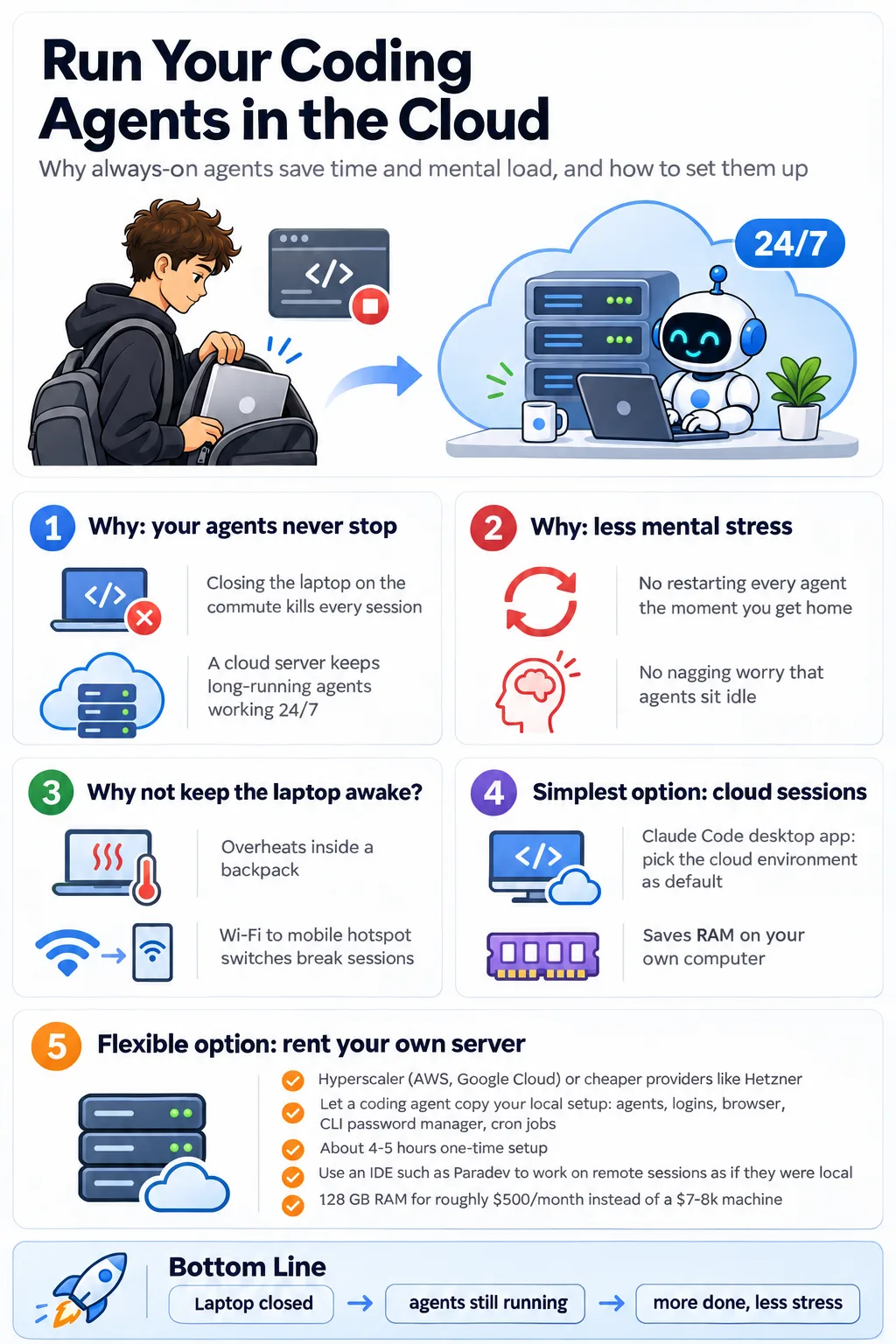
This infographic highlights the main contents of this article. I'll discuss how to efficiently run always on cloud coding agents. Image by ChatGPT.
Why run cloud coding agents?
First of all, let's cover the why of running cloud coding agents. The reason I started doing it is that I noticed whenever I was walking home from work, I had to close my computer, and thus my coding agents closed with it. When I got home, I always needed to make sure that I immediately opened my computer and made sure all my coding agents restarted and that there were no issues. This, of course, costs me a lot of time.
One, because the coding agents were not working in the 20 minutes that I was walking home. And two, I had to spend time when going home and immediately make sure to turn on all the coding agents, which is not always easy if you have something to do when you get home. I also found that it saved me a lot of cognitive strain when I didn't have to worry about always starting or making sure my coding agents were running continuously.
Previously, before I started running everything in the cloud, I would worry because my coding agents were not running when my computer was closed, and I felt like I was basically wasting time. This always put a thought in the back of my mind that I should make sure to keep my computer open and make sure my coding agents were constantly running, which I noticed over time could cause a bit of mental stress. Running everything in the cloud, of course, takes this away because you don't have to worry about restarting them when you get home; they were always running on the way home.
So, simply put, you should run cloud coding agents for two main reasons:
It just saves you time; your coding agents never have to stop.
It reduces the mental stress of feeling that you always have to ensure your coding agents are running.
Lastly, I would also just like to mention that, yes, it is possible to make sure that your computer doesn't fall asleep whenever you close the lid, and you can keep it running and have your coding agents running. However, I found two main issues with this. One is that your computer is susceptible to overheating because the fans are not able to work as they normally should. I definitely noticed this when I had my computer running in my backpack. The computer was hot when I opened it when I got back home.
Secondly, you always need to make sure that it's connected to Wi-Fi, which means you have to switch to a mobile hotspot when going home, which, of course, has its downsides. You have to switch away from the mobile hotspot when you get home, which adds a risk that your coding agents will stop, and of course this is again a mental stress that you would want to avoid.
How to run cloud coding agents
This table highlights the 2 main options you have for running cloud coding agents, including pros and cons. Image by the author.
Let's move into how to run cloud coding agents. There are several ways to run them, and some are easier than others. I think perhaps the simplest way to run these cloud coding agents is to use Claude Code, which lets you run sessions in the cloud rather than running them locally on your computer. This is a simple swap you can make in the Claude desktop application. As you can see, it is marked in the image below. To find this setting, just select Claude Code in the Claude desktop app. Go to the drop-down I show you below the chat input box and select cloud environment by default.
This image shows how you can select the cloud environment when using Claude in the desktop app. Image by the author.
This will make sure that every time you spin up a new session from the Claude desktop app, it spins it up in the cloud and it will always be on. An added benefit is that if you have a low performance computer or just want to save memory, this also saves memory, aka RAM, because the session is running in the cloud and not on your computer itself.
I have another setup, however, for running my cloud session. The main reason I have for this is that I want to be able to run my cloud sessions with any coding agents that I choose, not only Claude Code. I also want added flexibility in how my coding sessions are run. For example, I have a lot of cron jobs that run there, which would not be possible using the Claude desktop app. They limit the amount of automation that you have available, which is basically also cron jobs.
So I decided instead to rent a server. You can rent one from a lot of different providers. You can rent it from the hyperscalers, like AWS, Google Cloud, and so on. These are a bit more expensive, but you can also get a lot of AI credits there, which you can use towards running servers. Otherwise, you can rent one from other cloud providers, such as Hetzner. These will definitely be a bit cheaper; I estimate around 30% cheaper.
One of the downsides of renting your own server is that there's a bit more of a setup to do. You have to first of all order the server and set everything up on it, and then you have to make sure that it's ready for you to go.
Two years ago, I would've argued that this is a reason in itself not to run coding agents in the cloud. However, this setup is now incredibly easy to create using coding agents such as Claude Code. I simply told Opus 5.5 to set up the cloud server with everything. So, just copy the exact setup that I have locally on my computer and make it so I can run it on the cloud server.
It set up all my coding agent accounts and copied over all my logins. It made sure I had access to a browser so that it could test the implementations it made through localhost. It also set up my password storage manager on the server, accessed through the CLI, to keep it as secure as possible.
And basically, within a 4-5 hours — a one-time setup cost — everything was running normally, with a few quirks every now and then. And I estimate it might take two hours total to resolve any issues that you encounter because you're running on the remote server. However, these issues can then immediately be fixed by just telling Opus 5.5 or a similar coding agent to fix them.
Thus, what I'm telling you here is that it's incredibly simple to set up such a cloud session in a cloud environment. I then use this cloud environment through an IDE called Paradev (previously Superset). Paradev is great because it allows you to very easily spin up coding sessions on the remote computer and access them on your local computer just as if the sessions were running locally. An example of this is that you can drag a file from your file explorer on a Mac and drop it into the terminal view in Paradev, and it will just automatically copy it over to the remote server for you without you having to do anything.
Normally, this would be a bit of a more complicated process because the file would be stored locally on your computer while the coding agents would be running remotely, which could be a challenge. However, Paradev removes all of these issues and simply makes running cloud coding agents very simple. In addition, they also have a clean IDE, in my opinion. (Note: I am not sponsored by Paradev.)
A last benefit I would like to mention is that you can also choose to have a very powerful server when running this cloud coding setup. Buying a 128-gigabyte memory Mac, for example, would cost you $7000 to $8000 typically.
However, you can rent a similar server with the same amount of RAM for probably around $500 per month (as of November 2026). This can be quite a good deal if you can't afford the upfront cost, but you want to invest in having a very powerful computer available to you.
In this article, I taught you why and how to set up cloud coding agents. I believe this is one of the best upgrades I've made to my coding setup this year. It saves me an enormous amount of time because my coding agents can be running 24/7, and I never have issues with memory and stuff on my own computer. Additionally, it significantly lowers the mental strain I always felt when I needed to make sure coding agents were running, like keeping my computer open and making sure they restart if I had to close my computer. This simply makes my life a lot easier. And that's why I highly encourage you to also set up cloud coding agents for your own setup. You can either do it through the simple approach using cloud sessions in Claude Code, which just works immediately, or you can do a more custom setup like I did, renting a server and starting running from there.
👉 My free eBook and Webinar:
Microservices Architecture and Local Development
January 20, 202516 min read
A practical guide to identifying, restoring, and transforming elements within your images
February 26, 202621 min read
Learn how to get the most out of agentic coding
January 13, 20267 min read
A practitioner's guide to estimating what an opt-in AI feature actually did, when nobody randomized it.
September 13, 202617 min read
Exploring ways to make voice assistants more personal
August 31, 20257 min read
Enterprise Document Intelligence [Vol.1 #5ter] - Table cells, OCR, captions, headings: cloud-grade structure, running on your own machine. No key, no per-page bill, nothing leaves the building
June 13, 202616 min read
How to define recurring work, give AI the right context, explain what high-quality work looks like, and decide where human judgment is still needed.
July 16, 20269 min read
Apply coding agents to your domain in a safe manner
Simple step-by-step tutorial to building an AI agent in Python
May 24, 202613 min read
原文为英文,正文由自动抓取并保留原文。
原文发布于 Towards Data Science(How to Run Claude Code and Other Coding Agents in the Cloud 24/7),标题、摘要与正文由机器翻译,术语按行业惯例统一,未经人工逐句校订。