在 Amazon EKS 上使用 NVIDIA Run:ai GPU 切分
GPU 共享并非新事物:Multi-Instance GPU(MIG)、时间切片和 Multi-Process Service(MPS)分别满足不同的隔离与利用率需求。NVIDIA Run:ai GPU Fractioning 在 MPS 的基础上构建,加入了与 Kubernetes 集成的调度、按 Pod 的内存契约、强制执行机制以及指标。
NVIDIA Run:ai 是面向 Kubernetes 的 AI 工作负载编排软件。其 GPU Fractioning Operator 可以帮助多个团队共享 Amazon Elastic Kubernetes Service(Amazon EKS)上的一块或两块 GPU。Notebook、模型评估和小型推理服务会让团队排队等待,即便 GPU 内存仍有空闲。在本演练的基线配置中,NVIDIA 设备插件将单块 GPU 暴露为一个 nvidia.com/gpu 资源,且 GPU 共享处于禁用状态。两个各自请求 nvidia.com/gpu: 1 的 Pod 无法在该节点上并发运行,即使它们合计的 GPU 内存需求能够满足。
NVIDIA Run:ai GPU Fractioning 为基于软件的共享增加了 Kubernetes 调度集成、强制执行的 GPU 内存限制以及按 Pod 的指标。该方法适用于满足 GPU Fractioning Operator 硬件和软件要求的 NVIDIA GPU,包括不支持 MIG 的 GPU。我们以一个配备 NVIDIA A10G Tensor Core GPU 的 Amazon Elastic Compute Cloud(Amazon EC2)g5.xlarge 实例作为经过验证的示例。其他配置需要做兼容性检查和验证。
NVIDIA 于 2026 年 10 月 13 日宣布将 NVIDIA Run:ai 开源。本示例使用了其四个模块化组件中的两个:KAI Scheduler 和 GPU Fractioning Operator。KAI Resource Management 与 Workload Map 用于解决组织治理和其他类型的工作负载,不在本演练的讨论范围内。
本文将展示如何构建自定义的 Amazon Linux 2023(AL2023)镜像,并在 Amazon EKS 上配置 GPU 显存共享。在经过验证的 G5/A10G 示例中,你将建立整卡 GPU 基线,为每个 Pod 分配 8 GiB 的显存配额,并验证 6 GiB 的分配。随后你将查看各 Pod 的指标,测试对 9 GiB 分配请求的拒绝,并清理这个一次性环境。
MIG 在受支持的 GPU 上提供硬件分区。设备插件的时间片切分可以共享一块 GPU,但不提供副本显存或故障隔离。MPS 允许并发的 CUDA 进程。故障隔离能力取决于配置。NVIDIA Run:ai GPU Fractioning 增加了强制执行的每容器显存限制,并支持时间片切分(默认)或 sm-sharing 计算模式。NVIDIA 的文档说明,其默认模式对应相互独立的工作负载错误域,而 sm-sharing 对应共享错误域。这些都不是安全保证。本演练测试的是显存限制,而非故障隔离或计算性能。显存限制并不会预留与之成比例的计算资源。
Amazon EKS 文档介绍了多种 GPU 共享方案:MIG、使用 NVIDIA 设备插件的时间片切分,以及使用 NVIDIA DRA 驱动和 Karpenter 的时间片切分。关于如何在它们之间进行选择,请参阅 Amazon EKS 最佳实践指南中的 GPU 共享指导。当你在不支持 MIG 的 GPU 上需要强制实施每 Pod 的 GPU 显存限制,并且能够运行固定规格的 GPU 节点组时,请选择 GPU fractioning。
动态资源分配(Dynamic Resource Allocation,DRA)提供了用于请求和分配设备的 Kubernetes API。GPU 共享与隔离取决于设备驱动的实现以及所启用的特性。KAI Scheduler 和 GPU Operator 支持 DRA。本演练使用的是 NvFractions 注解,而非 DRA。
GPU 分割有助于支持存在空闲时段的交互式 Notebook、短时评测任务、GPU 兼容性测试以及小型推理服务。应依据实测峰值用量加上额外开销来确定每个 GPU 内存请求,然后在并发负载下测试延迟。所展示的密度提升并不能证明吞吐有所提升,也不能证明成本会普遍下降。
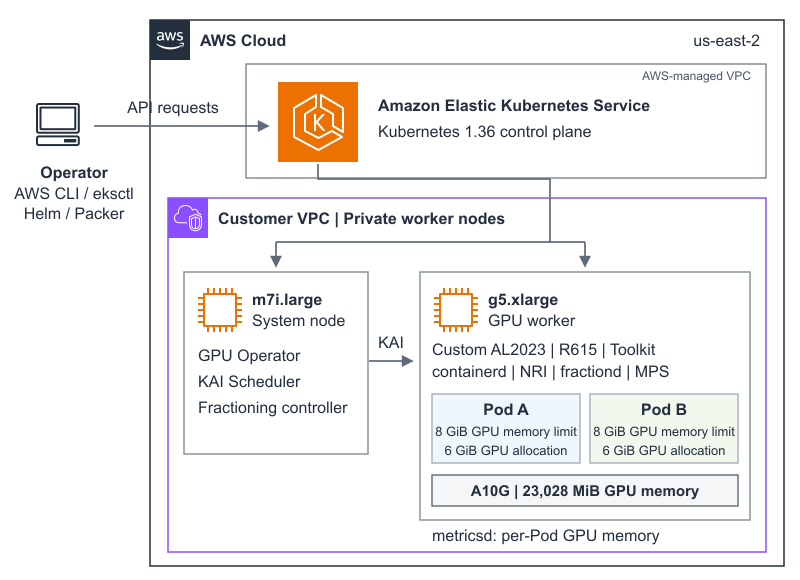
下图展示了美国东部(俄亥俄)区域(us-east-2)中经过验证的单 GPU 环境。你可以使用 AWS Command Line Interface(AWS CLI)、eksctl、Helm 和 Packer 来构建并运维该环境。Amazon EKS 控制平面在由 AWS 托管的 Amazon Virtual Private Cloud(Amazon VPC)中运行 Kubernetes 1.36 版本,该 VPC 与客户 VPC 相互独立。它连接到客户 VPC 私有子网中的 EC2 工作节点。
一个 m7i.large 系统节点承载 operator 控制器和 KAI Scheduler。KAI Scheduler 将两个 Pod 都调度到一个带污点的 g5.xlarge 上,该实例配有一块 A10G,包含 23,028 MiB 的 GPU 内存。
每个 Pod 的 GPU 内存限制为 8 GiB,实际分配 6 GiB GPU 内存。GPU 工作节点使用定制版 AL2023,搭配 NVIDIA R615 驱动分支、NVIDIA Container Toolkit 和 containerd。它运行 fractiond,并集成 Node Resource Interface(NRI),通过 MPS 实现共享。metricsd 守护进程导出每个 Pod 的 GPU 内存指标。
图 1:在 Amazon EKS 中,单个 A10G 上两份 GPU 内存契约的已验证示例
本演练使用 AWS Samples 代码库。请确认前提条件和经验证的组件版本,然后完成第 1 步到第 10 步。
使用一个具有 Amazon EKS、AWS CloudFormation、Amazon VPC、Amazon EC2、Amazon Elastic Block Store (Amazon EBS)、AWS Identity and Access Management (IAM) 以及用于 Amazon Machine Image (AMI) 发现的 AWS Systems Manager 权限的 AWS 账户。确认 g5.xlarge(系统节点)以及一台临时 m5.xlarge 镜像构建器的配额和容量。安装 AWS CLI v2、eksctl、kubectl、Helm、Packer、Git、jq 和 curl。
使用你常规的 AWS 凭证提供程序:命名配置文件、AWS IAM Identity Center、代入角色或访问密钥环境变量。优先使用临时凭证。使用临时访问密钥时必须提供 AWS_SESSION_TOKEN。示例使用 us-east-2。其他区域必须支持所选的 Amazon EKS 版本和实例类型。
在选择另一款 GPU 之前,请检查 NVIDIA 的 GPU Operator 硬件列表、所选驱动程序的硬件支持以及 GPU Fractioning Operator 的先决条件。仅凭硬件支持并不能确立分片兼容性。本演练仅验证 G5/A10G 配置。AMI 构建面向 x86_64。检查 CUDA 兼容性和内存余量:两个 8 GiB 合约需要为两个合约及运行时开销留出空间。更小的设备需要更小的合约并调整探针。
本演练会创建可计费资源,包括 Amazon EKS 控制平面、NAT 网关、实例、卷和 AMI 快照。使用一次性环境,并在验证完成后彻底清理。
在验证时,针对 EKS 优化的 AL2023 NVIDIA 镜像提供 R580 和 R595 驱动分支。GPU Fractioning Operator v0.1.7 需要 R615 或更新版本。R615 属于短生命周期版本,并非 GPU Operator 的默认版本。本示例构建了一个自定义的标准 Amazon EKS 1.36 AL2023 镜像,其驱动和工具包由 AMI 自带。它不使用在其他操作系统上由 Operator 管理的驱动容器。该表格记录的是实验室验证结果,而非厂商支持认证。
我们于 2026 年 10 月 22 日使用 NVIDIA 驱动 615.71.10 验证了本操作指南。2026 年 11 月 18 日,在更新 GPU 节点污点(taint)后,我们使用相同驱动的镜像重跑了除第 3 步镜像构建之外的每一个步骤。结果一致。该表格列出的是已测试的组件版本,而非长期支持矩阵。在更换任何组件之前,请重新查阅 Amazon EKS AMI 文档和 NVIDIA 的前置要求。
克隆代码仓库,然后基于提供的示例创建本地配置文件,并限制其权限:
git clone https://github.com/aws-samples/sample-code-for-gpu-fractioning-on-eks.git cd sample-code-for-gpu-fractioning-on-eks cp walkthrough.env.example walkthrough.env chmod 600 walkthrough.env 克隆完成后,使用 walkthrough.env 进行配置,并为每个阶段运行 run.sh。生成的文件和 kubeconfig 保留在被忽略的 .state 目录中。GPU_INSTANCE_TYPE 用于选择实例类型。仅更改该变量并不能确立兼容性。
walkthrough.env 中的默认设置与可选认证设置
AWS_REGION=us-east-2 CLUSTER_NAME=runai-fractioning-blog EKS_VERSION=1.36 GPU_INSTANCE_TYPE=g5.xlarge NVIDIA_DRIVER_VERSION=615.71.10 # 选择 profile 或访问密钥变量,不要同时使用两者。 # AWS_PROFILE=my-profile # AWS_ACCESS_KEY_ID=YOUR_ACCESS_KEY_ID # AWS_SECRET_ACCESS_KEY=YOUR_SECRET_ACCESS_KEY # AWS_SESSION_TOKEN=YOUR_SESSION_TOKEN 切勿提交凭证。本地配置文件已被 Git 忽略。在预配前确认当前活动身份:
./run.sh check 可分别运行各阶段以检查结果,或使用 ./run.sh walkthrough 运行一遍内存限制测试。清理始终是单独的操作。
运行以下命令以创建可丢弃的 Amazon EKS 集群及其系统节点:
./run.sh create-cluster 该命令会预配一个运行 Kubernetes 版本 1.36 的 Amazon EKS 集群、一个带一个 NAT 网关的专用 VPC、OpenID Connect (OIDC) 集成,以及一个私有的 m7i.large 托管节点。
来自 config/eksctl-cluster.yaml.tpl 的选定字段
原文较长,译文为节选;译文由英文原文机器翻译,术语按行业惯例统一,可在文末展开原文核对。
查看英文原文(Using NVIDIA Run:ai GPU Fractioning on Amazon EKS)
GPU sharing is not new: Multi-Instance GPU (MIG), time-slicing, and Multi-Process Service (MPS) address different isolation and utilization needs. NVIDIA Run:ai GPU Fractioning builds on MPS with Kubernetes-integrated scheduling, per-Pod memory contracts, enforcement, and metrics.
NVIDIA Run:ai is AI workload orchestration software for Kubernetes. Its GPU Fractioning Operator can help several teams share one or two GPUs on Amazon Elastic Kubernetes Service (Amazon EKS). Notebooks, model evaluations, and small inference services can leave teams waiting even when GPU memory remains available. In this walkthrough’s baseline, the NVIDIA device plugin exposes the single GPU as one nvidia.com/gpu resource, with GPU sharing disabled. Two Pods each requesting nvidia.com/gpu: 1 cannot run concurrently on that node, even when their combined GPU-memory demand fits.
NVIDIA Run:ai GPU Fractioning adds Kubernetes scheduling integration, enforced GPU-memory limits, and per-Pod metrics to software-based sharing. The approach applies to NVIDIA GPUs that meet the GPU Fractioning Operator’s hardware and software requirements, including GPUs without MIG. We use one Amazon Elastic Compute Cloud (Amazon EC2) g5.xlarge instance with an NVIDIA A10G Tensor Core GPU as the validated example. Other configurations require compatibility checks and validation.
NVIDIA announced the open source release of NVIDIA Run:ai on October 13, 2026. This example uses two of its four modular components: KAI Scheduler and GPU Fractioning Operator. KAI Resource Management and Workload Map address organizational governance and additional workload types, outside this walkthrough’s scope.
In this post, we show how to build a custom Amazon Linux 2023 (AL2023) image and configure GPU-memory sharing on Amazon EKS. In the validated G5/A10G example, you establish a whole-GPU baseline, give each Pod an 8 GiB memory contract, and verify 6 GiB allocations. You then inspect per-Pod metrics, test rejection of a 9 GiB allocation, and clean up the disposable environment.
Choose a GPU sharing approach
MIG provides hardware partitions on supported GPUs. Device-plugin time-slicing shares a GPU without replica memory or fault isolation. MPS permits concurrent CUDA processes. Fault containment depends on configuration. NVIDIA Run:ai GPU Fractioning adds enforced per-container memory limits and supports time-slicing (default) or sm-sharing compute modes. NVIDIA documents separate workload error domains for its default mode and a shared error domain for sm-sharing. These are not security guarantees. This walkthrough tests memory limits, not fault containment or compute performance. A memory limit does not reserve proportional compute.
Amazon EKS documents several GPU sharing options: MIG, time-slicing with the NVIDIA device plugin, and time-slicing with the NVIDIA DRA driver and Karpenter. For guidance on choosing among them, see the GPU sharing guidance in the Amazon EKS Best Practices Guide. Choose GPU fractioning when you need enforced per-Pod GPU-memory limits on GPUs without MIG and can run fixed-size GPU node groups.
Dynamic Resource Allocation (DRA) provides Kubernetes APIs for requesting and allocating devices. GPU sharing and isolation depend on the device driver’s implementation and enabled features. KAI Scheduler and GPU Operator support DRA. This walkthrough uses NvFractions annotations, not DRA.
GPU fractioning can help interactive notebooks with idle periods, short evaluation jobs, GPU compatibility tests, and small inference services. Choose each GPU-memory request from measured peak usage plus overhead, then test latency under concurrent load. The demonstrated density improvement does not establish a throughput gain or a universal cost reduction.
Solution overview
The following diagram shows the validated single-GPU environment in the US East (Ohio) Region (us-east-2). You use the AWS Command Line Interface (AWS CLI), eksctl, Helm, and Packer to build and operate it. The Amazon EKS control plane runs Kubernetes version 1.36 in an AWS managed Amazon Virtual Private Cloud (Amazon VPC), separate from the customer VPC. It connects to EC2 workers in private subnets of the customer VPC.
An m7i.large system node hosts the operator controllers and KAI Scheduler. KAI Scheduler places both Pods on a tainted g5.xlarge with one A10G containing 23,028 MiB of GPU memory.
Each Pod has an 8 GiB GPU-memory limit and allocates 6 GiB of GPU memory. The GPU worker uses custom AL2023 with the NVIDIA R615 driver branch, NVIDIA Container Toolkit, and containerd. It runs fractiond with Node Resource Interface (NRI) integration and MPS for sharing. The metricsd daemon exports per-Pod GPU-memory metrics.
Figure 1: Validated example of two GPU-memory contracts on one A10G in Amazon EKS
Implementation walkthrough
The walkthrough uses the AWS Samples repository. Confirm the prerequisites and validated component versions, then complete Steps 1 through 10.
Prerequisites
Use an AWS account with permissions for Amazon EKS, AWS CloudFormation, Amazon VPC, Amazon EC2, Amazon Elastic Block Store (Amazon EBS), AWS Identity and Access Management (IAM), and AWS Systems Manager for Amazon Machine Image (AMI) discovery. Confirm quota and capacity for g5.xlarge, the system node, and a temporary m5.xlarge image builder. Install AWS CLI v2, eksctl, kubectl, Helm, Packer, Git, jq, and curl.
Use your normal AWS credential provider: a named profile, AWS IAM Identity Center, an assumed role, or access-key environment variables. Prefer temporary credentials. AWS_SESSION_TOKEN is required when using temporary access keys. The examples use us-east-2. Another Region must support the selected Amazon EKS version and instance types.
Before choosing another GPU, check NVIDIA’s GPU Operator hardware list, the selected driver’s hardware support, and the GPU Fractioning Operator prerequisites. Hardware support alone does not establish fractioning compatibility. This walkthrough validates the G5/A10G configuration only. The AMI build targets x86_64. Check CUDA compatibility and memory headroom: The two 8 GiB contracts require room for both contracts and runtime overhead. Smaller devices need smaller contracts and adjusted probes.
The walkthrough creates billable resources, including an Amazon EKS control plane, a NAT gateway, instances, volumes, and an AMI snapshot. Use a disposable environment and complete cleanup when validation finishes.
Use the validated AL2023 stack
At the time of validation, the EKS-optimized AL2023 NVIDIA image provided R580 and R595 driver branches. GPU Fractioning Operator v0.1.7 requires R615 or newer. R615 is short-lived and is not the GPU Operator default. This example builds a custom standard Amazon EKS 1.36 AL2023 image with AMI-owned driver and toolkit. It does not use an operator-managed driver container on another OS. The table records lab validation, not vendor support certification.
| Component | Validated version |
| Amazon EKS | 1.36 |
| GPU | NVIDIA A10G, 23,028 MiB |
| NVIDIA driver / Container Toolkit | 615.71.10 / 1.20.1-1 |
| containerd | 2.3.5 with NRI |
| GPU Operator / device plugin | 26.7.1 / 0.20.1 |
| KAI Scheduler / Fractioning Operator | 0.18.5 / 0.1.7 |
We validated this walkthrough on October 22, 2026, using NVIDIA driver 615.71.10. On November 18, 2026, after updating the GPU node taint, we repeated every step except the Step 3 image build, using an image with the same driver. The results matched. The table lists the tested component versions, not a permanent support matrix. Recheck the Amazon EKS AMI documentation and NVIDIA prerequisites before changing any component.
Step 1: Clone and configure
Clone the repository, then create a local configuration file from the provided example and restrict its permissions:
git clone https://github.com/aws-samples/sample-code-for-gpu-fractioning-on-eks.git
cd sample-code-for-gpu-fractioning-on-eks
cp walkthrough.env.example walkthrough.env
chmod 600 walkthrough.envAfter cloning, use walkthrough.env for configuration and run.sh for each stage. Generated files and kubeconfig stay in the ignored .state directory. GPU_INSTANCE_TYPE selects the instance type. Changing it alone does not establish compatibility.
Defaults and optional authentication settings in walkthrough.env
AWS_REGION=us-east-2
CLUSTER_NAME=runai-fractioning-blog
EKS_VERSION=1.36
GPU_INSTANCE_TYPE=g5.xlarge
NVIDIA_DRIVER_VERSION=615.71.10

# Choose a profile or access-key variables, not both.
# AWS_PROFILE=my-profile
# AWS_ACCESS_KEY_ID=YOUR_ACCESS_KEY_ID
# AWS_SECRET_ACCESS_KEY=YOUR_SECRET_ACCESS_KEY
# AWS_SESSION_TOKEN=YOUR_SESSION_TOKEN
Never commit credentials. The local configuration file is ignored by Git. Confirm the active identity before provisioning:
./run.sh checkRun stages separately to inspect results, or use ./run.sh walkthrough to run through the memory-limit test. Cleanup is always a separate action.
Step 2: Create the disposable cluster
Run the following command to create the disposable Amazon EKS cluster and its system node:
./run.sh create-clusterThe command provisions an Amazon EKS cluster running Kubernetes version 1.36, a dedicated VPC with one NAT gateway, OpenID Connect (OIDC) integration, and a private m7i.large managed node.
Selected fields from config/eksctl-cluster.yaml.tpl
iam:
  withOIDC: true
vpc:
  nat:
    gateway: Single
managedNodeGroups:
  - name: system-ondemand
    instanceType: m7i.large
    desiredCapacity: 1
    privateNetworking: true
Step 3: Build the custom AL2023 image
Run the following command to build the custom AL2023 image with the R615 driver branch:
./run.sh build-amiThe script discovers a public builder subnet and the recommended standard Amazon EKS AMI for Kubernetes 1.36 on AL2023. Packer installs the current patch release from the R615 driver branch and the toolkit, configures the NVIDIA runtime, checks package state, and creates an encrypted image. The Region-specific AMI ID is stored in .state/ami-id.
NVIDIA_DRIVER_VERSION selects the R615 branch. It is not an exact patch pin. The workflow records the discovered driver version with the AMI ID and uses that version in AMI and node-group tags. Read .state/installed-driver-version for the version observed in your build. For production, pin exact packages and the base image in your own build and validate a supported driver-branch upgrade.
You need this step only because the EKS-optimized AL2023 NVIDIA AMI did not include the R615 driver branch at the time of validation. Prefer an EKS-optimized NVIDIA AMI once the driver that it selects for your GPU and the remaining host prerequisites meet the GPU Fractioning Operator requirements. Check the driver versions in the Amazon EKS AMI releases on GitHub. The sample’s scripts currently require the R615 driver and metadata from the image build, so using a stock AMI also requires script changes.
Relevant Packer settings from ami/eks-al2023-r615.pkr.hcl
source "amazon-ebs" "eks_al2023_r615" {
  source_ami = var.source_ami_id
  region = var.aws_region
  encrypt_boot = true
  metadata_options {
    http_tokens = "required"
  }
}
SOURCE_AMI_ID and PACKER_SUBNET_ID are optional overrides for an approved base image or builder subnet. Rebuild and test images when the operating system or GPU stack changes.
Step 4: Add the GPU worker
Run the following command to add a GPU managed node group that uses the custom image:
./run.sh add-gpu-nodeBy default, the managed node group uses the custom image and stays at one On-Demand g5.xlarge, the validated GPU worker. A GPU taint excludes ordinary workloads. The script disables eksctl’s NVIDIA device-plugin installation because GPU Operator manages that component.
Selected fields from config/eksctl-gpu-nodegroup.yaml.tpl
managedNodeGroups:
  - name: gpu-g5-r615-ondemand
    instanceType: g5.xlarge
    ami: <generated-ami-id>
    amiFamily: AmazonLinux2023
    desiredCapacity: 1
    minSize: 1
    maxSize: 1
    privateNetworking: true
    taints:
      - key: nvidia.com/gpu
        effect: NoSchedule
Step 5: Install GPU Operator and inspect the host
Run the following command to install GPU Operator and inspect the GPU worker’s host configuration:
./run.sh install-gpu-operatorGPU Operator 26.7.1 supplies the device plugin and Kubernetes integrations. Its configuration preserves the image-owned driver and toolkit:
driver:
  enabled: false
toolkit:
  enabled: false
The same command runs a temporary privileged inspection Pod on the GPU worker, prints the host configuration, and removes the Pod. The validated node reports:
Observed host configuration
GPU: NVIDIA A10G, 23028 MiB
Driver: 615.71.10
NVIDIA Container Toolkit: 1.20.1-1
containerd: 2.3.5
cgroup filesystem: cgroup2fs
NRI socket paths:
  /var/run/nri/nri.sock
  /run/nri/nri.sock
On this AL2023 node, /var/run is a symbolic link to /run. Both paths identify the same socket. Limit privileged inspection to the disposable environment and confirm the Pod is removed.
Step 6: Establish the whole-GPU baseline
Run the following command to test whole-GPU scheduling before fractioning is installed:
./run.sh baselineEach baseline Pod requests and limits nvidia.com/gpu to 1. The test assumes one available physical GPU with sharing disabled: One Pod runs and the other remains Pending. This demonstrates the whole-device scheduling constraint before fractioning is installed. On multi-GPU nodes, adapt this baseline and verify that both fractional workloads use the same GPU.
Measured baseline result
NAME          READY   STATUS    NODE
whole-gpu-a   1/1     Running   <gpu-node>
whole-gpu-b   0/1     Pending   <none>
The script checks this state and removes both baseline Pods.
Step 7: Install KAI Scheduler and GPU Fractioning Operator
Run the following command to install KAI Scheduler, which includes GPU Fractioning Operator:
./run.sh install-kaiThe pinned KAI Scheduler 0.18.5 chart includes GPU Fractioning Operator 0.1.7. The values turn on NvFractions and per-Pod metrics while retaining GPU-stack version checks. The optional nvidia.com/container.<name>.gpu-compute.mode annotation selects compute mode. These workloads leave the default unchanged.
Relevant fields from helm/kai-values.yaml
global:
  gpuSharingMode: NvFractions
  nvFractions:
    set: true
gpu-fractioning:
  metricsAgent:
    enabled: true
  skipGpuStackVersionChecks: false
In the validation, FractiondReady, MpsdReady, and Ready are True. DriverUpgradeInProgress is False with reason NoDriverUpgrade, consistent with the AMI retaining driver ownership.
Step 8: Run the positive sharing test
Run the following command to deploy two Pods with 8 GiB GPU-memory contracts:
./run.sh shareEach Pod requests and limits memory to 8 GiB and selects kai-scheduler. Neither requests a whole nvidia.com/gpu resource. The repository applies these scheduling fields and runs a CUDA probe that allocates 6 GiB:
Essential fields from kubernetes/fraction-8gi-pods.yaml
metadata:
  annotations:
    nvidia.com/container.gpu-workload.gpu-memory.request: 8Gi
    nvidia.com/container.gpu-workload.gpu-memory.limit: 8Gi
spec:
  schedulerName: kai-scheduler
  runtimeClassName: nvidia
Measured positive result
NAME             READY   STATUS    NODE
fraction-8gi-a   1/1     Running   <same-gpu-node>
fraction-8gi-b   1/1     Running   <same-gpu-node>
The script verifies matching node names and GPU UUIDs. In the validation, both Pods see 8,192 MiB and report allocation_succeeded_mib=6144. Those checks establish placement on one physical GPU, the bounded device view, and successful allocations within each contract.
Measured allocation output from each Pod
NVIDIA_GPU_MEMORY_LIMIT=8192
requested_allocation_mib=6144
allocation_succeeded_mib=6144
Observe memory while both Pods remain active
./run.sh metricsThe gpu_fractioning_gpu_memory_used_bytes metric attributes memory by Pod and GPU UUID. The observed 6,394 MiB (about 6.24 GiB) per Pod exceeds the probe’s 6,144 MiB allocation by 250 MiB. Metrics can include CUDA context and runtime overhead. This experiment does not measure that breakdown. Retain workload identity and request, limit, and usage values together when monitoring the shared device.
Measured per-Pod metric series
gpu_fractioning_gpu_memory_used_bytes{
  gpu_uuid="<same-gpu-uuid>",
  namespace="runai-fractioning-test",
  pod="fraction-8gi-a"} 6.704594944e+09

gpu_fractioning_gpu_memory_used_bytes{
  gpu_uuid="<same-gpu-uuid>",
  namespace="runai-fractioning-test",
  pod="fraction-8gi-b"} 6.704594944e+09
Step 9: Verify rejection above the limit
Run the following command to test an allocation that exceeds the 8 GiB contract:
./run.sh limitThis command removes the positive-test Pods and creates one Pod with an 8 GiB contract that attempts a 9 GiB allocation. The probe reports:
Measured over-limit result
NVIDIA_GPU_MEMORY_LIMIT=8192
requested_allocation_mib=9216
allocation_failed=out of memory
Measured negative-test Pod status
NAME                      READY   STATUS      NODE
fraction-8gi-over-limit   0/1     Completed   <gpu-node>
Here, cudaMalloc returns an out-of-memory error, which the probe handles before exiting with code 0. Completed is expected, not OOMKilled. This demonstrates allocation rejection, not container termination or general fault isolation.
Step 10: Clean up
Capture the VPC ID before deleting the cluster. The independent checks that follow use the default cluster name and Region. Substitute your configured values if you changed them.
Capture the VPC ID
VPC_ID=$(aws eks describe-cluster \
  --name runai-fractioning-blog --region us-east-2 \
  --query cluster.resourcesVpcConfig.vpcId --output text)
Remove the disposable environment
./run.sh cleanupStandard cleanup removes the test namespace, Helm releases, and disposable cluster while preserving the custom AMI and its Amazon EBS snapshot.
Verify resource deletion
aws eks describe-cluster \
  --name runai-fractioning-blog --region us-east-2
aws cloudformation describe-stacks \
  --stack-name eksctl-runai-fractioning-blog-cluster \
  --region us-east-2
aws ec2 describe-vpcs --vpc-ids "$VPC_ID" --region us-east-2
Expect explicit resource-not-found responses for deleted resources. Authentication or permission errors do not establish deletion. Also inspect remaining node groups and cluster-tagged instances. If cleanup fails, inspect CloudFormation events and resolve owned dependencies before retrying. An absent Amazon EKS endpoint does not prove that its VPC is gone.
Use ./run.sh cleanup-all only when the custom AMI and its Amazon EBS snapshot are no longer needed. If image deletion is refused, confirm the AMI ID and sample ownership tag. Do not bypass the safeguard.
Production considerations
Treat this as a behavior validation. Use trusted workloads and apply least-privilege IAM, namespace controls, approved images, and admission rules for fraction requests. Choose whole GPUs or MIG on supported hardware when stronger isolation is required.
The pinned fractioning daemons use privileged containers, host PID access, and NRI/MPS host mounts. Restrict their deployment and configuration to trusted administrators.
Allow headroom for CUDA contexts, caches, batching, and runtime overhead. Measure latency and throughput under concurrent load. Monitor allocation failures, MPS health, NRI connectivity, and GPU errors. Pin the base AMI, driver, toolkit, device plugin, operator, scheduler, and workload images as one tested combination. Rebuild images and test rollback before rollout.
This walkthrough requires pre-provisioned GPU capacity. It does not configure or validate GPU-fraction-aware autoscaling. The fractional Pods select kai-scheduler, request no nvidia.com/gpu resource, and use a nodeSelector that targets a node group fixed at one node. Karpenter support for secondary schedulers is an open feature request (issue #742 on GitHub). The custom image cannot run on Amazon EKS Auto Mode-managed nodes, because Auto Mode selects and manages their AMI. A cluster can mix Auto Mode-managed nodes with managed node groups, but we did not validate this walkthrough in such a cluster.
Teams that use Karpenter can reference the same custom AMI by ID in an EC2NodeClass. The autoscaling limit still applies. We did not validate this path.
KAI Scheduler is a second scheduler. It handles queueing and placement for Pods that select it. If you already use Kueue, decide which component owns queueing for GPU workloads before you adopt KAI Scheduler.
We recommend running the Amazon EKS node monitoring agent on GPU nodes. In a November 18, 2026 regression run, the agent ran on the custom R615 image with MPS sharing active and reported healthy GPU conditions throughout the sharing and limit tests. That run did not test fault detection. Because GPU Operator already runs a Data Center GPU Manager (DCGM) host engine, configure the agent to use that host engine instead of its bundled one.
Conclusion
In this post, we showed how to configure GPU-memory fractioning on Amazon EKS with a custom AL2023 image, using G5/A10G as the validated example. The approach extends to compatible NVIDIA GPUs after checking prerequisites and validating the selected configuration. You established the whole-GPU baseline, ran two bounded workloads on the same GPU, inspected per-Pod memory usage, and verified rejection of an allocation above the limit. Fractioning can improve access to existing capacity when workload memory fits. Production adoption also requires isolation controls and performance testing.
To repeat the experiment, clone the AWS Samples repository and compare your results with its validated evidence. Explore the GPU Fractioning Operator documentation and the Amazon EKS accelerated AMI guidance before adapting the example to your workloads.
The content and opinions in this post are those of the third-party author and AWS is not responsible for the content or accuracy of this post.
About the authors

Muru Bhaskaran
Muru Bhaskaran is a Sr. Specialist Solutions Architect at Amazon Web Services. With more than 20 years of experience, he helps enterprises build secure, scalable AI training and inference infrastructure using accelerated computing and Kubernetes, with a focus on production readiness and price-performance.

Robert Ferrer
Robert Ferrer is a Specialist Solutions Architect at Amazon Web Services. He focuses on large-scale model training and inference, GPU-accelerated infrastructure, distributed computing, and agentic AI. He works with customers to weigh architecture trade-offs across compute, networking, storage, orchestration, resilience, and cost, helping them move from experimentation to reliable production.

Eliuth Triana
Eliuth Triana is a developer relations manager at NVIDIA on the Amazon team. He connects Amazon and AWS product leaders, developers, and scientists with NVIDIA technologists and product leaders to accelerate Amazon model inference and training, ML/DL workloads, Amazon EC2 products, and AWS AI services. Eliuth is a passionate mountain biker, tennis player, skier, and poker player.

Felipe Garcia
Felipe Garcia is a Senior Solutions Architect for AI Cloud Services on NVIDIA’s Cloud Service Provider GTM team. He helps cloud providers build and scale GPU-accelerated AI infrastructure, with a focus on cloud-native architectures and moving AI workloads from experimentation to production.
正文保留英文原文,标题与摘要由机器翻译。
原文发布于 AWS Machine Learning(Using NVIDIA Run:ai GPU Fractioning on Amazon EKS),标题、摘要与正文由机器翻译,术语按行业惯例统一,未经人工逐句校订。
