用 Service Worker 和 Pyodide 在浏览器运行完整服务端 Datasette Python 应用
现在,你只需使用一个精心构造的指向 lite.datasette.io 的 URL,就能完成以下所有操作:
加载客户端侧的 Datasette,以浏览任意 SQLite 数据库、JSON 文件、CSV 文件或 SQL 脚本
选择从 PyPI 加载某个已发布的 Datasette 版本
从 Datasette 的 GitHub 仓库加载指定的 commit、tag 或分支名
从 100 多个 SQLite 版本中挑选一个与 Datasette 搭配使用
从 PyPI 或 wheel 文件的 URL 安装额外的 Datasette 插件,包括 JavaScript 可视化工具
能够加载指定的 Datasette 引用、插件和 SQLite 版本,使这个工具非常适合用来链接到开发中功能的演示或 bug 复现,而无需为此启动一个完整的 Web 服务器来提供该演示。
举个例子,请看下面这个 URL:
点击该链接,经过短暂的加载屏幕后,你会看到一个像这样的页面:
这是 Datasette 在运行新的 datasette-maplibre 插件,加载一个由各国 GeoJSON 形状构成的数据库,并在表格中同时展示一张合并地图以及各个单独的边界地图。
让我们拆解一下这个 URL,看看它在做什么:
https://lite.datasette.io/
 ?install=datasette-maplibre
 &url=https://.../demo.db
 &metadata=https://.../metadata.yml
 #/demo/capitals_and_countries%23map=0/4.2/180&color=continent
?install=datasette-maplibre 会从 PyPI 安装这个额外的插件。你可以按需多次传入 &install=...,以加载更多插件。
&url=https://.../demo.db 会从所提供的 URL 加载那个 SQLite 数据库。这些 URL 必须带有开放的 CORS 响应头——我把这类文件托管在 Gist 上,因为 Gist 提供了一种简便的方式,让网页托管的文件带上开放的 CORS 响应头。
&metadata=https://.../metadata.yml 会加载这个 metadata.yml 文件。该元数据文件为各个表以及 Datasette 首页添加了 HTML 描述。点击此处访问该首页,可获得对该插件其他功能的引导式导览,这些功能都定义在该元数据文件中。
#/demo/capitals_and_countries%23map=0/4.2/180&color=continent 是一个片段哈希(fragment hash),会转换为 Datasette 内的一个位置——这里它加载 /demo/capitals_and_countries 这个 SQL 视图,然后在其后追加另一个片段哈希(%23 是经过 URL 编码的 #),以此告诉地图插件缩放到特定位置,并根据数据中的 continent 列设置地图上各形状的颜色。
那个 URL 承担了很多工作!去年我写过更多关于这个技巧的内容,讲的是如何在可通过 URL 寻址的 Pyodide Python 环境中构建可通过 URL 寻址的软件。
支持的 URL 参数全集在 Datasette Lite README 中有说明。
我已经开始将 Datasette Lite 作为 Datasette 开发流程的一部分来使用。这里有一个近期的问题,描述了一个分页 bug——我在那里发表了一条评论,用 Datasette Lite 的链接演示了旧的、有问题的行为以及新的修复:
它如何工作:使用 service worker
Datasette Lite 并不是一个新项目。我在 2022 年就发布了第一个版本,最初多少带着点玩笑性质(在浏览器里运行服务端应用确实挺有趣),但它很快就证明了自己的价值。
最初那个版本的问题在于,它只是个权宜之计。它的工作方式是在一个 Pyodide web worker 中运行 Datasette,通过这套技术栈模拟请求,然后用 innerHTML 把生成的 HTML 注入回顶层页面。
这对基础的 Datasette 是可行的,但意味着任何使用 JavaScript 的功能都无法工作,因为 innerHTML 中的 script 标签不会执行,而它所用的 web worker 技巧也无法加载额外的 JavaScript 或 CSS 文件。
新版本采用了基于 Service Worker 的完全不同的方案。Service Worker 允许 JavaScript 拦截对新页面和资源的 HTTP 请求,改由客户端代码来提供响应。
Datasette Lite 为整个 lite.datasette.io 域名注册了一个 Service Worker。随后,父页面会创建一个 iframe,把对 Datasette 页面的请求发送到如下形式的 URL:
/app/aa94e6851595/ # 首页(HTML) /app/aa94e6851595/data/places # 表格页面(HTML) /app/aa94e6851595/-/static/navigation-search.js #(JavaScript) /app/aa94e6851595/-/static/app.css #(CSS)
这些都是常规的 Datasette URL,只是带了 /app/aa94e6851595/ 前缀。这是怎么回事?
/app// 前缀之所以必要,是因为存在多个标签页。
以上面那个 URL 为例,它加载了带 datasette-maplibre 插件的演示实例。该 URL 定义了一个完整的自定义 Datasette 实例。你可能在一个标签页里运行它,同时在另一个标签页里运行我的另一个演示链接。
lite.datasette.io 的 Service Worker 在所有这些标签页之间是共享的。如果它路由到单个 Datasette 实例,那么无论各标签页的 URL 试图配置什么插件或其他设置,每个标签页都会共用那个底层实例。
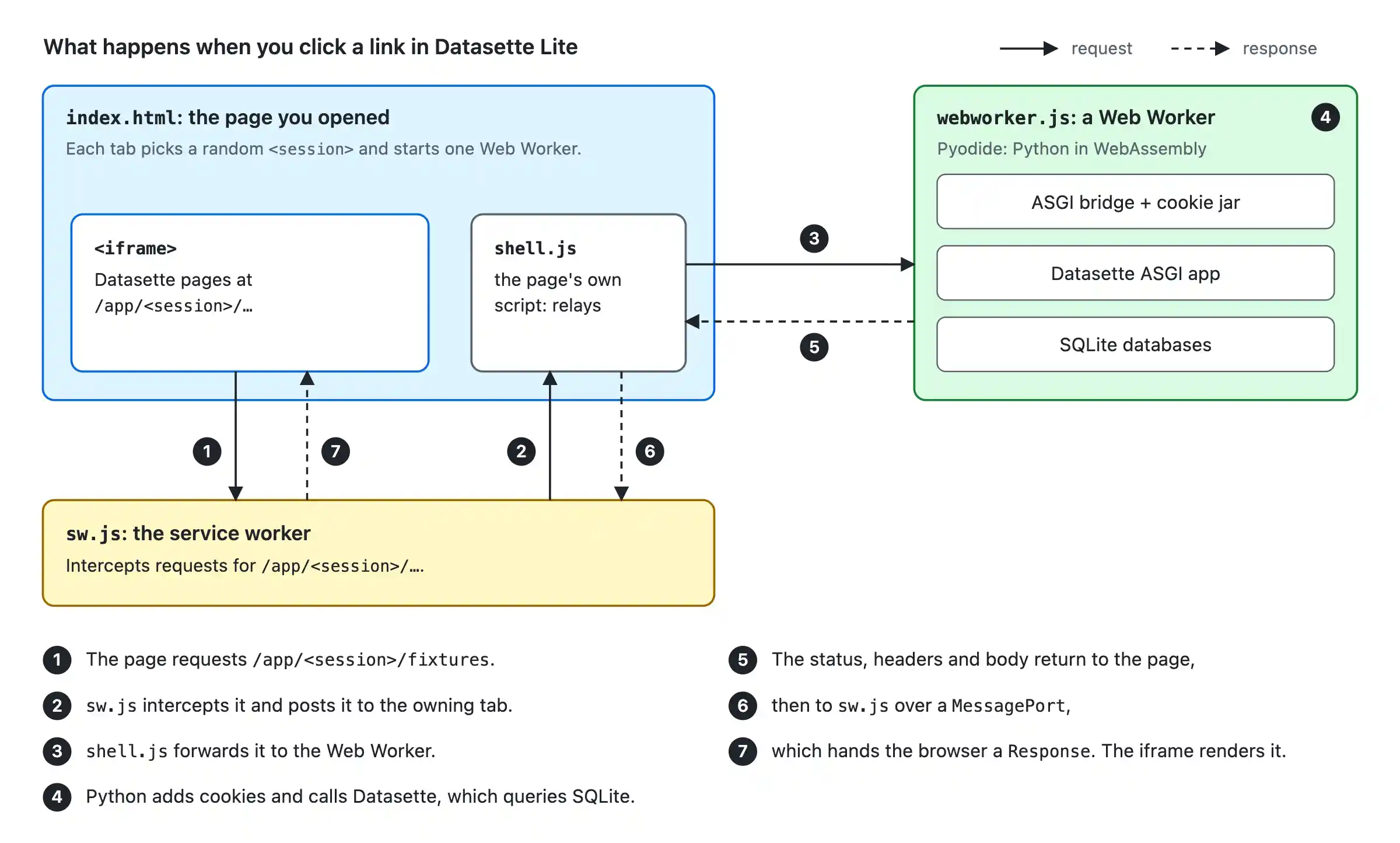
于是,父页面会生成一个随机会话 ID,并将其用作后续所有隐藏资源与页面加载的前缀。Service Worker 随后可以用这个会话 ID,把这些请求经由父页面路由到一个 Web Worker,由后者为该特定会话运行专属的 Datasette 实例。
(我们仍然需要 Web Worker,因为 Service Worker 中的 Pyodide 无法将状态维持超过 30 秒左右,具体取决于浏览器。这里牵涉的环节实在太多了!)
我让 Claude Fable 5.2 生成了几张 SVG 示意图来帮助解释这一点。下面是我最喜欢的一张,现在已经嵌入到 Datasette Lite 的 README 里:
这个系统最早诞生于 5 月,当时是用 Claude Opus 4.8 生成的一次 AI 研究性尝试。直到 11 月(以及 Claude Fable 5.2 出现),我才对它整体的运作方式足够熟悉,有信心把它正式发布到生产环境!
附加功能:自选 SQLite 版本
这个功能是我昨晚加上的,起因是在排查 SQLite 中的一个潜在 bug。
Datasette 的目标是支持自 3.25 以来(发布于 2018 年 9 月)所有已发布的 SQLite 版本。此后又发布了 87 个版本。
能够针对某个特定版本的 SQLite 启动 Datasette,对于演示 SQLite 的新功能和排查奇怪的问题非常有用。
过去我在 Mac 上尝试用各种取巧办法让不同版本的 SQLite 与 Python 配合运行,但这并不是个简单的过程。
WebAssembly 非常适合这种场景。我可以完全在浏览器里加载一个自定义构建的 SQLite,在那里测试它,关闭标签页时就把它丢弃。
datasette/pysqlite3-wasm-wheels 是我的新仓库,其中包含为 163 个不同 SQLite 版本编译的 pysqlite3 的 WebAssembly Python wheel。每个版本对应一个文件名类似这样的文件:
pysqlite3-0.6.2-3.54.1-cp314-cp314-pyemscripten_2026_0_wasm32.whl
这是针对 SQLite 3.54.1,也就是最新版本。
Datasette Lite 现在支持一个特殊的 ?sqlite= URL 参数,它会接受像 3.54.1 这样的版本号,解析出对应 wheel 文件的路径,然后获取该 wheel 并将其安装到 Pyodide 环境中,再配置 Datasette 使用它。
构建好这些 wheel 之后,我决定让 Claude Fable 5.2 为我构建[这个附加工具](https://datasette.github.io/pysqlite3-wasm-wheels/?versions=3.54.1,3.54.0&sql=select+json_object(%27a%27%2C+(select+json_array(1%29%29%29),用于在任意选定的 SQLite 版本之间比较同一个 SQL 查询。下面是一个示例,展示 select json_object('a', (select json_array(1))) 在 SQLite 3.54.0 与 3.54.1 之间的差异:
这应该也适用于其他所有 Python 应用
Datasette Lite 的运作方式并非 Datasette 独有。几乎任何 Python 应用都应该能采用同样的技巧——完全在浏览器中借助 WebAssembly 和 Pyodide 运行,以此作为一种低成本方式提供预览环境、演示功能和复现 bug。
C 和 Rust 扩展过去是这类做法的障碍,但如今任何优秀的编程智能体都能把它们编译成 Pyodide 兼容的 WebAssembly。截至 2026 年 4 月的 PEP 783,你甚至可以把它们发布到 PyPI。
一个难点是数据库。SQLite 完全不成问题,但在 WebAssembly 中运行 PostgreSQL 或 MySQL 虽然可行,仍是一条少有人走的路。
我很希望像这样的 WebAssembly 预览环境能成为整个 Python 生态中常见的模式。
发往 Hacker News:用 Service Worker 在浏览器中运行完整的服务端 Datasette Python 应用
本文是 Simon Willison 的《用 Service Worker 和 Pyodide 在浏览器中运行完整的服务端 Datasette Python 应用》,发布于 2026 年 11 月 17 日。
属于系列 Datasette Lite
Datasette Lite 的插件支持 - 2022 年 8 月 17 日 下午 6:20
用 Service Worker 和 Pyodide 在浏览器中运行完整的服务端 Datasette Python 应用 - 2026 年 11 月 17 日 下午 4:48
每月赞助我 10 美元,即可获得一份精选的当月最重要 LLM 进展邮件摘要。
付钱给我,让我少给你发!
译文由英文原文机器翻译,术语按行业惯例统一,可在文末展开原文核对。
查看英文原文(Running the full server-side Datasette Python app in the browser with service workers and Pyodide)
You can now do all of the following, using a carefully crafted URL to lite.datasette.io:
Load client-side Datasette to browse any SQLite database, JSON file, CSV file or SQL script
Select a released version of Datasette to load from PyPI
Load a specific commit, tag, or branch name from the Datasette GitHub repository
Pick from over 100 versions of SQLite to use with Datasette
Install additional Datasette plugins from PyPI or URLs to wheel files, including JavaScript visualization tools
The ability to load specific Datasette references, plugins, and SQLite versions makes this a fantastic tool for linking to demos of work-in-progress features or bug reproductions, without needing to spin up a full web server to serve that demo.
As an example, consider the following URL:
Follow that link and, after a short loading screen, you’ll find yourself on a page that looks like this:
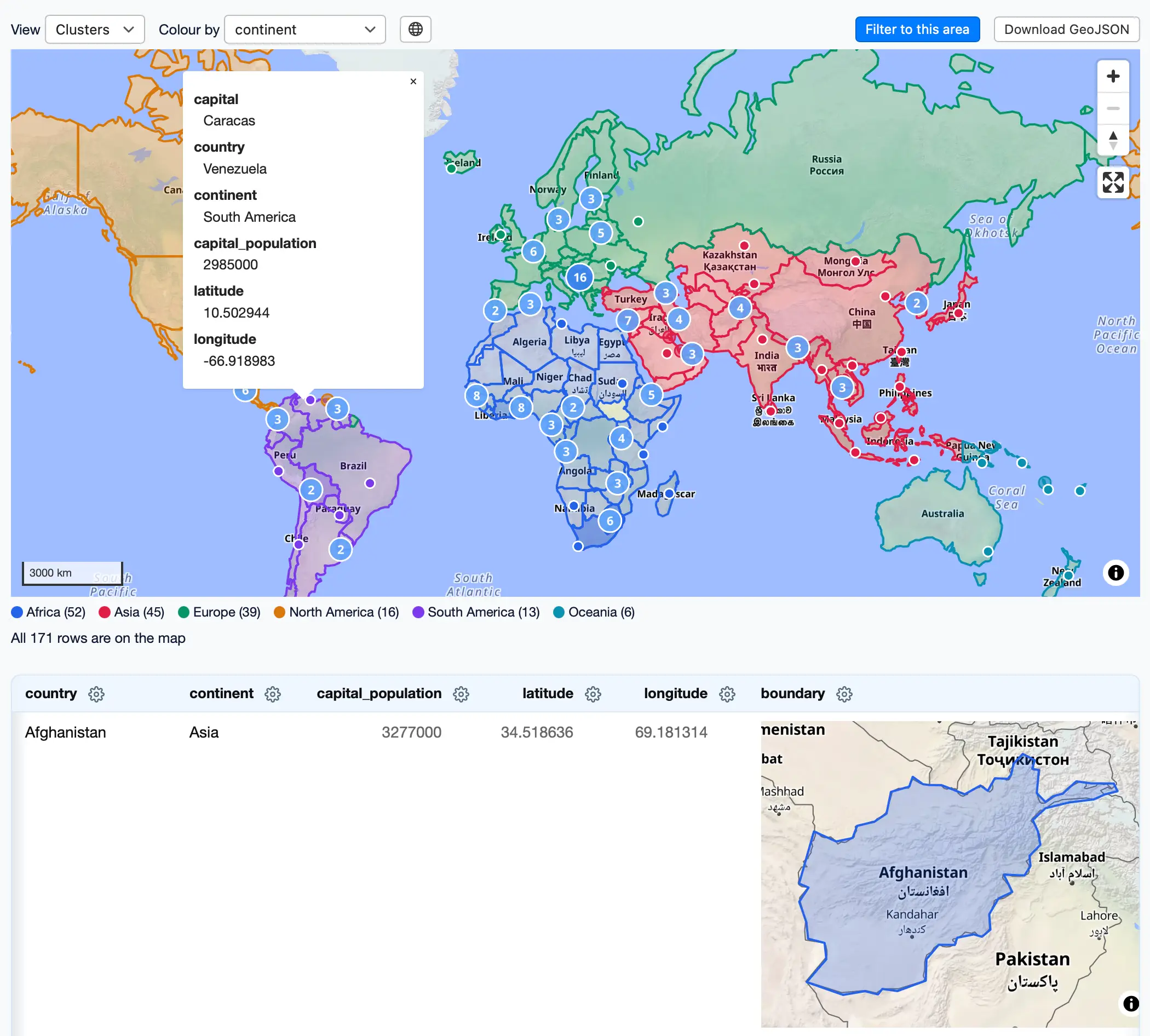
That’s Datasette running the new datasette-maplibre plugin, loading up a database of GeoJSON shapes of countries and displaying both a combined map and individual boundary maps in a table.
Let’s break down that URL to see what it’s doing:
https://lite.datasette.io/
?install=datasette-maplibre
&url=https://.../demo.db
&metadata=https://.../metadata.yml
#/demo/capitals_and_countries%23map=0/4.2/180&color=continent
The ?install=datasette-maplibre installs that additional plugin from PyPI. You can pass &install=... as many times as you like to load more plugins.
&url=https://.../demo.db loads that SQLite database from the provided URL. These URLs need to have open CORS headers—I host files like this in Gists, because they provide an easy way to get open CORS headers on a web-hosted file.
&metadata=https://.../metadata.yml loads this metadata.yml file. The metadata file adds HTML descriptions to various tables, and to the Datasette homepage. Visit that homepage here for a guided tour of the other features of that plugin, all defined in the metadata file.
#/demo/capitals_and_countries%23map=0/4.2/180&color=continent is a fragment hash that turns into a location within Datasette—here it’s loading the /demo/capitals_and_countries SQL view, then appending another fragment hash to it (%23 is a URL-encoded #) which tells the map plugin to zoom to a certain location and to set the color of the shapes on the map based on the continent column in the data.
That URL is doing a lot of work! I wrote more about this trick for building URL-addressable software in URL-addressable Pyodide Python environments last year.
The full set of supported URL arguments is described in the Datasette Lite README.
I’ve already started using Datasette Lite as part of the Datasette development process. Here’s a recent issue describing a pagination bug—I posted a comment there demonstrating the old, broken behavior and the new fix using links to Datasette Lite:
How this works, using service workers
Datasette Lite is not a new project. I launched the first version back in 2022, originally as a bit of a joke (running server-side apps in the browser is pretty funny) but one that quickly started proving its value.
The problem with that initial version is that it was a hack. It worked by running Datasette in a Pyodide web worker, simulating requests through that stack, then injecting the resulting HTML back into the top level page using innerHTML.
This worked for basic Datasette, but meant that any feature that used JavaScript failed to work, because script tags in innerHTML don’t execute, and the web worker tricks it used failed to load additional JavaScript or CSS files.
The new version takes a completely different approach based on Service Workers. These allow JavaScript to intercept HTTP requests for new pages and resources and serve them from client-side code instead.
Datasette Lite registers a service worker for the entire lite.datasette.io domain. The parent page then creates an iframe that sends requests for Datasette pages to URLs that look like this:
/app/aa94e6851595/ # the homepage (HTML)
/app/aa94e6851595/data/places # a table page (HTML)
/app/aa94e6851595/-/static/navigation-search.js # (JavaScript)
/app/aa94e6851595/-/static/app.css # (CSS)
Those are regular Datasette URLs, but with a /app/aa94e6851595/ prefix. What’s that about?
The /app// prefix is necessary because of multiple tabs.
Consider the URL above, which loads the demo instance with the datasette-maplibre plugin. That URL defines a full, custom Datasette instance. You might have that one running in a tab, then one of my other demo links running in another.
The service worker for lite.datasette.io is shared between all of those tabs. If it routed to a single instance of Datasette then every tab would share that underlying instance, no matter what plugins or other settings their URL attempted to configure.
Instead, the parent page generates a random session ID and uses it as a prefix for all of the subsequent hidden asset and page loads. The service worker can then use that session ID to route those requests back through the parent page to a web worker running a dedicated Datasette instance for that particular session.
(We still need a web worker because Pyodide in a service worker would not be able to maintain state beyond around 30 seconds, depending on the browser. There are a lot of moving parts here!)
I had Claude Fable 5.2 generate several SVG diagrams to help explain this. Here’s my favorite of those, now embedded in the Datasette Lite README:
This system started life back in May as an AI research spike generated using Claude Opus 4.8. It wasn’t until November (and Claude Fable 5.2) that I felt familiar enough with how it all works to confidently ship it to production!
Bonus feature: pick your version of SQLite
I added this feature last night as an off-shoot of investigating a potential bug in SQLite.
Datasette is meant to work against any released version of SQLite since 3.25 (released in September 2018). There have been 87 further releases since then.
Being able to fire up Datasette against a specific version of SQLite is really useful for demonstrating new SQLite features and debugging weird issues.
In the past I’ve used various tricks to get different SQLite versions running with Python on my Mac, but it’s not a trivial process.
WebAssembly is perfect for this. I can load up a custom SQLite build entirely in my browser, test it there, then discard it when I close my tab.
datasette/pysqlite3-wasm-wheels is my new repository which contains WebAssembly compiled Python wheels for pysqlite3 for 163 different SQLite versions. Each version gets a file with a name like this:
pysqlite3-0.6.2-3.54.1-cp314-cp314-pyemscripten_2026_0_wasm32.whl
That’s for SQLite 3.54.1, the most recent version.
Datasette Lite now takes a special ?sqlite= URL parameter, which will accept a version number like 3.54.1, resolve the path to the corresponding wheel file, then fetch that wheel and install it into the Pyodide environment and configure Datasette to use it.
Once I’d built the wheels, I decided to have Claude Fable 5.2 build me [this bonus tool](https://datasette.github.io/pysqlite3-wasm-wheels/?versions=3.54.1,3.54.0&sql=select+json_object(%27a%27%2C+(select+json_array(1%29%29%29) for comparing a SQL query across any selected versions of SQLite. Here’s an example showing how select json_object('a', (select json_array(1))) differs between SQLite 3.54.0 and 3.54.1:
This should work for every other Python app, too
Nothing about how Datasette Lite works is unique to Datasette. Almost any Python application should be able to pull the same trick—running entirely in the browser using WebAssembly and Pyodide, as a cheap way to provide preview environments, demonstrate features, and recreate bugs.
C and Rust extensions used to be a blocker for this kind of thing, but any good coding agent can compile those to Pyodide-compatible WebAssembly now. You can even publish them to PyPI as of PEP 783 in April 2026.
One catch is databases. SQLite is no problem at all, but running PostgreSQL or MySQL in WebAssembly, while possible, is still a path less trodden.
I’d love to see WebAssembly preview environments like these become a common pattern across the Python ecosystem.
For Hacker News: Full server-side Datasette Python app in the browser with service workers
This is Running the full server-side Datasette Python app in the browser with service workers and Pyodide by Simon Willison, posted on 17th November 2026.
Part of series Datasette Lite
Plugin support for Datasette Lite - Aug. 17, 2022, 6:20 p.m.
Running the full server-side Datasette Python app in the browser with service workers and Pyodide - Nov. 17, 2026, 4:48 p.m.
Sponsor me for $10/month and get a curated email digest of the month's most important LLM developments.
Pay me to send you less!
原文为英文,正文由自动抓取并保留原文。
原文发布于 Simon Willison(Running the full server-side Datasette Python app in the browser with service workers and Pyodide),标题、摘要与正文由机器翻译,术语按行业惯例统一,未经人工逐句校订。