为 Amazon Aurora PostgreSQL 设计负责任 AI 管控
一个客户支持聊天机器人,如果查询存储在 Amazon Aurora PostgreSQL-Compatible Edition 中的历史工单和知识库文章,就能提供快速、具备上下文感知能力的答案。然而,它也会在隐私、准确性、安全性和治理方面带来挑战,尤其是当底层数据包含敏感的客户信息时。在本文中,我们将八个 AWS Responsible AI (RAI) 维度映射到 Aurora PostgreSQL 能力。随后,我们以基于检索增强生成(RAG)的客户支持聊天机器人作为参考用例,走查可解释性维度的设计模式。本文深入实现其中一个维度——可解释性。请将其视为系列文章的第 1 部分,而不是对全部八个维度的完整构建。
Amazon Aurora PostgreSQL-Compatible Edition 通过其原生 Aurora Machine Learning (Aurora ML) 能力,使负责任 AI 的落地运营更加直接。借助 Aurora ML,你可以直接从 SQL 调用 Amazon SageMaker 端点和 Amazon Bedrock 基础模型,无需数据移动、自定义提取、转换和加载(ETL)管道或复杂集成。本文使用 Aurora ML 从 SQL 生成向量嵌入,将嵌入管道保留在数据库层内。
AWS 通过 AWS Well-Architected Responsible AI Lens、Amazon Bedrock Guardrails 和 Responsible Use of AI Guide 发布了八个核心负责任 AI 维度。这些维度(公平性、可解释性、隐私与安全、安全性、可控性、真实性与稳健性、治理和透明度)为评估和实施可信 AI 系统提供了一个结构化框架。
客户支持系统往往难以在维护隐私与合规的同时,提供准确、具备上下文感知能力的回复。设想一个基于 Amazon Aurora PostgreSQL 构建的客户支持聊天机器人,它使用带 pgvector 向量嵌入的 RAG、Amazon Bedrock 模型推理以及 AWS 负责任 AI 防护机制,来给出有依据、可解释的回复。
客户可以提出诸如“我上个月的账单为什么这么高?”或“我最近的订单在哪里?”之类的问题,并获得带引用的准确回答,同时通过个人可识别信息(PII)脱敏和访问控制,让敏感数据保持遮蔽状态。
下表将 AWS 负责任 AI 的八个维度映射到基于 Amazon Aurora PostgreSQL-Compatible Edition 构建的客户支持聊天机器人的实际实施策略。它展示了数据库功能、AWS AI 服务与治理控制如何协同工作,从而交付一个可信、安全且可解释的基于 RAG 的聊天机器人。
注意:这些只是示例方法,可能因使用场景而异。
该参考架构展示了负责任 AI 控制措施如何对应到基于 Amazon Aurora PostgreSQL-Compatible Edition 的 RAG 聊天机器人的各个组件。
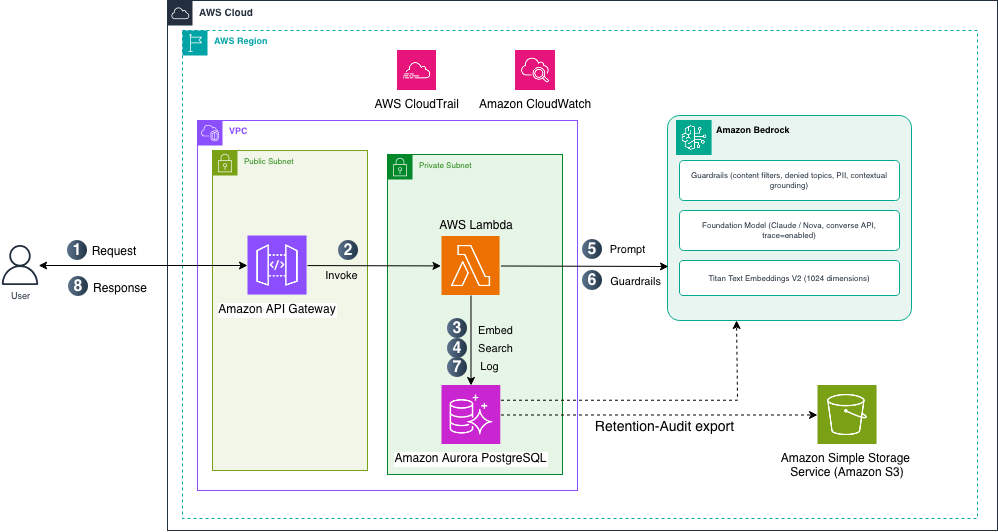
数据摄取管道会对支持工单、FAQ 和产品文档中的 PII 进行脱敏,然后将其转换为向量嵌入。当用户提交查询时,AWS Lambda 会在 Aurora PostgreSQL 上执行语义搜索,应用 Amazon Bedrock Guardrails 以保障隐私并锚定依据,把经过防护的上下文发送给 Amazon Bedrock 基础模型(FM),并记录每一次交互,以实现可解释性与治理。
Lambda 将回答锚定在企业数据之上,对 PII 进行脱敏并应用行级安全(RLS)以保护隐私,记录引用和交互日志以实现可解释性,并写入审计记录以支持治理。
何时自建、何时使用托管服务:Amazon Bedrock Knowledge Bases 提供内置的 RAG,并带有引用标注,当默认的检索与引用行为就能满足需求时,它是更简单的选择。当你需要将溯源信息按自己的 schema 存储时,就应采用本文中的自定义日志记录设计。这类溯源信息包括已检索来源与已引用来源的对比、相似度分数,以及防护机制追踪记录,你可以用 SQL 查询它们,并按自己的策略进行保留。
下图展示了该方案的端到端架构,包括数据摄取流程(左)、查询与响应流程(中),以及在各阶段应用的负责任 AI 控制措施(中、右)。
图 1:基于 RAG 的客户支持聊天机器人架构,在 Amazon Aurora PostgreSQL 上设有负责任 AI 控制措施
摄取管道在完成 PII 脱敏后,将历史支持工单、FAQ 和产品文档加载到 Amazon Aurora PostgreSQL 中,并使用 pgvector 与 aws_ml 扩展进行向量操作和 Aurora ML 集成。
Aurora ML 的 aws_bedrock.invoke_model_get_embeddings 函数将文本转换为 Amazon Titan Text Embeddings V2 向量(1,024 维),再由 pgvector 存储。
Aurora PostgreSQL 既可作为结构化客户数据的关系型存储,也可作为语义搜索的向量数据库。
当用户提问时,聊天机器人按以下步骤执行(见图 1):
支撑性操作与每次请求分开运行:
开始之前,请确保已具备以下条件:
注意:此处列出的先决条件聚焦于数据库层。你的应用层(例如 AWS Lambda、Amazon API Gateway 和聊天 UI)是独立的,并取决于你的部署架构。
本节介绍数据库层设计模式,这些模式使每个 AI 生成的回复都可追溯,从用户查询,经过检索和防护机制评估,直到最终回答及其引用。
创建用于客户数据、聊天会话、交互日志和反馈的核心表:
首先创建所需的模式和表。每张表服务于一个特定的负责任 AI 维度:
CREATE SCHEMA IF NOT EXISTS rai_postgresql; customers 表存储用于租户感知访问控制的配置文件:
CREATE TABLE rai_postgresql.customers ( customer_id UUID PRIMARY KEY DEFAULT gen_random_uuid(), full_name VARCHAR(150) NOT NULL, email VARCHAR(255) UNIQUE NOT NULL, phone VARCHAR(20), created_at TIMESTAMP WITH TIME ZONE DEFAULT NOW(), is_active BOOLEAN DEFAULT TRUE, metadata JSONB DEFAULT '{}' ); chat_interactions 表是可解释性实现的核心。它记录每个查询-回复周期,并附带完整的 RAG 溯源信息,包括检索到的分块 ID、相似度分数、被引用的来源与检索到的来源、防护机制轨迹,以及所使用的模型:
CREATE TABLE rai_postgresql.chat_interactions ( interaction_id UUID PRIMARY KEY DEFAULT gen_random_uuid(), session_id UUID NOT NULL, customer_id UUID NOT NULL REFERENCES rai_postgresql.customers(customer_id), turn_number INTEGER NOT NULL DEFAULT 1, request_text TEXT NOT NULL, request_timestamp TIMESTAMP WITH TIME ZONE DEFAULT NOW(), response_text TEXT, response_timestamp TIMESTAMP WITH TIME ZONE, response_latency_ms INTEGER, intent VARCHAR(100), confidence_score NUMERIC(5, 4), -- 可解释性列 retrieved_chunk_ids UUID[], -- pgvector 返回的文本块 ID similarity_scores NUMERIC[], -- 每个文本块的余弦相似度 citations JSONB, -- 已引用来源与所有检索来源的对比 guardrail_assessment JSONB, -- 完整 Guardrail 追踪记录 model_id VARCHAR(100), -- 使用的 Bedrock 模型 guardrail_version VARCHAR(20) -- 应用的 Guardrail 版本 ); 由于 chat_interactions 存储原始 request_text 和 response_text,应以与源数据相同的方式保护它:在 INSERT 前脱敏 PII(复用摄入时的防护机制),或使用 pgcrypto 加密这些列,并对日志表应用行级安全(Row-Level Security),使租户无法读取彼此的交互。记录未受保护的客户内容会削弱此设计旨在展示的隐私与安全控制。
chat_feedback 表记录用户对聊天机器人响应的评分和评论,这支持可控性(Controllability)维度。ON DELETE CASCADE 子句确保 90 天保留期清理不会因外键约束违规而失败:
CREATE TABLE rai_postgresql.chat_feedback ( feedback_id UUID PRIMARY KEY DEFAULT gen_random_uuid(), interaction_id UUID NOT NULL REFERENCES rai_postgresql.chat_interactions(interaction_id) ON DELETE CASCADE, customer_id UUID NOT NULL REFERENCES rai_postgresql.customers(customer_id), rating SMALLINT NOT NULL CHECK (rating BETWEEN 1 AND 5), feedback_text TEXT, created_at TIMESTAMP WITH TIME ZONE DEFAULT NOW() ); 第 2 步:使用 pgvector 和 Aurora ML 准备知识库。使用向量嵌入、租户隔离和 Aurora ML 集成创建检索层:
CREATE EXTENSION IF NOT EXISTS vector; CREATE EXTENSION IF NOT EXISTS aws_ml CASCADE; CREATE TABLE rai_postgresql.knowledge_chunks ( chunk_id UUID PRIMARY KEY DEFAULT gen_random_uuid(), ticket_id UUID NOT NULL, content TEXT NOT NULL, embedding VECTOR(1024), -- Amazon Titan Text Embeddings V2 (default 1024) metadata JSONB, -- source, date, category, product tenant_id UUID, created_at TIMESTAMP DEFAULT NOW() ); 创建 HNSW 索引,以实现快速的近似最近邻搜索:
原文较长,译文为节选;译文由英文原文机器翻译,术语按行业惯例统一,可在文末展开原文核对。
查看英文原文(Design responsible AI controls for Amazon Aurora PostgreSQL)
A customer support chatbot that queries historical tickets and knowledge base articles stored in Amazon Aurora PostgreSQL-Compatible Edition can deliver fast, context-aware answers. However, it also introduces challenges around privacy, accuracy, safety, and governance, especially when the underlying data contains sensitive customer information. In this post, we map the eight AWS Responsible AI (RAI) dimensions to Aurora PostgreSQL capabilities. We then walk through a design pattern for the Explainability dimension, using a Retrieval Augmented Generation (RAG) based customer support chatbot as the reference use case. This post implements one dimension, Explainability, in depth. Treat it as Part 1 of a series rather than a full build-out of all eight.
Amazon Aurora PostgreSQL-Compatible Edition makes it more straightforward to operationalize responsible AI through its native Aurora Machine Learning (Aurora ML) capabilities. With Aurora ML, you can invoke Amazon SageMaker endpoints and Amazon Bedrock foundation models directly from SQL, without data movement, custom extract, transform, and load (ETL) pipelines, or complex integrations. This post uses Aurora ML to generate vector embeddings from SQL, keeping the embedding pipeline inside the database layer.
AWS defines eight core Responsible AI dimensions, published through the AWS Well-Architected Responsible AI Lens, Amazon Bedrock Guardrails, and the Responsible Use of AI Guide. These dimensions (Fairness, Explainability, Privacy and Security, Safety, Controllability, Veracity and Robustness, Governance, and Transparency) provide a structured framework for evaluating and implementing trustworthy AI systems.
Use case overview
Customer support systems often struggle to provide accurate, context-aware responses while maintaining privacy and compliance. Consider a customer support chatbot built on Amazon Aurora PostgreSQL that uses RAG with pgvector embeddings, Amazon Bedrock model inference, and AWS Responsible AI guardrails to deliver grounded, explainable responses.
A customer can ask questions such as “Why was my last bill high?” or “Where is my last order?” and receive accurate answers with citations, while sensitive data remains obscured through personally identifiable information (PII) redaction and access controls.
Mapping the AWS Responsible AI dimensions to Aurora PostgreSQL
The following table maps the eight AWS Responsible AI dimensions to practical implementation strategies for a customer support chatbot built on Amazon Aurora PostgreSQL-Compatible Edition. It highlights how database features, AWS AI services, and governance controls work together to deliver a trustworthy, secure, and explainable RAG-based chatbot.
| RAI Dimension | What It Means | Implementation Approaches | Key PostgreSQL / Aurora Features | Primary AWS Services / Tools |
| 1. Fairness | Chatbot should provide equal quality responses regardless of language, region, or customer profile | Bias testing using diverse support queries. Decouple demographics from embeddings. Metadata filtering and multilingual testing. | pgvector, JSONB metadata, SQL filtering, views | Amazon Bedrock Model Evaluation, Amazon SageMaker Clarify |
| 2. Explainability | Users and support teams should know why the chatbot gave a specific answer | Log retrieved chunks, similarity scores, and citations. RAG tracing with source attribution. Full interaction logging. | chat_interactions table, array columns, JSONB logs, pgvector similarity | Amazon Bedrock Knowledge Bases, Amazon Bedrock InvokeModel |
| 3. Privacy and Security | Protect customer PII such as name, phone, and order details in tickets | PII redaction before embedding. Row-Level Security (RLS), encryption, IAM auth, RBAC, and anonymization. | Row-Level Security, pgcrypto, roles, policies | Amazon Bedrock Guardrails, AWS KMS, Amazon Comprehend, AWS IAM |
| 4. Safety | Help prevent harmful, toxic, or inappropriate responses | Content filters, denied topics, prompt injection protection, rate limiting, and moderation. | SQL functions, interaction logs | Amazon Bedrock Guardrails |
| 5. Controllability | Ability to steer chatbot behavior and escalate to humans | Human-in-the-loop escalation, feedback table, feature flags, prompt control, and kill switch. | chat_feedback table, escalation tables, triggers | Amazon Bedrock Guardrails, Amazon CloudWatch, AWS CloudTrail |
| 6. Veracity and Robustness | Verify accurate responses grounded in support data and avoid hallucinations | RAG grounding with similarity threshold. Versioned documents and validation checks. | pgvector typed columns, CHECK constraints, triggers | Amazon Bedrock Guardrails, Amazon Bedrock Model Evaluation |
| 7. Governance | Maintain audit trail and accountability for chatbot decisions | Audit logging with retention policy. Model version tracking and Amazon S3 archival. | pgaudit, pg_cron, JSONB model metadata | AWS Audit Manager, AWS CloudTrail |
| 8. Transparency | Clearly inform users they are interacting with AI and show data sources | Powered-by-AI notice, citations, privacy notice, and source explanation. | SQL views, interaction logs | Amazon Bedrock Knowledge Bases, AWS AI Service Cards |
Note: These are example approaches and may vary by use case.
Solution overview
This reference architecture shows how Responsible AI controls map to each component of a RAG-based chatbot on Amazon Aurora PostgreSQL-Compatible Edition.
An ingestion pipeline redacts PII from support tickets, FAQs, and product documents, then converts them into vector embeddings. When a user submits a query, AWS Lambda runs a semantic search over Aurora PostgreSQL, applies Amazon Bedrock Guardrails for privacy and grounding, sends the guarded context to an Amazon Bedrock foundation model (FM), and logs every interaction for explainability and governance.
Lambda grounds responses in enterprise data, redacts PII and applies Row-Level Security (RLS) for privacy, records citations and interaction logs for explainability, and writes audit records for governance.
When to build this versus use a managed service: Amazon Bedrock Knowledge Bases provides built-in RAG with citations and is the simpler choice when default retrieval and citation behavior meets your needs. Build the custom logging design in this post when you need provenance stored in your own schema. That provenance includes retrieved versus cited sources, similarity scores, and guardrail traces that you can query with SQL and retain under your own policies.
The following diagram illustrates the end-to-end architecture of this solution, showing the data ingestion flow (left), the query and response flow (center), and the responsible AI controls applied at each stage (center and right).
Figure 1: Architecture of RAG-based customer support chatbot with Responsible AI controls on Amazon Aurora PostgreSQL
Data ingestion
An ingestion pipeline loads historical support tickets, FAQs, and product documentation into Amazon Aurora PostgreSQL after redacting PII, using the pgvector and aws_ml extensions for vector operations and Aurora ML integration.
The Aurora ML aws_bedrock.invoke_model_get_embeddings function transforms the text into Amazon Titan Text Embeddings V2 vectors (1,024 dimensions), and pgvector stores them.
Aurora PostgreSQL functions as both a relational store for structured customer data and a vector database for semantic search.
Query and response flow
When a user asks a question, the chatbot follows these steps (see Figure 1):
- The user sends a natural language question to Amazon API Gateway over HTTPS.
- API Gateway invokes AWS Lambda.
- Turn the question into a vector. Lambda calls the Aurora ML
aws_bedrock.invoke_model_get_embeddingsfunction with Amazon Titan Text Embeddings V2. This must be the same model used to embed the knowledge base, so the question and documents both produce comparable 1,024-dimension vectors. - Run a similarity search. Aurora PostgreSQL uses the
pgvectorcosine distance operator to compare the question vector with the stored knowledge vectors, and returns the most relevant chunks with their similarity scores. Row-Level Security limits results to the current tenant. - Build the augmented prompt. Lambda combines the user’s question with the retrieved chunks, labeling each one
[Source N]. This gives the model knowledge from your database that it would not otherwise have. - Generate a grounded answer. Lambda sends the prompt to Amazon Bedrock. Guardrails check the input (content filters, denied topics, PII), the foundation model writes an answer based on the retrieved chunks, and a contextual grounding check confirms the answer is supported by those sources.
- Log the interaction for explainability. Lambda writes the complete interaction to the
chat_interactionstable: the question, retrieved chunk IDs, similarity scores, the sources actually cited, the guardrail trace, and the model ID. - Lambda returns the answer, with its source citations, to the user.
Supporting operations run separately from each request:
- Ingestion: document embeddings are created once, when content is loaded (see Data ingestion).
- Retention:
pg_cronarchives older interaction records to Amazon Simple Storage Service (Amazon S3). - Monitoring: Lambda sends logs and metrics to Amazon CloudWatch, and AWS CloudTrail records API activity for audit.
Prerequisites
Before you begin, make sure you have the following in place:
- An Amazon Aurora PostgreSQL cluster with the
pgvectorextension enabled. HNSW indexes and iterative index scans require newerpgvectorversions, and Aurora ML and Amazon Bedrock model support are versioned separately. See the Aurora ML, pgvector, and Bedrock documentation for the current minimum versions rather than pinning to a specific one. - The
aws_mlextension enabled on the cluster (CREATE EXTENSION IF NOT EXISTS aws_ml CASCADE), with an AWS Identity and Access Management (IAM) role attached to the cluster grantingbedrock:InvokeModel. Aurora ML calls Bedrock in the cluster’s own Region. - The
aws_s3extension enabled on the cluster (CREATE EXTENSION IF NOT EXISTS aws_s3 CASCADE), with an IAM role attached for thes3Exportfeature so the retention job can export to Amazon S3. - Amazon Bedrock access with Amazon Titan Text Embeddings V2 (
amazon.titan-embed-text-v2:0) for embeddings and a foundation model that supports the Bedrock Converse API for answer generation. Model availability and recommended versions change over time, so choose a current model from Supported foundation models in Amazon Bedrock. Newer models are invoked through cross-Region inference profile IDs. - Amazon Bedrock Guardrails configured for PII protection, content filtering, and contextual grounding (enable the contextual grounding policy in your Guardrail configuration).
- IAM roles with appropriate permissions for Amazon Bedrock, Lambda, and Aurora PostgreSQL.
- A custom cluster parameter group that adds
pgauditandpg_cronto the existingshared_preload_librariesvalue (append to it rather than replacing it, so defaults such aspg_stat_statementsare preserved. This requires a cluster restart). Setcron.database_nameto your target database. - Basic familiarity with PostgreSQL, SQL, and Python.
Note: The prerequisites listed here focus on the database layer. Your application layer (for example, AWS Lambda, Amazon API Gateway, and a chat UI) is separate and depends on your deployment architecture.
Design patterns for the Explainability dimension
This section presents the database-layer design patterns that make every AI-generated response traceable, from the user query, through retrieval and guardrail evaluation, to the final answer and its citations.
Step 1: Set up the database schema
Create the core tables for customer data, chat sessions, interaction logging, and feedback:
Start by creating the schema and the tables you need. Each table serves a specific Responsible AI dimension:
CREATE SCHEMA IF NOT EXISTS rai_postgresql;The customers table stores profiles for tenant-aware access control:
CREATE TABLE rai_postgresql.customers (
customer_id UUID PRIMARY KEY DEFAULT gen_random_uuid(),
full_name VARCHAR(150) NOT NULL,
email VARCHAR(255) UNIQUE NOT NULL,
phone VARCHAR(20),
created_at TIMESTAMP WITH TIME ZONE DEFAULT NOW(),
is_active BOOLEAN DEFAULT TRUE,
metadata JSONB DEFAULT '{}'
);The chat_interactions table is the core of the Explainability implementation. It logs every query-response cycle with full RAG provenance, including retrieved chunk IDs, similarity scores, cited versus retrieved sources, guardrail traces, and the model used:
CREATE TABLE rai_postgresql.chat_interactions (
    interaction_id        UUID PRIMARY KEY DEFAULT gen_random_uuid(),
    session_id            UUID NOT NULL,
    customer_id           UUID NOT NULL REFERENCES rai_postgresql.customers(customer_id),
    turn_number           INTEGER NOT NULL DEFAULT 1,
    request_text          TEXT NOT NULL,
    request_timestamp     TIMESTAMP WITH TIME ZONE DEFAULT NOW(),
    response_text         TEXT,
    response_timestamp    TIMESTAMP WITH TIME ZONE,
    response_latency_ms   INTEGER,
    intent                VARCHAR(100),
    confidence_score      NUMERIC(5, 4),
    -- Explainability columns
    retrieved_chunk_ids   UUID[],          -- IDs of chunks returned by pgvector
    similarity_scores     NUMERIC[],       -- cosine similarity per chunk
    citations             JSONB,           -- cited vs. all-retrieved sources
    guardrail_assessment  JSONB,           -- full Guardrail trace
    model_id              VARCHAR(100),    -- Bedrock model used
    guardrail_version     VARCHAR(20)      -- Guardrail version applied
);
Because chat_interactions stores raw request_text and response_text, protect it the same way as the source data: redact PII before the INSERT (reusing the ingestion-time guardrail), or encrypt those columns with pgcrypto, and apply Row-Level Security to the log tables so tenants cannot read each other’s interactions. Logging unprotected customer content would undercut the Privacy and Security control this design is meant to demonstrate.
The chat_feedback table captures user ratings and comments on chatbot responses, which supports the Controllability dimension. The ON DELETE CASCADE clause makes sure the 90-day retention purge does not fail with foreign key violations:
CREATE TABLE rai_postgresql.chat_feedback (
    feedback_id     UUID PRIMARY KEY DEFAULT gen_random_uuid(),
    interaction_id  UUID NOT NULL
        REFERENCES rai_postgresql.chat_interactions(interaction_id)
        ON DELETE CASCADE,
    customer_id     UUID NOT NULL REFERENCES rai_postgresql.customers(customer_id),
    rating          SMALLINT NOT NULL CHECK (rating BETWEEN 1 AND 5),
    feedback_text   TEXT,
    created_at      TIMESTAMP WITH TIME ZONE DEFAULT NOW()
);
Step 2: Prepare the knowledge base with pgvector and Aurora ML
Create the retrieval layer with vector embeddings, tenant isolation, and Aurora ML integration:
CREATE EXTENSION IF NOT EXISTS vector;
CREATE EXTENSION IF NOT EXISTS aws_ml CASCADE;

CREATE TABLE rai_postgresql.knowledge_chunks (
    chunk_id    UUID PRIMARY KEY DEFAULT gen_random_uuid(),
    ticket_id   UUID NOT NULL,
    content     TEXT NOT NULL,
    embedding   VECTOR(1024),       -- Amazon Titan Text Embeddings V2 (default 1024)
    metadata    JSONB,              -- source, date, category, product
    tenant_id   UUID,
    created_at  TIMESTAMP DEFAULT NOW()
);
Create an HNSW index for fast approximate nearest neighbor search:
-- HNSW index for approximate nearest neighbor search
CREATE INDEX idx_chunks_embedding ON rai_postgresql.knowledge_chunks
USING hnsw (embedding vector_cosine_ops);
Enforce tenant isolation with Row-Level Security so that vector search results are scoped to the current tenant before data leaves the database:
-- Row-Level Security for tenant isolation (Privacy & Security)
-- FORCE RLS, non-owner role, safe current_setting
ALTER TABLE rai_postgresql.knowledge_chunks ENABLE ROW LEVEL SECURITY;
ALTER TABLE rai_postgresql.knowledge_chunks FORCE ROW LEVEL SECURITY;

CREATE ROLE app_user;
GRANT USAGE ON SCHEMA rai_postgresql TO app_user;
GRANT SELECT ON rai_postgresql.knowledge_chunks TO app_user;

CREATE POLICY tenant_isolation ON rai_postgresql.knowledge_chunks
USING (
    current_setting('app.current_tenant', true) IS NOT NULL
    AND tenant_id = current_setting('app.current_tenant', true)::uuid
);
Generate vector embeddings directly from SQL using Aurora ML, keeping the embedding pipeline inside the database layer:
-- Generate embeddings using Aurora ML
-- No Lambda/boto3 needed for embeddings --- runs inside the database
UPDATE rai_postgresql.knowledge_chunks
SET embedding = aws_bedrock.invoke_model_get_embeddings(
    'amazon.titan-embed-text-v2:0',    -- model_id
    'application/json',                -- content_type
    'embedding',                       -- json_key to extract
    json_build_object('inputText', content)::text    -- model_input
)::vector
WHERE embedding IS NULL;
Always redact PII before inserting data into the knowledge base. Use Amazon Bedrock Guardrails (the ApplyGuardrail API) or Amazon Comprehend (the detect_pii_entities API) to identify and mask PII in your ingestion pipeline, as shown in the following example:
# Example: Redact PII using Bedrock Guardrails ApplyGuardrail API
response = bedrock.apply_guardrail(guardrailIdentifier=guardrail_id,
    source='INPUT', content=[{'text': {'text': raw_text}}])
# outputs is empty when nothing is flagged; masking requires an ANONYMIZE PII policy (not BLOCK)
redacted_text = (response['outputs'][0]['text']
    if response.get('outputs') else raw_text)
Step 3: Retrieve context and generate responses
When a query reaches your application layer, retrieve the top matching knowledge chunks using the pgvector cosine similarity operator. The following SQL query shows this pattern:
-- Connect as app_user and set the tenant for this transaction so RLS returns rows
SET LOCAL app.current_tenant = '11111111-1111-1111-1111-111111111111';

-- Retrieve top 5 relevant chunks for a query
SELECT chunk_id, content, metadata,
    1 - (embedding <=> :query_embedding::vector) AS cosine_similarity
FROM rai_postgresql.knowledge_chunks
WHERE metadata ->> 'category' = :intent_category
    AND 1 - (embedding <=> :query_embedding::vector) >= 0.7 -- drop weak matches
ORDER BY embedding <=> :query_embedding::vector
LIMIT 5;
Note: The 0.7 cosine-similarity cutoff drops weakly related chunks so the model is not grounded on noise. Tune it against your own data. The category filter and this threshold both post-filter HNSW results and may return fewer than 5 rows. Raise hnsw.ef_search or use iterative index scans (pgvector 0.8.0+) to compensate.
The following pseudocode shows the key patterns for contextual grounding, guardrail-intervention handling, citation parsing, and interaction logging. The snippets focus on the Responsible AI logic rather than application plumbing.
Use guardContent blocks to enable contextual grounding in the Bedrock Converse API:
# Contextual grounding --- tag context and query for guardrail evaluation
response = bedrock.converse(
    modelId=model_id,
    messages=[{'role': 'user', 'content': [
        {'guardContent': {'text': {'text': context, 'qualifiers': ['grounding_source']}}},
        {'guardContent': {'text': {'text': query, 'qualifiers': ['query']}}},
        {'text': prompt}
    ]}],
    guardrailConfig={'guardrailIdentifier': guardrail_id,
        'guardrailVersion': '1', 'trace': 'enabled'},
    inferenceConfig={'maxTokens': 500, 'temperature': 0.1})
Check stopReason to handle cases where the guardrail blocks the response:
# Handle guardrail intervention
if response.get('stopReason') == 'guardrail_intervened':
    answer = 'Unable to answer --- content flagged by guardrail.'
    trace = response.get('trace', {}).get('guardrail', {})
else:
    answer = response['output']['message']['content'][0]['text']
Distinguish actually cited sources from all retrieved sources. On an Explainability post, this distinction is the point:
# Parse [Source N] markers from the model answer
cited_indices = re.findall(r'\[Source (\d+)\]', answer)
cited = [retrieved[n-1] for n in map(int, cited_indices) if n-1 < len(retrieved)]
citations = {'cited_sources': cited, 'all_retrieved': retrieved,
    'citation_rate': len(cited) / len(retrieved) if retrieved else 0}
Log every interaction for Explainability. The INSERT captures the full RAG provenance chain:
INSERT INTO rai_postgresql.chat_interactions (
    session_id, customer_id, request_text, response_text,
    response_timestamp, response_latency_ms, intent, confidence_score,
    retrieved_chunk_ids, similarity_scores, citations,
    guardrail_assessment, model_id, guardrail_version
) VALUES (%s, %s, %s, %s, NOW(), %s, %s, %s, %s, %s, %s, %s, %s, %s);
We define confidence_score as the mean cosine similarity of the top-k retrieved chunks. The intent field classifies the query (for example, billing or order_status), and response_latency_ms records end-to-end inference time.
Step 4: Log interactions and add governance
Every chatbot interaction (the user query, retrieved chunks, similarity scores, response, and citations) is logged to the chat_interactions table using the INSERT shown in Step 3, supporting Explainability and Transparency. Customer feedback captured in chat_feedback supports continuous improvement, reinforcing Controllability. For Governance, pgaudit provides query audit trails, and pg_cron drives automated data retention.
Set up pgaudit and pg_cron, which both require shared_preload_libraries (see Prerequisites):
CREATE EXTENSION IF NOT EXISTS pgaudit;
CREATE EXTENSION IF NOT EXISTS pg_cron;

-- Audit everything the application role does. In RDS/Aurora, object-level
-- auditing uses pgaudit.role = 'rds_pgaudit'; see the pgaudit docs for scope.
ALTER ROLE app_user SET pgaudit.log = 'write, ddl';
ALTER ROLE app_user SET pgaudit.log_relation = 'on';
Query for governance review:
-- Find low-confidence responses for review
SELECT interaction_id, request_text, response_text,
    confidence_score, intent, request_timestamp
FROM rai_postgresql.chat_interactions
WHERE confidence_score < 0.80
ORDER BY request_timestamp DESC LIMIT 10;

-- Analyze feedback by intent
SELECT ci.intent, AVG(cf.rating) AS avg_rating, COUNT(*) AS total,
    COUNT(*) FILTER (WHERE cf.rating <= 2) AS low_ratings
FROM rai_postgresql.chat_feedback cf
JOIN rai_postgresql.chat_interactions ci
    ON cf.interaction_id = ci.interaction_id
GROUP BY ci.intent ORDER BY avg_rating ASC;
Archive both tables to Amazon S3 and purge only after the export succeeds. Running archive and purge as two independent cron jobs is unsafe: if the archive fails, a separately scheduled purge still deletes the rows. Wrap both in one function so the DELETE runs only when the export returns. Also archive chat_feedback, because the cascade would otherwise delete feedback that was not saved. The 90-day window matches a typical support-data retention policy. Adjust it to your own regulatory requirements.
-- One job: archive both tables, then purge only if the export succeeded
CREATE OR REPLACE FUNCTION rai_postgresql.archive_and_purge(cutoff INTERVAL DEFAULT '90 days')
RETURNS void LANGUAGE plpgsql AS $$
DECLARE exported bigint;
BEGIN
    -- Archive interactions due for purge
    SELECT rows_uploaded INTO exported FROM aws_s3.query_export_to_s3(
        format('SELECT * FROM rai_postgresql.chat_interactions
            WHERE request_timestamp < NOW() - %L', cutoff),
        aws_commons.create_s3_uri('your-audit-bucket',
            'chat-interactions/'||to_char(NOW(),'YYYY-MM-DD')||'.csv', 'us-east-1'));

    -- Archive the feedback that the cascade would otherwise delete
    PERFORM aws_s3.query_export_to_s3(
        format('SELECT cf.* FROM rai_postgresql.chat_feedback cf
            JOIN rai_postgresql.chat_interactions ci USING (interaction_id)
            WHERE ci.request_timestamp < NOW() - %L', cutoff),
        aws_commons.create_s3_uri('your-audit-bucket',
            'chat-feedback/'||to_char(NOW(),'YYYY-MM-DD')||'.csv', 'us-east-1'));

    -- Purge only after a successful export (feedback goes via ON DELETE CASCADE)
    IF exported IS NOT NULL THEN
        DELETE FROM rai_postgresql.chat_interactions
        WHERE request_timestamp < NOW() - cutoff;
    END IF;
END $$;

-- Schedule the single ordered job
SELECT cron.schedule('archive_and_purge', '0 0 * * *',
    $$SELECT rai_postgresql.archive_and_purge()$$);
Validate the solution
Run one question end to end, then read the row it produced. That single row is the evidence the design works: it shows which chunks were retrieved, how similar they were, which sources the answer actually cited, and the guardrail outcome.
SELECT request_text, model_id, confidence_score,
    retrieved_chunk_ids, similarity_scores,
    citations -> 'cited_sources' AS cited,
    guardrail_assessment -> 'action' AS guardrail_action
FROM rai_postgresql.chat_interactions
ORDER BY request_timestamp DESC LIMIT 1;
Expected: One row whose cited_sources is a subset of retrieved_chunk_ids, similarity_scores at or above your 0.7 threshold, and a guardrail_action of NONE for a clean question. If cited_sources is empty, the model did not ground its answer and the response should be treated with caution.
Limitations and considerations
- Amazon Bedrock Guardrails adds latency to each inference call and incurs per-text-unit charges. Contextual grounding has additional pricing. Benchmark your response times and costs before production deployment.
- Interaction logging grows storage over time. The S3 archival and purge cron jobs help manage this, but monitor your Aurora storage and adjust the retention period as needed.
- HNSW indexes provide approximate nearest neighbor search. Post-filtering (for example, by category or tenant) runs after the index scan and may return fewer rows than your LIMIT. Increase
hnsw.ef_searchor use iterative index scans (pgvector0.8.0+) to improve recall. - The contextual grounding check evaluates whether the model’s response is grounded in the provided context. It does not guarantee factual accuracy of the source documents themselves.
- Aurora ML embedding generation runs synchronously in the database. For large batch ingestion, consider batching updates or using an asynchronous pipeline.
- Everything in this post except Aurora ML (the
aws_bedrock.invoke_model_get_embeddingscalls) works on Amazon Relational Database Service (Amazon RDS) for PostgreSQL as well.
Clean up
To avoid ongoing charges, delete the following resources if you created them for this walkthrough:
- Unschedule the cron job first, or it fails nightly once the schema is gone:
SELECT cron.unschedule('archive_and_purge');. - Drop the schema:
DROP SCHEMA rai_postgresql CASCADE;. - Delete the Amazon Bedrock Guardrail.
- Remove the AWS Lambda functions and API Gateway endpoints.
- Delete the Amazon S3 audit bucket (or configure a lifecycle policy).
- Delete the Aurora PostgreSQL cluster (or stop it if you plan to reuse it).
- Remove IAM roles created for Bedrock and Aurora ML integration.
- Drop the application role (roles are not removed by
DROP SCHEMA):DROP ROLE app_user;.
Cost considerations: This solution uses Amazon Aurora PostgreSQL, Amazon Bedrock (model inference and embeddings), and Amazon Bedrock Guardrails. Costs vary by Region, instance size, request volume, and model choice. For pricing details, see the pricing pages for each service.
Conclusion
Amazon Aurora PostgreSQL-Compatible Edition, with pgvector, Row-Level Security, pgaudit, pgcrypto, pg_cron, and Aurora ML, provides database-layer building blocks for Responsible AI. Several dimensions also depend on AWS services outside the database, as the mapping table shows.
In this post, we focused on the Explainability dimension as a detailed design walkthrough. By logging retrieved chunk IDs, similarity scores, cited sources, and guardrail traces in Aurora, you get a queryable audit trail at the database layer. The mapping table shows how the remaining dimensions build on the same foundation, combining Aurora PostgreSQL features with AWS AI services.
The key takeaways from these design patterns are:
- Log retrieval provenance at query time: retrieved and cited chunk IDs, similarity scores, and the guardrail trace.
- Distinguish the sources actually cited from everything retrieved. That distinction is what makes an answer explainable.
- Enforce tenant isolation with Row-Level Security, and set the tenant context before a vector search runs.
- Archive audit data before purging, and protect the log tables as carefully as the source data.
As a next step, explore Amazon Bedrock Knowledge Bases, the fully managed RAG capability that now supports Aurora PostgreSQL as a vector store in many AWS Regions and provides built-in citation generation, which can help reduce the custom integration code required for Explainability in new projects.
About the authors

InduTeja Aligeti
InduTeja is a Senior Lead Database Consultant at AWS. She has over 18 years of experience working with Microsoft technologies with a specialization in SQL Server. She focuses on helping customers build highly available, cost-effective database solutions and migrate their large-scale SQL Server databases to AWS. She also works on responsible AI integration patterns for Aurora PostgreSQL, combining database governance features with AWS AI services.

Nisha Gambhir
Nisha is a Senior AI/ML & Cloud Architect at Amazon Web Services, based out of India. She is passionate about helping customers design, architect and develop secure, scalable and reliable applications using AI/ML and Agentic AI. She loves working on latest technologies, providing simple and scalable solutions that drive positive business outcomes.

Anuradha Chintha
Anuradha is a Delivery Consultant with Amazon Web Services. She works with customers to build scalable, highly available, and secure solutions in the AWS Cloud. She focuses on homogeneous and heterogeneous database migrations, including Microsoft SQL Server and Oracle migrations to Amazon Aurora PostgreSQL. She also uses DevOps practices to automate database deployment and testing.
正文保留英文原文,标题与摘要由机器翻译。
原文发布于 AWS Machine Learning(Design responsible AI controls for Amazon Aurora PostgreSQL),标题、摘要与正文由机器翻译,术语按行业惯例统一,未经人工逐句校订。