在 AWS Agent Registry 中用通用元数据治理和发现记录
随着各组织构建越来越多的智能体、Model Context Protocol (MCP) 服务器和技能,它们需要一种统一的方式来描述、治理和查找这些资源。AWS Agent Registry 提供了一个目录,用于注册、审批和发现这些资源以及自定义记录。每条记录都带有名称、描述、协议描述符和审批状态。然而,每个组织都有自己想要跟踪的属性和事实,其中一些是该组织独有的,例如其业务部门、资源负责人、风险分类和开发环境。组织希望为这些属性中的每一项建立统一定义,并希望注册表中的每个智能体、MCP 服务器和技能都携带这些事实。此前,组织无法在 AWS Agent Registry 中定义这些事实并将其存储到每条记录上。
AWS Agent Registry 现已提供自定义元数据架构。自定义元数据架构是一组由组织定义的键值对,由 AWS Agent Registry 中的记录来携带。管理员定义该架构并将其应用于注册表,注册表中的所有记录随后都必须遵循该架构。当发布者创建或提交记录时,他们需为适用架构中指定的字段提供值,AWS Agent Registry 会依据管理员设定的架构验证这些值。审批人在审核记录时可以依赖这些经过验证的值,使用者和智能体也可以利用这些值来发现和筛选记录。管理员、发布者、安全与治理团队、审批人、使用者以及智能体都基于同一套共享事实,来治理、发现和理解其智能体资产中的资源。
在本文中,我们以 AnyCompany 组织为例,介绍其如何发布带有自定义 schema 定义的 MCP server、丰富该记录,并使其可被人类或智能体发现。我们以 MCP server 为例,但同样的步骤也适用于其他记录类型。
借助自定义元数据,组织可以使用标准化词汇来描述其资源。注册表管理员定义自定义元数据 schema:字段名称、类型、允许值,以及每个字段是必填还是可选。注册表对每条记录都强制执行该 schema,因此无论哪个团队发布记录,像 environment 这样的字段都具有相同的名称和相同的允许值。
该 schema 包含适用于所有记录类型的通用属性,你也可以添加仅适用于特定记录类型的专用字段。每个字段的类型为 Text、Enum、URL 或 Boolean。
当记录被创建或更新时,注册表会根据管理员设置的 schema 校验自定义元数据。
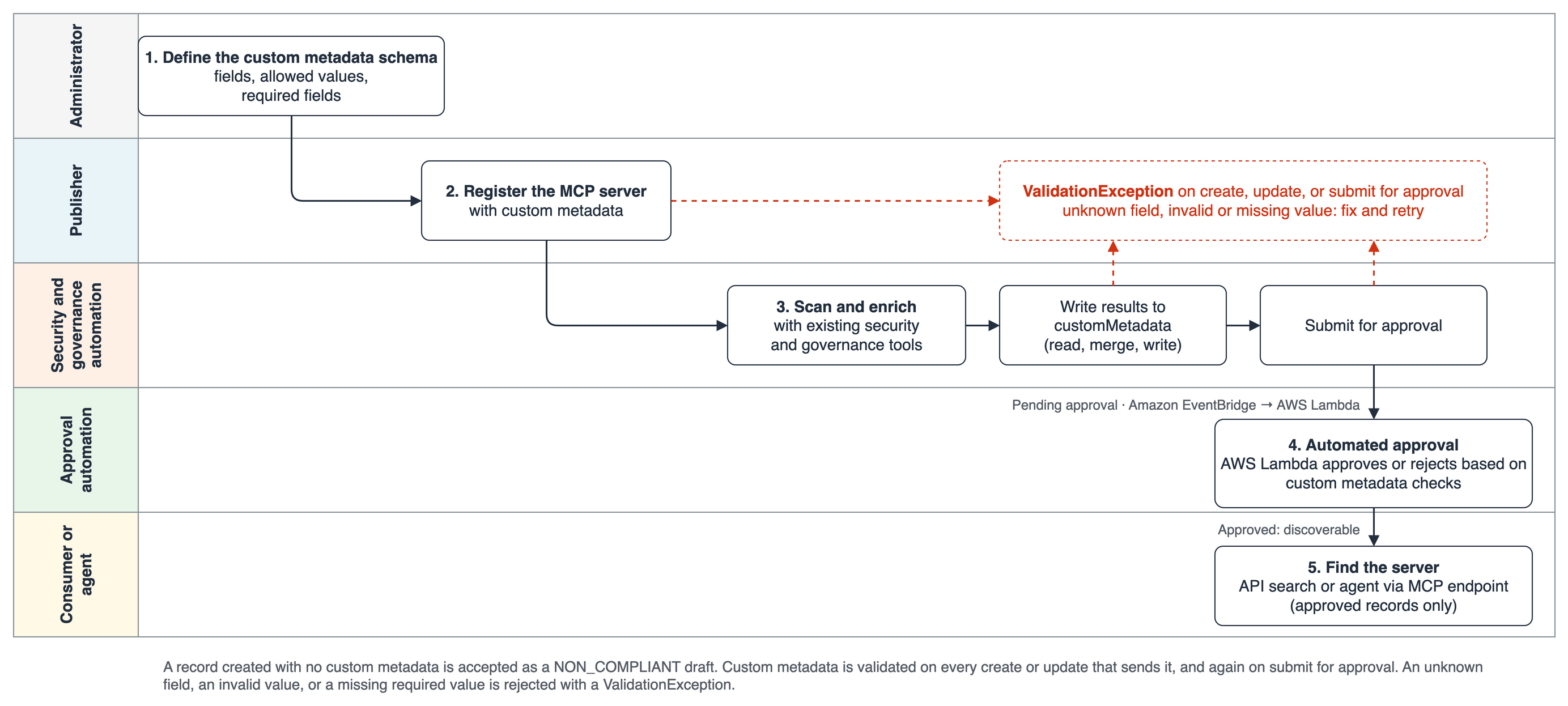
如果创建记录时未包含任何自定义元数据,AWS Agent Registry 会将其保存为 NON_COMPLIANT。团队可以通过这种方式保存进行中的工作,但在具备必填字段和值之前,无法将该记录提交审批。
如果记录的自定义元数据包含未知字段、缺失必填字段或无效值,AWS Agent Registry 会以 ValidationException 拒绝该记录。
GetRegistryRecord 返回该记录的自定义元数据值及其合规状态。(COMPLIANT 表示这些值与管理员设置的 schema 匹配,并不代表已获批准;批准与否由审批人决定。)
发现类 API 还允许根据自定义属性筛选记录。
由于各团队可以使用相同的字段和值来描述 AWS Agent Registry 记录,该注册表能够支撑治理与合规要求并实现规模化扩展。
environment(prod、staging 或 dev)、businessUnit、ownerTeam、supportContact 和 costCenter 等字段记录了资源的运行位置、由谁负责以及由谁付费。配置管理数据库(CMDB)ID 将记录与你现有的资产清单关联起来,support-tier 字段则为所有依赖该资源的人设定预期。
数据分类、合规范围(如支付卡行业标准 PCI 或《健康保险流通与责任法案》HIPAA)、风险等级、扫描状态以及扫描报告 URL,把审批转变为对结构化证据的核查。你现有的扫描器、CMDB 同步任务和分类工具会在记录提交之前通过 API 写入这些值。正如本文所示,你可以利用这些值来构建记录审批流程或自动化机制。
自定义元数据值会被建立索引以供搜索。消费者或智能体可以将自然语言查询与特定的元数据过滤条件结合使用,例如 environment=prod AND businessUnit=payments AND securityScanStatus=PASSED。只有已获批的记录才会被返回,因此某条记录即便符合过滤条件但尚未获批,也不会出现在结果中。图 1 展示了从管理员到消费者,各个角色如何推动一条记录经历模式定义、注册、信息补全、审批和发现等阶段。
图 1:泳道图,展示记录如何按角色在 AWS Agent Registry 中流转
AnyCompany 运营 anycompany-governed-registry,这是一个不启用自动审批的 AWS Agent Registry。其支付团队发布了一条 MCP 记录 payments-ledger-mcp,这是一个用于账本查询的只读服务器。现有安全与库存系统会先对该 MCP 记录进行补充,然后由审批功能决定消费者是否可以发现它。
图 2 中五个编号步骤与演练一致:定义、注册、补充并提交、审核,然后发现。
图 2:自定义元数据从现有工具中收集发布者上下文和值,因此审批和搜索可以使用相同的事实
要跟随本演练,你需要:
一个位于受支持 AWS 区域的 AWS 账户。
Boto3 可用的 AWS 凭证,以及 AWS Agent Registry 的 AWS Identity and Access Management (IAM) 权限。
Python 3.11 或更高版本,以及 boto3 1.43.113 或更高版本。
示例实现位于 GitHub 仓库中。
这些代码片段经过了精简:cp 和 dp 分别是 agent-registry-control 和 agent-registry 的 boto3 客户端。示例代码库中包含完整代码。
AnyCompany 的管理员创建一个注册表,并附带一套自定义元数据 schema,每条记录都必须遵循它。
每条记录都必须包含 environment、businessUnit 和 securityScanStatus 字段。
记录还可以携带可选字段,由发布者或自动化流程稍后填写:ownerTeam、cmdbId、dataClassification 和 securityScanReportUrl。
MCP 服务器还会记录其 networkEgress,该字段为可选。
default_schema = {"type": "object", "properties": { "environment": {"type": "string", "enum": ["prod", "staging", "dev"]}, "businessUnit": {"type": "string"}, "ownerTeam": {"type": "string"}, "cmdbId": {"type": "string"}, "dataClassification": {"type": "string", "enum": ["public", "internal", "confidential", "restricted"]}, "securityScanStatus": {"type": "string", "enum": ["PENDING", "PASSED", "FAILED"]}, "securityScanReportUrl": {"type": "string", "format": "uri"}, }, "required": ["environment", "businessUnit", "securityScanStatus"]} mcp_schema = {"type": "object", "properties": {"networkEgress": { "type": "string", "enum": ["none", "vpc-only", "allowlisted-internet"]}}} cp.create_registry( name="anycompany-governed-registry", approvalConfiguration={"autoApprovalRules": []}, customMetadataSchemaConfiguration={ "defaultSchema": json.dumps(default_schema), "recordTypeSchemaOverrides": [ {"recordType": "MCP", "schema": json.dumps(mcp_schema)}]}) 图 3 展示了该 schema,以及 payments-ledger-mcp 在 Step 3 完成富化(enrichment)后将携带的取值。autoApprovalRules 列表为空,意味着该注册表自身不会批准任何内容。每条提交的记录都会一直处于“待批准(Pending approval)”状态,直到某个人或某个机制批准它。至于是由你构建的自动化检查(Step 4 使用 AWS Lambda 函数)来完成、由人工审批者完成,还是两者兼用,由你决定。
图 3:示意图展示该注册表的通用属性、为 MCP 记录新增的字段,以及 payments-ledger-mcp 经过校验的 customMetadata 映射
管理员还可以在 AWS Agent Registry 控制台中查看该 schema。图 4 展示了注册表详情页上呈现的通用属性与 MCP 专属字段。
图 4:AWS Agent Registry 控制台中的自定义元数据 schema
支付团队的流水线用自定义元数据注册 payments-ledger-mcp。它第一次尝试时使用了 production,而不是管理员允许的取值之一。
流水线发送的 customMetadata:{ "environment": "production", "businessUnit": "payments", "securityScanStatus": "PENDING" } ValidationException:记录类型 MCP 的自定义元数据校验失败:/environment:在枚举 ["prod", "staging", "dev"] 中没有对应取值。注册表拒绝了这条记录。在流水线改发 prod 后,记录被创建为合规的草稿。正是通过这种方式,该 schema 让每个团队都使用相同的取值。
接下来,AnyCompany 的自动化流程补上了其自身系统所掌握的信息:来自其安全扫描器的结果、来自其 CMDB 的资产 ID,以及已获批的数据分类。随后它提交该记录以供审批。
原文较长,译文为节选;译文由英文原文机器翻译,术语按行业惯例统一,可在文末展开原文核对。
查看英文原文(Govern and discover records with common metadata in AWS Agent Registry)
As organizations build more agents, Model Context Protocol (MCP) servers and skills, they need a consistent way to describe, govern, and find them. AWS Agent Registry provides a catalog for registering, approving, and discovering these resources and custom records. Each record carries a name, a description, a protocol descriptor, and an approval status. However, every organization has attributes and facts that it wants to track, and some are unique to that organization, such as its business units, resource owners, risk classifications, and development environments. Organizations want one common definition for each of these attributes, and they want every agent, MCP server, and skill in the registry to carry these facts. Until now, organizations had no way to define these facts in AWS Agent Registry and store them on each record.
Custom metadata schemas are now available in AWS Agent Registry. A custom metadata schema is a set of organization-defined key-value pairs that records in an AWS Agent Registry carry. An administrator defines the schema and applies it to the registry, and all records within the registry must then adhere to the schema. When publishers create or submit records, they supply values for the fields specified in the applicable schema, and AWS Agent Registry validates those values against the schema set by the admin. Approvers can rely on the validated values when reviewing a record, and consumers and agents can use them to discover and filter records. Administrators, publishers, security and governance teams, approvers, consumers, and agents all work from a shared set of facts to govern, discover, and understand the resources in their agentic fleet.
In this post, we follow the AnyCompany organization publishing an MCP server with custom schema definition, enriching that record, and making it available for discovery by humans or agents. We use an MCP server as the example, but the same steps apply to other record types.
How custom metadata works
With custom metadata, an organization can use standardized vocabulary for describing its resources. The registry administrator defines the custom metadata schema: field names, types, allowed values, and whether each field is required or optional. The registry enforces the schema on every record, so a field such as environment has the same name and the same allowed values whichever team publishes the record.
The schema has common attributes that apply to every record type, and you can add dedicated fields that only apply to specific record types. Each field is Text, Enum, URL, or Boolean.
-
When a record is created or updated, the registry validates the custom metadata against the schema set up by the admin.
-
If a record is created without any custom metadata, AWS Agent Registry saves it as
NON_COMPLIANT. A team can save work in progress this way, but it can’t submit the record for approval until it has the required fields and values. -
If a record includes custom metadata with an unknown field, a missing required field, or an invalid value, AWS Agent Registry rejects it with a
ValidationException.
-
-
GetRegistryRecordreturns the record’s custom metadata values and its compliance status. (COMPLIANTmeans that the values match the administrator’s schema. It is not an approval. The approvers make that decision.) -
Discovery APIs also allow filtering records based on custom attributes.
What custom metadata makes possible
Because teams can describe the AWS Agent Registry records with the same fields and values, the registry can support and scale governance and compliance.
Ownership and operations
Fields such as environment (prod, staging, or dev), businessUnit, ownerTeam, supportContact, and costCenter record where a resource runs, who is responsible for it, and who pays for it. A configuration management database (CMDB) ID links the record to your existing inventory, and a support-tier field sets expectations for anyone who depends on the resource.
Security and compliance
Data classification, compliance scope such as Payment Card Industry (PCI) or Health Insurance Portability and Accountability Act (HIPAA), risk tier, scan status, and a scan report URL turn an approval into a check of structured evidence. Your existing scanners, CMDB sync jobs, and classification tools write these values through the API before a record is submitted. You can build your record approval process or automation using these values, as this post shows.
Better discovery
Custom metadata values are indexed for search. A consumer or agent can combine a natural-language query with specific metadata filters, such as environment=prod AND businessUnit=payments AND securityScanStatus=PASSED. Only approved records are returned, so a record that matches the filters but hasn’t been approved stays out of the results. Figure 1 shows how each role, from administrator to consumer, moves a record through schema definition, registration, enrichment, approval, and discovery.
Figure 1: Swimlane diagram showing how a record moves through AWS Agent Registry, by role
Walkthrough of an MCP record from registration to discovery
AnyCompany operates anycompany-governed-registry, an AWS Agent Registry without auto-approval. Its payments team publishes an MCP record, payments-ledger-mcp, a read-only server for ledger lookups. Existing security and inventory systems enrich this MCP record before an approval function decides whether consumers can discover it.
The five numbered steps in Figure 2 match the walkthrough: define, register, enrich and submit, review, then discover.
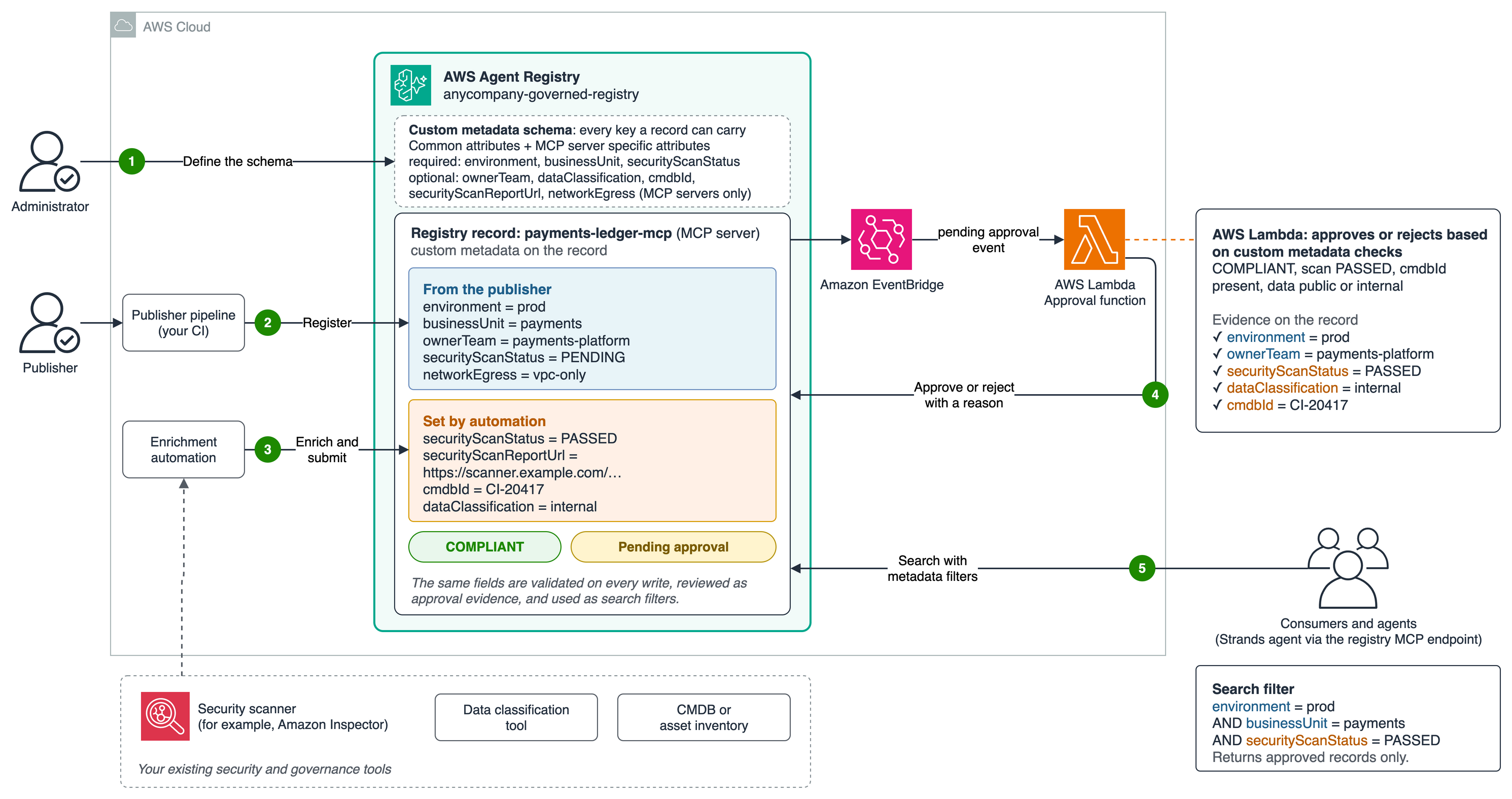
Figure 2: Custom metadata gathers publisher context and values from your existing tools, so approval and search can use the same facts
Prerequisites
To follow the walkthrough, you need:
-
An AWS account in a supported AWS Region.
-
AWS credentials available to Boto3 and AWS Identity and Access Management (IAM) permissions for AWS Agent Registry.
-
Python 3.11 or later and boto3 1.43.113 or later.
-
The sample implementation is in the GitHub repo.
The snippets are shortened: cp and dp are the agent-registry-control and agent-registry boto3 clients. The sample repository has the complete code.
Step 1: AWS Agent Registry admin defines the custom metadata schema for the registry
AnyCompany’s admin creates a registry with a custom metadata schema that every record must follow.
-
Every record must have its
environment,businessUnit, andsecurityScanStatusfields. -
Records can also carry optional fields that the publisher or automation fills in later:
ownerTeam,cmdbId,dataClassification, andsecurityScanReportUrl. -
MCP servers also record their
networkEgress, which is optional.
default_schema = {"type": "object", "properties": {
"environment": {"type": "string", "enum": ["prod", "staging", "dev"]},
"businessUnit": {"type": "string"},
"ownerTeam": {"type": "string"},
"cmdbId": {"type": "string"},
"dataClassification": {"type": "string", "enum": ["public", "internal", "confidential", "restricted"]},
"securityScanStatus": {"type": "string", "enum": ["PENDING", "PASSED", "FAILED"]},
"securityScanReportUrl": {"type": "string", "format": "uri"},
}, "required": ["environment", "businessUnit", "securityScanStatus"]}
mcp_schema = {"type": "object", "properties": {"networkEgress": {
"type": "string", "enum": ["none", "vpc-only", "allowlisted-internet"]}}}
cp.create_registry(
name="anycompany-governed-registry",
approvalConfiguration={"autoApprovalRules": []},
customMetadataSchemaConfiguration={
"defaultSchema": json.dumps(default_schema),
"recordTypeSchemaOverrides": [
{"recordType": "MCP", "schema": json.dumps(mcp_schema)}]})Figure 3 shows this schema and the values payments-ledger-mcp will carry once enrichment completes in Step 3. The empty autoApprovalRules list means that the registry approves nothing on its own. Every submitted record stays in Pending approval until someone or something approves it. You decide whether that is done by automated checks you build (Step 4 uses an AWS Lambda function), a human approver, or both.
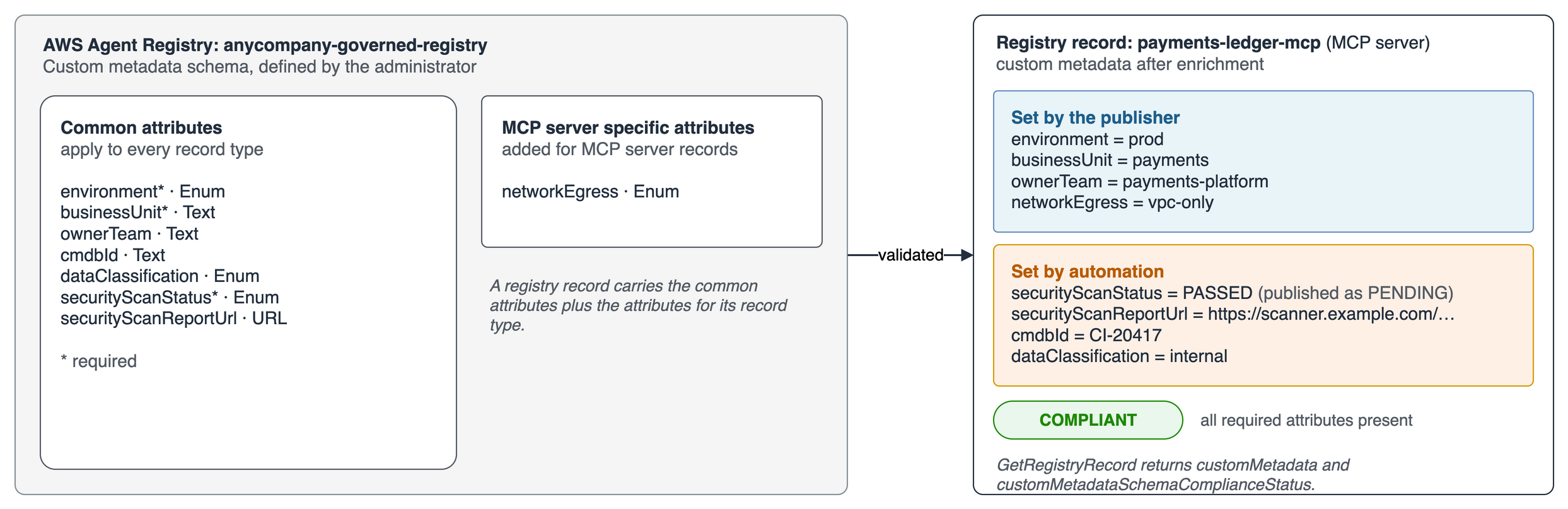
Figure 3: Diagram showing the registry’s common attributes, the fields added for MCP records, and the validated customMetadata map for payments-ledger-mcp
Administrators can also review the schema in the AWS Agent Registry console. Figure 4 shows the common attributes and the MCP-specific field as they appear on the registry’s details page.
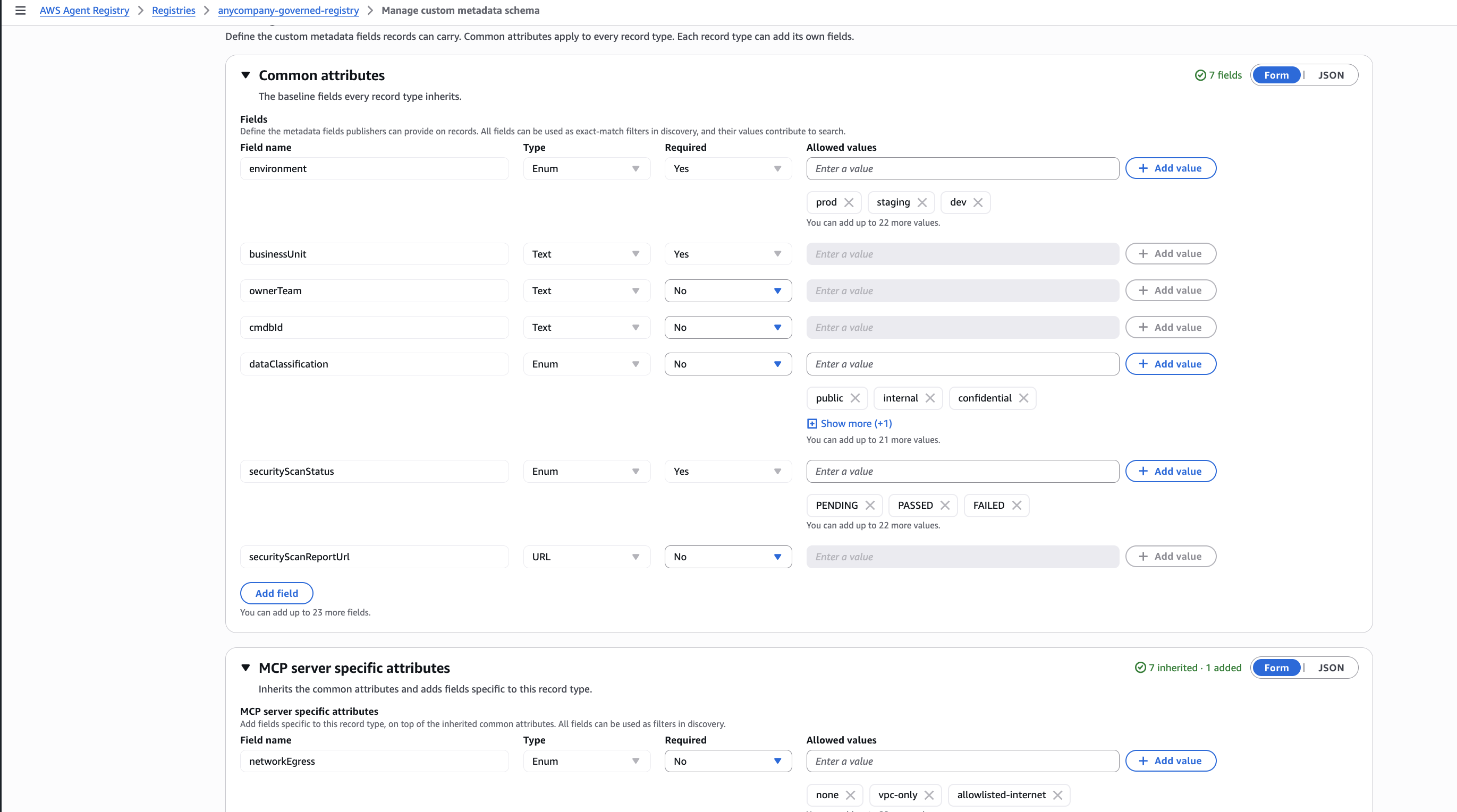
Figure 4: The custom metadata schema in the AWS Agent Registry console
Step 2: The publisher registers the server
The payments team’s pipeline registers payments-ledger-mcp with its custom metadata. Its first attempt uses production instead of one of the administrator’s allowed values.
customMetadata sent by the pipeline:

{
    "environment": "production",
    "businessUnit": "payments",
    "securityScanStatus": "PENDING"
}

ValidationException: Custom metadata validation failed for record type MCP: /environment: does not have a value in the enumeration ["prod", "staging", "dev"]
The registry rejects the record. After the pipeline sends prod, the record is created as a compliant draft. This is how the schema keeps every team using the same values.
Step 3: Automation adds additional metadata and submits
Next, AnyCompany’s automation adds what its own systems know: the result from its security scanner, the asset ID from its CMDB, and the approved data classification. It then submits the record for approval.
record = cp.get_registry_record(registryId=registry_id, recordId=record_id)
scan = run_security_scan(record)  # Replace this stub with your scanner call.
metadata = {**record["customMetadata"],
    "cmdbId": get_cmdb_id(record),
    "dataClassification": get_classification(record),
    "securityScanStatus": scan["status"],
    "securityScanReportUrl": scan["report_url"]}
cp.update_registry_record(registryId=registry_id, recordId=record_id,
    customMetadata={"optionalValue": metadata})
wait_for_record(cp, registry_id, record_id, "DRAFT")
cp.submit_registry_record_for_approval(
    registryId=registry_id, recordId=record_id)
An update replaces the whole metadata map, so the automation reads the current values, adds its own, and writes them back together. In the sample, the scanner and CMDB calls are stubs that you replace with your own tools. The registry sends a pending-approval event to Amazon EventBridge. In Step 4, a rule that you create passes the event to your approval function.
Step 4: The approval automation decides from the evidence
When the record moves to Pending approval, AWS Agent Registry sends an event to Amazon EventBridge, and an Amazon EventBridge rule is set to invoke a custom AWS Lambda function. Figure 5 shows the console view of payments-ledger-mcp, with the custom metadata values that the approval function reads for its check.
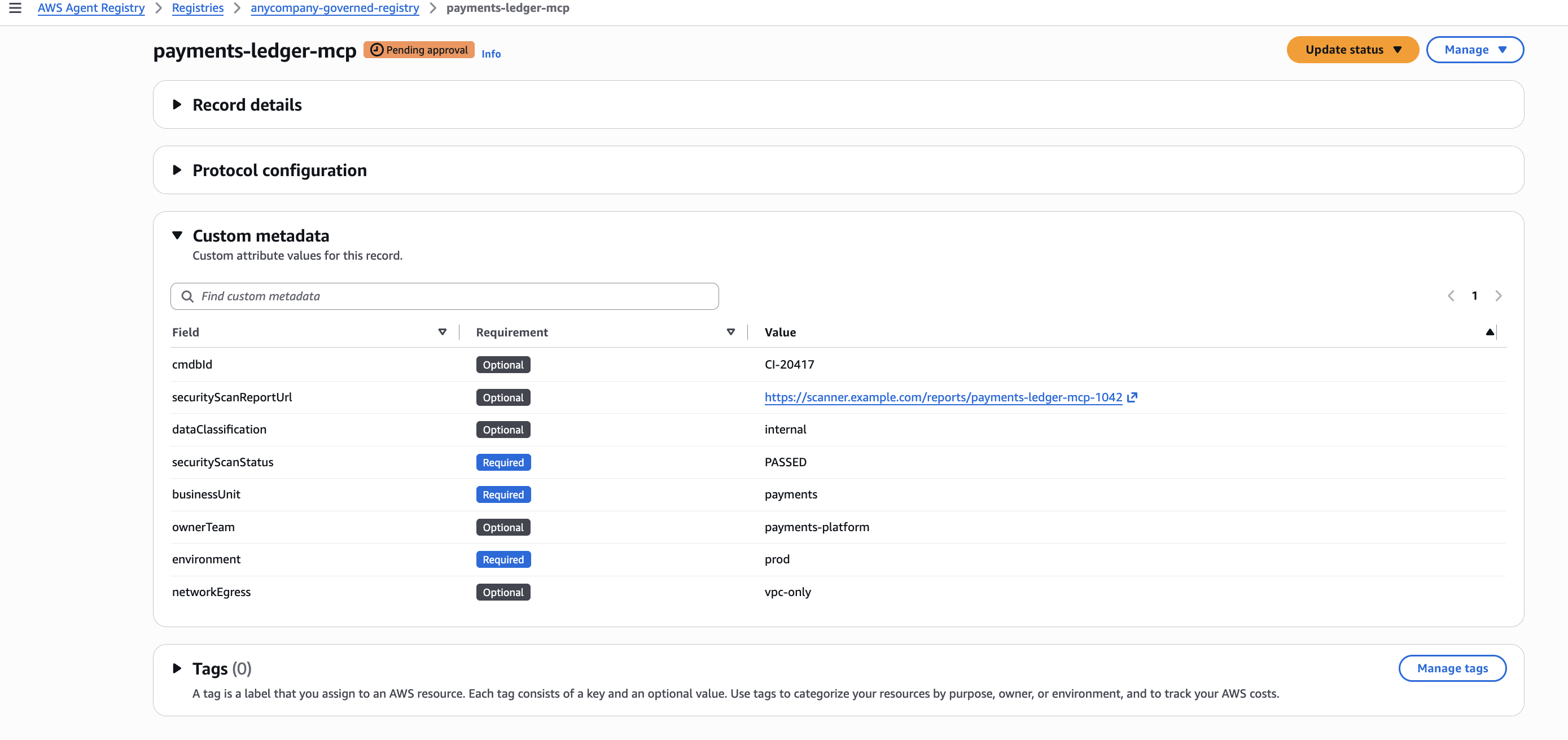
Figure 5: The custom metadata on the record is the evidence that the approval function will check
The function reads the record’s custom metadata and compliance status to check that the record is COMPLIANT, the scan PASSED, a cmdbId is present, and the data is public or internal. payments-ledger-mcp passes all four, so the function approves. A record that fails a check is rejected, and the reason names the failed check. In your production systems, you can choose to route records that need a human review, such as those with confidential or restricted data, for manual review instead of being rejected.
Step 5: Consumers find the records from AWS Agent Registry with custom metadata fields as filters
A developer looking for a ledger tool searches the registry and filters on the same fields the administrator defined.
dp = boto3.client("agent-registry")
matches = dp.search_discoverable_registry_records(
    registryIds=[registry_id],
    searchQuery="ledger lookup",
    filters={"$and": [
        {"customMetadata.environment": {"$eq": "prod"}},
        {"customMetadata.businessUnit": {"$eq": "payments"}},
        {"customMetadata.securityScanStatus": {"$eq": "PASSED"}},
    ]},
)
The search returns payments-ledger-mcp because it’s approved and matches all three filters. Agents can run the same search through the registry’s MCP endpoint, https://agentregistry.<region>.api.aws/registry/<registryId>/mcp, which offers search, list, and get as MCP tools. In the GitHub sample, a Strands agent connects to the AWS Registry MCP endpoint and uses a model on Amazon Bedrock. Its system prompt lists the custom metadata fields to filter records on. The agent turns a plain-language request, such as “a production MCP server for payments ledger lookups that passed its security scan”, into a filtered search. It answers with payments-ledger-mcp.
Developers and agents query the same fields the administrator defined, and the approval function checked, so both find only servers that meet your governance rules.
Design the schema for long-term use
Treat the schema as your organization’s shared vocabulary:
-
Agree on the vocabulary first. Settle field names and allowed values with the teams that publish and approve records before you create the schema. Schema changes are additive: you can add fields, add allowed values, or make an optional field required, but you can’t rename, remove, or retype a field.
-
Expect existing records to lag behind schema changes made after the records were added to the registry. Existing records aren’t rewritten. A record that no longer matches the schema is reported as
NON_COMPLIANTand keeps its approval status. The record stays approved, but its next update must meet the new schema. Editing an approved record creates a draft that must be submitted for approval again, and the submit fails until every required field has a value. Until a curator approves the new revision, consumers keep seeing the approved one. -
Put each field at the right level. Use common attributes for questions that apply to every record type, and record-type fields for record-specific facts such as autonomy level for agents.
-
Pick the type that fits the field. Use Enums for decision fields that need consistent spelling, Text for external identifiers, and URL for evidence stored behind the source system’s access controls.
-
Make a field required only when the publisher can assign a value at registration. For a value that your continuous integration (CI) or automation provides after the record is published, allow an interim value, for example
PENDING. In this post, the scan runs after registration, sosecurityScanStatushas three values:PENDING,PASSED, andFAILED. The publisher writesPENDING, and the enrichment automation replaces it. -
Keep sensitive details out. Leave secrets, internal endpoints, and detailed findings out of broadly readable metadata.
Conclusion
In this post, we showed how to add custom metadata in AWS Agent Registry to give every record a common set of facts, such as its environment, owning business unit, data classification, and security scan status. Using one MCP server, we showed an administrator defining the schema, a publisher and existing automation filling in the values, an approval function that you build in AWS Lambda deciding approval, and a consumer finding the approved server with metadata filters. Because the administrator owns the schema, every team uses the same fields and values, and that consistency is what makes approvals and searches in AWS Agent Registry dependable.
-
Try it yourself: Use the sample at GitHub repo.
-
Go deeper: Read the AWS Agent Registry Developer Guide and custom metadata API reference.
-
Availability: See supported AWS Regions.
About the authors

Sana Iqbal
Sana is a GenAI Solutions Architect at AWS, focused on helping Financial Services customers design, build, and scale generative AI solutions. Prior to AWS, she worked as an ML Scientist and AI Engineer at various startups, bringing 8+ years of hands-on experience in building machine learning systems from the ground up. She has a MS degree focused on AI/ML from UC Berkeley.

Chaitra Mathur
Chaitra is a Principal GenAI Solutions Architect at AWS, focused on helping enterprises design and govern agentic systems at scale. She works with customers across industries to build agentic architectures, from orchestration and tool governance to production-grade AI environments. She is a frequent conference speaker and has published several blog posts in the Machine Learning and Generative AI domains.

Anubhav Mangal
Anubhav is a Principal Product Manager at Amazon Web Services with Amazon Bedrock AgentCore, where he owns discovery of governance of agentic resources and AWS Agent Registry. He was formerly Sr. Manager, Product Management at AWS Marketplace. He has spent his career in technology and consulting across India and the US. He has a Masters in Computer Science and a Masters in Business Administration. Outside of work, he enjoys reading fiction, hiking, baking, and follows soccer and Formula One.
正文保留英文原文,标题与摘要由机器翻译。
原文发布于 AWS Machine Learning(Govern and discover records with common metadata in AWS Agent Registry),标题、摘要与正文由机器翻译,术语按行业惯例统一,未经人工逐句校订。