Amazon SageMaker AI 实时端点现支持 KV 缓存感知路由
今天,Amazon SageMaker AI 推出 KV 缓存感知路由(KV-aware routing),这是面向实时端点的一种新路由策略。它利用模型容器上报的缓存状态,把每个请求发送到已经为其提示词持有较长缓存匹配、且负载不过高的实例上。它面向的是那些用大语言模型(LLM)支撑多轮对话、长共享提示词或高负载的团队。你需要在两处开启它:为模型添加一个环境变量,让容器上报其缓存内容;并在端点配置中将 RoutingStrategy 设为 KV_AWARE。客户端调用端点所使用的 API 与以往完全相同。
它解决的问题是这样的:聊天助手、检索增强生成(RAG),以及带有长系统提示词的智能体等 LLM 应用,会发送大量以相同文本开头的请求。模型会把针对某个提示词所做的计算保存在 GPU 内存中,即 KV 缓存,当同样的开头再次到达同一实例时,就跳过这部分计算。在本系列第 1 部分中,我们介绍了 Amazon SageMaker AI 的前缀感知路由,它把开头相同的请求发送到同一实例。前缀感知路由仅凭请求本身推断前缀被缓存的位置,因此无法判断某个实例是否已经驱逐了该缓存。
前缀感知路由仅根据请求本身来选择实例。它对请求的开头进行哈希,范围取决于你配置的 PrefixLength(对于 InvokeEndpoint 载荷按字节计,对于 OpenAI 兼容的 Chat Completions API 按消息文本字符计),并把开头相同的请求发送到同一实例。它从不知道实例实际缓存了什么。当每个请求都以相同的共享文本开头时,这种方式效果很好;但在以下两种情况下效果就没那么好:
实例上的缓存会随时间变化。当 GPU 内存被占满时,实例会逐出较旧的 KV 缓存条目,但路由器仍会继续把匹配的请求发送到该实例,仿佛缓存依然是热的一样。
一段对话一开始很短。在多轮聊天中,每一轮都会增加历史记录。当请求仍短于 PrefixLength 时,每个新轮次都会改变路由器用于哈希的文本,因此下一轮可能落到与缓存了前几轮的实例不同的实例上。只有请求增长到超过 PrefixLength 之后,一段对话的各轮次才会留在同一个实例上。
在本文中,我们将解释 KV 感知路由的工作原理、何时使用它,以及如何在单模型端点和推理组件端点上启用、调用和验证它。
KV 感知路由包含三个部分:模型容器上报自己缓存了什么,SageMaker AI 为该端点维护一份记录这些状态的托管缓存索引,端点则利用该索引为每个请求选择实例。
当你通过 SM_VLLM_KV_EVENTS_CONFIG 开启事件后,容器每次存储或驱逐缓存条目时都会发布一个 KV 缓存事件,SageMaker AI 利用这些事件保持索引为最新状态。索引中只保存指针:缓存内容的单向、截断哈希,每个哈希映射到持有它的实例或推理组件副本。它从不存储提示词、Token ID、请求负载或 KV 张量。当请求到达时,端点会对提示词进行 Token 化,并在索引中查找这些 Token。索引返回那些在其缓存中持有提示词一部分的实例或推理组件副本,以及每个实例持有其中多少。例如,如果实例 A 持有某段对话开头的缓存,该对话的下一轮就会发送到 A。由于索引按 Token 而非固定字节数进行匹配,多轮历史随着增长可以完整匹配。一个只共享部分提示词的请求,仍会被路由到匹配最长的实例。
随后,端点会在这些候选实例中进行选择,权衡每个实例已缓存的提示词比例与其繁忙程度。过于繁忙的候选实例会被跳过,因此如果匹配最长的实例正忙,请求就会转向下一个可用的最佳实例。如果没有任何候选实例有可用的匹配,或者它们全都繁忙,请求就会回退到负载感知路由,如“路由开销与回退”一节所述。与前缀感知路由不同,你无需为此配置并发阈值。索引也会跟随集群变化。缩容时,被移除实例的条目会被丢弃。扩容或更新替换实例时,新实例的缓存为空,因此短期内延迟可能会偏高。
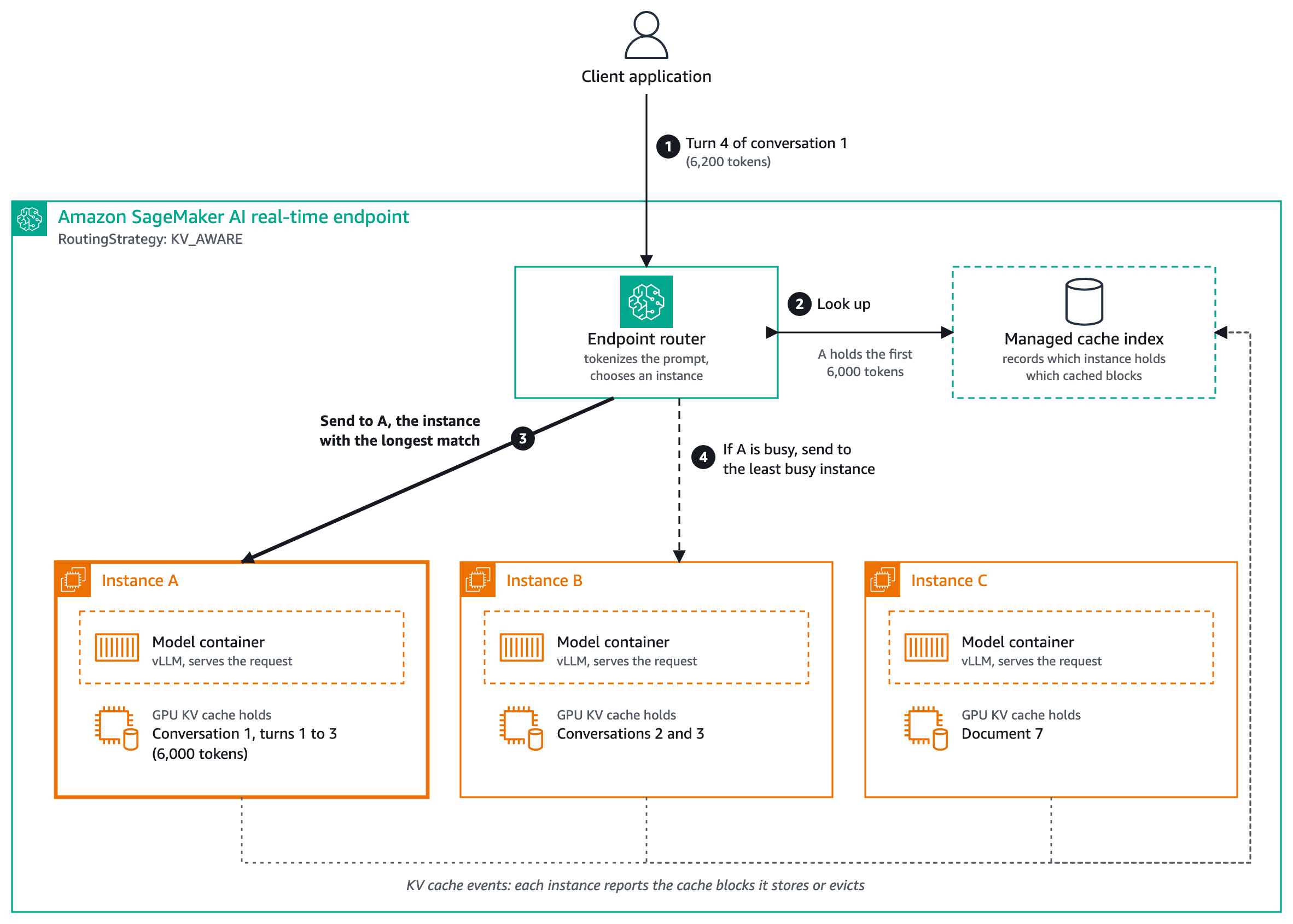
图 1:SageMaker AI 终端节点上的 KV 感知路由。路由器查询托管缓存索引,并将请求转发到持有最长缓存匹配的实例。每个实例都会将 KV 缓存事件上报回该索引。
在图 1 中,该终端节点有三个实例:A、B 和 C。每个实例都在各自的模型容器(即“要求与限制”中列出的 AWS vLLM 深度学习容器)中运行同一个模型,并在 GPU 内存中拥有自己的 KV 缓存,因此各实例持有的缓存内容各不相同:A 持有对话 1 的第 1 至第 3 轮,B 持有对话 2 和对话 3,C 持有文档 7。当对话 1 的第 4 轮到达时(步骤 1),路由器对其进行 Token 化,并在托管缓存索引中查询(步骤 2)。索引显示,A 持有该请求 6,200 个 Token 中的前 6,000 个,因此路由器将请求发送给 A(步骤 3),A 只需计算剩余的 Token。如果 A 正忙,路由器则改为将请求发送给最不繁忙的实例(步骤 4)。KV 感知路由需要可选的多个目的地,因此它仅在至少有两个实例、或至少有两个推理组件副本时才生效。如果只有一个实例,所有请求都会发往该实例,该设置不会产生任何影响。
通过此次发布,SageMaker AI 为实时终端节点提供了四种路由策略。你可以在终端节点配置的 RoutingConfig 中为每个生产变体设置策略。
两种策略都会将请求发送到其前缀可能已被缓存的位置。它们的区别在于如何得知该位置,以及需要你的容器提供什么。
我们通过两种方式将 KV 感知路由与随机路由进行了对比测量:在生产规模实例上进行的大规模基准测试,以及一个规模更小、可复现的对比实验,你可以在“验证 KV 感知路由是否正常工作”中按步骤操作。
在我们使用 Llama 3.1 70B Instruct、在七个 ml.p5.48xlarge 实例上进行的基准测试中,我们运行了每轮 30 分钟的测试,模拟 20 或 100 个用户进行多轮对话和文档问答,提示词最长约 64,000 个 Token。与随机路由相比,在负载下面对长提示词时,KV 感知路由将 p50 首 Token 延迟(TTFT)最多降低了 97%,并将吞吐最多提升了 234%。它把 KV 缓存命中率从 3–48% 提升到 80–93%。即使负载较低,长提示词也能获得收益。短提示词的收益最小,因为可节省的预填充更少。结果取决于你的工作负载。要针对你自己的流量衡量这些收益,请使用「Verify that KV-aware routing is working」中的检查项。
在路由请求之前,端点会对提示词做分词,并在托管缓存索引中查找。短提示词的查找只需几毫秒,长提示词则更久,耗时主要花在分词上,但相比一次缓存命中节省的时间仍然很小。对于使用标准选项的纯文本请求,它计算出的 Token 会被传给模型,因此提示词不会被分词两次。
如果查找速度慢、找不到有用的匹配,或者所有匹配的实例都处于忙碌状态,端点会改用负载感知路由来转发请求,其行为与 LEAST_OUTSTANDING_REQUESTS 策略相同。请求仍会被处理,只是无法享受缓存带来的收益。当端点无法对请求做分词时也会如此,但「Invoking the endpoint」中描述的那两种错误情况除外。这些回退情况在发布时不会在 SageMaker AI 控制台或指标中报告,因此请使用「Verify that KV-aware routing is working」中的检查项,确认路由对你的流量确实有效。
当提示词非常短时,需要保存的预填充(prefill)内容更少,因此前缀感知路由(prefix-aware routing)可能就足够了。
前缀感知路由无需对容器做任何改动,但它看不到实例实际持有什么。KV 感知路由会向容器询问其持有什么,因此更精确。当有大量已缓存的上下文可供复用、且该缓存承受压力时,它就能带来收益:长提示词、高负载,以及实例的 GPU 内存不足以支撑 KV 缓存的情况。此时,容器会逐出缓存中最近最少使用的部分,包括共享提示词和对话历史的部分内容。
原文较长,译文为节选;译文由英文原文机器翻译,术语按行业惯例统一,可在文末展开原文核对。
查看英文原文(Amazon SageMaker AI real-time endpoints now support KV cache aware routing)
Today, Amazon SageMaker AI introduces KV cache-aware routing (KV-aware routing), a new routing strategy for real-time endpoints. It uses the cache state that the model container reports. It sends each request to an instance that already holds a long cached match for its prompt and isn’t too busy. It’s for teams that serve large language models (LLMs) with multi-turn conversations, long shared prompts, or heavy load. You turn it on in two places: add one environment variable to your model so the container reports its cache contents, and set RoutingStrategy to KV_AWARE in the endpoint configuration. Your clients call the endpoint with the same APIs as before.
Here’s the problem it solves: LLM applications such as chat assistants, Retrieval Augmented Generation (RAG), and agents with long system prompts send many requests that start with the same text. A model keeps the work it did on a prompt in GPU memory, the KV cache, and skips that work when the same start reaches the same instance again. In part 1 of this series, we introduced prefix-aware routing for Amazon SageMaker AI, which sends requests that start the same way to the same instance. Prefix-aware routing infers where a prefix is cached from the request alone, so it can’t tell when an instance has evicted that cache.
Prefix-aware routing picks an instance from the request alone. It hashes the start of the request, up to the PrefixLength you configure (bytes of the InvokeEndpoint payload, or characters of the message text for the OpenAI-compatible Chat Completions API), and sends requests that start the same way to the same instance. It never sees what an instance actually has cached. This works well when every request starts with the same shared text, and less well in two cases:
The cache on an instance changes over time. An instance evicts older KV cache entries when its GPU memory fills up, but the router keeps sending matching requests there as if the cache were still warm.
A conversation starts out short. In a multi-turn chat, each turn adds to the history. While the request is still shorter than PrefixLength, every new turn changes the text the router hashes, so the next turn can land on a different instance than the one that cached the earlier turns. The turns of a conversation stay on one instance only after the request grows past PrefixLength.
In this post, we explain how KV-aware routing works, when to use it, and how to enable, invoke, and verify it on single model endpoints and inference component endpoints.
How KV-aware routing works
KV-aware routing has three parts: the model container reports what it has cached, SageMaker AI keeps a managed cache index of that state for the endpoint, and the endpoint uses the index to choose an instance for each request.
When you turn events on with SM_VLLM_KV_EVENTS_CONFIG, the container publishes a KV cache event each time it stores or evicts cache entries, and SageMaker AI uses these events to keep the index current. The index holds only pointers: one-way, truncated hashes of cached content, each mapped to the instance or inference component copy that holds it. It never stores prompts, token IDs, request payloads, or KV tensors. When a request arrives, the endpoint tokenizes the prompt and looks up the tokens in the index. The index returns the instances or inference component copies that hold part of the prompt in their cache, and how much of it each one holds. For example, if instance A holds the cached start of a conversation, the next turn of that conversation goes to A. Because the index matches on tokens rather than a fixed number of bytes, a multi-turn history can match in full as it grows. A request that shares only part of its prompt still goes to the instance with the longest match.
The endpoint then picks among these candidates by weighing how much of the prompt each one has cached against how busy it is. A candidate that is too busy is skipped, so if the instance with the longest match is busy, the request goes to the next-best one that is available. If no candidate has a useful match or all of them are busy, the request falls back to load-aware routing, as described in Routing overhead and fallbacks. You don’t configure a concurrency threshold for this, as you do with prefix-aware routing. The index also follows the fleet. When you scale in, entries for removed instances are dropped. When you scale out or an update replaces instances, the new instances start with empty caches, so latency can be higher for a short time.
Figure 1: KV-aware routing on a SageMaker AI endpoint. The router looks up the managed cache index and forwards the request to the instance that holds the longest cached match. Each instance reports KV cache events back to the index
In Figure 1, the endpoint has three instances, A, B, and C. Each instance runs the same model in its own model container (the AWS vLLM Deep Learning Container listed in Requirements and limits) and has its own KV cache in GPU memory, so each instance holds different cached content: A holds turns 1 to 3 of conversation 1, B holds conversations 2 and 3, and C holds document 7. When turn 4 of conversation 1 arrives (step 1), the router tokenizes it and looks it up in the managed cache index (step 2). The index shows that A holds the first 6,000 of the request’s 6,200 tokens, so the router sends the request to A (step 3), and A only has to compute the remaining tokens. If A is busy, the router sends the request to the least busy instance instead (step 4). KV-aware routing needs a choice of destinations, so it is active only with at least two instances, or at least two copies of an inference component. With a single instance, every request goes to that instance and the setting has no effect.
Routing strategies on SageMaker AI
With this launch, SageMaker AI offers four routing strategies for real-time endpoints. You set the strategy per production variant in the RoutingConfig of your endpoint configuration.
| Strategy | How it routes | Recommended for |
| RANDOM (default) | Sends each request to a randomly chosen instance. | General-purpose workloads, non-LLM models, and requests that are interchangeable. |
| LEAST_OUTSTANDING_REQUESTS | Sends each request to the instance with the fewest in-flight requests. | Workloads where processing time varies and you want to keep all instances equally busy. |
| PREFIX_AWARE | Sends requests that share the same prompt prefix, up to PrefixLength, to the same instance. Overflows to another instance at ConcurrencyThreshold. | LLM workloads with shared text at a fixed position at the start of the request, on any serving framework that supports prefix caching. |
| KV_AWARE (new) | Sends each request to an instance that holds a matching cached prefix, based on cache state reported by the container, weighing match length against load. Falls back to load-aware routing. | LLM workloads on a supported container with multi-turn conversations, frequent cache eviction, or requests that share only part of their start. |
Prefix-aware or KV-aware
Both strategies send requests to where their prefix is likely to be cached. They differ in how they know where that is, and in what they need from your container.
| Prefix-aware routing | KV-aware routing | |
| Source of cache location | Inferred from the request prefix | Cache state reported by the container |
| Added latency per request | 1.3–1.9 milliseconds in part 1 | A few milliseconds for short prompts, more for long ones, mostly for tokenization |
| Matching | First PrefixLength bytes (Invoke API) or characters (OpenAI-compatible API) | Tokens, longest cached match |
| Parameters | PrefixLength, ConcurrencyThreshold | None needed |
| Container | Any container with prefix caching on | A supported container, with prefix caching and KV cache events on (see Requirements and limits) |
| Request payload | Any | OpenAI-compatible Completions or Chat Completions format |
Performance
We measured KV-aware routing against random routing in two ways: a large-scale benchmark on production-sized instances, and a smaller, reproducible comparison you can follow in Verify that KV-aware routing is working.
Benchmark results
In our benchmarks with Llama 3.1 70B Instruct on seven ml.p5.48xlarge instances, we ran 30-minute tests with 20 or 100 simulated users holding multi-turn chats and document Q&A sessions, with prompts of up to about 64,000 tokens. Compared with random routing, and with long prompts under load, KV-aware routing reduced p50 time to first token (TTFT) by up to 97 percent and increased throughput by up to 234 percent. It raised the KV cache hit rate from 3–48 percent to 80–93 percent. Long prompts gained even at lower load. The gain was smallest with short prompts, where there is less prefill to save. Results depend on your workload. To measure them for your own traffic, use the checks in Verify that KV-aware routing is working.
Routing overhead and fallbacks
Before it routes a request, the endpoint tokenizes the prompt and looks it up in the managed cache index. The lookup takes a few milliseconds for short prompts and longer for long ones, mostly for tokenization, but it stays small next to the time a cache hit saves. For text-only requests that use standard options, the tokens it computes are passed to the model, so the prompt isn’t tokenized twice.
If the lookup is slow, finds no useful match, or all matching instances are busy, the endpoint routes the request with load-aware routing, the same behavior as the LEAST_OUTSTANDING_REQUESTS strategy. The request is still served, without the cache benefit. The same happens when the endpoint can’t tokenize a request, except in the two error cases described in Invoking the endpoint. These fallbacks aren’t reported in the SageMaker AI console or metrics at launch, so use the checks in Verify that KV-aware routing is working to confirm that routing is effective for your traffic.
With very short prompts there is less prefill to save, so prefix-aware routing can be all you need.
When to use KV-aware routing
Prefix-aware routing needs no changes to your container, but it can’t see what an instance actually holds. KV-aware routing asks the container what it holds, which makes it more precise. It pays off when there is a lot of cached context to reuse and that cache is under pressure: long prompts, high load, and instances that run short of GPU memory for the KV cache. When that happens, the container evicts the least recently used parts of the cache, including parts of shared prompts and conversation history.
For example, a support assistant runs on three instances, and each conversation begins with the same 6,000-token knowledge-base excerpt. Conversation 1 starts on instance A, which caches the excerpt. Traffic rises, A runs short of memory, and the container evicts most of that excerpt. Instance B recently served another conversation over the same excerpt and still holds its first 4,000 tokens. When the next turn of conversation 1 arrives, prefix-aware routing sends it to A again, and A recomputes the excerpt. With KV-aware routing, A’s container has already reported the eviction, so the index shows that B holds the longest match, and the request goes to B, which recomputes only the remaining tokens. At low load, A wouldn’t have evicted anything, and both strategies would have sent the request to A with the cache intact.
KV-aware routing helps most when requests reuse cached context in ways a fixed-length prefix can’t capture:
Multi-turn conversations: Each turn sends the full conversation history, so the cached prefix grows with every turn. KV-aware routing matches the whole cached history and keeps each conversation on the instance that holds it. This matters most for long conversations. After the managed cache index reflects an eviction, the router doesn’t keep sending the conversation to an instance that has already dropped its cache.
High-throughput inference with shared context: RAG applications prepend retrieved documents, and assistants send long system prompts with every request. KV-aware routing fits when these prompts are long and instances are under memory pressure. With a stable shared prefix and moderate load, prefix-aware routing also fits. Put the shared content first and in the same order: if the same documents appear in a different order, the prompts no longer share a start, so they don’t match.
Workloads where prefix length is hard to tune: With prefix-aware routing, you choose a PrefixLength that covers your shared text without scattering requests that should stay together. KV-aware routing has no prefix length to tune, because it matches on what is actually cached.
Prefix-aware routing is a good fit, with no container changes, if your requests share a stable system prompt or document at the start, your prompts are short, or load is moderate. In these cases, instances have enough GPU memory to keep the shared text cached, so both strategies find it. Prefix-aware routing is also the choice if your container isn’t supported by KV-aware routing, because it works with any container that has prefix caching turned on. If your requests are short and interchangeable, or your model isn’t an LLM, there is little cached context to reuse, so use RANDOM or LEAST_OUTSTANDING_REQUESTS.
If you aren’t sure which fits, start with prefix-aware routing, run your own traffic against a KV_AWARE endpoint, and compare time to first token, throughput, and hit rate as described in Verify that KV-aware routing is working.
Requirements and limits
Before you enable KV-aware routing, check that your container, endpoint, and requests meet these requirements:
Container: At launch, KV-aware routing supports the AWS vLLM Deep Learning Container for SageMaker AI: images with vLLM 0.33.0 or later, or the Amazon Linux build server-sagemaker-cuda-v2.8.0 or later. Prefix caching must be on, which is the default, and KV cache events must be turned on with the SM_VLLM_KV_EVENTS_CONFIG environment variable, as shown in How to enable it. SageMaker AI doesn’t set it for you.
Endpoints and instances: Real-time single model endpoints and inference component endpoints, including dynamic Low-Rank Adaptation (LoRA) adapters, on GPU instance types. You can also configure KV-aware routing with AWS CloudFormation. Routing is active only with at least two instances for a single model endpoint, or at least two copies of an inference component, which can be on the same instance. With fewer, you can still set KV_AWARE and the endpoint isn’t rejected, but every request goes to the single instance or copy.
Requests: OpenAI-compatible Completions or Chat Completions payloads, sent with InvokeEndpoint, InvokeEndpointWithResponseStream, or the SageMaker AI OpenAI-compatible Chat Completions API. InvokeEndpointWithBidirectionalStream isn’t supported. If you set the model field, it must match the value of SM_VLLM_MODEL.
SDK versions: Detailed observability, which you use to track the KV cache hit rate, needs AWS Command Line Interface (AWS CLI) version 2.35.6 or later, or Boto3 version 1.43.31 or later.
SageMaker AI checks these requirements before your endpoint serves traffic. If a check fails, the request or deployment fails with a message that describes what is missing. For the full list of settings, validation behavior, and quotas, see the SageMaker AI documentation.
How to enable it
You turn on KV-aware routing in two places: the model and the endpoint configuration. The example notebook runs every step end to end, for both a single model endpoint and an inference component endpoint.
1. Turn on KV cache events in the model – When you create the model, add SM_VLLM_KV_EVENTS_CONFIG to the container environment. Without it, the endpoint has no cache state to route on. The ports in this setting are used only inside the instance, so you don’t open them to your network.
"Environment": {
    "SM_VLLM_MODEL": "<model-id-or-/opt/ml/model>",
    "SM_VLLM_KV_EVENTS_CONFIG": "{\"enable_kv_cache_events\": true, \"publisher\": \"zmq\", \"endpoint\": \"tcp://*:5557\", \"topic\": \"kv-events\", \"replay_endpoint\": \"tcp://*:5658\"}"
}
2. Choose KV-aware routing in the endpoint configuration – Set RoutingStrategy to KV_AWARE in the RoutingConfig of the production variant:
"RoutingConfig": {
    "RoutingStrategy": "KV_AWARE"
}
If your container image is built for CUDA 13, also set InferenceAmiVersion in the production variant to an AMI that supports it, such as al2023-ami-sagemaker-inference-gpu-4-1. Otherwise the container can fail to start. See Inference GPU drivers.
Check that your account has enough endpoint quota for the instance type and count you choose, and request an increase in Service Quotas if needed.
The same RoutingConfig setting works for inference component endpoints, including dynamic LoRA adapters. For adapters, KV-aware routing chooses among the instances that already have the adapter loaded.
Invoking the endpoint
Nothing changes in how you call the endpoint. Send a Chat Completions payload with InvokeEndpoint, or with InvokeEndpointWithResponseStream and "stream": true in the request body:
{"messages": [{"role": "user", "content": "What is your return policy?"}]}You can also call the endpoint with the OpenAI Python client through the SageMaker AI OpenAI-compatible Chat Completions API. The Use the OpenAI-compatible API with SageMaker AI notebook on GitHub shows how, for both single model endpoints and inference components.
KV-aware routing doesn’t apply the multi-tenant prefix isolation from part 1: it ignores the prefix-aware ID header and the prompt_cache_key field. A request that sets a top-level cache_salt field to a non-null value is rejected with a 400 error.
KV-aware routing adds two error cases: a request whose model field names a model that the container doesn’t serve fails with a ModelError, and a request with a non-null cache_salt is rejected with a 400 error. Errors from inference itself are returned as before, and your model container’s own logs in Amazon CloudWatch can help you find the cause. The endpoint doesn’t deliver logs about its KV-aware routing decisions to your account, so use the checks in Verify that KV-aware routing is working, such as cached_tokens per request and the KV cache hit rate, to see how routing behaves.
Verify that KV-aware routing is working
KV-aware routing doesn’t add metrics of its own, so you check its effect on your model. There are three ways to do this.
Check cache hits per request – The container doesn’t report prompt token details by default, so set SM_VLLM_ENABLE_PROMPT_TOKENS_DETAILS to true in the model environment. Each response then includes usage.prompt_tokens_details.cached_tokens, the number of prompt tokens that were served from the KV cache. When you send a follow-up turn, or another request that starts the same way as an earlier one, a non-zero value shows that the request reached an instance that held its prefix.
Check model metrics in Amazon CloudWatch – Turn on detailed observability by adding --metrics-config '{"EnableDetailedObservability": true}' when you create the endpoint configuration, using the SDK versions in Requirements and limits. SageMaker AI then publishes the model container’s metrics, including the KV cache hit rate and TTFT. Query them as described in Detailed observability with PromQL.
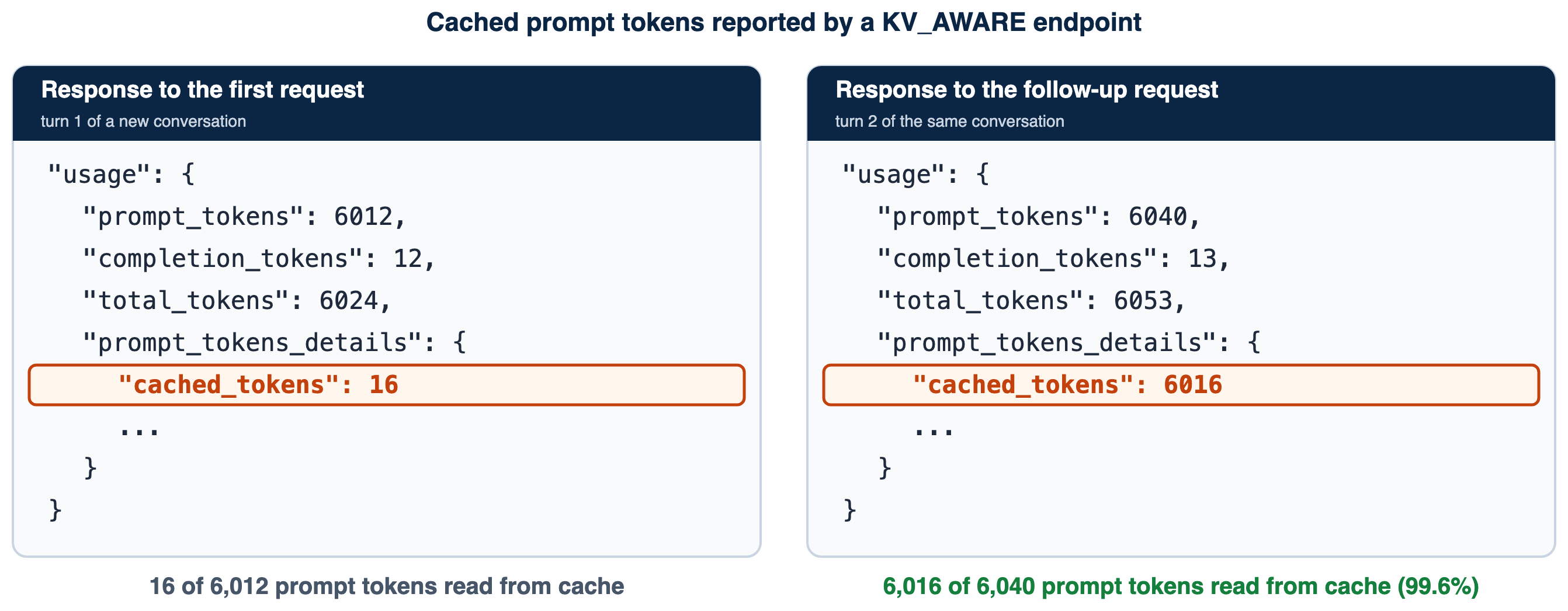
Figure 2: Verifying KV-aware routing. (a) A follow-up request shows most prompt tokens served from the KV cache. (b) The KV cache hit rate for the same endpoint in the SageMaker AI Insights dashboard
Compare with the strategy you would otherwise use – For most LLM workloads the real choice is between KV_AWARE and PREFIX_AWARE, so compare those two, and add a RANDOM endpoint as a baseline. Use the same model, instance type, and instance count for each endpoint, and send the same prompts at the same concurrency for the same duration, so that the only difference is the routing strategy. Make sure your test reuses context the way your production traffic does, for example with multi-turn conversations or shared documents. If KV_AWARE and PREFIX_AWARE perform about the same for your traffic, prefix-aware routing is the simpler choice.
As an example of this comparison, we compared RANDOM and KV_AWARE on a small endpoint. We sent the same multi-turn workload to two endpoints that differ only in routing strategy. Each endpoint had two ml.g5.xlarge instances serving Qwen3-4B-Instruct-2507 on a supported container. Each run sent 128 requests: 32 simulated users, each asking 4 questions about a document chosen from 12 documents of about 7,400 tokens. Each question resends the conversation so far, so every question after the first can reuse cached context. We ran two pairs of runs, with RANDOM first in pair 1 and KV_AWARE first in pair 2, and used new documents for each pair so that both endpoints started with empty caches. Table 1 shows the results as pair 1 / pair 2.
| Metric | RANDOM | KV_AWARE |
| CloudWatch ModelLatency average (ms) | 4,124 / 5,100 | 1,235 / 1,314 |
| CloudWatch ModelLatency p50 (ms) | 3,153 / 4,083 | 656 / 700 |
| CloudWatch ModelLatency p90 (ms) | 8,334 / 10,746 | 3,213 / 3,535 |
| CloudWatch ModelLatency p99 (ms) | 17,779 / 16,249 | 6,876 / 7,238 |
| Time to first token p50, questions 2–4 (ms) | 1,284 / 1,632 | 237 / 245 |
| Time to first token p90, questions 2–4 (ms) | 5,039 / 6,101 | 456 / 367 |
| Time to first token p90, all requests (ms) | 5,003 / 5,683 | 1,465 / 1,759 |
| Share of prompt tokens served from cache | 0.761 / 0.701 | 0.903 / 0.903 |
| Run duration (s) | 31.1 / 36.9 | 17.9 / 18.0 |
| CloudWatch OverheadLatency average (ms) | 13.1 / 8.1 | 27.1 / 27.5 |
Table 1: RANDOM and KV_AWARE routing under the same workload. Each cell shows pair 1 / pair 2. ModelLatency and OverheadLatency are Amazon CloudWatch metrics for the endpoint. The client measured time to first token and run duration. The cache share is the sum of cached_tokens divided by the sum of prompt_tokens over a run
In both pairs, KV_AWARE had lower CloudWatch ModelLatency (average 1,235 and 1,314 ms against 4,124 and 5,100 ms) and lower time to first token for questions 2–4 (p50 237 and 245 ms against 1,284 and 1,632 ms). Its cache share was higher, at 90 percent in both pairs against 76 and 70 percent. OverheadLatency, the time SageMaker AI spends outside the model container, was 14 to 19 ms higher on average with KV_AWARE. This is one model, one instance type, and one workload with long shared documents, so measure your own traffic as described earlier in this section. Figure 3 shows the model latency charts that the SageMaker AI console displays for the two endpoints.
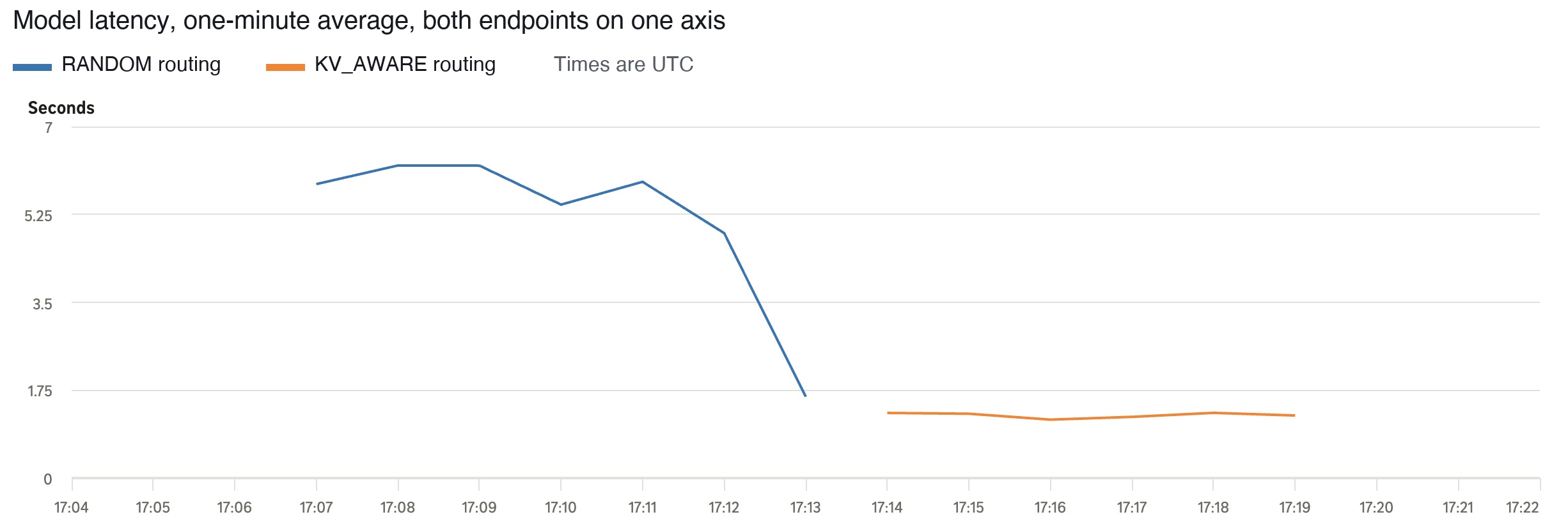
Figure 3: One-minute average model latency in Amazon CloudWatch for the RANDOM endpoint (blue) and the KV_AWARE endpoint (orange), on a shared 0–7 second axis. Each endpoint received seven consecutive runs of the same workload on new documents, RANDOM first. Average model latency was 4.9–6.2 seconds for RANDOM and 1.2–1.3 seconds for KV_AWARE. The last RANDOM point is lower because that minute holds only the last 20 requests of the run
If neither does better than RANDOM, check that prefix caching and KV cache events are turned on in the container, as described in Requirements and limits.
Example notebook
The example notebook applies the steps in this post to Qwen/Qwen3-4B-Instruct-2507 on two ml.g5.xlarge instances, the minimum for a single model endpoint, and on an inference component endpoint with two copies. It calls the endpoint with both APIs, shows in the container logs that follow-up requests are served from the KV cache, and doesn’t compare routing strategies. Run its cleanup cells at the end to avoid ongoing charges.
Clean up
To avoid ongoing charges, delete the resources you created. For an inference component endpoint, delete the inference components first (delete-inference-component), then the endpoint, endpoint configuration, and model (delete-endpoint, delete-endpoint-config, delete-model).
Practical guidance
These three practices help you keep KV-aware routing effective after you turn it on.
Monitor the KV cache hit rate – Keep detailed observability on after launch and watch the KV cache hit rate over time in the SageMaker AI Insights dashboard (Figure 2b), or query it with PromQL, as described in Verify that KV-aware routing is working.
Plan for cold starts – The first request with new context, such as a new document or the first turn of a conversation, has nothing cached on any instance. KV-aware routing speeds up the requests that follow, not the first one.
Plan for cache rebuilds during scaling and updates – As described in How KV-aware routing works, new instances start with empty caches. To soften the latency increase, use a rolling or blue/green update for single model endpoints, or a RollingUpdatePolicy for inference components.
Conclusion
KV-aware routing gives SageMaker AI real-time endpoints a second way to send requests to where their prompts are cached. It uses the cache state that your model container reports, so it follows the cache when instances evict it under memory pressure. Prefix-aware routing from part 1 of this series remains the simpler choice for stable shared prompts, short contexts, and moderate load. SageMaker AI handles routing inside the endpoint for both strategies, so you don’t build or run a routing layer yourself. You turn it on with one environment variable in the model and "RoutingStrategy": "KV_AWARE" in the endpoint configuration.
KV-aware routing is available today in all commercial AWS Regions that support SageMaker AI real-time inference, for endpoints that use a supported container. It is available at no additional charge. SageMaker AI runs and manages the cache index for you, and you pay only for the instances your endpoint uses. KV_AWARE is a new value for the existing RoutingStrategy field, so you don’t need a new configuration object, and older versions of the AWS CLI and Boto3 accept it. To get started, read the documentation, run the example notebook on a small endpoint, and then compare KV_AWARE with PREFIX_AWARE on a copy of your own traffic.
About the authors

Dmitry Soldatkin
Dmitry is a Worldwide Leader for Specialist Solutions Architecture, Amazon SageMaker AI Inference at AWS. He helps customers design, build, and optimize generative AI and machine learning solutions, with a focus on inference performance optimization, deep learning, and scaling ML across the enterprise. In previous roles, he led teams at financial services, insurance, and telecommunications companies.

Shashi Kiran
Shashi is the Worldwide Leader for Specialist Solutions Architecture, Distributed Inference at AWS, where he drives solutions to complex customer challenges in scaling and optimizing AI/ML inference. He helps customers design and build distributed serving platforms for generative AI and deep learning, translating their needs and real-world insights into product direction for Amazon SageMaker.

Apoorva Chandra
Apoorva is a Product Manager on the Amazon SageMaker AI Inference team, where she focuses on the endpoint experience and hosting experience. She works with customers deploying generative AI models in production to make accelerated compute easier to obtain, more cost-efficient to run, and more predictable to operate. Outside of work, Apoorva enjoys hiking, exploring coffee shops, and spending time with friends.

Shijie Lyu
Shijie is a Software Development Engineer on the Amazon SageMaker AI Inference team, working on large language model inference and training at scale. His work spans KV-aware routing, LoRA adapter serving, speculative decoding, rapid scaling, and heterogeneous clusters. He also builds reinforcement learning post-training infrastructure, optimizes GPU kernels with CUDA and Triton, and contributes to the vLLM and SGLang open-source projects.
正文保留英文原文,标题与摘要由机器翻译。
原文发布于 AWS Machine Learning(Amazon SageMaker AI real-time endpoints now support KV cache aware routing),标题、摘要与正文由机器翻译,术语按行业惯例统一,未经人工逐句校订。