构建 Agent Host Protocol,让会话跨设备延续
模型如今已经足够强大,可以独自工作数小时甚至数天。你不必盯着它们做的每一件事,但无论你身在何处,仍然需要能够随时查看进展。智能体不能只存在于某一个应用内部。即使你关闭窗口或切换设备,工作也应当继续进行。
在 GitHub Copilot 中,你可以在一个地方启动智能体会话,再在另一个地方接着进行。这种会话连续性依托于 Agent Host Protocol(AHP)——一个最初在 VS Code 中构建、随后在 GitHub 全域采用的开放标准。下面介绍它的工作原理、我们在构建过程中的收获,以及你如何用它把智能体引入自己的应用和工作流。
GitHub Copilot 最初是作为 VS Code 的扩展构建的,并自带一套运行框架。这让你能在 VS Code 中使用自己的智能体,但也把它们的生命周期绑在了编辑器上。扩展依附于单个 VS Code 窗口。关掉那个窗口,智能体就没了。更新 VS Code,随着应用重启,所有智能体都会停止。连接到远程机器时,你会得到一个全新的扩展宿主,它与你所用的 VS Code 工作台版本按提交(commit)锁定在一起。
与此同时,Copilot 应用也在开发之中,与现有的 iOS 和 Android 版 GitHub 移动应用并行推进。每个产品都在各自与基于云的智能体做不同的集成,以努力实现会话连续性。
这些集成方案各自解决了一个产品的问题,但开发者仍然希望能把自己的智能体引入自己的工作流——无论是编辑器、终端、手机,还是自己构建的工具——而如果每个客户端都需要各自的一次性集成,他们就无法做到这一点。这正是开发者需要一个协议的原因:一种标准的、独立版本化的语言,适用于 VS Code 的各个版本、GitHub Copilot 应用、移动应用,以及任何可能承载智能体的其他客户端。共享协议意味着每个客户端看到的都是相同的智能体、历史和状态,无需定制集成,你也不会被某一个应用对“智能体会话”的定义所束缚。
该协议需要让多个客户端能够无缝地与同一组智能体交互。例如,用手机在云端开启一个会话,然后用笔记本电脑继续这个会话。它应当能容忍网络中断、重连以及多个客户端的并发修改。同时,它还需要功能足够完整,让你能从每一个客户端上完成真正的工作。
与此同时,该协议需要避开智能体的行为本身。与催生 Language Server Protocol 和 Debug Adapter Protocol 的领域不同,智能体的世界正在快速演进。因此,AHP 避免对智能体如何工作做出规定,而是聚焦于你希望如何与它们交互。
你还需要让这个协议足够简单,以便在你自己的客户端或服务器上实现。虽然完整的功能集必然相当庞大,但核心协议需要保持精简。
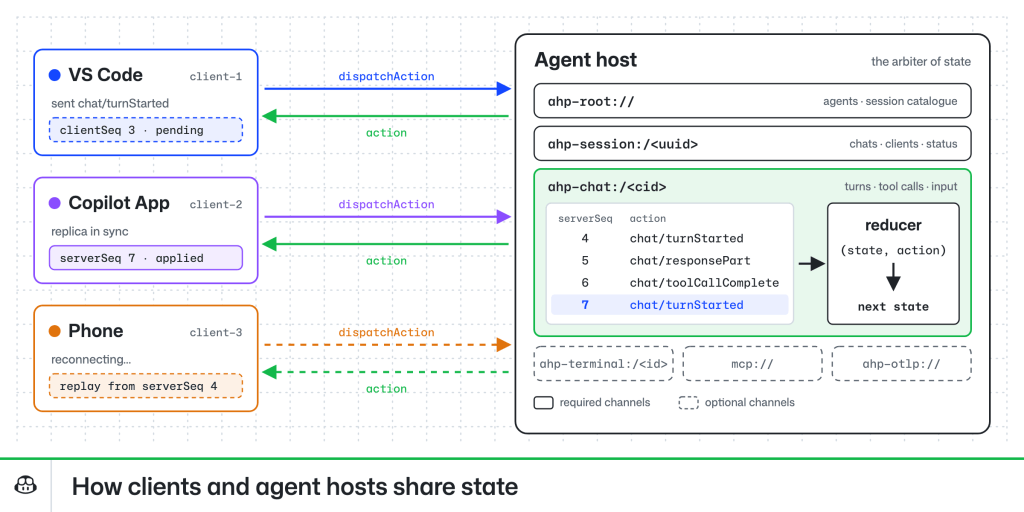
这些需求催生了 Agent Host Protocol(AHP)。它围绕以 URI 标识的“通道”(channel)构建,通道是该协议中最粗粒度的功能单元。每个服务器都必须实现 root、session 和 chat 通道,但也可以实现更多通道,例如提供终端支持、MCP 扩展或 OTel 上报的通道。
每个通道内部都有一个基于 reducer 的状态对象,客户端的大部分逻辑都由它驱动。服务器是状态的仲裁者,每个客户端发送一系列 action,这些 action 要么改变状态,要么触发副作用,比如发送一条聊天消息。这带来了几个非常好的特性。在网络条件较差时,重连和重放都很容易:客户端发送所有排队的 action,呈现正确的“加载中”状态,并等待服务器进行对账并确认这些 action,之后才向用户确认。客户端和服务器都很容易调试。而且,基于 reducer 的状态也能很好地配合 React 等主流 UI 框架。
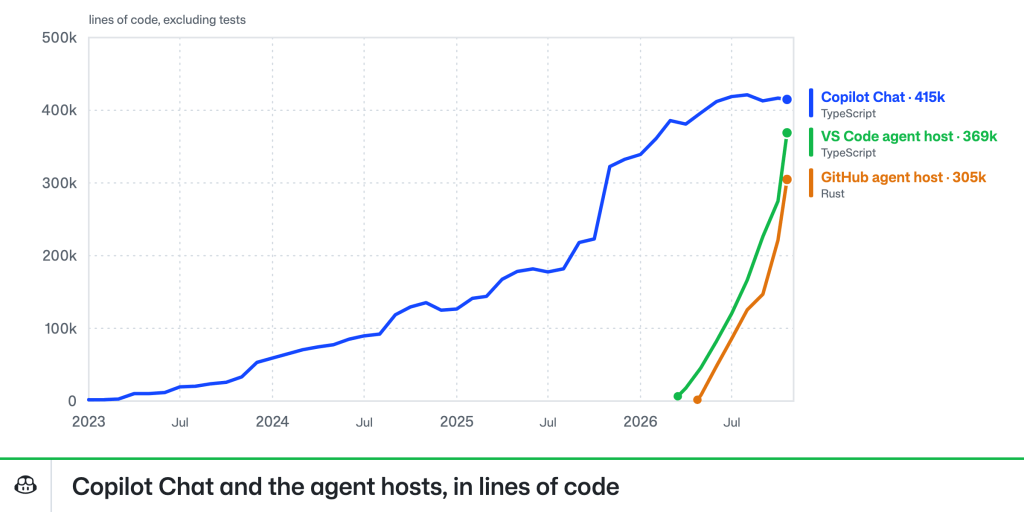
要在 VS Code 中采用 Agent Host Protocol,就必须在它之下构建一套新的 harness 和智能体栈。Copilot Chat 扩展过去提供了 VS Code 全部的 AI 与智能体能力,它已经持续演进三年多,代码量超过 400,000 行 TypeScript(不含测试)。但作为 VS Code 扩展,它的结构围绕 VS Code 窗口的生命周期展开,并完全依赖 VS Code 扩展 API。而在独立的 agent host 进程中,无论是这种生命周期还是这些 API 都不存在。
当我们在 2026 年初开始构建 Agent Host Protocol 时,Copilot SDK 也在同步开发中,把它作为新智能体技术栈的基础是顺理成章的。这是一次重大的转变。构建一个能打个招呼、能编辑文件的 harness 实现很容易——头几周之后,我们已经在用 agent host 来开发 agent host 本身了——但要构建一个能覆盖开发者早已从 Copilot Chat 中习以为常的长尾功能的实现,就完全是另一回事了。
GitHub 推出 Copilot 云端智能体已有几年时间,让开发者可以从任何设备在云端运行任务。当 VS Code 在悄然开发 Agent Host Protocol 时,GitHub 正寻求扩展这一能力,以协调通过 Copilot 应用在你自己的设备上、或在云沙箱中运行的会话。这正是 AHP 旨在解决的 N:M 问题,因此采用同一套技术完全合理。
从一开始,GitHub Agent Host 的需求就与 VS Code 的实现不同。VS Code 在本地运行 host,并可以通过 SSH、容器、WSL 或 Dev Tunnels 把它的 host 部署到其他算力上,而且它实际上作为 VS Code Server 捆绑包的一部分被包含在内。而 GitHub Agent Host 需要运行在云端,并跨更多种类的基础设施、环境和安全约束。
正是这些不同的需求,使它们成为用不同语言编写的两套独立实现:VS Code 的用 TypeScript,GitHub 的用 Rust。目前来看,拥有两个 agent host 对协议本身是一次很好的压力测试。当两个完全不同的团队和两组智能体各自独立实现同一协议时,它能运转得如何?
事实证明,效果相当不错。与 MCP 一样,Agent Host Protocol 通过自定义方法以及对象上的 _metadata 提供了逃生出口,消费者可用它们进行带外信令。在各自埋头推进自身实现数月之后,我们迈向统一的第一项任务,就是盘点每种实现是以哪些方式扩展了该协议。其中许多扩展理应保留 GitHub 专有的特性,例如 GitHub Agent Host 使用 metadata 来链接到项目看板。而在另一些情况下,差异则意味着协议本身存在缺口;例如早期版本无法准确表示并非由 PTY 支撑的 shell 类工具输出。还有一些则是糟糕的假设,比如 VS Code 的客户端假定它从 agent host 收到的会话 URI 具有某种特定结构。只有一种实现的协议算不上真正可移植;当我们教会自己的客户端和服务器彼此对话时,AHP 才在实践上而不只是理论上变得可移植。
如今,Agent Host Protocol 在所有 VS Code 和 GitHub 界面上提供了同样的连续性。在 GitHub Copilot 应用中本地运行、在云沙箱中运行以及在 VS Code 中运行的智能体会话,都共享同一套底层协议。想了解它是如何被使用的,可以阅读如何借助全新的互联 Copilot 云体验随时随地开展工作。
AHP 的设计目标就是在客户端和服务器端都易于使用。Agent Host Protocol 提供 Rust、TypeScript、Kotlin、Swift、.NET 和 Go 版本的库,智能体只需极少的提示就能构建出客户端和服务器。我的桌上放着一个 macropad,它能实时反映我的智能体状态;还有人基于该协议做出了从智能手表应用看板式任务管理工具等各种东西。无论你是想为自己智能体做一款配套应用、想把智能体会话引入团队工具,还是想在自己的编辑器或智能体中加入 AHP 支持,这个协议都开放供你构建。
你可以连接到自己在 Copilot 应用中实现的智能体宿主(启用 Experimental > Direct Connections,然后进入 Environments > Add Agent Host Protocol Host),也可以连接 VS Code 中的智能体宿主(在 Agents 窗口中通过 Add Remote Agent Host 添加)。在终端中运行 code agent host,即可启动 VS Code 智能体宿主的独立版本;运行 code agent endpoints 则可查看编辑器中该宿主的各个端点,示例还能帮你和你的智能体快速上手。
Agent Host Protocol 是一项开放标准,欢迎在 GitHub 上提出问题与建议。
编码愉快!
在 GitHub 上探索 Agent Host Protocol >
文章《Building the Agent Host Protocol for sessions that continue across devices》首发于 The GitHub Blog。
译文由英文原文机器翻译,术语按行业惯例统一,可在文末展开原文核对。
查看英文原文(Building the Agent Host Protocol for sessions that continue across devices)
Models are now good enough to work for hours or even days on their own. You don’t have to watch over every thing they do, but you still need to be able to check in, no matter where you are. An agent can’t live only inside one application. The work should continue even If you close a window or switch devices.
In GitHub Copilot you can start an agent session in one place and pick it up in another. This session continuity runs on the Agent Host Protocol (AHP), an open standard built first in VS Code and adopted across GitHub. Here’s how it works, what we learned building it, and how you can use it to bring your agents into your own apps and workflows.
Why one integration per client stopped working
GitHub Copilot was first built in VS Code as an extension that bundled its own harness. This gave you access to your agents in VS Code, but it tied their lifetime to the editor. Extensions are attached to a single VS Code window. Close that window, and the agent is gone. Update VS Code, and every agent stops as the application restarts. Connect to a remote machine, and you get an entirely new extension host commit-locked against the version of the VS Code workbench you have.
At the same time, the Copilot app was being developed, alongside the existing GitHub mobile apps for iOS and Android. Each product was doing its own distinct integration with cloud-based agents to work towards delivering session continuity.
Each of these integrations solved the problem for one product, but developers also still want to be able to pull their agents into their own workflows–whether that’s an editor, a terminal, a phone, or a tool they built themselves–and they can’t do that if every client needs its own one-off integration. That’s why developers needed a protocol: a standard, independently versioned language across versions of VS Code, the GitHub Copilot app, mobile apps, and any other client that might host an agent. A shared protocol means every client sees the same agents, history, and state without bespoke integrations, and you aren’t tied to one app’s idea of what an agent session is.
Designing a protocol for agents on every client
The protocol needed to allow multiple clients to interact with the same set of agents seamlessly. Start a session in the cloud from your phone, for example, then continue it from your laptop. It should tolerate network interruptions, reconnections, and concurrent client mutations. And it needed to be full-featured enough for you to do real work from each of your clients.
At the same time, the protocol needed to stay out of agent behavior. Unlike the domains that produced the Language Server Protocol and Debug Adapter Protocol, the world of agents is evolving quickly. That’s why AHP avoids encoding how agents work, and instead focuses on how you want to interact with them.
You also need the protocol to be simple enough to implement on your own client or server. While the full feature set would necessarily be extensive, the core protocol needed to be minimal.
The result of these requirements is the Agent Host Protocol (AHP). It is oriented around URI-identified “channels”, which are the coarsest unit of functionality in the protocol. Every server must implement the root, session, and chat channels, but can also implement more channels that provide terminal support, MCP additions, or OTel reporting, for example.
Within each channel is a reducer-based state object, which drives most of the logic for clients. The server is the arbiter of the state, and each client sends a sequence of actions that either mutate the state or trigger side effects, like sending a chat message. This provides a few very nice properties. Reconnection and replay in poor network conditions are easy: a client sends all queued actions, presents the right ‘loading’ state, and waits for the server to reconcile and acknowledge the actions before confirming them. Clients and servers are straightforward to debug. And reducer-based state also plays nicely with popular UI frameworks like React.
Shipping five clients and two hosts
Adopting the Agent Host Protocol in VS Code required building a new harness and agentic stack underneath it. The Copilot Chat extension, which used to provide all of VS Code’s AI and agentic capabilities, had been growing for over three years, reaching over 400,000 lines of TypeScript, not counting tests. But, as a VS Code extension, it was structured around the lifecycle of a VS Code window and depended entirely on the VS Code extension API. Neither that lifetime nor those APIs would be available in a standalone agent host process.
As we started building the Agent Host Protocol in early 2026, the Copilot SDK was also being developed, and it made sense to leverage it as the foundation for the new agentic stack. This was a big transition. It’s easy to build a harness implementation that says hello and can edit files—we were using the agent host to develop the agent host after the first couple weeks—but it’s another thing to build one that covers the long tail of features developers had come to expect from Copilot Chat.
GitHub has had Copilot cloud agents for a couple of years, allowing developers to run tasks in the cloud from any device. While VS Code was quietly developing the Agent Host Protocol, GitHub was looking to expand that capability to coordinate sessions running on your own devices via the Copilot app, or in cloud sandboxes. This was exactly the N:M problem that AHP was built to solve, so adopting the same technology made perfect sense.
From the outset, the GitHub Agent Host had different requirements than VS Code’s implementation. VS Code runs the host locally and can drop its host on other compute over SSH, containers, WSL, or Dev Tunnels, and it is actually included as part of the VS Code Server bundle. The GitHub Agent Host needed to run in the cloud and across a much wider variety of infrastructure, environments, and security constraints.
Those differing requirements are why they’re separate implementations written in different languages: VS Code’s in TypeScript and GitHub’s in Rust. For now, having two agent hosts has been a good acid-test for the protocol itself. How well does it work when two entirely different teams and sets of agents implement the same protocol independently?
Pretty well, it turns out. Like MCP, the Agent Host Protocol provides escape hatches via custom methods and _metadata on objects that consumers can use for out-of-band signaling. After several months heads-down on our respective implementations, our first task as we worked toward unification was inventorying the ways each implementation had extended the protocol. Many of these extensions reasonably stay GitHub-specific, such as the GitHub Agent Host using metadata to link to project boards. In other cases, variance was a sign of a gap in the protocol; early versions, for example, could not accurately represent shell-type tool output that wasn’t backed by a PTY. And some were bad assumptions, like VS Code’s client assuming a particular structure for the session URIs it received from the agent host. A protocol with only one implementation isn’t truly portable; as we taught our clients and servers to talk to each other, AHP became portable in practice, not just in theory.
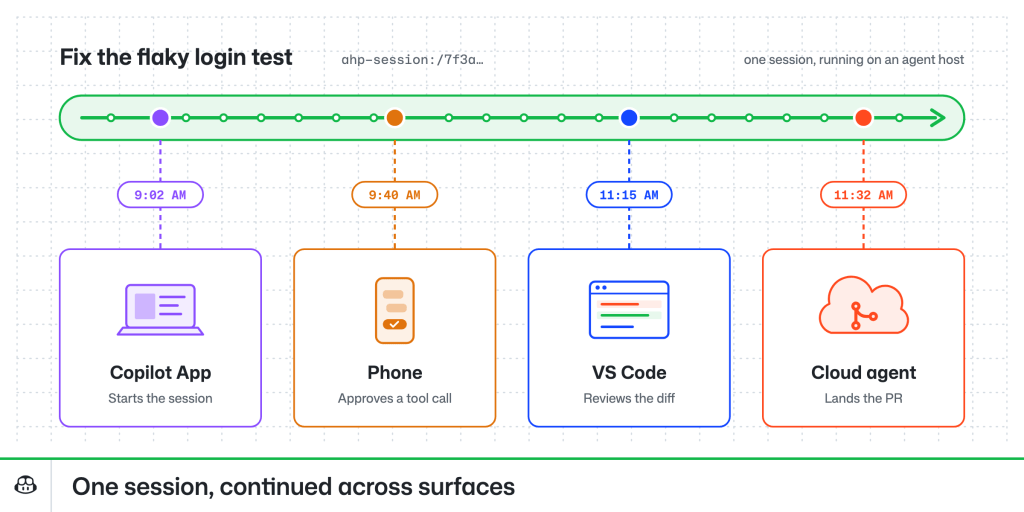
Today, the Agent Host Protocol provides that same continuity across all VS Code and GitHub surfaces. Agent sessions running locally in the GitHub Copilot app, in cloud sandboxes, and in VS Code all share the same underlying protocol. To see how it’s used, read about how you can work from anywhere with the new connected Copilot cloud experience.
Using the Agent Host Protocol
AHP was designed to be easy to use in clients and servers. Agent Host Protocol libraries are available in Rust, TypeScript, Kotlin, Swift, .NET, and Go, and agents are able to build clients and servers with little prompting. I have a macropad sitting on my desk that reflects my agent’s state in real time, and others have built everything from smart watch apps to Kanban-style task management tools against the protocol. Whether you want a companion app for your own agents, a way to bring agent sessions into your team’s tools, or AHP support in your own editor or agent, the protocol is open for you to build on.
You can connect to an agent host you implement in the Copilot app (enable Experimental > Direct Connections, then go to Environments > Add Agent Host Protocol Host) and in VS Code (via Add Remote Agent Host in the Agents window). You can spawn a standalone version of VS Code’s agent host by running code agent host in your terminal, or see the endpoints for the one in your editor by running code agent endpoints, and samples can help you and your agent get started.
The Agent Host Protocol is an open standard, and questions and suggestions are welcome on GitHub.
Happy coding!
The post Building the Agent Host Protocol for sessions that continue across devices appeared first on The GitHub Blog.
正文保留英文原文,标题与摘要由机器翻译。
原文发布于 GitHub Blog(Building the Agent Host Protocol for sessions that continue across devices),标题、摘要与正文由机器翻译,术语按行业惯例统一,未经人工逐句校订。