如何用编排器将编码智能体效率提升30%
在本文中,我将介绍过去几个月里我开始使用的一项主要新技术,它能让我写代码更高效,也就是通过一个集中式的 herder 智能体来与我所有的编码智能体和会话交互。
这是一种这样的设置:我不必再手动在不同的编码智能体之间来回切换,逐个查看是否有需要我回答或处理的事情,而是通过一个集中式的编码智能体(我称之为“herder”,取自放牧羊群之意)与它们全部交互。这样我花在寻找该做的工作上的时间更少,花在完成手头工作上的时间更多,也能及时回答编码智能体向我提出的问题,从而腾出更多时间去做其他事情,比如启动新的编码智能体或做人工测试。
过去两个月里,随着我应用这些技术,对比我开始这样做之前和之后所能完成的工作,我看到了超过 30% 的效率提升。
这张信息图概括了本文的主要内容。我将讨论如何通过一个名为 herder 的集中式编排智能体,更高效地与你所有的编码智能体交互,配图由 ChatGPT 生成。
为什么要通过集中式的 herder 来交互?
你想通过集中式的 herder 来交互,主要原因在于:很多人会花大量时间翻看自己正在运行的各个编码智能体会话,看看有没有什么需要自己回复的内容。
没错,像 Paradev 这样的新型 IDE(我现在用的就是它)确实提供了一种视觉指示器,用来显示编码智能体是在等你,还是正忙着手上的工作。但根据我的经验,这些指示器至少有三分之一的时候是错的,这就使得配备一个 herder 更有效率。下图展示了这种视觉指示器的一个例子。
这张图展示了 Paradell 如何显示会话是否需要用户输入。如果会话旁边有绿色图标,通常意味着编码智能体正在等待用户。但根据我的经验,它经常显示错误的状态:要么在其实还没准备好等待用户时就显示绿色,要么在正等待用户时却没有显示绿色。图片由作者提供。
所以,与我在“如何成为更高效的程序员”中介绍的多数技巧类似,你应该通过一个集中式 herder 来交互,主要有两个原因:
你能节省时间,因为不必翻遍所有会话去找编码智能体在哪里等待你的回复。
你能减轻精神负担,因为不必再耗费心力去思考接下来该做什么。herder 会替你排好优先级,你只需回答编码智能体向你提出的问题。
此外,通过集中式 herder 交互,还让你可以自定义与编码智能体的交互方式。我最初搭建 herder 时,它只是一个新建的 Paradev Session。但我很快发现,我完全可以自己做一个 HTML 页面,按我最喜欢的方式设计每个会话的信息呈现,帮我尽可能提高效率。这种设置具体长什么样,我会在本文后面展示。
如何设置 herder 智能体
我们来讨论一下如何搭建一个 herder 智能体。你可以使用两种主要技术来实现。一种是用便宜模型(例如 Anthropic 的 Haiku 5.5)设置轮询会话,轮询你正在运行的所有其他编码会话,并告诉这些便宜的智能体:一旦有任何更新,特别是编码智能体向用户发起了任何询问,就通知 herder 智能体。
这种方案可行;它简单、非常容易理解,而且非常稳定一致。例如,你可以用一个便宜的智能体每分钟轮询一次。这是可持续的,因为这类智能体运行成本极低,而且只有当某个编码会话的输出发生变化时,它们才需要做出反应或再次运行。是的,这是一个简单的方案。
第二种方式是设置一种 webhook,这是更高效的实现。在这种实现中,你基本上是告诉你正在运行的所有编码智能体:每当它们完成任务,或者每当它们需要用户输入时,就调用一个特定的函数。这个函数会通知 herder:调用它的那个会话已发生更新,并且需要用户输入。这样 herder 就能立即知道何时需要向用户提问,以及该问用户什么。这需要多一些设置,但效率更高,也是我选择采用的方案。
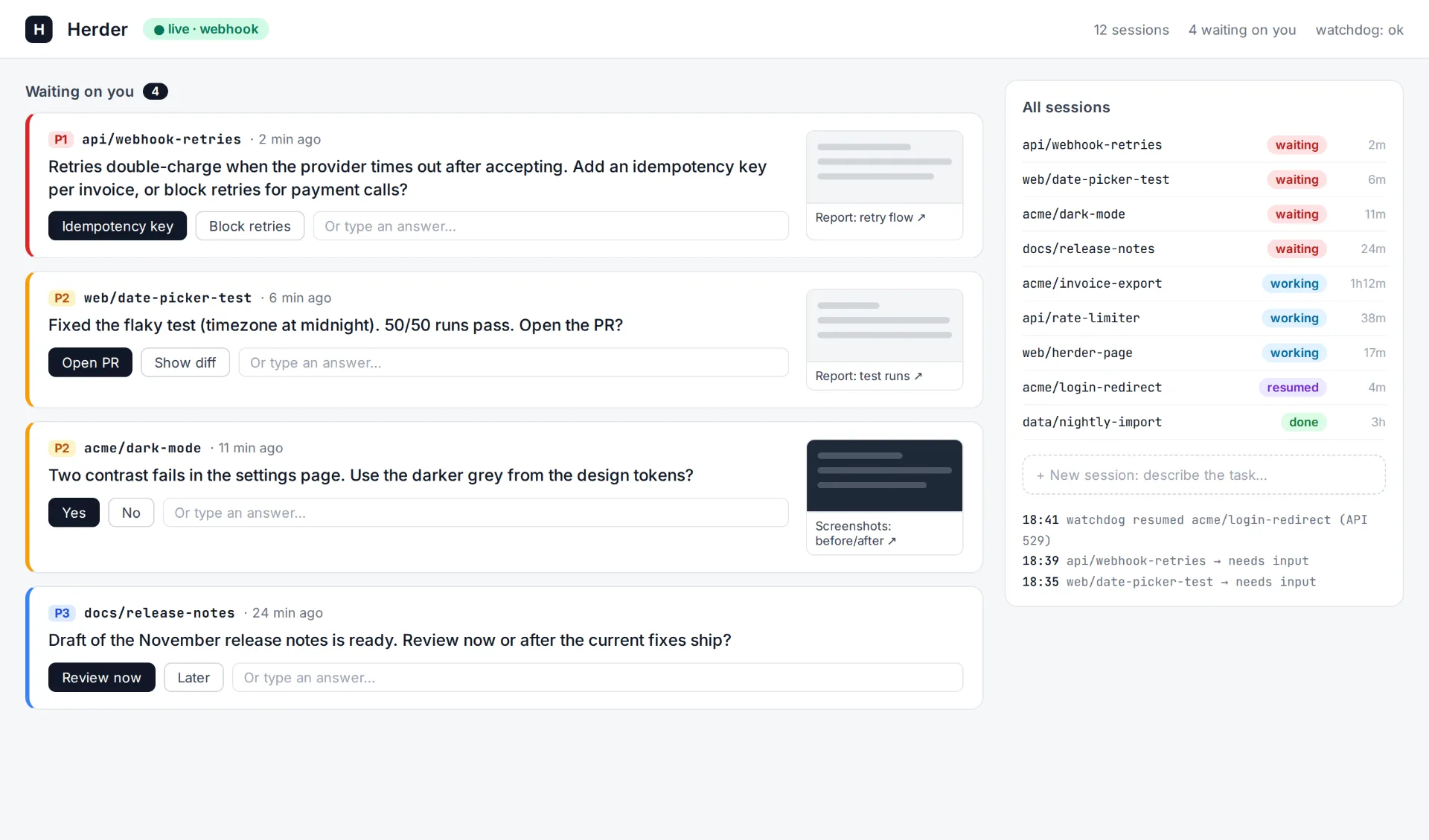
这是 HTML 实现,下面的图示展示了我的搭建方式。
这张图展示了我的 herder 搭建方案,采用 webhook 加看门狗(watchdog)的方式。图片由作者提供。
每当我想编写、编辑或理解代码时,我通常都会通过 herder 来运行我的会话。它的工作方式是这样的:只要某项任务需要我关注,herder 就会立即通知我,并按任务划分优先级。因此,优先级最高的任务会最先送到我这里。然后我会去看这个任务。它通常以 herder 提出的一个问题的形式呈现,同时还附带解释说明的 HTML 报告,这是我在之前文章中介绍过的一种技巧。基本上,每当我要理解代码库的某一部分,或者理解编码智能体在问我什么时,我都会提示智能体生成一份 HTML 报告来解释该问题,因为 HTML 报告非常直观、易于理解,而且我能轻松获得自己喜欢的统一格式。
然后,每当我把这些询问都回答完之后,我可能会启动几个新的编码会话,这也是通过 herder 完成的,而 herder 会把它们转成新的 paradev 会话,并且当然也开始监控这些会话。
我还想解释一下在实现这种方法时遇到的一些问题。最初,我采用的是轮询,效果还算可以,但有点低效,因为很多时候轮询时并没有新的更新,所以它提供不了任何价值。后来我改用 webhook 设置,即每个单独的编码会话在有更新时通知 herder。不过,这带来了一个挑战。
我注意到的是,有时候这套设置会有点堵塞。这可能由多种原因造成。例如,可能是 Claude 的 API 出了问题,于是会话就直接停止了。也可能是 Cloudflare 的问题,以及各种其他更小众的问题,这些问题随着时间推移几乎不可避免地会发生。
我解决这个问题的方式是,我有一个单独的总览智能体或编排智能体,它在另一个编码智能体中为我运行。我决定使用 OpenAI 的 Codex,因为我更喜欢它,并认为它是一个很好的编码模型。我告诉模型的是:你应该监控所有会话,只要有任何会话因任何原因停止,你就应该尝试恢复它——如果无法恢复,就尽快通知 herder 智能体。
这种编排器设置帮助我确保所有子智能体都按预期继续运行。
在这篇文章中,我讨论了如何通过实现一种主编排会话(我喜欢称之为 herder)将编码效率提高 30%。对我来说,这带来了惊人的效率提升,因为我花更少时间手动检查我正在运行的所有编码智能体会话,而花更多时间直接回答每个会话向我提出的查询。然后我可以把额外时间用于启动新的编码会话或进行人工 QA。设置起来非常简单。你只需将一个会话设置为主编排会话或 herder,并让该会话监控所有其他编码智能体。值得注意的是,正如我之前提到的,有两种实现方式。一种是轮询设置,另一种是 webhook 设置。我确实推荐 webhook 设置。
👉 我的免费电子书和网络研讨会:
可复用、延迟加载的指令如何解决 AI 辅助开发中的上下文膨胀问题。
三个 Python 类、一个 OpenRouter 密钥和 gpt-4.1-mini,为智能体提供了计算器、存根式网络搜索,以及能在重启后保留的对话回忆。
全球已有数百名科学家正在从这款革命性软件中获益。而且无需任何费用。
用 CatBoost 梯度提升决策树对可食用蘑菇与有毒蘑菇进行分类
AWS Lambda 通常是在云端部署和执行代码最简单的方式之一,尤其是在使用 sam CLI 部署代码时……
通过迷宫求解为初学者提供强化学习的实用入门。附代码。
我在从零构建并分发第一个 Skill 的过程中学到的东西
从闭包函数与迭代器到 State Machine Python 库
把演示智能体改造成能够保存真实预订数据的东西
译文由英文原文机器翻译,术语按行业惯例统一,可在文末展开原文核对。
查看英文原文(How to Improve Coding Agent Efficiency by 30% with an Orchestrator)
In this article, I'll cover one of the main new techniques that I started using in the last few months to make my coding more effective, which is to interact with all my coding agents and sessions through one centralized herder agent.
This is a setup where, instead of having to manually swap between the different coding agents that are working and see if there's anything I need to answer or do, I interact with all of them through a centralized coding agent (called the "herder," from herding sheep). So I spend less time looking for work to do and more time just completing the work I have to do, answering the queries my coding agents have for me, freeing up more time to spend on other things such as spinning up new coding agents or human testing.
As I've applied these techniques in the last two months, I've seen efficiency gains of upwards of 30% based on a comparison of the work I was able to achieve before an after I started doing this.
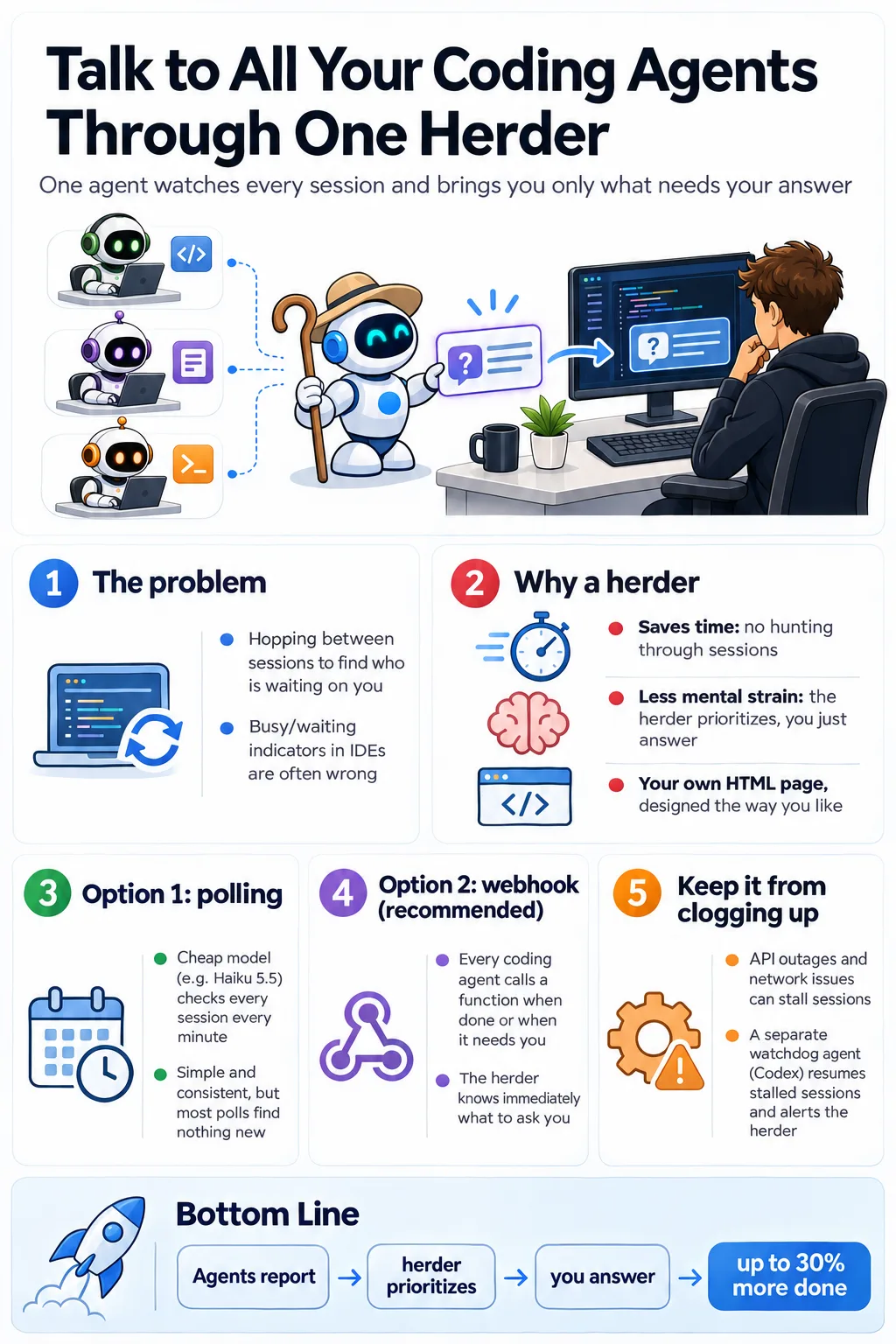
This infographic highlights the main contents of this article. I'll discuss how to more efficiently interact with all your coding agents by having a centralized orchestrator agent called a herder, imaged by ChatGPT.
Why interact through a centralized herder?
The main reason you want to interact through a centralized herder is that a lot of people spend a lot of time looking through the different coding agent sessions that they have running, seeing if there's anything they need to reply to.
And yes, new IDEs such as Paradev, which I'm using now, do offer a kind of visual indicator on whether a coding agent is waiting on you or if it's busy and working. However, in my experience, these indicators are wrong at least a third of the time, which makes having a herder more efficient. An example of the visual indicator is shown in the image you see below.
This image shows how Paradell shows if sessions need user input. If the session has a green icon beside it, it typically means that the coding agents are waiting on the user. However, in my experience, this often shows the wrong thing, either being green when it's not actually ready for the user or not being green when it is waiting on the user. Image by the author.
So, similar to most techniques that I cover for being a more efficient programmer, there are two main reasons you should interact through a centralized herder:
You save time because you don't have to look through all sessions to figure out where a coding agent is waiting on your reply.
You lower the mental strain because you don't have to spend any mental capacity thinking about what to do next. The herder prioritizes for you, and you simply answer the queries the coding agents have for you.
Also, interacting through a centralized herder allows you to customize the design of how you interact with your coding agents. What I did was that my initial herder, when I set it up, was just a new Paradev Session. However, I've quickly learned that I could just create my own HTML page, which is designed exactly how I prefer to get the information on each session, helping me be as efficient as possible. I'll show exactly what the setup looks like later in this article.
How to set up a herder agent
Let's discuss how to set up a herder agent. There are two main techniques that you can use to do this. You can either set up polling sessions using cheap models, such as Haiku 5.5 from Anthropic, polling all other coding sessions you have running, and telling those cheap agents to inform the herder agent if any updates are made, and specifically if any queries are made to the user from the coding agents.
This setup works; it's simple, it's very easy to understand, and it's very consistent. You can, for example, set up the polling to happen every minute with a cheap agent. This is sustainable because those agents are so cheap to run, and they only need to react or run again if there have been changes to the output of a specific coding session. And yes, it's a simple setup.
The second way is to set up a type of webhook, which is a more efficient implementation. In this implementation, you basically tell all the coding agents that you have running that, whenever they are done or whenever they need input from the user, they should call a specific function. And this function informs the herder that an update has been made to the calling session and it needs user input. The herder can then immediately know when it has to ask the user a query and what to ask the user. This requires a bit more setup, but it is a more efficient setup, and it is the setup I chose to use.
This is the HTML implementation, with a representation below showing how I set it up.
This image highlights my herder setup through a webhook plus watchdog setup. Image by the author.
Whenever I want to write, edit, or understand code, I typically run my sessions through the herder. This is how it works: the herder informs me immediately whenever a task requires my attention, and it prioritizes based on the task. So the highest-priority tasks come to me first. I then go look at the task. It's typically presented as a question from the herder, and it also contains HTML reports of explanations, which is a technique I've covered in previous articles. Basically, whenever I try to understand part of the codebase or what the coding agent is asking me, I prompt the agent to make an HTML report explaining the issue, because HTML reports are very visual and easy to understand, and it's easy for me to have a consistent format that I like.
Then, whenever I'm done answering queries, I might spin up a few new coding sessions, which I also do through the herder, and the herder spins them into new paradev sessions and starts monitoring those sessions as well, of course.
I would also like to explain some of the issues I faced when I implemented this approach. Initially, I did polling, which worked okay, but it's a bit inefficient because a lot of the time when you poll, there's no new update, so it doesn't provide any value. I then switched to the webhook setup, where each individual coding session informs the herder once there are updates. However, this came with a challenge.
What I noticed is that sometimes this setup would clog up a bit. This could happen for many reasons. It could, for example, be Claude having issues with their API, so the session just stopped. It could be a Cloudflare issue and a bunch of other kinds of smaller niche issues that kind of inevitably happen over time.
The way I solved this was that I had a separate kind of overview agent or orchestrator agent that was running in a different coding agent for me. I decided to use Codex from OpenAI because I prefer that one and think it's a good coding model. What I told the model is that you should monitor all the sessions, and if any session stops for any reason whatsoever, you should try to resume it — and if you're unable to, inform the herder agent as quickly as possible.
This kind of orchestrator setup helped me ensure that all the subagents continued as expected.
In this article, I discussed how to improve your coding efficiency by 30% by implementing a kind of master orchestrator session, which I like to call a herder. For me, this has driven incredible efficiency gains because I spend less time manually going through all the coding agent sessions that I have running and more time just answering directly the queries each session has for me. I can then spend the extra time spinning up new coding sessions or doing manual human QA. It's pretty simple to set up. You simply set up one session to be the master orchestrator session or the herder, and have that session monitor all other coding agents. It's worth noting that there are two ways to implement this, as I mentioned earlier. One could be the polling setup, and one is the webhook setup. I do recommend the webhook setup.
👉 My free eBook and Webinar:
How reusable, lazy-loaded instructions solve the context bloat problem in AI-assisted development.
February 28, 202615 min read
Three Python classes, an OpenRouter key, and gpt-4.1-mini give the agent a calculator, a stub web search, and conversation recall that survives restarts.
November 6, 202617 min read
Hundreds of scientists around the world are already profiting from this revolutionary software. And at no cost.
July 21, 202114 min read
Classifying edible and poisonous mushrooms with CatBoost gradient boosted decision trees
August 17, 20235 min read
AWS Lambda is generally one of the easiest ways to deploy and execute code in the cloud, especially when deploying code with the sam CLI...
November 30, 20203 min read
A beginner's practical introduction to Reinforcement Learning through maze solving. Code included.
August 15, 202010 min read
What I learned building and distributing my first Skill from scratch
March 16, 202610 min read
From closure functions and iterators to the State Machine Python library
June 14, 20229 min read
Turning a demo agent into something that can keep real booking data
August 22, 20266 min read
原文为英文,正文由自动抓取并保留原文。
原文发布于 Towards Data Science(How to Improve Coding Agent Efficiency by 30% with an Orchestrator),标题、摘要与正文由机器翻译,术语按行业惯例统一,未经人工逐句校订。