搜索 AI 模式现已提供临时对话线程
查看“产品与平台”中的全部内容
查看“创新与 AI”中的全部内容
查看“产品与平台”中的全部内容
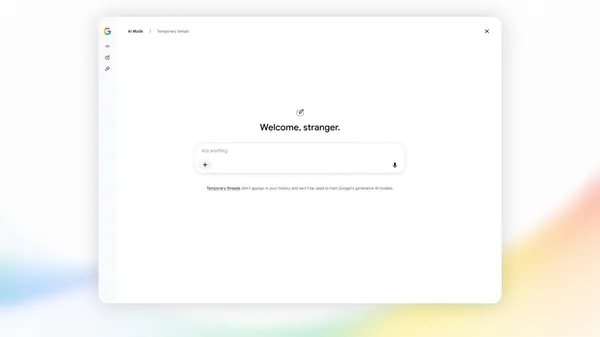
搜索中的 AI 模式现已推出临时线程。
我们在 AI 模式中引入临时线程,你可以在这里探索并提问——无论是为一份惊喜礼物做头脑风暴,还是查询某些你不希望之后再次出现的内容,比如出现在你的历史记录或推荐中。
无需调整你的设置——对于任何你不希望被保存的查询,你都可以快速进入临时线程,用完后立刻切回。要开始使用,只需点击 AI 模式右上角的临时线程图标,然后开始提问。由于你的会话与账户完全分离,你的回答不会受到过往偏好的影响,不会影响未来的个性化设置,也不会被保存到历史记录中。一旦关闭该线程,它就消失了,你可以像往常一样继续搜索。
该功能正在全球范围内面向桌面端和移动端浏览器推出,覆盖 AI 模式支持的所有语言。
译文由英文原文机器翻译,术语按行业惯例统一,可在文末展开原文核对。
查看英文原文(Temporary threads are now available in AI Mode in Search.)
See all in Products & platforms
See all in Innovation & AI
See all in Products & platforms
Temporary threads are now available in AI Mode in Search.
We’re introducing temporary threads in AI Mode, where you can explore and ask questions — whether that’s brainstorming a surprise gift or looking something up you don’t want resurfaced later like in your history or recommendations.
There’s no need to adjust your settings — you can quickly jump into a temporary thread for any query you don't want saved, and switch right back when you're done. To get started, simply click the temporary threads icon in the upper right corner of AI Mode and start asking your questions. Because your session is completely detached from your account, your responses won’t be informed by past preferences, affect future personalization, or be saved to your history. Once you close the thread, it’s gone, letting you go back to searching as usual.
This feature is rolling out globally on desktop and mobile browsers across all languages supported in AI Mode.
原文为英文,正文由自动抓取并保留原文。
原文发布于 Google Blog(Temporary threads are now available in AI Mode in Search.),标题、摘要与正文由机器翻译,术语按行业惯例统一,未经人工逐句校订。

