安全发布 VS Marketplace 扩展

我们很高兴地宣布面向 Visual Studio Marketplace 的 Trusted Publishing——一种更简单、更安全的方式,可从 GitHub Actions 或 Azure Pipelines 发布 Visual Studio Code 和 Visual Studio 扩展,而无需存储长期有效的 Azure DevOps 个人访问令牌(PAT)。
Trusted Publishing 使用联合身份来验证你的发布工作流,并授予发布访问权限——无需存储或轮换发布密钥。
自动化的 Marketplace 发布历来需要将 PAT 作为 CI/CD 密钥存储。Trusted Publishing 提供了一种更安全的替代方案:
现有的基于 PAT 的发布方式仍然可用,因此你可以在准备好时再采用 Trusted Publishing。
当你使用 OIDC 进行发布时,该过程是自动的——无需获取或管理 PAT。
对于 Azure Pipelines,请参阅配置由 Microsoft Entra 支持的 WIF 服务连接,并将其身份添加为发布者贡献者。
创建一项 Marketplace 策略,指明允许发布的 GitHub 仓库和工作流。
对于私有仓库,请在创建策略后的 48 小时内运行已配置的工作流。首次成功的令牌交换将永久激活该策略。
要配置 GitHub Actions 工作流并在不使用 PAT 的情况下发布,请参阅 Visual Studio Code 文档中的《安全地自动发布到 Visual Studio Marketplace》指南。
要从命令行发布 Visual Studio 扩展,请参阅 Visual Studio 文档中的《通过命令行发布 Visual Studio 扩展》指南。
Azure Pipelines 使用带有工作负载身份联合(WIF)的 Azure DevOps 服务连接,而不是 GitHub 可信发布策略。
不要为 Azure Pipelines 在 Marketplace 可信发布页面上创建策略。
发布之前:
随后该管道即可发布 Visual Studio Code 或 Visual Studio 扩展,而无需存储 Marketplace PAT。
GitHub 策略的激活方式因仓库可见性而异。对于私有仓库,新策略会临时激活 48 小时。首次成功完成 Token 交换后,该策略将永久激活。如果该策略在此期间未被使用,它将过期,并可重新开启以获得另一个 48 小时。
你可以从可信发布页面查看每个策略的状态和最近使用情况。
如果你的 GitHub Actions 工作流已经使用 vsce 进行发布,迁移过程很直接:
我们建议在首次 Trusted Publishing 运行验证通过之前保留该 PAT。迁移成功后,请删除这一不再使用的密钥,以免它被其他工作流步骤意外调用。
对于 Azure Pipelines,请先配置 WIF 服务连接和发布者身份,再将发布步骤改为使用该连接,并且只有在联合发布成功后删除 PAT。此过程不需要 Marketplace Trusted Publishing 策略。
Trusted Publishing 让扩展的自动化发布更易于维护,并且默认更安全——无需长期有效的发布密钥。
要开始使用:
改用 Azure Pipelines?请按照 Azure Pipelines 设置指南,通过工作负载身份联合(WIF)进行发布,无需 PAT。
如需完整的设置说明和故障排查指引,请访问 Trusted Publishing 文档。
感谢各位扩展发布者为更安全的发布流程投入精力。在你采用 Trusted Publishing 的过程中,我们很想听听哪些地方体验良好、哪些地方还有改进空间——从配置第一条策略到无需 PAT 完成发布。
在 Visual Studio Marketplace GitHub 讨论区分享你的反馈。
博文《使用 Trusted Publishing 安全发布 Visual Studio Marketplace 扩展》首发于 Microsoft for Developers。
译文由英文原文机器翻译,术语按行业惯例统一,可在文末展开原文核对。
查看英文原文(Publish Visual Studio Marketplace extensions securely with Trusted Publishing)
We are excited to announce Trusted Publishing for Visual Studio Marketplace —a simpler and safer way to publish Visual Studio Code and Visual Studio extensions from GitHub Actions or Azure Pipelines without storing a long-lived Azure DevOps personal access token (PAT).
Trusted Publishing uses federated identity to verify your release workflow and grant access for the publish—no publishing secret to store or rotate.
Why Trusted Publishing?
Automated Marketplace publishing has traditionally required storing a PAT as a CI/CD secret. Trusted Publishing offers a safer alternative:
- No long-lived secrets—there is no publishing credential to store or rotate in your CI/CD system.
- Short-lived access—for GitHub Actions, Marketplace issues a temporary credential that expires after 15 minutes.
- Federated identity—Marketplace trusts a configured GitHub workflow or Azure Pipelines workload identity.
Existing PAT-based publishing continues to work, so you can adopt Trusted Publishing when you are ready.
How it works
- The CI/CD system presents its federated identity to Visual Studio Marketplace.
- Marketplace verifies the GitHub Trusted Publishing policy or the Azure Pipelines workload identity.
- The publishing tool uses the verified identity to publish the extension without a PAT.
The process is automatic when you publish with OIDC—there is no PAT to retrieve or manage.
Supported CI/CD providers
| Provider | Status | Authentication and setup |
|---|---|---|
| GitHub Actions | Supported | Create a policy on the publisher’s Trusted Publishing page and publish with GitHub OIDC. |
| Azure Pipelines | Supported | Configure a Microsoft Entra-backed WIF service connection and add its identity as a publisher contributor. No Marketplace policy is required. |
For Azure Pipelines, see configure a Microsoft Entra-backed WIF service connection and add its identity as a publisher contributor.
Get started with GitHub Actions
Create a Marketplace policy that identifies the GitHub repository and workflow allowed to publish.
1. Create a Trusted Publishing policy
- Sign in to Visual Studio Marketplace.
- Open the publisher that owns your extension.
- Select Trusted Publishing.
- Expand Create, then fill in the fields described below.
Field Value Policy name A descriptive name such as Release workflow.Repository owner The exact GitHub organization or user login that owns the repository, such as contoso.Repository The repository name without the owner, such as sample-extension.Workflow The workflow filename under .github/workflows, such aspublish.yml.Environment (optional) If the workflow uses a GitHub environment, enter its exact name, such as production. - Select Create.
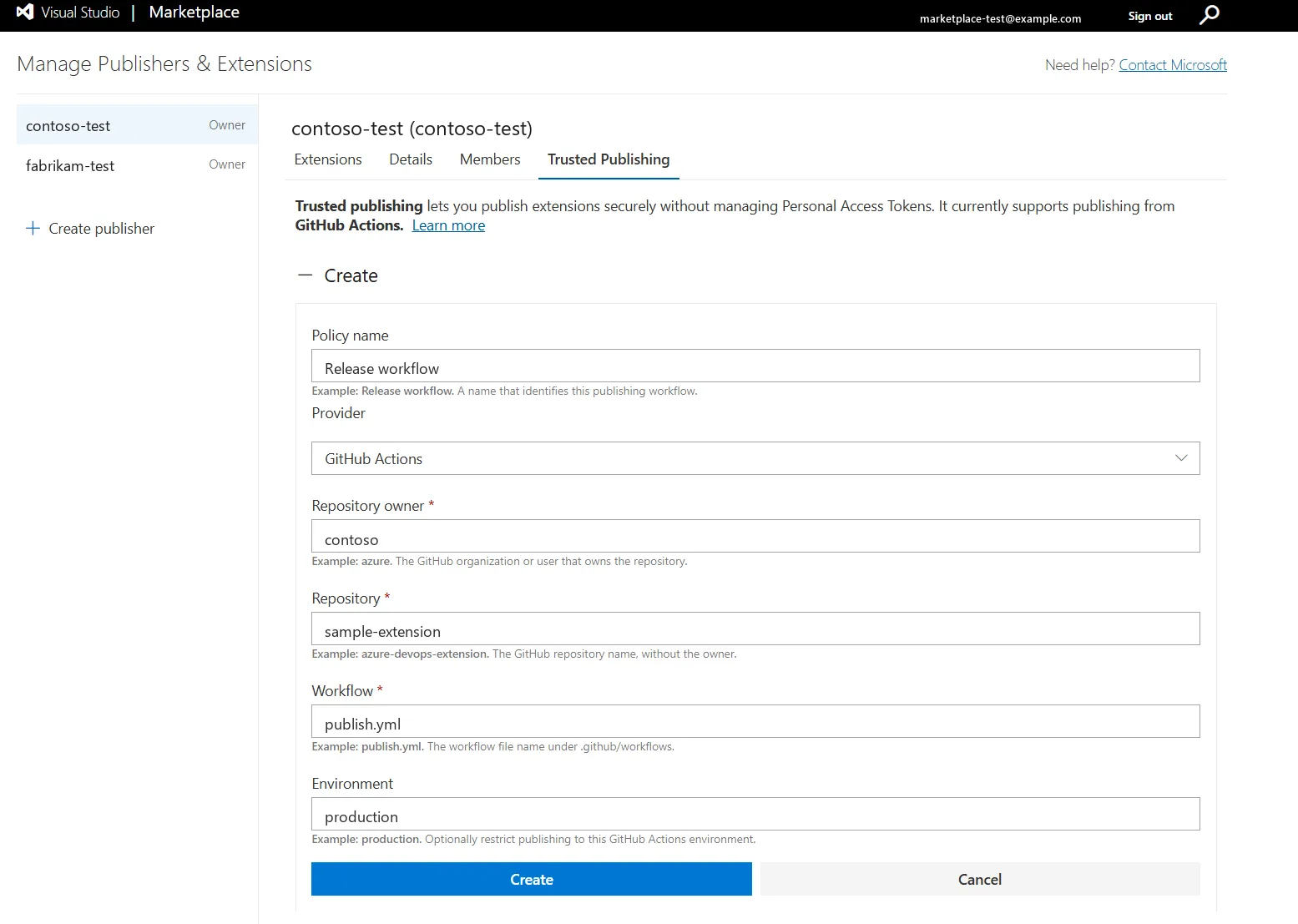
For a private repository, run the configured workflow within 48 hours of creating the policy. The first successful token exchange permanently activates the policy.
2. Publish a Visual Studio Code extension
To configure your GitHub Actions workflow and publish without a PAT, follow the Secure automated publishing to Visual Studio Marketplace guide in the Visual Studio Code documentation.
3. Publish a Visual Studio extension
To publish your Visual Studio extension from the command line, follow the Publish a Visual Studio extension via command line guide in the Visual Studio documentation.
Publishing from Azure Pipelines
Azure Pipelines uses an Azure DevOps service connection with Workload Identity Federation (WIF) instead of a GitHub Trusted Publishing policy.
Do not create a policy on the Marketplace Trusted Publishing page for Azure Pipelines.
Before publishing:
- Configure an Azure Pipelines service connection that uses Workload Identity Federation. Back the connection with either a Microsoft Entra app registration and service principal or a managed identity.
- Add that identity to your Visual Studio Marketplace publisher and grant it the Contributor role.
- Configure the publishing step to use the WIF service connection.
The pipeline can then publish Visual Studio Code or Visual Studio extensions without storing a Marketplace PAT.
GitHub policy lifecycle
GitHub policy activation differs based on repository visibility. For a private repository, a new policy is temporarily active for 48 hours. The first successful token exchange makes the policy permanently active. If the policy is not used during that period, it expires and can be reopened for another 48 hours.
You can view the status and last use of each policy from the Trusted Publishing page.
Migrating from a PAT
If your GitHub Actions workflow already publishes with vsce, migration is
straightforward:
- Create a Trusted Publishing policy for the repository and workflow.
- Add
id-token: writeto the publishing job. - Update the publishing command to use OIDC.
- Run the workflow and verify that the OIDC publish succeeds.
- After the OIDC publish succeeds, remove the Marketplace PAT from the workflow and repository secrets.
We recommend keeping the PAT until you have verified the first Trusted Publishing run. After the migration succeeds, remove the unused secret so it cannot be used accidentally by another workflow step.
For Azure Pipelines, configure the WIF service connection and publisher identity first, update the publishing step to use that connection, and remove the PAT only after the federated publish succeeds. No Marketplace Trusted Publishing policy is needed.
Try Trusted Publishing Today
Trusted Publishing makes automated extension releases easier to maintain and safer by default—without requiring a long-lived publishing secret.
To get started:
- Open your publisher in Visual Studio Marketplace publisher management.
- Create a policy under Trusted Publishing.
- Update your GitHub Actions workflow to use OIDC.
- Publish your extension without a PAT.
Using Azure Pipelines instead? Follow the Azure Pipelines setup guide to publish with Workload Identity Federation (WIF), without a PAT.
For complete setup instructions and troubleshooting guidance, visit the Trusted Publishing documentation.
Thank you
Thank you to our extension publishers for investing in more secure releases. As you adopt Trusted Publishing, we would love to hear what works well and where we can improve—from configuring your first policy to publishing without a PAT.
Share your feedback in the Visual Studio Marketplace GitHub discussions.
The post Publish Visual Studio Marketplace extensions securely with Trusted Publishing appeared first on Microsoft for Developers.
正文保留英文原文,标题与摘要由机器翻译。
原文发布于 Microsoft DevBlogs(Publish Visual Studio Marketplace extensions securely with Trusted Publishing),标题、摘要与正文由机器翻译,术语按行业惯例统一,未经人工逐句校订。