走进Omniverse:开发者用前沿AI智能体把想法变成仿真
把仿真构想变成可用的应用,意味着要组装资产、打通物理与渲染,并检查场景是否按预期运行。开发者正在把前沿 AI 模型与 NVIDIA Omniverse 库结合起来,以帮助完成这些工作——构建用于探索场景、排查故障和改进设计的应用。
开发者通过自然语言指令指挥 AI 智能体,审阅结果并引导修改。Omniverse 库提供 GPU 加速的物理、渲染和传感器仿真能力。
浏览下方项目,了解 GPT-6 Astra 等前沿 AI 模型的实际运作,并持续关注来自 NVIDIA 团队及整个生态开发者的新案例。
制作动画 3D 内容需要打通建模、仿真、材质和渲染。NVIDIA BondLab 团队的高级技术美术 Nick Scarcella 指挥 AI 智能体——主要使用 Claude——配合 CUDA 库和 Isaac Sim 来创作动画。BondLab 团队使用 SideFX Houdini 和 NVIDIA ovrtx 库开发材质、灯光以及最终渲染效果。
在一项实验中,Scarcella 指导 Astra 借助产品图片、手册和技术指导重建了一台 OP-1 便携合成器。他把模型导出到 OpenUSD 框架,在 Houdini 和 Blender 中进行测试,随后使用 Astra 和 Opus 打磨细节,再调整材质和纹理以用于 ovrtx 渲染。
Scarcella 还在 Isaac Sim 中使用了一个公开共享的机械手检查点,负责指导动作设计,并在 Claude 的协助下于 Houdini 中制作材质与灯光。团队与成员 Steven Dvornik 合作,创作了一个名为 “Echos” 的可视化作品:机械手的半透明版本相互重叠,并融合成一段单一的手部动画,为机器人训练提供了一种视觉化的解读。
图:模拟机械手动作的艺术化可视化作品,借助 AI 辅助以及 Houdini 的材质与灯光工具制作而成。
这些工作流将智能体辅助创作引入现有的艺术家工具中,让团队获得可编辑的内容,并可在不同应用中进行查看、精修与渲染。
探索 Scarcella 的 Houdini MCP 工具与智能体技能。
在机器人能够拆解一件产品之前,开发者需要知道它的工具能否够到并拆下各个零件。NVIDIA 负责 OpenUSD 的高级产品经理 Jens Jebens 指挥 Astra 在 PTC Onshape 中为一套汽车悬架建模,并在 NVIDIA Isaac Sim 中进行配置。
Jebens 利用仿真反馈来修改工装,其中包括一把为够到悬架螺栓而设计的扳手,并报告称在仿真中成功拆下了一个悬架部件。
PTC 还通过 Onshape 的 SimReady Publisher 将计算机辅助设计(CAD)与仿真连接起来,该工具基于 NVIDIA Omniverse 库构建。机器人初创公司 Sensori 用它把自家的 Yuri 机器人导入 Isaac Sim,一并带上几何结构、关节与配置数据,使团队无需反复重建仿真模型,就能评估设计变更。
阅读 Sensori 的故事。
探索 Onshape 导入器指南。
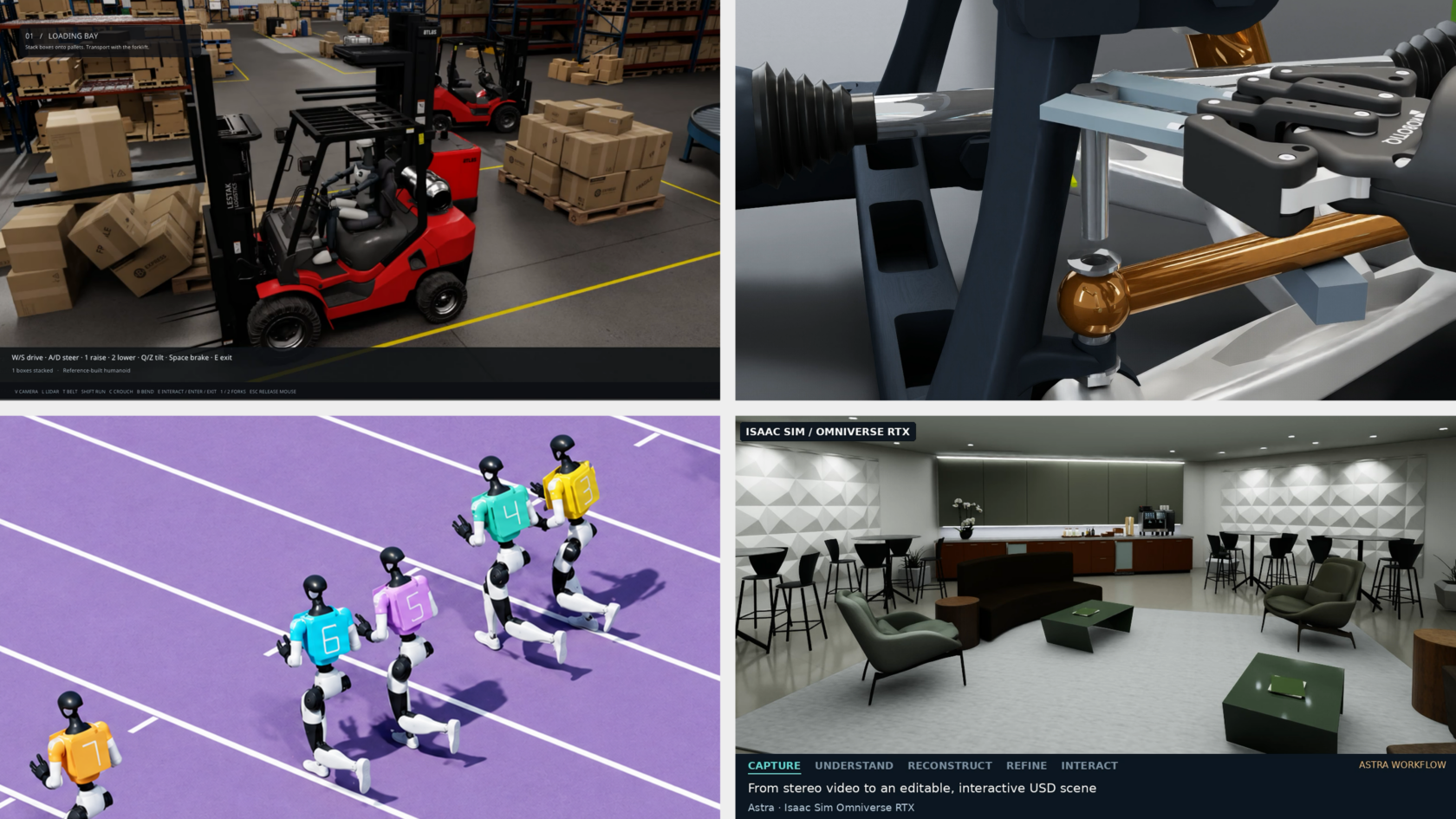
规划仓库自动化需要建筑本身的模型,但在现场扫描中,货架和机械会遮挡建筑结构。Omniverse 将 real-to-sim 工具与智能体技能结合起来,帮助开发者把真实世界的采集数据转化为可用于物理 AI 仿真的、可编辑的初始环境。
来自 NVIDIA 仿真技术团队的 David Wehr 在这项工作的基础上,使用 Astra 开发出一套工作流,可在去除内部物品的情况下对建筑进行数字化重建。目标是得到一个可编辑、可直接用于仿真的建筑模型,开发者可以在其中添加或重新摆放货架和机械,从而在做出实体改动之前评估仓库布局和自动化方案。
Wehr 引导 Astra 解析全景照片、生成建筑几何结构,并将其与点云测量数据对齐。OpenUSD 负责存储模型,Omniverse 的 ovrtx 库则渲染结果以供检查。
探索 NVIDIA Omniverse 智能体技能,帮助智能体基于 Omniverse 库进行构建。
在改变工业设备的运行方式之前,工程师需要一种探索其后果的手段。NVIDIA Omniverse 开发者关系团队成员 Pradeep Kaushik 指导 Astra 围绕一台仿真燃气轮机和发电机构建了一个 what-if 分析应用。
该应用允许用户调整负载、环境温度和燃料成分等条件,然后比较功率、效率、燃料消耗和设备响应。六个测试流程探索了包括负载变化、燃料阀卡滞和排气传感器故障在内的多种情景。
该原型为工程师提供了一种交互式方式,用以研究运行变更和故障可能如何影响设备行为,从而帮助判断哪些情景值得进一步测试。
Astra 使用 Cantera 等工具进行热化学计算,并使用 SciPy 进行设备动力学建模。该应用将求解器的结果映射到 3D 涡轮的转子动画,以及带有颜色编码的温度、压力和流速指示器上。NVIDIA Omniverse 库负责更新场景(ovstage)、用 RTX 渲染场景(ovrtx),并将视图流式传输到浏览器(ovstream)。工程师可以旋转和缩放剖面视图,在各项指示器之间切换,并暂停或拖动查看模拟响应,同时配合图表和虚拟仪表。
通过 GTC Berlin 上发布的 SimReady Central Library,开发者可以获取来自设备制造商和资产提供商的 2,000 多个可直接用于仿真的 USD 资产,用于机器人仿真和 AI 工厂数字孪生工作流。
NVIDIA Omniverse 文档团队成员 Paul Kind 将一个 AI 智能体指向该资源库,并通过对话引导场景组装。他的厨房场景包含 180 个摆放对象,取自 63 个不同的库资产,另有 18 个自定义几何体。Kind 查看了使用 Isaac Sim 生成的渲染图,并引导做了进一步调整。
对于机器人和工厂工作流,开发者可以选择已嵌入仿真属性的 SimReady 资产,以匹配所需任务,然后在组装好的环境中进行测试。
在 SimReady Central Library 中查找资产,并了解如何贡献。
随着越来越多的机械臂、传送带和箱子填满场景,仓库仿真需要保持流畅运行。
当它变慢时,开发者需要找出是什么拖慢了它。NVIDIA 首席工程师 Bhavik Sanganee 使用 Astra 配合 NVIDIA Omniverse 库构建了一个仓库仿真,提升其复杂度并调查性能下降的原因。
当场景规模翻倍时,性能首次跌破目标值。将物理计算、图像渲染和视频准备并发运行后,性能得以恢复,并支持进一步扩展。
在 80 条传送带、40 个机械臂和 800 个箱体的规模下,该仿真在为期两分钟的测试中于全高清分辨率下保持 30 帧每秒。机械臂成功完成了 640 次箱体放置。
场景规模再次翻倍后,性能出现下降。测试将性能下降的原因定位到物理与机器人控制流水线,这为 Sanganee 指明了具体的改进方向。
立即开始使用 NVIDIA Omniverse 库进行开发。
在电子装配中,机器人可能需要先把柔性线缆绕过各个元器件定位,再将其插入端口。线缆会随着机器人的操作而弯曲,连接器必须精确对齐才能插接成功。
NVIDIA 机器人技术营销经理 Oyindamola Omotuyi 指导 Astra 构建了一个机器人仿真,使用 NVIDIA Isaac Lab、Newton 物理引擎和 Omniverse 渲染,并由 Robotiq 夹爪来处理线缆。
Astra 还开发了一套强化学习系统,将学习到的线缆布线动作与位置和姿态反馈相结合,并针对 USB-C 插接进行纠正调整。该仿真让 Omotuyi 能够在转入实体机器人实验之前,测试线缆操作与连接器对齐。
该控制器使用的是仿真直接提供的信息。下一步包括测试依靠摩擦力夹持的抓取方式,以及使用实体机器人可通过摄像头和传感器获取的信息。
在 NVIDIA Isaac Lab 中开始机器人学习。
在测试机器人能否抓起并移动一个箱子之前,开发者需要一个仿真模型,其关节运动正确,夹爪能够抓住物体。计算机辅助设计(CAD)模型提供了机器人的外形,但仍需要物理属性才能完成任务。
开发者使用 ABB Robotics 的 YuMi 机器人,借助 NVIDIA Omniverse 内容库中的 Astra 将 CAD 文件转换为 OpenUSD,把机器人的外观与参考图像进行匹配,并配置关节和碰撞几何体。他们在 NVIDIA Isaac Sim 中进行测试之前,先按照 SimReady Foundation 要求检查了该资产。
两条机械臂和夹爪完成了四个方块抓取-放置循环,使用了模拟的手指接触和摩擦。这些测试展示了在仿真条件下的行为——所估算的物理属性并未针对真实机器人进行校准。
请跟随五步 SimReady 教程操作。
原文较长,译文为节选;译文由英文原文机器翻译,术语按行业惯例统一,可在文末展开原文核对。
查看英文原文(Into the Omniverse: How Developers Turn Ideas Into Simulations With Frontier AI Agents)
Turning a simulation idea into a working application means assembling assets, connecting physics and rendering, and checking that the scene behaves as intended. Developers are combining frontier AI models with NVIDIA Omniverse libraries to help carry out that work — building applications for exploring scenarios, investigating failures and improving designs.
Developers direct AI agents through natural-language instructions, review results and guide changes. Omniverse libraries provide GPU-accelerated physics, rendering and sensor simulation capabilities.
Explore the projects below to see frontier AI models such as GPT-6 Astra at work, and check back for new examples from NVIDIA teams and developers across the ecosystem.
Create Editable 3D Assets With Houdini and AI Agents 
Creating animated 3D content requires connecting modeling, simulation, materials and rendering. Nick Scarcella, a senior technical artist on NVIDIA’s BondLab team, directed AI agents — primarily using Claude — to work with CUDA libraries and Isaac Sim to create animations. The BondLab team uses SideFX Houdini and the NVIDIA ovrtx library to develop materials, lighting and the final rendered appearance.
In one experiment, Scarcella guided Astra to recreate an OP-1 portable synthesizer using product images, manuals and technical direction. He exported the model into the OpenUSD framework, tested it in Houdini and Blender, then used Astra and Opus to refine details before adjusting materials and textures for ovrtx rendering.
Scarcella also used a publicly shared robot-hand checkpoint in Isaac Sim, directing the motion and developing materials and lighting in Houdini with Claude’s assistance. Working with team member Steven Dvornik, the team created an “Echos” visualization: translucent versions of the hand overlap and merge into a single hand animation, offering a visual interpretation of robot training.
Figure: An artistic visualization of simulated robot-hand motion, developed with AI assistance and Houdini’s materials and lighting tools.
These workflows bring agent-assisted creation into existing artist tools, giving teams editable content they can inspect, refine and render across applications.
Explore Scarcella’s Houdini MCP tools and agent skill.
Test Robotic Disassembly With Computer-Aided Design and Simulation
Before a robot can disassemble a product, developers need to know whether its tools can reach and remove the parts. Jens Jebens, a senior product manager for OpenUSD at NVIDIA, directed Astra to model a car suspension in PTC Onshape and configure it in NVIDIA Isaac Sim.
Jebens used simulation feedback to revise the tooling, including a wrench designed to reach the suspension’s bolts, and reported successful removal of a suspension component in simulation.
PTC also connects computer-aided design (CAD) with simulation through Onshape’s SimReady Publisher, built with NVIDIA Omniverse libraries. Robotics startup Sensori uses it to transfer its Yuri robot into Isaac Sim, carrying geometry, joints and configuration data so the team can evaluate design changes without repeatedly rebuilding the simulation model.
Explore the Onshape importer guide.
Create an Editable Building Model From Site Scans
Planning warehouse automation requires a model of the building itself, but shelving and machinery can obscure its structure in site scans. Omniverse brings together real-to-sim tools and agent skills to help developers turn real-world captures into editable starting environments for physical AI simulation.
David Wehr, from NVIDIA’s simulation technology team, built on that work using Astra to develop a workflow for digitally reconstructing a building without its contents. The goal is an editable, simulation-ready building model where developers can add or reposition shelving and machinery to evaluate warehouse layouts and automation plans before making physical changes.
Wehr guided Astra to interpret panoramic photos, create building geometry and align it with point-cloud measurements. OpenUSD stores the models, while Omniverse’s ovrtx library renders results for inspection.
Explore NVIDIA Omniverse agent skills to help agents build with Omniverse libraries.
Test Gas-Turbine Operating Scenarios With a Digital Twin
Before changing how industrial equipment operates, engineers need a way to explore the consequences. Pradeep Kaushik, a member of the NVIDIA Omniverse developer relations team, directed Astra to build a what-if analysis application around a simulated gas turbine and generator.
The application lets users adjust conditions such as load, ambient temperature and fuel composition, then compare power, efficiency, fuel consumption and equipment response. Six test procedures explore scenarios including load changes, a stuck fuel valve and an exhaust-sensor error.
The prototype gives engineers an interactive way to investigate how operating changes and faults could affect equipment behavior, supporting decisions about which scenarios warrant further testing.
Astra used tools like Cantera for thermochemistry and SciPy for equipment dynamics. The application maps solver results to rotor animation and color-coded temperature, pressure and flow-velocity indicators in a 3D turbine. NVIDIA Omniverse libraries update the scene (ovstage), render it with RTX (ovrtx) and stream the view to the browser (ovstream). Engineers can rotate and zoom the cutaway, switch between indicators, and pause or scrub through a simulated response alongside charts and virtual instruments.
Build Simulation Scenes With Open Source SimReady Assets
With SimReady Central Library, announced at GTC Berlin, developers can access more than 2,000 simulation-ready USD assets from equipment manufacturers and asset providers for robotics simulations and AI factory digital twins workflows.
Paul Kind, a member of NVIDIA’s Omniverse documentation team, pointed an AI agent to the library and guided scene assembly through conversation. His kitchen scene included 180 placements drawn from 63 unique library assets, alongside 18 custom geometry pieces. Kind reviewed renders produced with Isaac Sim and guided further adjustments.
For robotics and factory workflows, developers can select SimReady assets with the simulation properties embedded to fit their required task then test in an assembled environment.
Find assets in SimReady Central Library, and learn how to contribute.
Stress-Test a Warehouse Simulation at Scale
A warehouse simulation needs to keep running smoothly as more robot arms, conveyors and boxes fill the scene.
When it slows down, developers need to identify what’s holding it back. Bhavik Sanganee, principal engineer at NVIDIA, used Astra with NVIDIA Omniverse libraries to build a warehouse simulation, increase its complexity and investigate slowdowns.
Performance first fell below the target when the scene doubled in size. Running physics calculations, image rendering and video preparation concurrently restored performance and enabled further scaling.
With 80 conveyors, 40 arms and 800 boxes, the simulation sustained 30 frames per second at full HD resolution during a two-minute test. The arms completed 640 successful box placements.
Doubling the scene again reduced performance. Testing traced the slowdown to the physics and robot-control pipeline, giving Sanganee a specific area to improve.
Start building with NVIDIA Omniverse libraries.
Test Robot Control for Flexible Cable Routing
In electronics assembly, a robot may need to position a flexible cable around components before plugging it into a port. The cable bends as the robot moves it, and the connector must line up precisely to fit.
Oyindamola Omotuyi, robotics technical marketing manager at NVIDIA, directed Astra to build a robot simulation using NVIDIA Isaac Lab, Newton physics and Omniverse rendering with a Robotiq gripper handling the cable.
Astra also developed a reinforcement learning system that combined learned cable-routing movements with position-and-orientation feedback and corrective adjustments for USB-C insertion. The simulation gave Omotuyi a way to test cable handling and connector alignment before moving to physical-robot experiments.
The controller used information supplied directly by the simulation. Next steps include testing a friction-held grasp and using information a physical robot could obtain from cameras and sensors.
Get started with robot learning in NVIDIA Isaac Lab.
Turn Robot Computer-Aided Design Into a SimReady Asset
Before testing whether a robot can pick up and move a box, developers need a simulation model with joints that move correctly and with grippers that can hold the object. A computer-aided design (CAD) model provides the robot’s shape, but it still needs physics properties to perform the task.
Using an ABB Robotics YuMi robot, developers directed Astra with NVIDIA Omniverse content libraries to convert CAD files into OpenUSD, match the robot’s appearance to reference images, and configure joints and collision geometry. They checked the asset against SimReady Foundation requirements before testing it in NVIDIA Isaac Sim.
Both arms and grippers completed four cube pick-and-place cycles, using simulated finger contact and friction. These tests demonstrated behavior under the simulated conditions — estimated physical properties were not calibrated against the real robot.
Follow the five-step SimReady tutorial.
Build a Humanoid Simulator for a Warehouse Environment
Explore a gamified, physics-based control of a humanoid robot in first- and third-person view.
Before automating warehouse tasks, developers need an interactive simulation environment to explore task behavior and evaluate how the work gets done. Frank DeLise, Omniverse product manager at NVIDIA, used Astra to turn a SimReady warehouse and humanoid robot into an interactive simulator with first- and third-person views.
DeLise directed Astra to connect NVIDIA Omniverse libraries for physics (ovphysx), scene updates (ovstage), rendering (ovrtx) and the user interface (ovui). He also used Astra with SimReady (simready-foundation) to create the physical scene in simulation. Astra then generated animation and application code to bring those capabilities together.
Learn how to prepare and validate SimReady robot assets with frontier AI models and NVIDIA Omniverse libraries.
Connect an Autonomous-Driving Testing Workflow
Changing a scene, sensor or driving model can significantly affect autonomous-vehicle simulations. Doyub Kim, a manager on the simulation technology team at NVIDIA, asked Astra to build Zero to Alpamayo — a reusable simulation environment based on San Francisco’s Market Street.
Kim directed Astra to map out the workflow, then connect asset creation, traffic, Omniverse RTX sensor simulation and Alpamayo driving in stages, checking each integration. The resulting prototype was a testing ground for comparing models and tracing how scene or sensor changes affect downstream driving behavior. A separate Cosmos3-Nano experiment varied weather and lighting in recorded simulation videos, allowing Kim to compare the driving model’s responses to the same scenario under different conditions.
Use Sensor Differences to Create and Improve Digital Twins
Comparing recorded and simulated camera and lidar outputs gives developers key performance indicator-based feedback for refining a scene.
To test robots and autonomous vehicles, developers need to know how closely simulated sensors match real ones. Ashley Reid, who works on RTX sensor validation at NVIDIA, directed Astra and Claude Fable 5 agents to compare ovrtx camera and raw LiDAR outputs with recorded data. The agents created two digital twins from scratch and improved two existing ones.
Over about three days, Reid guided an iterative workflow in which agents measured differences, created or modified OpenUSD scenes, and checked the results. Changes addressed missing objects, geometry and materials, with acceptance depending on camera and LiDAR metrics. This gives developers a way to use measured discrepancies to guide scene creation and improvement.
Start by rendering an OpenUSD scene with the ovrtx minimal Python example, then define a sensor measure to compare with recorded data.
Robo Olympics: Test Robot Skills With Simulation
Teaching robots new movements means checking whether those actions work under physical constraints. Tae Kim, who leads NVIDIA Omniverse engineering and product, used sports videos and natural-language instructions to guide Astra in building Robo Olympics, an experimental project that tests simulated Unitree G1 humanoids performing sports movements.
Under Kim’s direction, Astra built controllers and refined them through physics trials. Newton Physics Engine simulated behavior, the open source NVIDIA Warp framework accelerated calculations and ovrtx rendered scenes and virtual-camera images. In one experiment, the robot cleared a single hurdle in 64 of 100 simulation trials. The trials gave Kim feedback for improving the robot’s timing and control.
Watch Kim explore building simulations with Astra and NVIDIA Omniverse libraries.
Bring the International Space Station Into the Browser
Turning 3D models into an application requires connecting assets, live data and an interface. Nic Johns, an engineering director at NVIDIA, prompted Astra to assemble NASA assets into an OpenUSD International Space Station model with telemetry. Johns built the application with a single prompt, then used a follow-up prompt to shift the scene to Earth’s daytime side so the planet was visible.
The workflow used Blender for asset preparation and Omniverse libraries for rendering (ovrtx), scene runtime (ovstage) and streaming (ovstream). The application brings 3D models and operational data into the browser, with Johns guiding its development through prompts and corrections.
Try the Omniverse Real-Time Viewer skill.
Turn Captured Rooms Into Testing Environments
A digitally reconstructed room needs editable objects and accurate physical behavior before developers can test interactions. Chirag Majithia, from the Isaac engineering applications team at NVIDIA, directed Astra to turn stereo camera captures into an editable OpenUSD studio.
The workflow combined PyCuSFM, FoundationStereo and nvblox for reconstruction, with user review guiding object selection and placement. Astra assembled generated and Blender-authored assets and used USD Content Agents to configure how objects move and interact in simulation. Isaac Sim tests guided collision and contact revisions for doors and drawers. The studio connects captured geometry to interaction testing, making gaps and object behavior easier to inspect.
Have a simulation idea? Explore NVIDIA Omniverse libraries to start building with an AI agent.
正文保留英文原文,标题与摘要由机器翻译。
原文发布于 NVIDIA Blog(Into the Omniverse: How Developers Turn Ideas Into Simulations With Frontier AI Agents),标题、摘要与正文由机器翻译,术语按行业惯例统一,未经人工逐句校订。