用 Ollama、Gemma 4 与 Nimble 校验本地 LLM 输出
你的本地模型给出的答案看起来还算合理。
当你自己阅读这个回复时,你可以当场做出判断。但如果这个回复直接送入下游组件,而没有人去看它呢?
如果我们能在把这个答案投入使用之前,再复核一遍,那就太好了。
事实上,决策模型正好能做到这一点。
决策模型是 LLM 的近亲。区别在于,LLM 通常用于生成文本,而决策模型则专门根据上下文和问题,从既定选项中做出选择。
在这里,我们可以把本地模型的答案和原始上下文交给决策模型,然后询问接下来该怎么做:是保留这个答案?还是要求修改?还是标记出来交由人工审核?随后我们的代码就可以根据这个选择采取行动。
更妙的是,决策模型也可以本地运行,因此你的上下文永远不必离开你的机器。
以下是本文将要做的内容:
使用 Ollama 搭建本地模型运行时;
搭建并运行 Gemma 4 E2B,作为我们的本地 LLM;
搭建并运行 Nimble,一个 9B 的决策模型;
构建工作流,以完成一个具体案例研究。
我们将构建一个本地工作流,用于起草参会者问题的回答,并使用决策模型检查这些回答是否可以直接使用。
假设一个团队正在组织一场工作坊。当有人完成一项任务、更改计划,或发现某个仍需确认的细节时,团队成员会通过消息分享这些进展。
与此同时,参会者正在提问:
我现在可以报名参加这个工作坊吗?
我的参会者提醒发了吗?
我应该几点到?
在回复之前,需要有人通读整段对话并跟踪其中的变化。
自然,LLM 可以协助这类工作,并为每个问题给出简短的答复。
不过,这个团队有一个条件:他们的内部消息必须留在自己掌控的机器上。
因此,我们将使用一个本地运行的小型语言模型来完成这项任务。
在本案例研究中,我们会把两位团队成员 Alex 和 Sam 之间的以下对话交给它:
Alex:报名已开放。演讲者已收到提醒。研讨会规划备注里写的是 10:00。
Sam:参会者提醒邮件用的是同一份文案。它已通过审核并排定发送时间,而演讲嘉宾名单仍在等待最终签字确认。日历邀请上写的是 10:30。
Alex:我已经取消了已排定的参会者邮件发送。这些人应该只在演讲嘉宾名单签字确认之后才收到我们的消息。请确认是备注还是日历上的开始时间才是正确的。
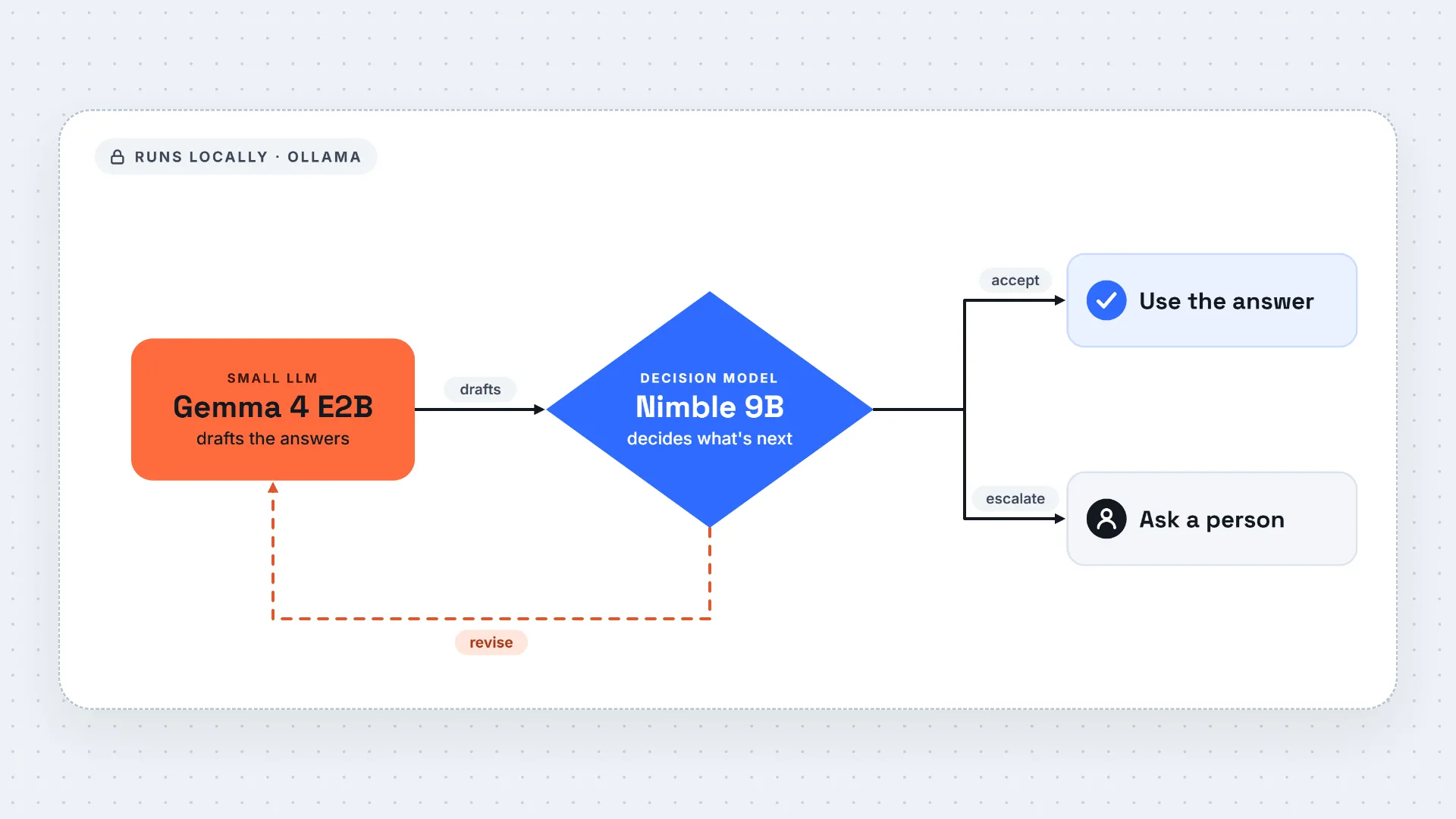
我们会给这两个模型分配不同的任务:本地 LLM 起草回复,本地决策模型则负责审阅这些回复并选择下一步操作。
本地 LLM 我们使用 Gemma 4 E2B,这是 Google Gemma 系列中的一款小语言模型。
对 Gemma 来说,输入很直接:对话内容和这三个问题。我们还会明确每个回答需要涵盖的内容。例如,关于提醒邮件的回复需要说明该邮件发送的当前状态,以及发送仍需满足的任何条件。关于开始时间的回复,如果已经确定了时间,就给出确认的时间;否则要清楚说明尚不确定。
我们让 Gemma 在一次调用中回答全部三个问题,并使用 Ollama 的结构化输出功能来请求结构化的 JSON 输出。这样,我们的代码就能识别每个回答并传给下一步进行审阅。
接下来,我们把 Gemma 的回答传给 Nimble,这是 Bespoke Labs 的 9B 决策模型。
我们在一次请求中把三份草稿全部发给 Nimble。对话内容提供共享上下文;每个审阅问题都包含参会者的提问、Gemma 的草稿,以及 Gemma 收到的相同要求。
我们给 Nimble 三个选择:
ACCEPT:答案满足要求。
REVISE_LOCALLY:答案需要修改,并且对话中有足够的信息来纠正它。
HUMAN_REVIEW:对话缺少满足要求所需的信息;需要人工输入。
我们的 Python 代码随后执行所选操作:如果是 ACCEPT,则保留答案。如果是 REVISE_LOCALLY,它会要求 Gemma 仅重新回答那个问题,使用相同的对话、写作指令、问题和要求。区别在于 Gemma 现在只需回答一个问题,而不是三个。最后,如果选择的是 HUMAN_REVIEW:代码会将问题标记出来,供人工解决。
将这些步骤组合在一起,以下是工作流程:
图 1. Gemma 起草回复;Nimble 选择哪些需要重点重试。(图片由作者提供)
2. 设置本地模型
首先,让我们把两个模型都准备好。我们首先安装 Ollama。
如果你以前没用过,Ollama 是一个运行时,用于从你自己的机器上下载、运行并对外提供本地语言模型服务。安装完成后,Ollama 会暴露一个本地 API 端点。
在 Windows 机器上,你可以通过官方安装程序完成安装:
https://ollama.com/download
或者,你也可以在 PowerShell 中使用 winget 进行安装:
winget install Ollama.Ollama
安装完成后,你应该能在 Windows 开始菜单中看到 Ollama。你可以像启动其他应用一样启动它。它运行后,你应该会在系统托盘中看到 Ollama 图标,这意味着本地 Ollama 服务正在后台运行。
图 2. Ollama 应用界面。(图片由作者提供)
如果你使用的是 Linux 机器,可以用以下命令安装 Ollama:
curl -fsSL https://ollama.com/install.sh | sh
使用 Nimble 的决策端点(decision endpoint)需要 Ollama 0.35.0 或更高版本。查看你已安装的版本:
Ollama 安装完成后,会在你的机器上运行一个本地服务器。
让 Ollama 保持运行,然后打开另一个终端下载模型。
对于 Nimble,我们将使用 nimble:9b-q4_K_M,这是 Bespoke-Nimble-9B 的 5.6 GB 量化版本。该版本采用 Apache 2.0 许可发布。另外单独发布的 Nimble v3 采用 CC BY-NC 4.0 许可,限制商业使用。
ollama pull gemma4:e2bollama pull nimble:9b-q4_K_M
运行以下命令,确认两个模型名称都出现在列表中:
我们将使用 requests 从 Python 调用 Ollama 的本地 API:
python -m pip install requests
两个模型均可通过本地服务器 http://localhost:11434 访问。
你可以在这里找到该案例研究的 notebook。
3.1 将任务转化为代码
首先,让我们定义模型名称和本地服务器地址:
import jsonimport requestsimport pandas as pdOLLAMA_URL = "http://localhost:11434"SLM_MODEL = "gemma4:e2b"DECISION_MODEL = "nimble:9b-q4_K_M"
接下来,让我们将 Alex 和 Sam 的消息放入一个列表,并保持它们发送时的顺序:
conversation = [ { "from": "Alex", "text": ( "注册已开放。演讲者已收到他们的提醒。 " "研讨会规划笔记上写的是 10:00。" ), }, { "from": "Sam", "text": ( "参会者提醒使用的是同一文案。它已获批并已安排发送, " "但演讲者名单仍在等待最终签署确认。 " "日历邀请上写的是 10:30。" ), }, { "from": "Alex", "text": ( "我取消了已安排好的参会者邮件发送。这些人只应在 " "演讲者名单签署确认后才会收到我们的消息。请 " "确认是笔记还是日历上的开始时间是正确的。" ), },]
对于每个参会者问题,我们会添加一个标识符和一个要求,描述一个有用的回答需要涵盖哪些内容:
questions = [ { "id": "registration", "question": "我现在可以报名参加研讨会吗?", "requirement": ( "说明参会者当前是否可以注册。" ), }, { "id": "reminder", "question": "我的参会者提醒已经发送了吗?", "requirement": ( "说明当前参会者提醒的状态以及发送前任何尚未满足的 " "前提条件。" ), }, { "id": "start_time", "question": "我应该什么时候到达?", "requirement": ( "如果已确定研讨会的开始时间,请说明该确认时间; " "否则明确说明尚未确认。" ), },]
我们需要 ID,这样我们的代码就能把每份草稿与其审核决定关联起来。我们还使用 requirement 字段来告诉两个模型回答需要实现什么。
我们会给 Gemma 一条通用的写作指令:
writing_instructions = ( "使用内部对话为每个问题撰写一条面向参会者的简短回复。遵循每个问题的要求。仅使用对话支持的信息。如果所需信息未确立,请说明,而不要编造。每个问题返回一个答案,并使用其 id。")
3.2 使用 Gemma 起草回复
在这里,我们构建 draft_replies()。它的工作是准备上下文,将其发送给 Gemma,并返回答案:
原文较长,译文为节选;译文由英文原文机器翻译,术语按行业惯例统一,可在文末展开原文核对。
查看英文原文(How to Check Local LLM Output with Ollama, Gemma 4, and Nimble)
Your local model gives you an answer that looks reasonable.
When you’re reading the response yourself, you can judge that on the spot. But what if the response feeds straight into downstream components and nobody looks at it?
It’d be great if we could give that answer a second look, before putting it to work.
In fact, a decision model can do just that.
Decision models are close relatives of LLMs. The difference is that LLMs are typically used to generate text, while decision models are specialized in selecting from defined choices given the context and the question.
Here, we can give the decision model the local model’s answer and the original context, then ask what should happen next: should we keep the answer? Or request a revision? Or flag it for human review? Our code can then act on that choice.
Better yet, the decision model can run locally too, so your context never has to leave your machine.
Here's what we'll do in this post:
Set up a local model runtime with Ollama;
Set up and run Gemma 4 E2B as our local LLM;
Set up and run Nimble, a 9B decision model;
Build the workflow to address a concrete case study.
We’ll build a local workflow that drafts answers to attendee questions and uses a decision model to check whether those answers are ready to use.
Suppose a team is organizing a workshop. When someone finishes a task, or changes a plan, or spots a detail that still needs confirming, team members share that progress through messages.
Meanwhile, attendees are asking questions:
Can I register for the workshop now?
Has my attendee reminder been sent?
What time should I arrive?
Before replying, someone would need to read the entire conversation and track changes.
Naturally, an LLM can help with this type of work and produce a short answer to each question.
The team has one condition, though: their internal messages must stay on a machine they control.
So we’ll use a small language model that runs locally to handle the task.
For this case study, we’ll give it the following conversation between two team members, Alex and Sam:
Alex: Registration is live. The speakers have received their reminder. The workshop planning notes say 10:00.
Sam: The attendee reminder uses the same copy. It is approved and scheduled, with the speaker list still waiting for final sign-off. The calendar invitation says 10:30.
Alex: I cancelled the scheduled attendee mailing. Those people should only hear from us after the speaker list is signed off. Please confirm whether the notes or the calendar have the right start time.
We’ll give the two models different jobs: the local LLM drafts the replies, and the local decision model reviews them and chooses the next step.
For the local LLM, we'll use Gemma 4 E2B, a small language model from Google’s Gemma family.
For Gemma, the input is straightforward: the conversation and the three questions. We also specify what each answer needs to cover. The reminder reply, for example, needs to state the mailing’s current status and any remaining conditions for sending it. The start-time reply should give the confirmed time if one is established, or make the uncertainty clear.
We ask Gemma to answer all three in one call, and we use Ollama’s structured output feature to request structured JSON output. This way, our code can identify each answer and pass it on for review.
Next, we pass Gemma’s answers to Nimble, a 9B decision model from Bespoke Labs.
We send Nimble all three drafts in one request. The conversation provides the shared context; each review question contains the attendee’s question, Gemma’s draft, and the same requirement Gemma received.
We give Nimble three choices:
ACCEPT: the answer meets the requirement.
REVISE_LOCALLY: the answer needs changing, and the conversation has enough information to correct it.
HUMAN_REVIEW: The conversation lacks the information needed to meet the requirement; human input is needed.
Our Python code then carries out the selected action: if it's ACCEPT, the answer is kept. If it's REVISE_LOCALLY, it asks Gemma to answer just that question again, with the same conversation, writing instructions, question, and requirement. The difference is that Gemma now has one question to answer instead of three. Finally, if the selected choice is HUMAN_REVIEW: the code flags the question for someone to resolve.
Putting those steps together, here’s the workflow:
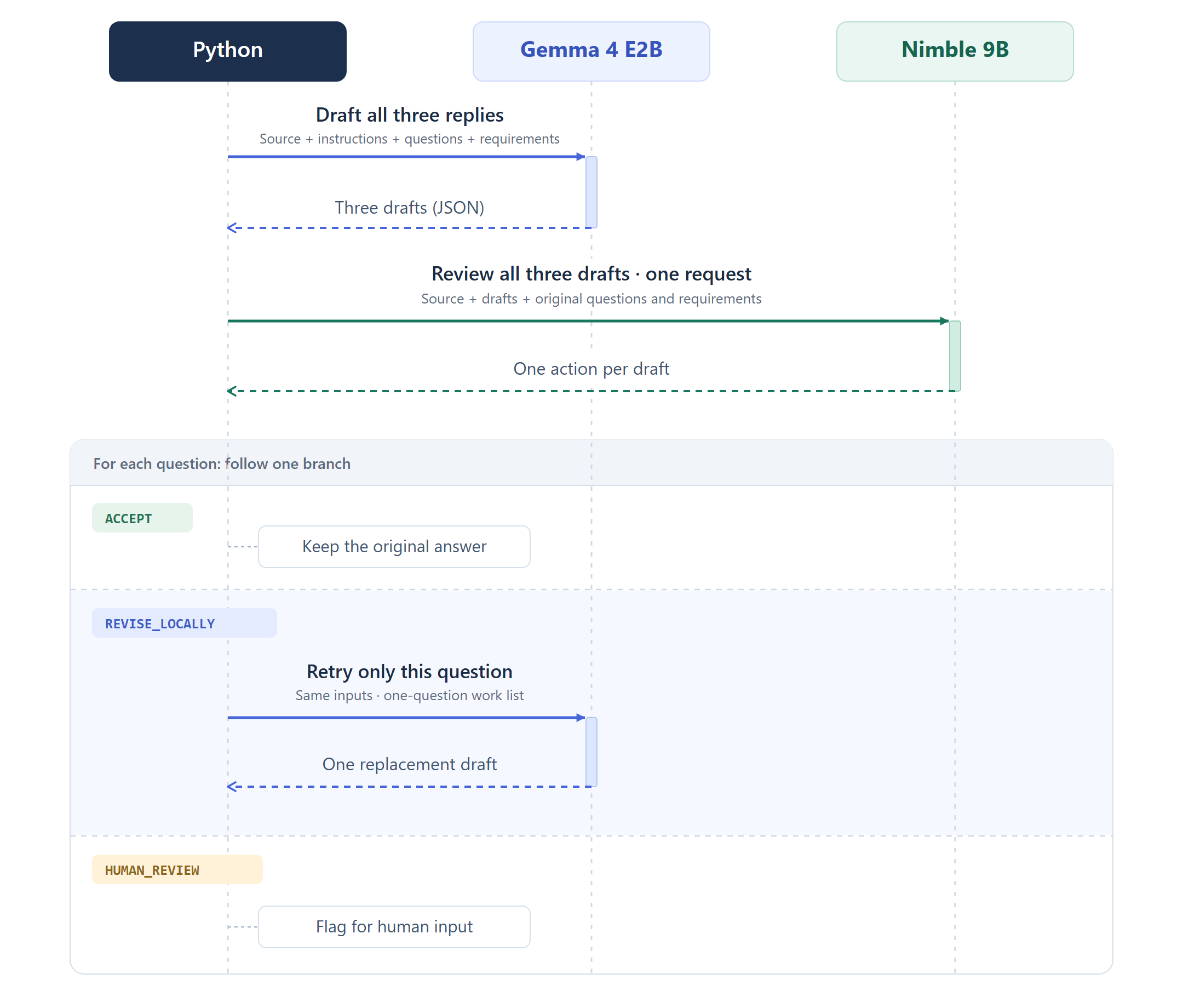
Figure 1. Gemma drafts the replies; Nimble selects which need a focused retry. (Image by author)
2. Set Up the Local Models
First things first, let’s get both models ready. We start by installing Ollama.
If you haven’t used it before, Ollama is a runtime for downloading, running, and serving local language models from your own machine. Once it is set up, Ollama exposes a local API endpoint.
On Windows machines, you can do that from the official installer:
https://ollama.com/download
Alternatively, you can also install it from PowerShell by using winget:
winget install Ollama.Ollama
After installation, you should be able to see Ollama from the Windows Start menu. You can launch it like any other app. Once it is running, you should see the Ollama icon in the system tray, and this means the local Ollama service is running in the background.
Figure 2. Ollama App interface. (Image by author)
If you are on a Linux machine, you can install Ollama with:
curl -fsSL https://ollama.com/install.sh | sh
You’ll need Ollama 0.35.0 or later for Nimble’s decision endpoint. Check your installed version:
Once Ollama is installed, it runs a local server on your machine.
Keep Ollama running, then open another terminal to download the models.
For Nimble, we’ll use nimble:9b-q4_K_M, a 5.6 GB quantized build of Bespoke-Nimble-9B. This build uses the Apache 2.0 release. The separate Nimble v3 release uses CC BY-NC 4.0, which restricts commercial use.
ollama pull gemma4:e2bollama pull nimble:9b-q4_K_M
Check that both model names appear when you run:
We’ll call Ollama’s local API from Python using requests:
python -m pip install requests
Both models are accessible through the local server at http://localhost:11434.
You can find the notebook for the case study here.
3.1 Put the task into code
First, let’s define the model names and local server address:
import jsonimport requestsimport pandas as pdOLLAMA_URL = "http://localhost:11434"SLM_MODEL = "gemma4:e2b"DECISION_MODEL = "nimble:9b-q4_K_M"
Next, let’s put Alex and Sam’s messages into a list, keeping them in the order they were sent:
conversation = [ { "from": "Alex", "text": ( "Registration is live. The speakers have received their reminder. " "The workshop planning notes say 10:00." ), }, { "from": "Sam", "text": ( "The attendee reminder uses the same copy. It is approved and " "scheduled, with the speaker list still waiting for final sign-off. " "The calendar invitation says 10:30." ), }, { "from": "Alex", "text": ( "I cancelled the scheduled attendee mailing. Those people should " "only hear from us after the speaker list is signed off. Please " "confirm whether the notes or the calendar have the right start time." ), },]
For each attendee question, we’ll add an identifier and a requirement describing what a useful answer needs to cover:
questions = [ { "id": "registration", "question": "Can I register for the workshop now?", "requirement": ( "State whether registration is currently open to the attendee." ), }, { "id": "reminder", "question": "Has my attendee reminder been sent?", "requirement": ( "State the current attendee reminder status and any remaining " "prerequisite for sending." ), }, { "id": "start_time", "question": "What time should I arrive?", "requirement": ( "State the confirmed workshop start time if established; " "otherwise make the lack of confirmation clear." ), },]
We need IDs so our code can link each draft to its review decision. We also use the requirement field to tell both models what the answer needs to accomplish.
We’ll give Gemma a common writing instruction:
writing_instructions = ( "Write a short attendee-facing reply to each question using the internal " "conversation. Follow the requirement for each question. Use only " "information supported by the conversation. If required information is " "not established, say so rather than inventing it. Return one answer " "per question, using its id.")
3.2 Draft the replies with Gemma
Here, we build draft_replies(). Its job is to prepare the context, send it to Gemma, and return the answers:
def draft_replies(questions): task = { "instructions": writing_instructions, "questions": questions, } prompt = "Perform the task below.\n\n" + json.dumps({ "task": task, "conversation": conversation, }) ids = [question["id"] for question in questions] record_schema = { "type": "object", "properties": { "id": {"type": "string", "enum": ids}, "answer": {"type": "string"}, }, "required": ["id", "answer"], "additionalProperties": False, } schema = { "type": "object", "properties": { "answers": { "type": "array", "items": record_schema, "minItems": len(ids), "maxItems": len(ids), } }, "required": ["answers"], "additionalProperties": False, } payload = { "model": SLM_MODEL, "messages": [ { "role": "system", "content": "Return only JSON matching the supplied schema.", }, {"role": "user", "content": prompt}, ], "format": schema, "stream": False, "think": False, "options": { "temperature": 0, "seed": 42, "num_ctx": 8192, "num_predict": 2048, }, "keep_alive": "30m", } response = requests.post( f"{OLLAMA_URL}/api/chat", json=payload, timeout=300 ) response.raise_for_status() return json.loads(response.json()["message"]["content"])["answers"]
In the code snippet above, the prompt brings together the writing instructions, selected questions with their requirements, and the complete conversation.
We supply questions as an argument because this way we can control how many questions we give to Gemma. We can pass all three questions and request three answers, or we can just pass one question and request one answer.
We have also defined the schema shape: each record should contain an id and an answer, and the array length should match the number of questions. We pass this schema through Ollama’s formatfield.
For the initial drafts, we pass all three questions:
drafts = draft_replies(questions)
3.3 Review the drafts with Nimble
Next, we need a function to review those answers:
def review_replies(drafts): source = "\n".join( message["from"] + ": " + message["text"] for message in conversation ) by_id = {draft["id"]: draft["answer"] for draft in drafts} criteria = { "ACCEPT": ( "The answer is supported by the conversation and meets " "the question requirement." ), "REVISE_LOCALLY": ( "The answer needs changing, and the conversation contains " "enough information to produce a corrected answer that " "meets the question requirement." ), "HUMAN_REVIEW": ( "The conversation does not establish the information " "needed to meet the question requirement; human input " "is needed." ), } review_questions = { question["id"]: { "type": "choice", "instructions": ( "Evaluate the proposed attendee-facing answer against " "the source conversation and the requirement. " "Select the appropriate next action.\n\n" f"Question: {question['question']}\n" f"Requirement: {question['requirement']}\n" f"Proposed answer: {by_id[question['id']]}" ), "criteria": criteria, } for question in questions } payload = { "model": DECISION_MODEL, "state": source, "questions": review_questions, "keep_alive": "30m", } response = requests.post( f"{OLLAMA_URL}/v1/systemone", json=payload, timeout=300 ) response.raise_for_status() answers = response.json()["answers"] return { record_id: answer["choice"] for record_id, answer in answers.items() }
Note that the request goes to Ollama's decision endpoint. Two main inputs here:
state: which contains the complete conversation,
questions: three named reviews, each containing the attendee’s question, its original requirement, and Gemma’s draft.
For each review, the instructions field tells Nimble what to evaluate. The general evaluation instruction stays the same, but the question, requirement, and proposed answer change. Setting type="choice" asks Nimble to select one of the three actions defined in criteria.
All three reviews are sent in one API request.
The response contains an answers object keyed by our question identifiers. We can then extract each selected choice, and give our Python code an action to follow for each draft.
actions = review_replies(drafts)
3.4 Act on the decisions
Once Nimble returns the reviews, we do:
draft_by_id = { draft["id"]: draft["answer"] for draft in drafts}results = []for question in questions: record_id = question["id"] action = actions[record_id] if action == "ACCEPT": final_answer = draft_by_id[record_id] elif action == "REVISE_LOCALLY": final_answer = draft_replies([question])[0]["answer"] else: final_answer = "Awaiting human input" results.append({ "question": question["question"], "initial_answer": draft_by_id[record_id], "action": action, "final_answer": final_answer, })
Note that we have implemented a focused retry, meaning that only the problematic questions will be retried. The returned draft becomes the replacement answer.
Now, let's see the results.
Nimble selected a focused retry for the reminder answer and kept the other two drafts:
Figure 3. Nimble’s choice for each question and the final answer. (Image by author)
Let’s take a look at the reminder. That's where the reviewer rejected the original answer.
Gemma’s initial draft was:
The attendee reminder has been sent, but the speaker list is still waiting for final sign-off before further communication can happen.
However, from the conversation, we see that the speakers have already received their reminder, and the attendee reminder was initially scheduled to go out. But Alex’s final message then cancels that attendee mailing and says to wait for speaker-list sign-off.
Nimble correctly caught that by selecting REVISE_LOCALLY, so Gemma was asked to answer that question again.
The focused call produced the right answer:
The attendee reminder was cancelled. Those people should only hear from us after the speaker list is signed off.
When an LLM produces an answer, it's good to have another pair of eyes to review the answer before feeding it into the workflow.
A decision model can take the reviewer role.
Local decision models let us further bring that review step into a local LLM workflow. In this post, we showed how to serve both models through Ollama. This way, generation and review can happen on the same machine, thus keeping the internal context under our control.
Of course, how well this works depends on the models, prompts, and task, so always thoroughly test the workflow on your own examples.
You can find the notebook for the case study here.
Understanding and implementing the DenseNet architecture from scratch with PyTorch
April 3, 202619 min read
How I turned 100 messy pdfs into structured insights by building a deterministic loop around agents
Ask several models the same question, take a vote, and you get fewer independent opinions than you paid for. One formula says how many, and I checked it on six open models and 1,500 exam questions.
October 23, 202614 min read
Learn how to extract important pieces of information from your documents
October 24, 20257 min read
A primer on overcoming LLM limitations with formal verification.
August 20, 202510 min read
Bridging the gap between computers and language: How AI Sentence Embeddings Revolutionize NLP
August 1, 202310 min read
By consolidating access to GPT-5, Claude, Gemini, DeepSeek, Grok, Llama, and more into one subscription, ChatLLM helps budget-conscious users replace multiple AI tools with a single, flexible platform
December 22, 20257 min read
A reproducible 100-step LoRA fine-tuning run for OpenVLA, with dataset checks, Colab setup, training metrics, and W&B evidence.
July 21, 202612 min read
In this article I am going to show how to built a simple model server application using pypmml, os.stat module and Flask. The main serving...
December 12, 20206 min read
原文为英文,正文由自动抓取并保留原文。
原文发布于 Towards Data Science(How to Check Local LLM Output with Ollama, Gemma 4, and Nimble),标题、摘要与正文由机器翻译,术语按行业惯例统一,未经人工逐句校订。