无障碍声明在 GitHub 上有了归属
无障碍相关工作往往散落在 issue 跟踪器、贡献指南、审计报告、团队知识和与用户的交流之中。当这些信息没有一个可预期的归宿时,遇到障碍的人只能自己去搜寻,而随着贡献者和项目归属的变动,维护者也会逐渐失去上下文。
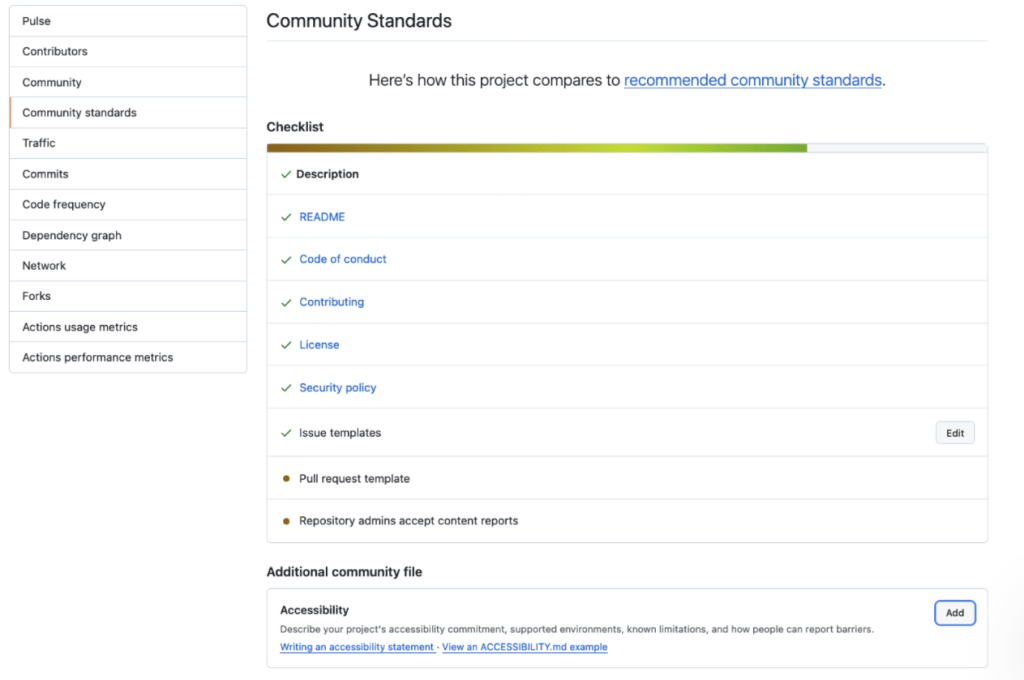
ACCESSIBILITY.md 文件如今会显示在仓库概览页面上,它为项目提供了一个持久的统一位置,用以说明其无障碍目标、对贡献者的期望、支持的环境、已知限制以及报告障碍的流程。
GitHub 现在会识别位于仓库根目录、.github/ 目录或 docs/ 目录中的 ACCESSIBILITY.md 文件。仓库也可以继承其所属组织的 .github/ 仓库中的声明。对于公开仓库,维护者可以通过 Insights > Community Standards,使用一份简洁的起步文档来添加或提议声明。
GitHub 的社区健康文件帮助人们了解一个项目是如何运作的:
对 ACCESSIBILITY.md 的识别,让无障碍信息在这些指引之外拥有了一个专属位置。
新仓库还会默认包含一个无障碍相关的 issue 标签。声明说明了如何报告障碍以及后续会发生什么,而该标签则帮助维护者组织和跟踪由此产生的工作。
例如,GitHub CLI 的无障碍声明记录了相关设置、已知障碍和变通方案。它解释了为什么表格输出在使用屏幕阅读器时难以跟进,并提供了一条命令,改为逐行打印 pull request 编号和标题。它还要求修改提示或输出的贡献者在开启相关无障碍设置的情况下展示结果。使用 CLI 的开发者获得了具体的变通方案;为 CLI 做贡献的开发者则对自己的改动有了明确的预期。
GitHub Annotation Toolkit 的无障碍声明记录了其 Figma 库的一项局限:标注通过画布位置、连接线和对应编号来以视觉方式传达关系。能够访问单个画布对象,并不必然能传达这些关系究竟是什么。
该声明为协作者提供了一个具体的替代方案:提供结构化的文字描述,标明每个被标注的元素、其预期语义与行为,以及任何相关的顺序。对于准备或接收设计交付的开发者来说,这说明了哪些信息需要与视觉标注一同提供。
该文件还说明了如何报告无障碍障碍,并明确指出该库尚未经过仅用键盘操作或屏幕阅读器的测试。读者既能获得实用指引,也能清楚了解该项目已验证范围的上限。将这些信息展示在仓库概览中,使其更容易与项目其他文档一起被找到。
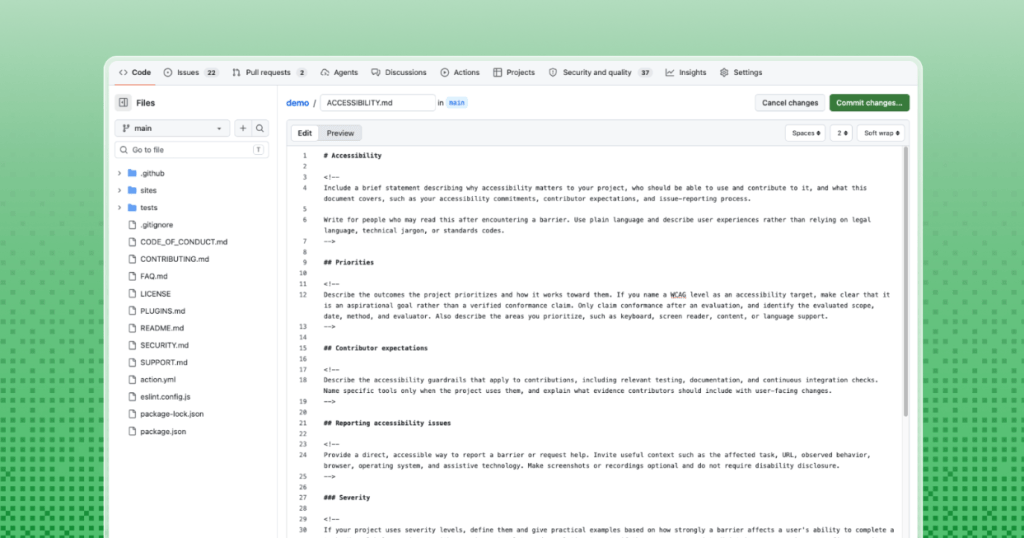
ACCESSIBILITY.md 文件没有唯一固定的格式。小型库、命令行工具、文档站点和大型 Web 应用有着不同的用户、风险和维护能力。先从项目能够持续保持准确的信息开始。
请记住,项目可以把某个 Web Content Accessibility Guidelines 版本和级别列为目标。目标并不等同于已验证的符合性。要作出符合性声明,需要进行评估,并应说明评估范围、日期、方法和评估者。
最有用的无障碍声明,服务于那些在问题已经出现之后才找来的人。平实的语言、描述性的链接和清晰的报告途径,比法律化或堆砌标准的语言更重要。
有用的报告指南会引导提供相关背景信息,例如受影响的任务、页面、观察到的行为、浏览器、操作系统和辅助技术。它把截图和录屏设为可选项,并避免要求他人证明自己存在残障。
该声明还应设定维护者能够持续兑现的预期。这可以包括确认收到、状态更新、可用的临时解决方案、预期时间线,以及让报告者验证修复结果的机会。
Open Source Accessibility Toolkit 提供了一个详细的公开示例。
GitHub 的社区标准(Community Standards)工作流提供了一个更简短的入门模板,其中的提示语可由各项目替换为自己的信息。目标并不是在发布该文件之前就制定出一份完美的政策。先从准确的信息开始,点明存在的缺口,并随着项目无障碍实践的成熟不断更新该声明。
添加无障碍声明能让无障碍工作更容易被用户、贡献者和维护者发现。将这一做法在开源项目中常态化,有助于让无障碍成为社区规划、构建、报告和改进其工作方式的一部分。
为你的代码仓库添加无障碍声明 >
博文《无障碍声明如今在 GitHub 上有了归属》最初发表于 The GitHub Blog。
译文由英文原文机器翻译,术语按行业惯例统一,可在文末展开原文核对。
查看英文原文(Accessibility statements now have a home on GitHub)
Accessibility work often lives in issue trackers, contribution guidelines, audit reports, team knowledge, and conversations with users. When that information has no predictable home, people who encounter a barrier must search for it, and maintainers lose context as contributors and project ownership change.
An ACCESSIBILITY.md file, now visible on repository overview pages, gives a project one durable place to explain its accessibility goals, contributor expectations, supported environments, known limitations, and process for reporting barriers.
GitHub makes accessibility statements easier to find
GitHub now recognizes the ACCESSIBILITY.md file in the repository’s root, .github/ directory, or docs/ directory. A repository can also inherit a statement from its organization’s .github/ repository. For public repositories, maintainers can add or propose a statement from Insights > Community Standards using a concise starter document.
GitHub’s community health files help people understand how a project works:
- Contribution guidelines explain how to propose changes
- Codes of conduct establish expectations for participation
- Security policies explain how to report vulnerabilities
Recognizing ACCESSIBILITY.md gives accessibility information a dedicated place alongside that guidance.
New repositories also include an accessibility issue label by default. The statement explains how to report a barrier and what to expect next, while the label helps maintainers organize and track the resulting work.
Accessibility statements make project practices visible
GitHub CLI’s accessibility statement, for example, documents settings, known barriers, and workarounds. It explains why table output can be difficult to follow with a screen reader and provides a command that prints pull request numbers and titles one per line instead. It also asks contributors changing prompts or output to show the results with relevant accessibility settings enabled. Developers using the CLI get a specific workaround; developers contributing to it get clear expectations for their changes.
The GitHub Annotation Toolkit’s accessibility statement documents a limitation of its Figma library: annotations use canvas position, connecting lines, and matching numbers to visually convey relationships. Access to individual canvas objects does not necessarily communicate what those relationships are.
The statement gives collaborators a concrete alternative: provide a structured text description that identifies each annotated element, its intended semantics and behavior, and any relevant ordering. For developers preparing or receiving a design handoff, this explains what information needs to accompany the visual annotations.
The file also explains how to report accessibility barriers and explicitly states that the library has not undergone keyboard-only or screen-reader testing. Readers get both practical guidance and clear limits on what the project has verified. Showing this information in the repository overview makes it easier to find alongside the project’s other documentation.
Document what the project can maintain
There is no one fixed format for an ACCESSIBILITY.md file. A small library, command-line tool, documentation site, and large web application have different users, risks, and maintenance capacity. Start with accurate information that the project can keep current.
- Priorities and goals: Explain why accessibility matters to the project and which user experiences receive attention.
- Contributor expectations: Describe the accessibility checks, evidence, or review practices expected for changes, including instructions for human contributors and coding agents.
- Reporting accessibility barriers: Provide a direct, accessible reporting path. Do not require disability disclosure, screenshots, or recordings.
- Response process: Explain how maintainers acknowledge, triage, track, and communicate about accessibility issues. If the project uses severity levels, let maintainers assign or confirm them during triage.
- Supported environments: List the platforms, browsers, input methods, and assistive technologies the project supports or has tested.
- Known limitations: Describe barriers in terms of the affected experience, include available workarounds, and link to tracked remediation work.
- Ownership and maintenance: Name the team, role, or maintainer responsible for keeping the statement and related practices current.
- Feedback and improvements: Explain how users and contributors can suggest changes to the statement or the project’s accessibility practices.
Keep in mind that a project can name a Web Content Accessibility Guidelines version and level as a target. A target does not establish verified conformance. A conformance claim requires an evaluation and should identify the evaluated scope, date, method, and evaluator.
What the most useful ACCESSIBILITY.md files contain
The most useful accessibility statements serve people who arrive after something has already gone wrong. Plain language, descriptive links, and a clear reporting route matter more than legal or standards-heavy language.
Useful reporting guidance invites relevant context, such as the affected task, page, observed behavior, browser, operating system, and assistive technology. It makes screenshots and recordings optional and avoids asking someone to prove a disability.
The statement should also set expectations that maintainers can consistently meet. That can include acknowledgement, status updates, available workarounds, expected timelines, and an opportunity for the reporter to verify a fix.
Start with an example and adapt it
The Open Source Accessibility Toolkit provides a detailed public example.
GitHub’s Community Standards workflow provides a shorter starter with prompts that projects can replace with their own information. The goal is not to produce a perfect policy before publishing the file. Start with accurate information, name the gaps, and update the statement as the project’s accessibility practices mature.
Adding an accessibility statement makes accessibility work more discoverable to users, contributors, and maintainers. Normalizing that practice across open source projects helps make accessibility part of how communities plan, build, report, and improve their work.
The post Accessibility statements now have a home on GitHub appeared first on The GitHub Blog.
正文保留英文原文,标题与摘要由机器翻译。
原文发布于 GitHub Blog(Accessibility statements now have a home on GitHub),标题、摘要与正文由机器翻译,术语按行业惯例统一,未经人工逐句校订。


