用 graphrag-toolkit 构建图增强 RAG
作者:Shittu Olumide,技术内容专家,2026 年 11 月 12 日,发表于 Language Models
标准的检索增强生成(RAG)聊天机器人处理“退货政策是怎么说的”这类问题毫无压力:它找到对应的文本块,交给模型,就完成了。但如果你问它“对于国际订单,退货政策与保修条款之间是如何相互作用的”,它就开始犯难了。这个答案并不存在于任何一个单独的文本块中。它需要把文档中两处彼此在原文里从未相邻的内容连接起来,而仅衡量每个文本块与问题在语义上有多相似的向量检索,本身无法建立这种连接。
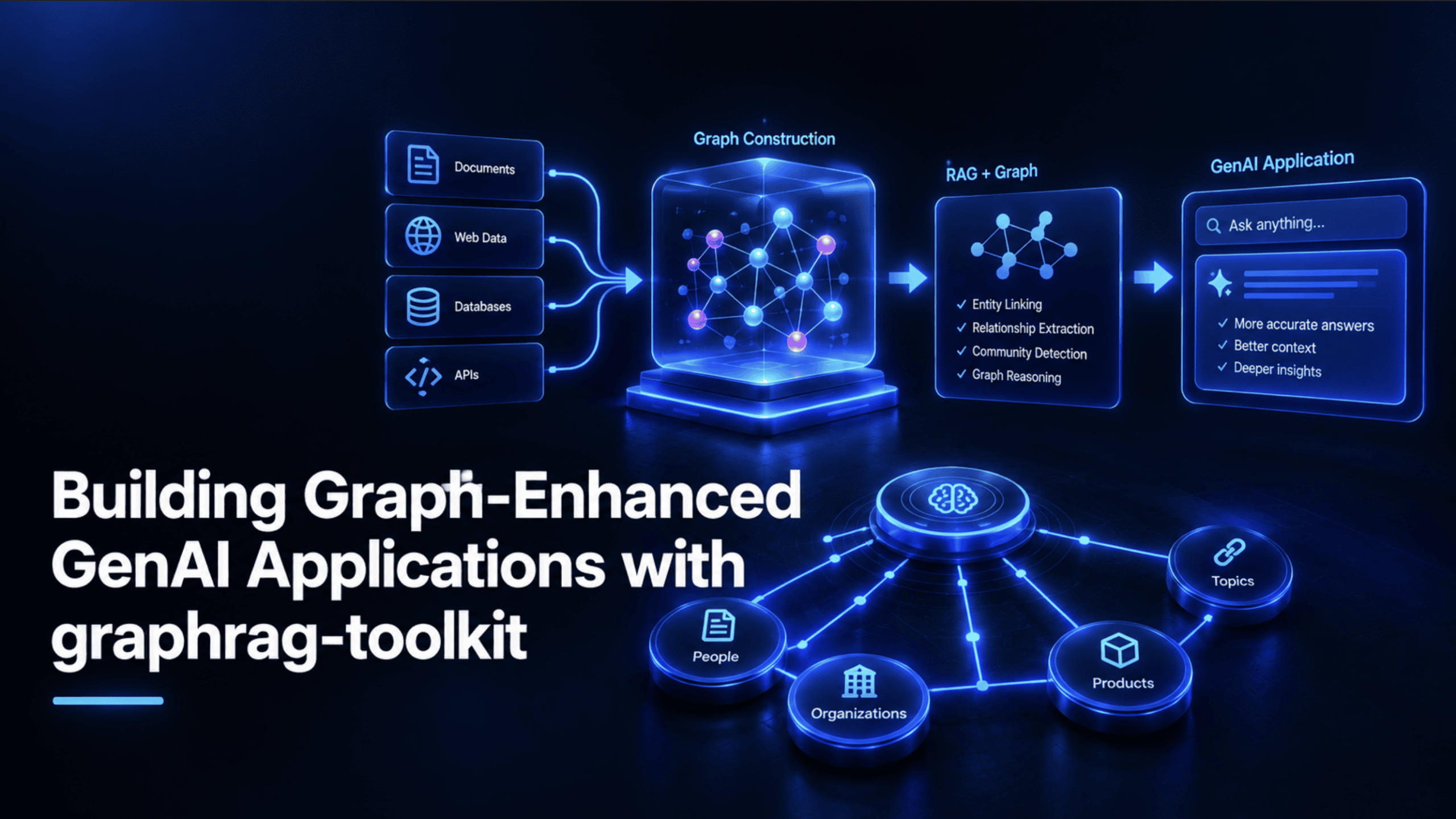
这一特定的缺口——系统能找到相关文本,却无法追踪文本片段之间的关系——正是图增强检索要填补的空白。本文将说明这究竟意味着什么,介绍 AWS Labs 开源的 graphrag-toolkit,然后从零开始构建一个真正可用的图增强研究助手,其中每一段代码都直接对照该工具包自身的文档进行核对,而非凭记忆想当然。
图增强生成式 AI 应用究竟是什么
图增强 RAG,通常简称为 GraphRAG,是一种查询知识图谱而非普通向量索引的检索方式,因此应用能够追踪信息片段之间真实的关系,而不只是找到与问题听起来相似的文本。Neo4j 自己的解读将这一做法概括为:把知识图谱的检索优势——明确的实体及实体之间的关系——与大语言模型(LLM)的生成流畅性结合起来,让模型基于相互关联的事实而非孤立的文本片段进行推理。
这并非某一家厂商的营销话术。Oracle 自己就同一理念撰写的文章,从数据库产业中一个完全不同的位置出发,基本提出了相同的论点:标准 RAG 把每个文本块当作一座孤立的岛屿,而图则能捕捉这些岛屿之间实际如何连接、哪些实体出现在多个位置,以及概念如何在整个文档集合范围内相互关联,而不是一次只局限于一个段落。两家主要数据库公司独立地汇聚到同一个核心论点上,这是一个合理的信号:底层问题是真实存在的,而不是为了推销图数据库而编造出来的说辞。
纯向量 RAG 究竟在哪里力不从心
这里值得把机制讲精确,而不是只笼统地说一句「向量搜索并不完美」。标准向量存储完全依据嵌入后的问题与嵌入后的文本块之间的语义相似度来检索文本块,而且是对每个文本块孤立地进行检索。整个过程中没有任何地方表示一个文本块与另一个文本块之间的关系:它们是否讨论同一个实体,其中一个是否为另一个提供其所依赖的上下文,或者它们是否处于因果关系之中。
多跳问题——即需要把两三个相互关联的独立事实拼合到一起、答案才说得通的问题——正是它失灵的地方。而这是检索机制本身的结构性局限,不是更好的提示词或更大的上下文窗口能够可靠解决的。问题不在于模型拿到正确信息后无法推理,而在于纯向量搜索往往从一开始就根本没有把全部正确的碎片都找出来。
推出 graphrag-toolkit
graphrag-toolkit 是 AWS Labs 构建的一款开源、采用 Apache 2.0 许可的 Python 工具包,专门用于填补这一空白。它由两个组件构成。第一个、也是本文关注的重点,是 lexical-graph,一个用于从非结构化文档自动构建分层知识图谱并对其进行查询的框架。第二个是 BYOKG-RAG(Bring Your Own Knowledge Graph,自带知识图谱),面向那些已经拥有知识图谱、希望在其上叠加多策略问答层、而无需从零重新抽取任何内容的团队,是一条独立的实现路径。
AWS 在其官方发布博客中公开介绍了该工具包,而分层词法图谱模型背后的设计则记录在一篇专门的研究论文《Hierarchical Lexical Graph for Enhanced Multi-Hop Retrieval》中。它也并非纯理论:Deloitte 在其基于 Amazon Neptune 的 GenAI Security Intelligence Center 中使用了 lexical-graph,这是一个真实的生产部署,已在 re:Invent 2025 的一场技术演讲中被介绍。
这是在动手写任何代码之前值得先理解的技术核心。按照该工具包自身的图模型文档,lexical graph 将抽取出的内容组织为六个相互连接的层级:source、chunk、topic、statement、fact 和 entity。检索可以在这些层级之间任意跳转,而不像普通向量存储那样只能停留在 chunk 层级进行检索——正是这一结构性特征,让多跳问题真正变得可回答。
构建这张图谱分为两个截然不同的阶段——抽取(extract)与构建(build),二者被刻意保持分离。抽取阶段摄入原始源文档,将其切分为块,并用 LLM 提取主题、陈述、事实和实体。构建阶段则接收这些抽取出的元素,据此填充实际的图谱与向量索引。将这两个阶段作为真正独立、微批处理、可断点续跑的流水线阶段来运行,而非一个单体流程,意味着一个大型的摄取任务可以在中途暂停、检查或过滤,而不会丢失进度。
有一个细节尤其值得了解,因为它解释了为何抽取质量能保持得如此之好:该流程对每个块发起两次独立的 LLM 调用,而不是一次。第一次调用将原始切块文本整理为一组格式良好、自包含的命题。第二次调用再从这些清洗后的命题中提取主题、陈述、事实和实体,而非直接从较为杂乱的原始文本中提取。这一步是可选的吗(第二次调用可以直接针对原始内容运行),但根据该工具包自身的文档,当先运行命题清洗这一遍时,抽取质量会有可测量的提升。
查询:基于遍历的搜索
以下才是实际的查询机制,直接来自该工具包的查询文档。用户的问题首先被嵌入,该嵌入会针对向量存储执行 top-K 相似度搜索,找出锚点:表面上看起来相关的语句或文本块。随后,这些锚点会触发一个或多个图遍历查询,从整张图中拉取主题上相关的内容,而不只是相似度得分最高的那些文本块。检索到的内容按主题和来源分组后,与原始问题一起提供给 LLM,用于生成最终答案。
有一个当下的事实很容易被忽略:该工具包还附带了一种较老的语义引导搜索策略,但文档中明确指出,它很可能在未来的版本中被弃用。基于遍历的搜索既是当前的默认方式,也是今天值得作为构建基础的方式,而下面的动手实践用的正是这种方法。
在写任何代码之前,值得先了解这个工具包里哪些部分实际可替换、哪些不可替换,因为这一选择会同时影响成本和搭建的复杂程度。
Amazon Neptune Database、Amazon Neptune Analytics、Neo4j、FalkorDB
Amazon Neptune(DB 与 Analytics)、Amazon OpenSearch Serverless、Postgres(搭配 pgvector)、Amazon S3 Vectors
基础模型提供商
Amazon Bedrock(唯一的内置选项;需自行开发才能扩展到其他提供商)
Neo4j 和配合 pgvector 的 Postgres 是仅有的两个能够在 Docker 中完全本地运行、基础设施成本为零的选项,这正是本教程围绕这一组合来构建的原因。关于 FalkorDB 有一点小提醒:该工具包的代码仓库将 FalkorDB 支持放在单独的 lexical-graph-contrib/falkordb 包中,而不是打包进核心的 graphrag-lexical-graph 安装包,因此如果你选择这条路线而非 Neo4j,就需要额外安装该包。目前唯一无法在不投入额外工程工作的情况下替换掉的部分是模型提供方:该工具包默认配置使用 Amazon Bedrock,因此本次构建不可避免地需要一个已开通 Bedrock 模型访问权限的 AWS 账户,尽管图存储和向量存储本身完全不会接触 AWS。
开始之前确切需要准备的东西:
已安装并运行 Docker(用于本地的 Neo4j 和 Postgres)
一个已开通至少一个 Amazon Bedrock 基础模型访问权限的 AWS 账户,因为鉴于该工具包当前的设计,这是本教程真正无法绕开的唯一依赖项
构建一个图增强的研究助手
原文较长,译文为节选;译文由英文原文机器翻译,术语按行业惯例统一,可在文末展开原文核对。
查看英文原文(Building Graph-Enhanced GenAI Applications with graphrag-toolkit)
By Shittu Olumide, Technical Content Specialist on November 12, 2026 in Language Models
A standard retrieval-augmented generation (RAG) chatbot handles "what does the return policy say" without any trouble: it finds the chunk, hands it to the model, and it's done. Ask it something like "how does the return policy interact with the warranty terms for international orders," and it starts to wobble. That answer isn't sitting in any single chunk. It requires connecting two separate pieces of the document that were never near each other in the source text, and a vector search that only measures how similar each chunk sounds to the question has no way to make that connection on its own.
That specific gap — a system that finds relevant text but can't follow relationships between pieces of it — is exactly what graph-enhanced retrieval exists to close. This article walks through what that actually means, introduces AWS Labs' open-source graphrag-toolkit, and then builds a real, working graph-enhanced research assistant from scratch, with every piece of code checked directly against the toolkit's own documentation rather than assumed from memory.
What Graph-Enhanced Generative AI Applications Actually Are
Graph-enhanced RAG, usually shortened to GraphRAG, is retrieval that queries a knowledge graph rather than a plain vector index, so an application can follow actual relationships between pieces of information instead of only finding text that sounds similar to the question. Neo4j's own explainer frames this as combining the retrieval strengths of a knowledge graph — explicit entities and the relationships between them — with the generative fluency of a large language model (LLM), so the model reasons over connected facts rather than isolated fragments of text.
This isn't a single vendor's marketing framing. Oracle's own write-up on the same idea makes essentially the same case from a completely different part of the database industry: standard RAG treats every chunk as an independent island, while a graph captures how those islands actually connect, which entities appear in multiple places, and how concepts relate across an entire document collection rather than within one paragraph at a time. Two major database companies converging independently on the same core argument is a reasonable signal that the underlying problem is real, not a talking point invented to sell graph databases.
Where Plain Vector RAG Actually Falls Short
It's worth being precise about the mechanism here rather than just gesturing at "vector search isn't perfect." A standard vector store retrieves chunks purely based on semantic similarity between the embedded question and the embedded chunks, and it does that retrieval for each chunk in isolation. There's no representation anywhere in that process of how one chunk relates to another: whether they discuss the same entity, whether one provides context the other depends on, or whether they sit in a cause-and-effect relationship.
Multi-hop questions — ones that require two or three separate, connected facts assembled together before an answer makes sense — are exactly where this breaks down. And it's a structural limitation of the retrieval mechanism itself, not something better prompting or a larger context window can reliably fix. The problem isn't that the model can't reason once it has the right information; it's that plain vector search often never surfaces all the right pieces in the first place.
Introducing graphrag-toolkit
The graphrag-toolkit is an open-source, Apache 2.0-licensed Python toolkit built by AWS Labs specifically to close that gap. It's made up of two components. The first, and the focus of this article, is lexical-graph, a framework for automatically building a hierarchical knowledge graph from unstructured documents and querying it. The second, BYOKG-RAG (Bring Your Own Knowledge Graph), is a separate approach for teams that already have a knowledge graph and want a multi-strategy question-answering layer over it, without re-extracting anything from scratch.
AWS introduced the toolkit publicly in its own launch blog post, and the design behind the hierarchical lexical graph model is documented in a dedicated research paper, "Hierarchical Lexical Graph for Enhanced Multi-Hop Retrieval." It's also not purely theoretical: Deloitte uses the lexical-graph inside its Amazon Neptune-based GenAI Security Intelligence Center, a real production deployment covered in a re:Invent 2025 technical session.
This is the technical core worth understanding before writing any code. Per the toolkit's own graph model documentation, a lexical graph organizes extracted content into six connected levels: source, chunk, topic, statement, fact, and entity. Retrieval can hop between any of these levels rather than being stuck retrieving only at the chunk level the way a plain vector store is, which is the structural feature that makes multi-hop questions actually answerable.
Building that graph happens in two distinct stages, extract and build, and they're deliberately kept separate. The extract stage ingests raw source documents, chunks them, and uses an LLM to pull out topics, statements, facts, and entities. The build stage takes those extracted elements and populates the actual graph and vector indexes from them. Running these as two genuinely separate, micro-batched, resumable pipeline stages, rather than one monolithic process, means a large ingestion job can be paused, inspected, or filtered partway through without losing progress.
One detail is worth knowing specifically, because it explains why extraction quality holds up as well as it does: the process makes two separate LLM calls per chunk rather than one. The first call cleans up the raw chunked text into a set of well-formed, self-contained propositions. The second call then extracts topics, statements, facts, and entities from those cleaned propositions rather than from the messier raw text directly. That extra step is optional (the second call can run directly against raw content), but per the toolkit's own documentation, extraction quality measurably improves when the proposition-cleanup pass runs first.
Querying: Traversal-Based Search
Here's the actual query mechanism, sourced directly from the toolkit's querying documentation. A user's question first gets embedded, and that embedding runs a top-K similarity search against the vector store to find anchor points: statements or chunks that look relevant on the surface. Those anchors then seed one or more graph traversal queries, which pull in thematically connected content from across the graph, not just the chunks that scored highest on similarity alone. The retrieved content, grouped by topic and source, is then supplied to an LLM alongside the original question to generate the actual answer.
One genuinely current fact is easy to miss: the toolkit also ships an older semantic-guided search strategy, but the documentation states directly that it's likely to be retired in a future release. Traversal-based search is both the current default and the one worth building against today, which is exactly the approach used in the hands-on build below.
Before writing any code, it's worth knowing what's actually swappable in this toolkit and what isn't, since the choice affects both cost and setup complexity.
Amazon Neptune Database, Amazon Neptune Analytics, Neo4j, FalkorDB
Amazon Neptune (DB and Analytics), Amazon OpenSearch Serverless, Postgres (with pgvector), Amazon S3 Vectors
Foundation model provider
Amazon Bedrock (the only built-in option; extensible to other providers with custom work)
Neo4j and Postgres with pgvector are the two options that can run entirely locally in Docker at zero infrastructure cost, which is exactly why this tutorial builds around that combination. One small caveat on FalkorDB specifically: the toolkit's repository keeps FalkorDB support in a separate lexical-graph-contrib/falkordb package rather than bundling it into the core graphrag-lexical-graph install, so you need that additional package if you go that route instead of Neo4j. The one piece that can't currently be swapped out without extra engineering effort is the model provider: Amazon Bedrock is what the toolkit is configured to use by default, so an AWS account with Bedrock model access enabled is unavoidable for this build, even though the graph and vector stores themselves won't touch AWS at all.
Exactly what's needed before starting:
Docker installed and running (for local Neo4j and Postgres)
An AWS account with access enabled to at least one Amazon Bedrock foundation model, since that's the one dependency this tutorial genuinely can't route around given the toolkit's current design
Building a Graph-Enhanced Research Assistant
The goal: a small research assistant that can answer questions spanning multiple real Wikipedia articles about human spaceflight — specifically, questions a single article alone can't fully answer, exactly the kind of multi-hop case this article opened with.
Step 1: Spinning Up Local Neo4j and Postgres
# docker-compose.yml
services:
 neo4j:
 image: neo4j:5
 ports:
 - "7474:7474"
 - "7687:7687"
 environment:
 - NEO4J_AUTH=neo4j/graphrag-password

 postgres:
 image: pgvector/pgvector:pg16
 ports:
 - "5432:5432"
 environment:
 - POSTGRES_PASSWORD=graphrag-password
 - POSTGRES_DB=graphrag
Run docker compose up -d and both databases are live: Neo4j on its standard Bolt port 7687, and Postgres, with the pgvector extension already included in the pgvector/pgvector image, on port 5432.
Step 2: Installing the Toolkit and Its Dependencies
pip install graphrag-lexical-graph
pip install psycopg2-binary pgvector
pip install llama-index-readers-web html2text
graphrag-lexical-graph is the actual PyPI package name for the lexical-graph library, confirmed directly on its PyPI page; it is currently in the 3.18.x release series and requires Python 3.10 or greater. The Postgres vector store specifically requires both psycopg2-binary and pgvector as separate dependencies, per the toolkit's own Postgres vector store documentation. llama-index-readers-web supplies SimpleWebPageReader, used to pull in the source articles below, and html2text is its own required dependency specifically when html_to_text=True is passed, per the reader's own source.
Step 3: Extracting and Building the Graph from Real Source Articles
from graphrag_toolkit.lexical_graph import LexicalGraphIndex
from graphrag_toolkit.lexical_graph.storage import GraphStoreFactory, VectorStoreFactory
from llama_index.readers.web import SimpleWebPageReader

# Local Neo4j graph store, connection string format confirmed against
# the toolkit's own Neo4j documentation
neo4j_connection = "neo4j://neo4j:graphrag-password@localhost:7687"

# Local Postgres vector store (pgvector), connection string format
# confirmed against the toolkit's own Postgres documentation
postgres_connection = "postgresql://postgres:graphrag-password@localhost:5432/graphrag"

with (
 GraphStoreFactory.for_graph_store(neo4j_connection) as graph_store,
 VectorStoreFactory.for_vector_store(
 postgres_connection,
 index_names=["chunk"],
 ) as vector_store,
):
 graph_index = LexicalGraphIndex(graph_store, vector_store)

 # Real, stable Wikipedia articles, deliberately covering related
 # but distinct topics so a genuine multi-hop question is needed
 # to connect them
 docs = SimpleWebPageReader(html_to_text=True).load_data([
 "https://en.wikipedia.org/wiki/Artemis_program",
 "https://en.wikipedia.org/wiki/International_Space_Station",
 "https://en.wikipedia.org/wiki/Commercial_Crew_Program",
 ])

 graph_index.extract_and_build(docs, show_progress=True)
This is the same core pattern shown in the toolkit's own quickstart guide, with the graph and vector store swapped for the local Neo4j and Postgres setup from Step 1. GraphStoreFactory.for_graph_store() and VectorStoreFactory.for_vector_store() are factory methods that detect which backend to connect to directly from the connection string's scheme: neo4j:// routes to the Neo4j store, and postgresql:// routes to the Postgres store. index_names=["chunk"] tells the vector store which graph elements to build embeddings for. And extract_and_build() runs both pipeline stages described earlier in this article, extraction and graph construction, in one continuous pass, using Amazon Bedrock to perform the actual LLM extraction calls. Behind the scenes, the toolkit's SigV4 request signing and TLS 1.3 connections handle the Bedrock side of this securely without any extra configuration from you.
One structural detail is worth being explicit about: GraphStoreFactory.for_graph_store() and VectorStoreFactory.for_vector_store() both return context managers, and the with block is what keeps the underlying database connections open. Steps 4 and 5 below both still need graph_store, vector_store, and graph_index, so they have to run inside that same with block, not as separate scripts after it closes. The two steps below are written to continue directly from the code above, indented at the same level, rather than as standalone snippets.
Step 4: Inspecting What Actually Got Built
Still inside the with block from Step 3:
 stats = graph_index.get_stats()
 print(stats)
 # {'source': 3, 'chunk': 47, 'topic': 62, 'statement': 210,
 # 'fact': 178, 'entity': 94, 'localConnectivity': 1.31,
 # 'globalConnectivity': 0.87, ...}
get_stats() is a real, documented method on LexicalGraphIndex that returns exact node counts across every level of the hierarchy — source, chunk, topic, statement, fact, and entity — alongside two connectivity metrics describing how densely linked the resulting graph actually is. Running this before querying anything is worth doing as a sanity check; seeing real numbers here confirms the extraction actually found and connected meaningful content across all three source articles.
Step 5: Querying It with a Genuine Multi-Hop Question
Still inside the same with block, using the graph_store and vector_store objects created in Step 3:
 from graphrag_toolkit.lexical_graph import LexicalGraphQueryEngine

 query_engine = LexicalGraphQueryEngine.for_traversal_based_search(
 graph_store,
 vector_store,
 versioning=False,
 )

 response = query_engine.query(
 "How does the Commercial Crew Program relate to crew transport "
 "for the International Space Station, and how might that "
 "connect to Artemis program crew logistics?"
 )

 print(response)
If you'd rather split extraction and querying into two separate script runs (reasonable, since extraction only needs to happen once), move the import statements to the top of a new file and wrap the querying code in its own with GraphStoreFactory.for_graph_store(neo4j_connection) as graph_store, VectorStoreFactory.for_vector_store(postgres_connection, index_names=["chunk"]) as vector_store: block, reconnecting to the same already-populated Neo4j and Postgres instances rather than rebuilding the graph from scratch.
LexicalGraphQueryEngine.for_traversal_based_search() is the current, recommended factory method per the toolkit's own documentation, taking the same graph_store and vector_store objects created in Step 3, plus versioning=False, since this tutorial isn't tracking document updates over time.
The question deliberately spans all three source articles: the Commercial Crew Program's role is described in one article, the International Space Station's crew transport needs in another, and Artemis's own logistics in a third. That's exactly the shape of question a plain vector search would struggle to answer fully, since no single chunk from any one article contains the complete picture. The traversal-based engine anchors on the most relevant statements from each article via vector similarity, then follows the graph's actual entity and topic links to pull the connected context together before generating a single coherent answer.
Two extra keyword arguments are worth knowing for tuning this further. Passing context_format="json" (instead of the default "text") returns the retrieved statements as a structured JSON array rather than plain text, which is useful if you want to inspect or post-process what the model actually saw. Passing verbose=False instructs the model to answer concisely rather than fully, which is worth setting for a production chat interface where a shorter answer is usually preferable to an exhaustive one.
What You Just Built, and Where to Go Next
What's running at this point isn't a toy demo; it's a real, queryable hierarchical lexical graph with working traversal-based retrieval, built from real source documents, on infrastructure that costs nothing beyond Bedrock's per-call pricing. From here, the toolkit documents several genuine next steps worth exploring rather than reinventing yourself.
The lexical-graph can expose a tenant's graph as a callable tool through a Model Context Protocol server, letting an agent browse a catalog of domain-specific graphs and pick the right one for a given question automatically. Multi-tenancy lets you host several separate graphs — different document collections, different users — inside the same underlying graph and vector stores rather than provisioning new infrastructure per tenant. Metadata filtering lets you constrain both indexing and querying to specific document subsets based on tags you attach yourself. And versioned updates handle the real-world case this tutorial's one-shot build ignored entirely: re-ingesting a document that's since changed, archiving the old version automatically rather than leaving stale, contradictory information in the graph.
If you're starting from an existing knowledge graph rather than raw documents, BYOKG-RAG is the toolkit's other half, worth a look specifically because it skips the extraction process this article just walked through entirely. And for a more guided next step than working from documentation alone, AWS provides a full self-guided workshop of Jupyter notebooks, plus a ready-made RAG Explorer application that lets you compare graph-based and plain vector RAG responses side by side on the same questions. It's a genuinely useful way to see the difference this article has been describing in the abstract, made concrete on your own data.
The distinction worth carrying forward from this whole article is a simple one: a vector index tells you what sounds relevant to a question; a lexical graph tells you how the underlying information is actually connected. Most RAG demos are built and tested against clean, single-fact questions specifically because those are the questions plain vector search already handles well.
Real users don't consistently ask such polite questions. The multi-hop one built and answered in this tutorial is a far better proxy for what a genuinely useful assistant needs to survive, and it's exactly the case graphrag-toolkit was built to handle.
Shittu Olumide is a software engineer and technical writer passionate about leveraging cutting-edge technologies to craft compelling narratives, with a keen eye for detail and a knack for simplifying complex concepts. You can also find Shittu on Twitter.
原文为英文,正文由自动抓取并保留原文。
原文发布于 KDnuggets(Building Graph-Enhanced GenAI Applications with graphrag-toolkit),标题、摘要与正文由机器翻译,术语按行业惯例统一,未经人工逐句校订。

