AWS re:Invent 2026 AI/ML 参会指南
从11月30日到12月4日,Amazon Web Services(AWS)将举办其年度旗舰学习活动:re:Invent。在这场活动上,参会者将通过多种体验在AWS技术的各个领域变得更强、更熟练:AWS领导者带来的主题演讲、AWS专家主持的互动实践课程,以及re:Play上的现场娱乐和游戏等趣味沉浸式活动。
本次活动有超过2,000场学习课程,聚焦不同技能水平的具体主题,其中AI/ML(AIM)专题有140多场独立课程供你选择。我们在此帮助你找到最契合自身需求的课程。即便无法亲临现场,你也可以按需回看许多课程,甚至观看主题演讲的直播。
如果你能到场参加,请记住我们提供多种类型的课程,帮助你在众多AWS主题上最大化学习效果。
re:Invent参会者可以选择参加分组会议(breakout)、白板讨论(chalk talk)、构建者会议(builder session)、工作坊(workshop)和代码演讲(code talk)。分组会议会被录制,并在几天后上传到AWS Events的YouTube频道,其余则是不录制的现场互动课程。以下是各类课程的详细介绍:
面对如此多的课程可供选择,了解各部分如何衔接会很有帮助。以下是AWS对其AI产品体系的思考方式,便于你决定从哪里入手、聚焦何处。
AWS在云端提供全面的AI产品组合。它涵盖了从支撑AI工作负载的物理基础设施和AI芯片,一直到团队今天就能采用的即用型智能体解决方案。理解这些服务如何协同工作,有助于你在re:Invent中找准方向,聚焦与自身正在构建的内容最相关的课程。
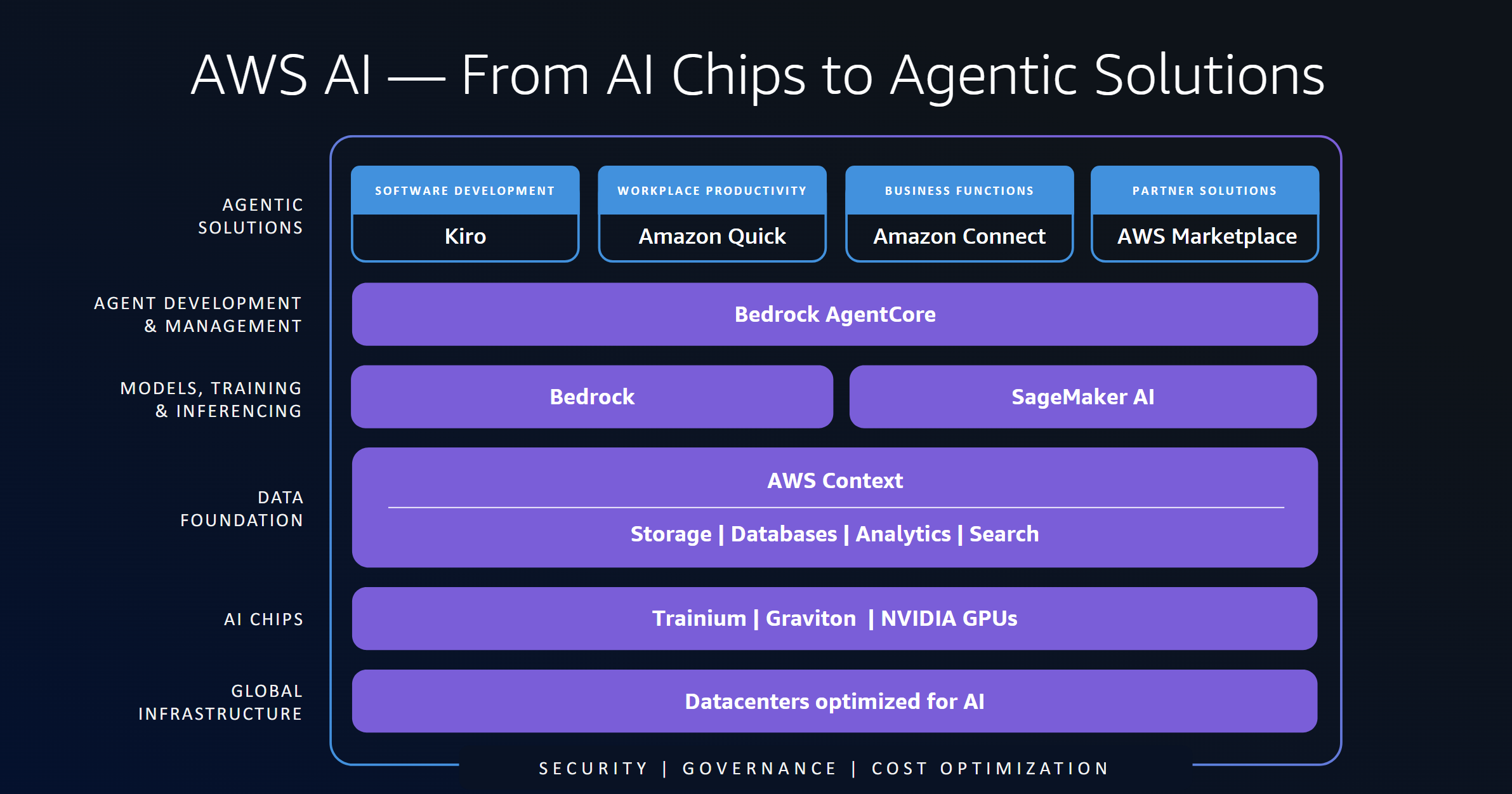
图1:AWS AI技术栈
全球基础设施——一切都始于为 AI 工作负载设计和优化的数据中心。这些设施在建设时就考虑了大规模 AI 训练和推理任务所需的电力、冷却和网络需求。
AI 芯片——在这些数据中心内运行着两种算力选择:专为高性能 AI 训练和推理打造的 AWS Trainium,以及面向需要基于 GPU 加速的团队的 NVIDIA GPU。客户根据自身工作负载、性能要求和成本目标做出选择。
数据基础——AI 的水平取决于其背后的数据。AWS Context 将你的数据跨存储、数据库、分析和搜索服务连接起来,让模型和智能体在恰当的时间获取恰当的信息。
模型、训练与推理——模型在这里构建、训练、微调和提供服务。Amazon Bedrock 通过统一的 API,让你以托管方式访问来自多家提供商的数百个领先模型。Amazon SageMaker AI 则让你完全掌控,在专用基础设施上训练、微调和部署自定义模型。许多客户会根据工作负载两者并用。
智能体开发与管理——Amazon Bedrock AgentCore 是你构建、部署和管理 AI 智能体的地方。它支持任意模型或提供商组合,包括来自 Amazon Bedrock 和 SageMaker AI 的模型,因此团队可以设计出为每项任务挑选合适模型的智能体,而不必锁定在单一提供商上。
智能体解决方案 —— 位于技术栈最顶层的是开箱即用的专用智能体。Kiro 通过规范驱动开发,帮助开发者第一次就把代码写对。AWS Quick 将你的应用、工具和数据连接成一张个人知识图谱,并能学习你的工作方式。Amazon Connect 提供面向客户体验、招聘、供应链和医疗健康的智能体。AWS Marketplace 则让你能够获取合作伙伴构建的 AI 解决方案。
安全、治理与成本优化贯穿 AI 技术栈的每一层。它们内建于基础层之中,包括芯片层的硬件级隔离,以及约束智能体可访问范围和可执行操作的管控机制。
re:Invent 上聚焦 AI 的会议覆盖了整个技术栈。无论你是在评估 AI 芯片、在生产环境中提供模型服务、构建自定义模型、部署智能体,还是采用开箱即用的解决方案,本指南都能帮你找到最相关的会议。用它来制定更合理的 re:Invent 参会日程。
人工智能与机器学习(AI/ML)专题主要聚焦这一技术栈的三个核心层:AI 芯片,模型、训练与推理,以及智能体的开发与管理,而安全、治理与成本优化则贯穿其中。以下各节从芯片层开始,逐层向上介绍模型与智能体,随后是串联整个技术栈的会议。指南最后还会涉及其他相关主题,例如可持续性,以及你运行 AI 工作负载所依托的基础设施。在每一节内,面向新手的会议排在最前,技术深度解析排在最后。
想直接跳到感兴趣的内容?可直接前往你最关注的主题:
这些课程把 AWS 的核心 AI 服务放在一起讲解:Amazon Bedrock、Amazon SageMaker AI、Amazon Bedrock AgentCore,以及它们所运行的 AI 芯片。它们能帮助你做出在使用规模增长后依然成立的架构选择。
刚接触 AWS 上的 AI?从 AIM204 开始。它会带你走完整个技术栈。你会看到 Trainium 和 Graviton 芯片、在 Amazon Bedrock 和 SageMaker AI 上进行模型推理,以及在 AgentCore 上运行的生产级智能体。如果你已经在做开发,可以试试 AIM364。它帮助你在 Amazon Bedrock 和 SageMaker AI 之间做选择,并说明何时两者都用。示例是一个运行在 AgentCore 上的真实智能体式编程应用。
其他课程则深入探讨具体的生产问题。如果你负责数据战略,请参加 AIM363。这场讲解会展示受治理的数据产品如何支撑定制化、推理和智能体。它还解释了为什么提示缓存、蒸馏和批量推理这类成本杠杆在干净数据上效果更好。需要证明 AI 的价值?AIM319 不止看成本,还看业务影响。一场覆盖整个 AI 技术栈的现场演示展示了如何衡量投资回报率(ROI)并比较每个成果的成本。
经验丰富的开发者应该关注 AIM443。在这场 400 级别的讲解会中,你会在 Amazon SageMaker HyperPod 上构建一条训练流水线。你引入公司数据,并让治理机制保持到位。然后你把同一个模型部署到 Amazon Bedrock 做推理,或部署到 AgentCore 做智能体。
在用于训练和推理的 AI 芯片上,AWS 提供两个主要选择:NVIDIA GPU 和 AWS Trainium。先从你当前使用的那一个入手,再去探索另一个。
AWS 提供种类丰富的搭载 NVIDIA GPU 的 Amazon Elastic Compute Cloud(Amazon EC2)实例。这些课程展示如何在这些实例上安全、可靠地运行 AI 训练和推理。
想了解 GPU 实例的最新进展,请从 AIM2210 开始。在 AIM3301 中,一位客户分享了它如何通过优化 GPU 调度来充分发挥其 GPU 容量的价值。AIM392 讲解了在什么情况下适合用 EC2 G7e 和 G7 实例替代 P 系列实例。想用自管理智能体来调优 AI 基础设施?请参加 AIM346。
如果你更喜欢动手实践,可以试试 AIM345,主题是分离式推理服务。在 AIM344 中,你将了解真实 GPU 集群故障的成因以及如何从中恢复。在 AIM347 工作坊中,你可以动手练习 GPU 性能工程。
在数据处理方面,请看 AIM3312。它展示了配备 NVIDIA cuDF 插件的 Amazon EMR for Apache Spark 如何在无需修改代码的情况下,在 EC2 G7 实例上比同级别 CPU 实例的作业运行速度最高快 3.7 倍。该场次还涵盖了 GPU 上的 DuckDB。
AWS Trainium 是一系列专为下一代深度学习训练和推理打造的 AI 芯片,能以更低的成本提供高性能。Trainium 运行在 AWS Neuron 之上,这一软件栈将 Trainium 与 PyTorch 等常见框架连接起来,让团队无需重写代码即可开发。采用基于 Trainium 的 Amazon EC2 实例的客户,可能会获得比同级别实例更好的性价比。
如果你是 Trainium 新手,AIM211 是最好的起点。它梳理了完整的技术栈,从芯片层一直讲到应用层。关于最新系统,AIM310 展示了 Trainium3 和 Trn3 UltraServer 如何让大型混合专家模型保持高性能。如果你仍在评估是否要迁移到 Trainium3,AIM2213 专题讨论汇集了四位已在 Trainium 上交付真实产品的 AI 负责人。
原文较长,译文为节选;译文由英文原文机器翻译,术语按行业惯例统一,可在文末展开原文核对。
查看英文原文(The attendee’s guide to the AWS re:Invent 2026 AI/ML track)
From November 30th to December 4th, Amazon Web Services (AWS) will hold its annual premier learning event: re:Invent. At this event, attendees will become stronger and more proficient in various areas of AWS technology through a variety of experiences: keynotes given by AWS leaders, interactive working sessions led by AWS experts, and fun, immersive activities such as live entertainment and games at re:Play.
There are over 2,000 learning sessions that focus on specific topics at various skill levels, and the AI/ML (AIM) track has more than 140 unique sessions for you to choose from. We’re here to help you identify the sessions that best fit your needs. Even if you can’t join in person, you can catch up with many of the sessions on demand and even watch the keynotes live.
The basics: Session types
If you can join us, then remember that we offer several types of sessions that can help maximize your learning in a variety of AWS topics.
re:Invent attendees can choose to attend breakouts, chalk talks, builder sessions, workshops, and code talks. The breakout sessions are recorded and uploaded a few days after to the AWS Events YouTube channel, while the rest are live non-recorded interactive sessions. Here are the details for each session type:
- Breakout sessions: Attendees are in a lecture-style 60-minute informative session presented by AWS experts, customers, and partners.
- Chalk-talk sessions: Attendees interact with presenters, asking questions, and using a whiteboard in session.
- Builder sessions: Attendees participate in a one-hour session and build something.
- Workshop sessions: Attendees join a two-hour interactive session where you work in a small team to solve a real problem using AWS services.
- Code talk sessions: Attendees participate in engaging code-focused sessions where an expert leads a live coding session.
- Lightning talk sessions: Attendees watch a 20-minute demo dedicated to either a specific service or customer story (located in the Venetian Expo Hall or Wynn/Encore Upper Convention Promenade).
With so many sessions to pick from, it helps to know how the pieces fit together. Here is how AWS thinks about its AI offerings, so you can decide where to begin and where to focus.
The AWS AI stack overview and tie-in to re:Invent sessions
AWS offers a comprehensive AI portfolio in the cloud. It covers everything from the physical infrastructure and AI chips that power AI workloads up through ready-to-use agentic solutions that teams can adopt today. Understanding how these services work together helps you navigate re:Invent and focus on the sessions most relevant to what you’re building.
Figure 1: The AWS AI stack
Global Infrastructure – It all starts with data centers designed and optimized for AI workloads. These facilities are built to handle the power, cooling, and networking demands that large AI training and inference jobs require.
AI Chips – Running inside those data centers are two compute options: AWS Trainium, purpose-built for high-performance AI training and inference, and NVIDIA GPUs for teams that need GPU-based acceleration. Customers choose based on their workload, performance requirements, and cost targets.
Data Foundation – AI is only as good as the data behind it. AWS Context connects your data across storage, databases, analytics, and search services, giving models and agents access to the right information at the right time.
Models, Training, and Inferencing – This is where models get built, trained, fine-tuned, and served. Amazon Bedrock gives you managed access to hundreds of leading models from multiple providers through a unified API. Amazon SageMaker AI gives you full control to train, fine-tune, and deploy custom models on dedicated infrastructure. Many customers use both depending on the workload.
Agent Development and Management – Amazon Bedrock AgentCore is where you build, deploy, and manage AI agents. It supports any model or provider mix, including models from both Amazon Bedrock and SageMaker AI, so teams can design agents that pick the right model for each task without being locked into a single provider.
Agentic Solutions – At the top of the stack sit purpose-built agents that are ready to use. Kiro helps developers ship correctly the first time with spec-driven development. AWS Quick connects your applications, tools, and data into a personal knowledge graph that learns how you work. Amazon Connect delivers agents for customer experience, hiring, supply chain, and healthcare. AWS Marketplace gives you access to partner-built AI solutions.
Security, Governance, and Cost Optimization run across every layer of the AI stack. They are built into the foundation, with hardware-level isolation at the chip layer and controls that enforce what agents can access and do.
The AI-focused sessions at re:Invent span the full stack. Whether you’re evaluating AI chips, serving models in production, building custom models, deploying agents, or adopting ready-to-use solutions, this guide helps you find the sessions that matter most. Use it to build a smarter re:Invent schedule.
The artificial intelligence and machine learning (AI/ML) track primarily focuses on three core layers of this stack: AI chips, models, training, and inference, and agent development and management, with security, governance, and cost optimization woven throughout. The following sections start at the chip layer and move up through models and agents. Then come sessions that tie the stack together. The guide ends with other relevant topics, such as sustainability and infrastructure where you run your AI workloads. Within each section, sessions for newcomers come first and technical deep dives come last.
Want to skip ahead? Jump straight to the topic you care about:
- AWS AI platform sessions
- AI chips: NVIDIA GPUs and AWS Trainium
- Amazon SageMaker AI sessions
- Build and run AI applications and agents with Amazon Bedrock
- Build AI that works with documents, voice, and images
- Building trust in AI agents
- Other topics
- Plan your re:Invent
AWS AI platform sessions
These sessions cover the core AWS AI services together: Amazon Bedrock, Amazon SageMaker AI, Amazon Bedrock AgentCore, and the AI chips that they run on. They help you make architecture choices that still work as your usage grows.
New to AI on AWS? Start with AIM204. It walks through the whole stack. You will see Trainium and Graviton chips, model inference on Amazon Bedrock and SageMaker AI, and production agents on AgentCore. If you’re already building, try AIM364. It helps you choose between Amazon Bedrock and SageMaker AI, and shows when to use both. The example is a real agentic coding app that runs on AgentCore.
Other sessions dig into specific production problems. If you own data strategy, attend AIM363. This chalk talk shows how governed data products feed customization, inference, and agents. It also explains why cost levers like prompt caching, distillation, and batch inference work better on clean data. Need to prove the value of AI? AIM319 looks past cost to business impact. A live demo across the AI stack shows how to measure return on investment (ROI) and compare cost per outcome.
Experienced builders should look at AIM443. In this 400-level chalk talk, you build a training pipeline on Amazon SageMaker HyperPod. You bring in company data and keep governance in place. Then you deploy the same model to Amazon Bedrock for inference or to AgentCore for agents.
AI chips: NVIDIA GPUs and AWS Trainium
AWS gives you two main choices of AI chips for training and inference: NVIDIA GPUs and AWS Trainium. Start with the one you use today, then explore the other.
NVIDIA GPU sessions
AWS offers a wide range of Amazon Elastic Compute Cloud (Amazon EC2) instances with NVIDIA GPUs. These sessions show how to run AI training and inference on them securely and reliably.
Start with AIM2210 for the latest on GPU instances. In AIM3301, a customer shares how it gets the most from its GPU capacity by optimizing GPU scheduling. AIM392 explains when EC2 G7e and G7 instances are a good fit in place of P-series instances. Want to tune AI infrastructure with self-managed agents? Join AIM346.
If you prefer hands-on learning, try AIM345 on disaggregated inference serving. In AIM344, you find the cause of real GPU cluster failures and how to recover from them. In the AIM347 workshop, you can practice GPU performance engineering.
For data processing, see AIM3312. It shows how Amazon EMR with the NVIDIA cuDF plugin for Apache Spark runs jobs up to 3.7x faster on EC2 G7 instances than on comparable CPU instances without code change. The session also covers DuckDB on GPUs.
AWS Trainium sessions
AWS Trainium is a family of AI chips purpose-built for next-generation deep learning training and inference. It delivers high performance at lower cost. Trainium runs on AWS Neuron, the software stack that connects Trainium to familiar frameworks like PyTorch, so teams build without rewrites. Customers who adopt Trainium-based Amazon EC2 instances may see better price performance than comparable instances.
If you’re new to Trainium, AIM211 is the place to start. It traces the full stack, beginning with the silicon and working up to the application. For the latest system, AIM310 shows how Trainium3 and the Trn3 UltraServer keep large mixture-of-experts models performant. If you’re still evaluating transitioning to Trainium3, the AIM2213 panel gathers four AI leaders who have already shipped real products on Trainium.
Several sessions are built around specific roles. Scientists and researchers who live in PyTorch should bring their questions to AIM339, a nanochat code talk, before getting hands-on in the AIM334 distributed-training workshop. ML engineers and developers can architect a production AI assistant with Hugging Face models in AIM349, and get hands-on with inference scaling in the AIM326 workshop. Performance engineers chasing peak throughput will want AIM329 on agentic optimization loops, followed by INV511, a 500-level look inside the Neuron Kernel Interface for serious kernel designers. If you want to run Trainium on Amazon Elastic Kubernetes Service (Amazon EKS), AIM311 whiteboards a resiliency stack that holds up across deployments as large as twenty thousand accelerators. If you deploy through SageMaker AI instead, see the SageMaker AI section.
For those who want to go further, world models are an emerging class that power simulation in gaming, robotics, and autonomous driving. AIM323 is a good starting point and covers serving world models with native PyTorch. From there, pick a hands-on path. In AIM304 you will deploy and optimize a real-time video world model using agentic Neuron workflows, while in AIM305 you will train vision-language-action models for physical AI. Both are builders’ sessions.
Amazon SageMaker AI sessions
Amazon SageMaker AI is the AWS service for customizing and deploying your own models. It handles the whole model lifecycle in one place. You can prepare data and customize a model on serverless compute. When you need more power, you can grow training jobs to thousands of accelerators. After your model is ready, deploy it on SageMaker inference endpoints or SageMaker HyperPod. You keep the model weights, and you decide where your models run.
New to SageMaker AI? Start with AIM342. It shows how to build, customize, and deploy models with one service. Between sessions, stop by the Builder’s Hub and test your skills in one of three contests. Fine tune an agent, field a team in the Agentic Football Cup, or teach a robot a new task. For the latest on robotics, world models, and physical AI, hear a panel of builders in AIM2215. Still picking a model or learning to write evaluations? AIM2205 shows how to build evaluations on your own data. It also shows how to turn business knowledge into models that cost less to run.
Customization starts with data. The AIM434 workshop shows how to prepare datasets for custom models. Next, AIM362 helps you pick the right compute for customization. Then fine-tune and deploy a large language model (LLM) in a few hours in AIM402. Customers will share their lessons too. In AIM393, Salesforce explains how it built and served its Koa models with open weights. Intuit tells its story in AIM361. If you build agents, AIM325 shows how to fine-tune agents that reason, using multi-turn reinforcement learning. The AIM456 workshop links evaluation, fine-tuning, and reinforcement learning into one pipeline. It spans SageMaker AI and Amazon Bedrock.
And if you’re building domain-specific AI, you should join AIM2205. Learn how to test models on your own data and weigh quality against cost. The session also covers when customizing a model is worth it. In AIM398, watch the team behind Forge whiteboard a fast path to building tailored AI solutions, drawing on their end-to-end customer engagements. They will cover everything from setting the right evaluations and optimizing prompts, context, and inference serving to choosing a customization approach that modifies model weights during pre- or post-training. When you’re ready to grow training and inference, SageMaker HyperPod helps you get more from every GPU hour. Teams use it for specialized work like biology foundation models (FMs), physical AI, world models, and sovereign AI. Start with customers who push the limits. In AIM343, Tencent Games explains how it scaled to 1,000 GPUs. In AIM433, HUMAIN shows how it keeps GPU use high for both training and inference.
For hands-on practice, build foundation model pipelines with Amazon EKS in AIM406, or tune AI pipelines with Ray in the AIM403 builders’ session. The AIM435 code talk teaches policy distillation, which trains a small model from a larger one. Physical AI teams can join the AIM318 workshop. It shows how to keep vision-language model training running when nodes fail. Robotics and autonomous vehicle teams can build a physical AI model factory on SageMaker HyperPod in AIM413.
When it’s time to serve your models, two 200-level talks show inference in production. In AIM213, CrowdStrike explains how it runs LLM inference for threat detection with less operational work. In AIM214, Vanguard shares how it trains and serves custom LLMs on SageMaker HyperPod. To build agents on open-weight models with fast inference, try AIM405. To create fast, resilient inference endpoints, join the AIM404 workshop. Platform teams can practice governed ModelOps in the AIM348 builders’ session. They can also add observability with managed MLflow in the AIM408 workshop.
Build and run AI applications and agents with Amazon Bedrock
The model and inference approach you choose shapes what your AI app can do for users. Amazon Bedrock gives you a wide choice of models and helps you pick the right one for each task. It gives you the performance, security, and cost control to run AI apps in production. Some apps need to use tools and data, remember context, and act for you. For those, Amazon Bedrock AgentCore helps you build, connect, and improve agents.
New to Amazon Bedrock? Start with AIM220. It covers what’s new in models, inference, security, and cost management. Then build and deploy your first Amazon Bedrock app in the hands-on AIM317 workshop.
Next, think about the kind of workload you need to serve. A customer support app may need fast answers. A large document processing job may care more about cost and can wait for results. AIM448 helps you pick the Amazon Bedrock inference option that fits your needs. It weighs performance, capacity, cost, and data residency. If your app must reason across your company’s information, attend AIM308. In this session, you’ll build a knowledge assistant that finds answers across documents, images, structured data, and the links between them.
Your inference plan also needs to stay affordable as usage grows. AIM437 helps you decide when to cache repeated context, route requests between models, or move work to batch inference. Model choice matters too. The newest model isn’t always the right one, and switching can change quality, speed, cost, and behavior. AIM438 shows how to test candidate models on your own use cases so you can switch with confidence. After your app is live, AIM374 covers the metrics, alarms, and operating habits to bring into production. Systems specialists can go deeper in INV517. This 500-level session looks at the scheduling and parallelism methods behind efficient large-model inference.
If you want to build an agent, start with the full production picture rather than building infrastructure one piece at a time. AIM212 introduces the complete AgentCore lifecycle. Nasdaq also shares how it runs agents in a regulated industry. For a hands-on path, try AIM439. You start with a basic customer support agent. Then you add memory, tool access, identity, policies, observability, and evaluation until it’s ready for production. Ready to design a multi-agent system? AIM407 uses Strands Agents to coordinate specialized agents. You share state, handle failures, and deploy the result to AgentCore.
After your agent is running, look at what happens under the hood. Each planning step, retrieval, tool call, and retry can add another model call. That changes cost, speed, and reliability. AIM429 connects agent design to inference behavior. It helps you think through context, harnesses, goals, and when an agent should stop. Developers who want to see these tradeoffs in code should follow it with AIM454. That session builds function calling, multi-step reasoning, and retrieval live.
The stakes rise as agents serve more users and reach more systems. Bring your scaling questions to AIM436, where you work through traffic spikes, tool failures, model timeouts, and multi-tenancy. Platform teams that manage agents across a company should attend AIM303. It covers how to find agents, control tool access, manage identity, and see your whole fleet. If your priority is securing every step between a user request and an agent action, pair it with AIM370. Then use AIM440 to turn production traces and evaluations into a steady way to improve agent quality.
Finally, pick a session that looks like the work you want an agent to do. AIM340 follows PepsiCo’s conversational ordering agent. It shows how memory, company APIs, and controls work together in a customer-facing workflow. AIM369 focuses on agents that respond to business events and run processes to the end, with human approval where needed. Software teams can get hands-on in AIM416. There, coding agents move off the laptop and run long-lived, parallel workflows on AgentCore.
Build AI that works with documents, voice, and images
AI apps often need to handle more than text. These sessions show how to build those skills on AWS. They add grounding, evaluation, and verification so your app holds up in real use. For document processing, start with AIM216 on Amazon Textract. Then, in AIM442, build a pipeline that turns documents into structured data you can check. Building voice apps? AIM217 introduces Amazon Polly and Amazon Transcribe, and AIM218 explores conversational AI with Amazon Nova Sonic. Go deeper with the AIM356 code talk, or build and deploy a voice agent in AIM352.
Build cross-modal search in AIM357. To improve quality, add web grounding in AIM350 and automated evaluation in AIM351. You can also explore identity verification with Amazon Rekognition in AIM355.
Building trust in AI agents
AI agents now do real work, like approving claims, issuing refunds, and acting on customer data. Teams need a way to trust what those agents do and prove it to others. That starts with responsible AI, which helps organizations make careful choices about how AI systems are designed, built, and run. AWS builds on that with Trust in Depth. It’s an approach for giving agents more freedom without losing control.
If you’re new to AI trust, start with the AIM2216 panel. It covers how to build confidence at each stage of an agent’s life. Topics include keeping an agent limited to its job and seeing exactly what it did. To see responsible AI governance in practice, attend AIM391. It shows how John Deere used AI Risk Intelligence to replace periodic manual reviews with continuous, automated governance. The change cut assessment time by more than 30 percent.
Several sessions are built for specific roles. Developers can join the AIM336 workshop to audit a multi-agent claims system for responsible AI gaps. Then they fix what they find and write a report backed by evidence. Risk, compliance, and data science teams can join AIM332. This chalk talk covers testing whether agents treat people fairly when they approve loans or issue refunds. You learn how to choose fairness metrics and catch bias in outcomes that affect people’s lives. Do your agents decide things like insurance eligibility? The AIM335 workshop shows how to turn the rules behind those decisions into Automated Reasoning checks in Amazon Bedrock Guardrails. Each decision can then be proven correct and audited.
For a deeper look at the science, several expert sessions cover automated reasoning. INV508 shows how subject matter experts can turn legal and regulatory policies into rules a machine can check. No coding is needed, and those rules then serve as AI guardrails. INV526 looks at what can be proven about agent behavior today, and where the limits are. The AIM451 chalk talk shows how to enforce rules that agents can’t get around. It also shows how to keep people involved in decisions machines shouldn’t make alone.
Other topics
A few more tracks round out your re:Invent planning, from sustainability to where you run your workloads.
AWS Sustainability
AWS is continuously innovating across its data centers, chips, and AI services to be more efficient and sustainable. AWS also gives you the data and tools to measure, track, and reduce the environmental impact of your own cloud and AI workloads running on AWS. These sessions discuss how we’re making our infrastructure more efficient and show how to act on sustainability data while still meeting your business goals. For the latest on the AWS Sustainability service, attend AIM201. This lightning talk covers new impact areas beyond carbon, more detailed data, and API access. In AIM205, learn how AWS makes AI infrastructure more sustainable. It uses hardware with low embodied carbon, energy-efficient custom chips, and data centers tuned by machine learning (ML). Want to understand the method behind your carbon data? Join the AIM321 chalk talk. It shows how to use that data to build AI workloads with a smaller footprint, which often cost less too.
If you prefer hands-on learning, try AIM320. You build a generative AI pipeline with Amazon Bedrock that turns messy company data into sustainability insights. The session is based on how AWS handles life cycle assessment across its data centers. To go deeper, join AIM412. It uses Amazon Neptune and an Amazon Bedrock agent to map how stakeholders depend on each other. You then test ways to cut carbon on a knowledge graph.
Local Zones and AWS AI Factories
As teams move AI into production, where a workload runs matters as much as how it’s built. Large training jobs, fine-tuning, and real-time inference each need different things from infrastructure. AWS gives you several places to run them: AWS Regions, AWS Local Zones, AWS Dedicated Local Zones, AWS AI Factories, and AWS Outposts. Start with HMC303. It compares these options on the four factors that drive the choice: latency, data sovereignty, compute density, and scale. Databricks shares how it uses GPU capacity in select Local Zones. T-Mobile covers latency-sensitive distributed inference.
In HMC307, see how Netflix supports its visual effects and animation teams from the Los Angeles Local Zone. Netflix starts Amazon EC2 G7e instances with NVIDIA RTX PRO 6000 GPUs just in time. That way, artists get ComfyUI environments when they need them.
Two hands-on workshops take different paths to building agents at the edge. HMC402 takes the managed route. You connect Amazon Bedrock AgentCore agents in an AWS Region to tools and agents in hybrid and edge locations. You use Model Context Protocol (MCP) and agent-to-agent (A2A) communication. HMC403 takes the self-managed path. You design, set up, and tune your own agents across Local Zones and Outposts. Then learn how to orchestrate fractional GPUs across the edge with NVIDIA Run:ai in the HMC401 code talk.
Some organizations can’t move AI workloads to the public cloud at all. Data sovereignty, data gravity, or latency can stand in the way. AIM206 shows how AWS AI Factories bring AWS and NVIDIA AI infrastructure into your own data center. AWS runs and updates it for you. See how organizations run leading foundation models on premises for training and inference, while keeping full control of their data.
Plan your re:Invent
Use this guide to build your schedule. Then reserve your seats in the event catalog early, since popular sessions fill up fast. Pro tip: if sessions are showing as full in the online session catalog, we recommend favoriting the session and trying your luck by walking up to the session to see if any extra room has become available. There are other activities where you can learn about AWS AI/ML offerings.
Visit the AI kiosks
Between sessions, stop by the AI kiosks at the AWS Village in the Venetian’s Expo Hall. Each kiosk is run by AWS experts who focus on the topics covered, including product managers and solutions architects. They answer your questions, help you think through your use case, and run demos all day. When visiting the AWS Village, come visit these kiosks:
- Amazon Bedrock.
- Amazon Bedrock AgentCore.
- Amazon Foundation Models.
- Speech AI.
- Accelerated Computing.
- Strands Agents.
- AI League.
- Amazon SageMaker AI.
- Global Infrastructure & Sustainability.
- Hybrid Cloud & Edge Computing.
Try the activations
You can also get hands-on at four interactive experiences, also in the AWS Village in the Venetian’s Expo Hall:
- AWS Quick: See how work changes when AI agents join everyday operations. Watch solutions architects show Quick live at one of three live demo stations, or go through a demo on your own at one of three self-guided stations. You can also use the touchscreen knowledge graph to explore re:Invent content and sessions.
- Galactic Agents: Sit down at one of four builder stations to build a five-officer AI crew, then launch your starship. Your crew keeps exploring a shared galaxy on its own all week, even while you’re in sessions. Each officer maps to a real agent pattern that companies use. A giant live galaxy map and a look under the hood show how to run agents you can watch and trust on AWS. Curious how the game was built? Talk to the expert at the SME desk.
- Security at Machine Speed: Play a touchscreen tabletop game at one of two tables. You protect your cloud and earn points for each AWS security service you deploy. When you finish, visit the nearby security kiosks for deeper conversations.
- AWS Cloud Infrastructure: Don’t miss the infrastructure experience at the AWS Village. See the hardware behind the AWS Cloud, built on more than 20 years of cloud infrastructure innovation. A chip wall shows every generation of AWS Graviton, AWS Trainium, AWS Inferentia, and AWS Nitro Cards. Touchscreens explain how these chips work with partner chips for agentic AI, training, and inference. Get up close to Trainium and Graviton server trays and racks, and learn how they scale out with Elastic Fabric Adapter (EFA) and Amazon EC2 UltraClusters. Then explore a 3D model of AWS AI Factories to see how AWS brings its infrastructure into your own data center. It’s a good stop after the AI chips, AWS AI Factories, and Local Zones sessions.
Can’t make it to Las Vegas? Watch the keynotes live and catch the breakout sessions later on the AWS Events YouTube channel. We hope to see you at re:Invent 2026.
About the author

Markus Adhiwiyogo
Markus is a Senior Product Marketing Manager for AWS Trainium. He previously led product marketing for AWS Graviton, Amazon EC2 Spot Instances, and x86-based Amazon EC2 instances. Earlier, he worked as a cloud gaming product manager at Intel and in product & engineering roles at Lattice Semiconductor and Xilinx. He earned his BS and MS in Electrical and Computer Engineering at Carnegie Mellon University and his MBA at Duke’s Fuqua School of Business.
正文保留英文原文,标题与摘要由机器翻译。
原文发布于 AWS Machine Learning(The attendee’s guide to the AWS re:Invent 2026 AI/ML track),标题、摘要与正文由机器翻译,术语按行业惯例统一,未经人工逐句校订。


